
Uvod
Thank you for choosing the Belkin Portable 20,000 mAh Power Bank. This device is designed to provide reliable and fast charging for your mobile devices, featuring an integrated USB-C cable and 30W Power Delivery. Its compact and lightweight design makes it ideal for travel, ensuring your devices stay powered wherever you go. This manual provides essential information on how to set up, operate, maintain, and troubleshoot your power bank.

Image: The Belkin Portable 20,000 mAh Power Bank in blue, showcasing njegovim elegantnim dizajnom.
Ključne karakteristike
- Integrisani USB-C kabl: For convenient charging on the go.
- Isporuka snage 30W: Enables fast charging for smartphones, tablets, and even some laptops like the MacBook Air.
- Kapacitet 20,000 mAh: Provides up to 87 hours of additional battery life for an iPhone 16 Pro, charging 0-50% in approximately 25 minutes.
- Istovremeno punjenje: Charge up to three devices concurrently using the integrated USB-C cable, USB-C port, and USB-A port, with a shared output of 30W.
- LED indikator: Displays the power bank's charging status.
- Prolazno punjenje: Charge your devices while the power bank itself is being recharged.
- Lightweight and Travel-Friendly: Weighing less than 395 grams, it meets aviation safety standards for carry-on luggage.
- Održivi dizajn: Made from 72% post-consumer recycled materials with 100% plastic-free packaging.
Setup
Početno punjenje Power Bank-a
Before first use, fully charge your Belkin Power Bank. Connect the power bank to a wall charger using a compatible USB-C cable (not included for recharging the power bank itself, only the integrated cable is for output). The LED indicators will show the charging progress. A full charge typically takes up to 12 hours.

Image: The power bank connected to a wall outlet for recharging, simultaneously charging a smartphone via its integrated cable. This illustrates pass-through charging.
Uputstvo za upotrebu
Punjenje vaših uređaja
- Korištenje integriranog USB-C kabela: Extend the integrated USB-C cable from the power bank and connect it directly to your USB-C compatible device.
- Korištenje USB-C porta: Spojite USB-C kabel za punjenje vašeg uređaja na USB-C izlazni priključak power bank-a.
- Korištenje USB-A priključka: Spojite USB-A kabel za punjenje vašeg uređaja na USB-A izlazni priključak power bank-a.

Image: The Belkin power bank connected to an iPhone via its integrated USB-C cable, demonstrating seamless high-speed charging.
Punjenje više uređaja
The power bank supports charging up to three devices simultaneously with a combined output of 30W. You can use the integrated USB-C cable, the USB-C port, and the USB-A port at the same time.
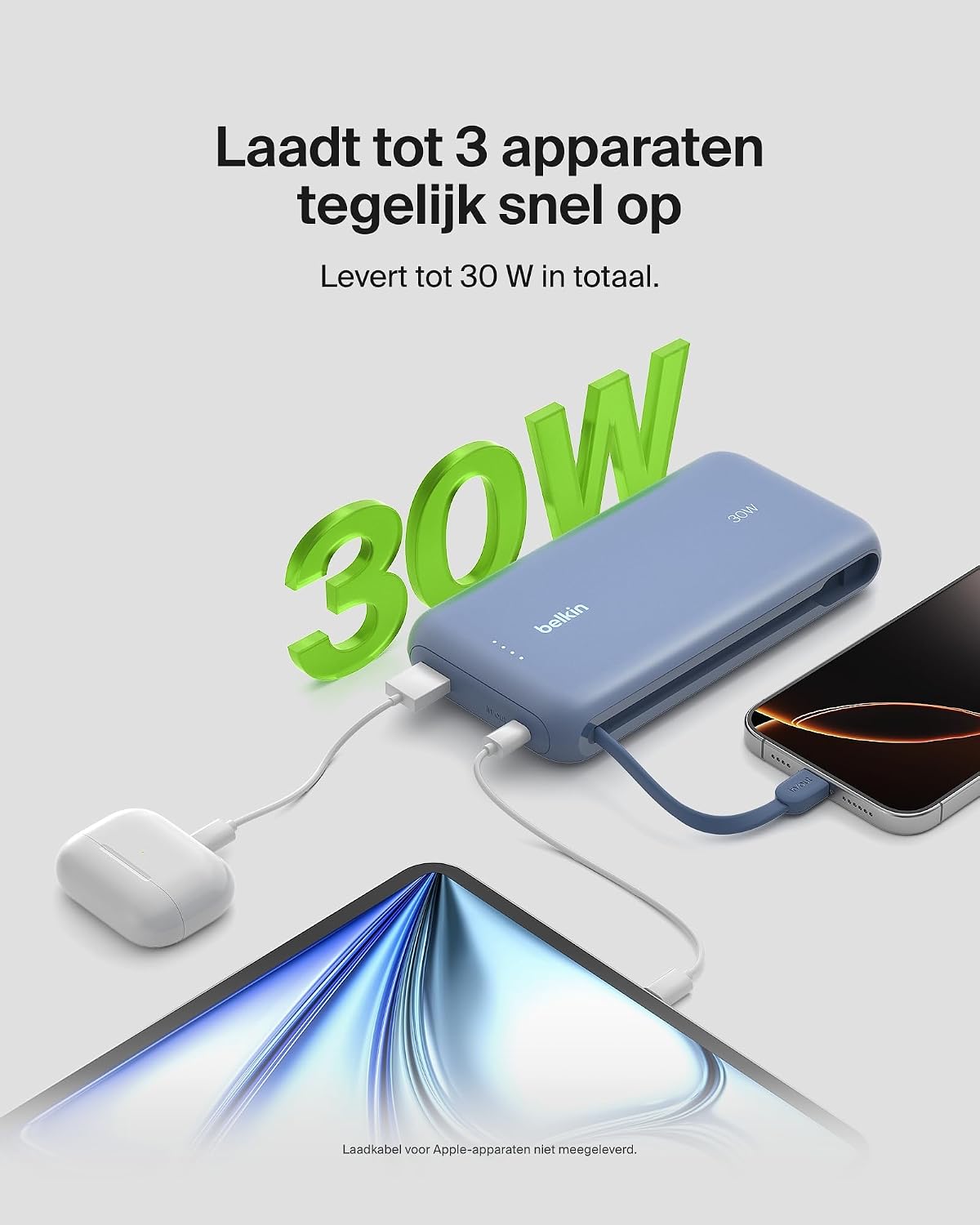
Image: The power bank simultaneously charging a smartphone, a tablet, and wireless earbuds, illustrating its capability to charge up to three devices with a total output of 30W.
LED indikator statusa baterije
The power bank features LED lights that indicate the remaining battery level and charging status. Refer to the table below for interpretation:
| Status LED-a | Značenje |
|---|---|
| Sve LED diode su solidne | Potpuno napunjen |
| LEDs blinking sequentially | Punjenje je u toku |
| Fewer LEDs solid | Preostali kapacitet baterije |
Održavanje
- čišćenje: Za čišćenje power bank-a koristite meku, suhu krpu. Izbjegavajte upotrebu jakih hemikalija ili abrazivnih materijala.
- Skladištenje: Power bank čuvajte na hladnom i suhom mjestu, dalje od direktne sunčeve svjetlosti i ekstremnih temperatura.
- Održavanje baterije: Da biste produžili vijek trajanja baterije, izbjegavajte redovno potpuno pražnjenje power bank-a. Napunite ga kada je nivo baterije nizak.
- Integrated Cable Care: When not in use, ensure the integrated USB-C cable is properly stowed to prevent damage.
Rješavanje problema
Uobičajeni problemi i rješenja
- Uređaj se ne puni:
- Ensure the power bank is charged. Check the LED indicators.
- Provjerite je li kabel za punjenje sigurno spojen i na power bank i na vaš uređaj.
- Isprobajte drugi kabel za punjenje ili priključak na power banku.
- Provjerite je li vaš uređaj kompatibilan sa specifikacijama punjenja power bank-a.
- Sporo punjenje:
- Ensure your device supports fast charging (Power Delivery) to utilize the 30W output.
- If charging multiple devices, the total 30W output is shared, which may result in slower charging for individual devices.
- Check if the cable used supports fast charging.
- Power bank se ne puni:
- Ensure the wall adapter and cable used for recharging the power bank are functional and properly connected.
- Try a different wall adapter or cable.
Belkin SmartProtect Safety Features
The Belkin Power Bank is equipped with SmartProtect technology, which includes multiple safety features to protect your devices and the power bank itself:
- Zaštita od preopterećenja
- Overcurrent Protection
- Overpower Protection
- Zaštita od kratkog spoja
- Output Overvoltage Zaštita
- Output High/Low Temperature Protection
- Input High/Low Temperature Protection
- Signal Interference Protection
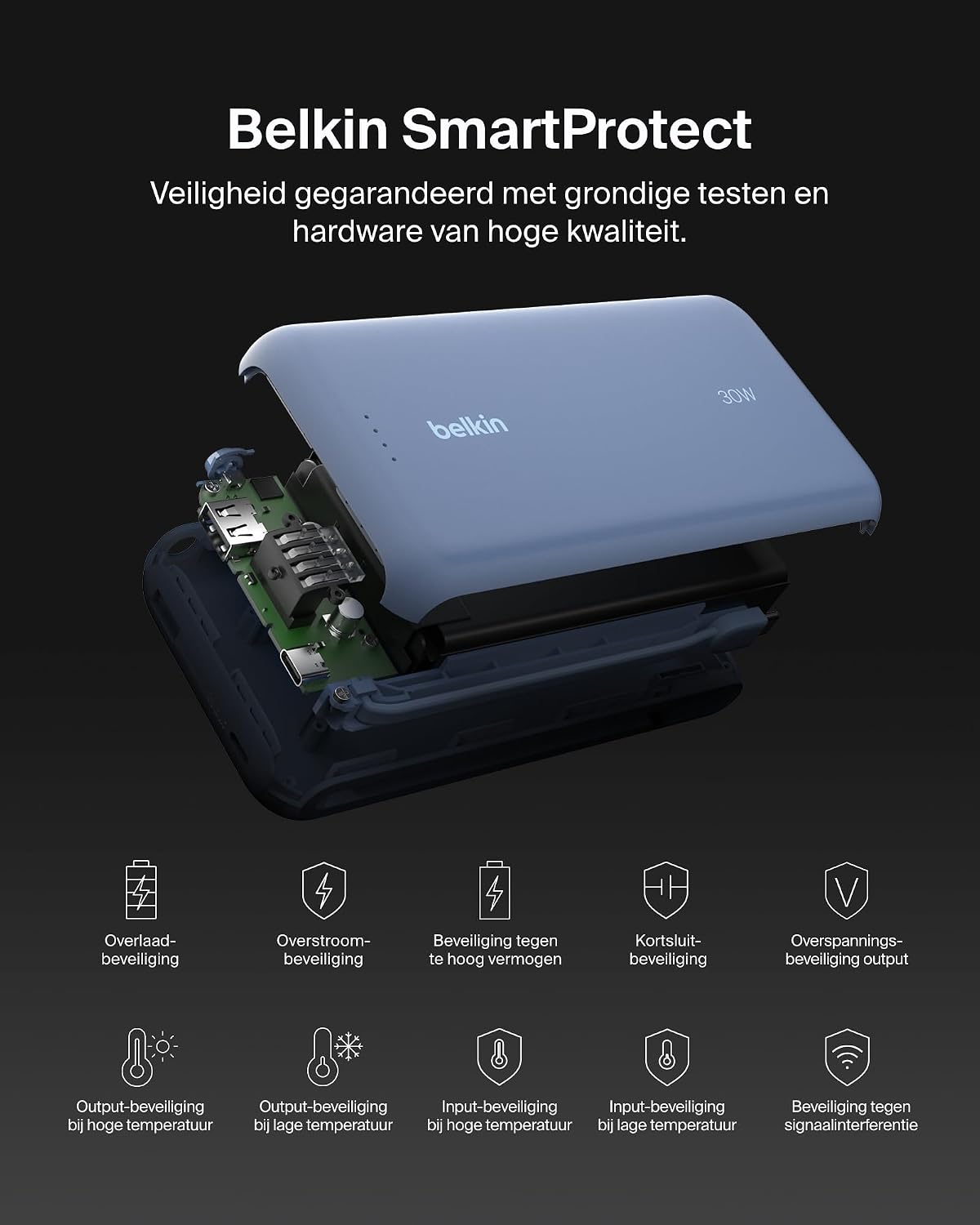
Slika: Eksplodirala view of the Belkin Power Bank, highlighting its internal components and the comprehensive Belkin SmartProtect safety features, including protection against overcharge, overcurrent, and short-circuits.
Specifikacije
| Feature | Detalj |
|---|---|
| Broj modela | BPB024hqBL |
| Kapacitet baterije | 20,000 mAh |
| Izlazna snaga | Up to 30W Power Delivery (shared) |
| Tip konektora | Integrated USB-C cable, 1x USB-C port, 1x USB-A port |
| Voltage | 5 Volts |
| AmpDob | 3 Ampere |
| Vrijeme punjenja (Power Bank) | Pribl. 12 sati |
| Dimenzije proizvoda | 15.4 x 7.62 x 2.51 cm |
| Težina artikla | 395 grama |
| Sastav baterije baterije | Litijum-jonski |
| Kompatibilni uređaji | Apple iPhone 16 series, iPhone 15 series, iPhone 14 series, iPhone 13 series, Samsung Galaxy S22/S23/S24/S25 series, iPad Pro, iPad Air, iPad, iPad Mini, and other USB-C/USB-A compatible devices. |
Garancija i podrška
Informacije o garanciji
This Belkin Portable Power Bank comes with a 2-godišnja garancija proizvođača. Additionally, it includes a Connected Equipment Warranty, providing peace of mind for your connected devices. Please retain your proof of purchase for warranty claims.
Korisnička podrška
For further assistance, technical support, or warranty inquiries, please visit the official Belkin support website or contact their customer service. You can find more information at www.belkin.com/support.