
Uvod
This manual provides detailed instructions for the installation, programming, operation, and maintenance of your Avisontek GK-R G3T-R wireless garage door opener keypad and remote system. This system is designed to replace or supplement your existing Genie Intellicode garage door opener controls, offering convenient and secure access to your garage.
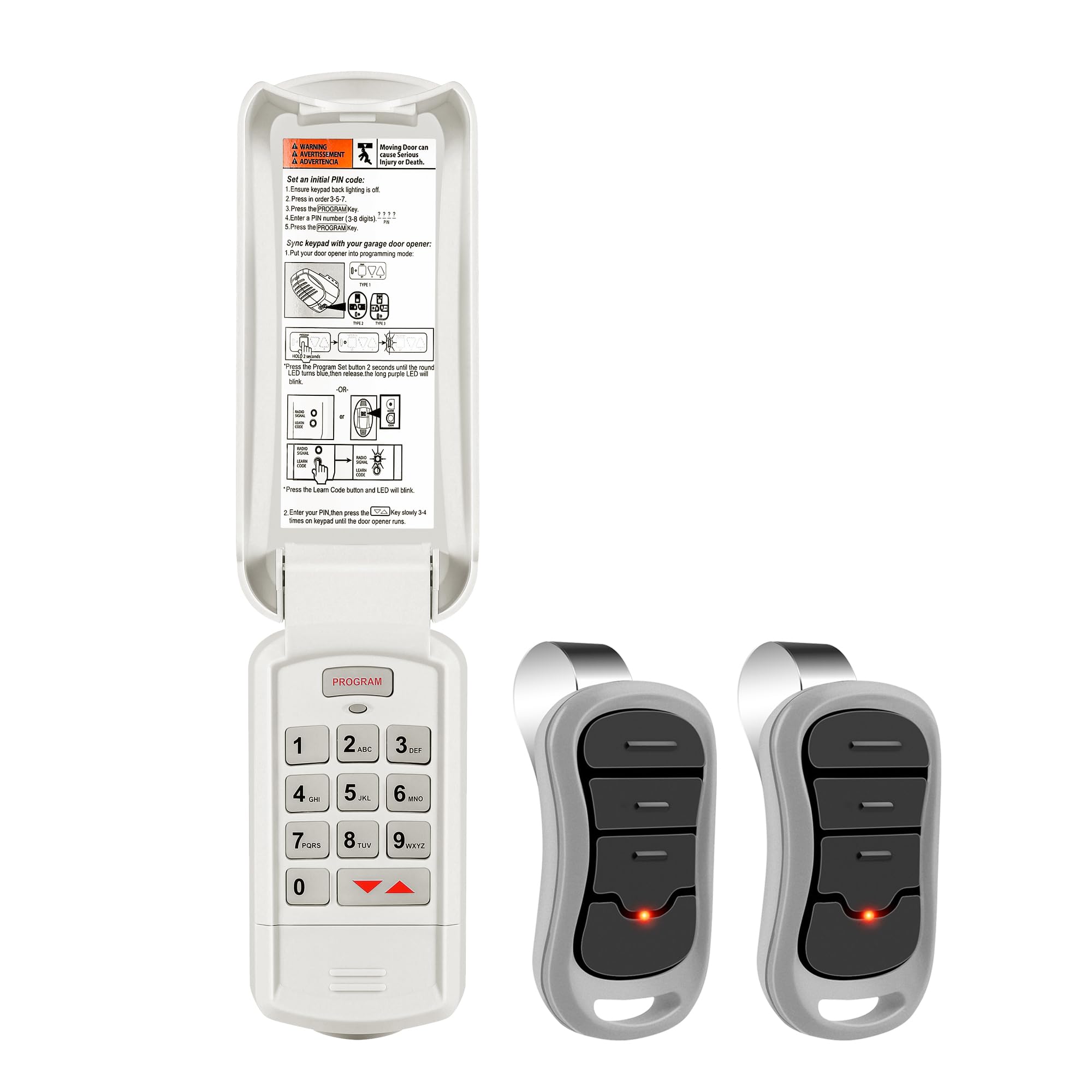
Image: The Avisontek GK-R G3T-R wireless keypad and two remote controls, showcasinkompletan sistem.
Kompatibilnost
The Avisontek GK-R G3T-R system is compatible with all Genie and Overhead Door garage door openers manufactured from 1995 to the present. This includes models that utilize Intellicode technology.
Važno: Ovaj sistem je NE compatible with garage door openers that use DIP switches (Genie from 1982 to 1996, and Overhead Door from 1995 to 1996). Please confirm your opener's compatibility before proceeding with installation.

Image: A visual guide illustrating compatibility with Genie and Overhead Door openers manufactured from 1995 to current, and explicitly stating non-compatibility with DIP switch models.
Podešavanje i programiranje
Instalacija tastature
The keypad is designed for wireless DIY installation on an outdoor garage wall. No electrical wiring is required. Use the provided screws to securely mount the keypad at a convenient height, ensuring the flip cover can open and close freely for weather protection and access.

Image: An illustration showing the wireless keypad mounted on a garage wall, highlighting the ease of installation without wires.
Instalacija baterije
The keypad requires two AAA alkaline batteries (included). The remote control typically uses a CR2032 battery. To install, open the battery compartment on the back of the keypad or remote and insert the batteries, carefully observing the correct polarity (+/-) markings.

Slika: Detaljna view of the keypad with its cover open, revealing the battery compartment and the placement of AAA alkaline batteries.
Uputstva za programiranje
Follow these steps to program your keypad and remote with your garage door opener.
Setting a Personal PIN on the Keypad
- Ensure the keypad backlight is off (do not press any buttons).
- Pritisnite 3, 5, 7 on the keypad, then press the PROGRAM dugme.
- The LED will blink. Enter your unique 3-8 digit PIN number.
- Pritisnite PROGRAM ponovo dugme.
- The keypad will blink twice and shut off, confirming successful PIN programming.
Syncing Keypad/Remote with Garage Door Opener
- Enter programming mode on your garage door opener. Refer to your garage door opener's manual for specific instructions. Generally, this involves pressing the "Learn Code" or "Program" button on the opener unit.
- Confirm the keypad backlight is off (do not press any buttons).
- Enter your previously set PIN on the keypad.
- Press the UP or Down key on the opener 3-4 times until it operates, confirming successful programming.
Video: This video demonstrates the programming process for the Avisontek GK-R G3T-R wireless keypad with a Genie garage door opener. It shows how to set a personal PIN and sync the keypad with the opener unit.

Image: A graphic detailing the step-by-step programming instructions for setting the keypad PIN and syncing it with the garage door opener.
Uputstvo za upotrebu
Opening/Closing the Garage Door with Keypad
To operate your garage door using the keypad, simply enter your personal 3-8 digit PIN on the keypad, then press the ENTER button (or the designated button to activate the door). The door will then open or close.

Image: A person entering a PIN on the wireless keypad to activate a garage door, demonstrating keyless entry.
Opening/Closing the Garage Door with Remote
Press the desired button on the remote control to activate the garage door opener. The remote control is capable of operating up to three different garage door motors, allowing for multi-door control.

Image: An illustration showing a single remote control capable of operating three separate garage doors, indicating its multi-channel functionality.
Privremeni kodovi
The keypad supports generating temporary access codes for visitors, maintenance workers, or delivery personnel. This feature allows you to grant limited-time access without sharing your primary PIN. Consult your garage door opener's manual or the keypad's advanced settings for specific instructions on setting temporary codes.
Održavanje
Zamjena baterije
Replace batteries in the keypad (2 AAA) and remote (CR2032) when the backlight dims, the operating range decreases, or the unit becomes unresponsive. Refer to the "Battery Installation" section for detailed instructions on how to replace the batteries.
Čišćenje
Clean the keypad and remote surfaces with a soft, slightly damp krpom. Izbjegavajte upotrebu abrazivnih sredstava za čišćenje, rastvarača ili jakih hemikalija, jer oni mogu oštetiti završnu obradu ili unutrašnje komponente.
Zaštita od vremenskih prilika
The keypad features a durable, weatherproof housing and a protective flip cover. Ensure the cover is closed when the keypad is not in use to shield it from rain, snow, direct sunlight, and other harsh weather conditions, prolonging its lifespan.

Image: The wireless keypad shown in various weather conditions, including rain and snow, demonstrating its weatherproof design and durability.
Rješavanje problema
Keypad/Remote Not Responding
- Provjerite baterije: Ensure batteries are correctly installed and not depleted. Low batteries are a common cause of unresponsiveness. Replace if necessary.
- Reprogramiraj: Attempt to reprogram the keypad/remote with your garage door opener. Refer to the "Programming Instructions" section for detailed steps.
- Kompatibilnost: Verify your garage door opener is compatible with the GK-R G3T-R system (manufactured 1995-present, not DIP switch).
Smanjeni radni domet
- Zamijenite baterije: Low battery power can significantly reduce the effective operating range of both the keypad and remote.
- Prepreke: Ensure there are no physical obstructions (e.g., vehicles, large objects, metal structures) between the keypad/remote and the garage door opener unit that might block the signal.
- smetnje: Check for potential sources of radio frequency interference in the vicinity, such as other wireless devices, power lines, or electronic equipment.
Keypad Backlight Not Working
- Provjerite baterije: A dim or non-functional backlight is often an early indication of low battery power. Replace the batteries.
Garage Door Opens/Closes Unexpectedly
- Rolling Code Security: The Avisontek system utilizes rolling code encryption to prevent unauthorized access. If unexpected operation occurs, reprogram the keypad/remote and consider changing your PIN to ensure security.
Specifikacije
| Feature | Detalj |
|---|---|
| Brand | Avisontek |
| Naziv modela | Tastatura za otvaranje garažnih vrata |
| Broj modela | GK-R G3T-R |
| Kompatibilni uređaji | Genie Garage Door Openers Manufactured 1995 to Present |
| Tehnologija povezivanja | Radio frekvencija |
| Radne frekvencije | 315MHz and 390MHz (Auto-Seek Dual Frequency) |
| Maksimalni domet | 164 stopa |
| Maksimalni broj podržanih uređaja | 3 (kanala) |
| Keypad Button Quantity | 12 |
| Keypad Battery Type | 2 AAA baterije (uključene) |
| Vrsta baterije za daljinsko upravljanje | CR2032 (for G3T-BX remote) |
| Posebne karakteristike | Auto-Seek Dual Frequency, Glow In The Dark Button, Weatherproof, Wireless DIY Install |
| Garancija | 3 godina |
| FCC certificirano | Da |
| UPC | 713038693211 |

Image: A detailed chart outlining the product parameters, including dimensions, working range, frequency, battery type, and warranty for both GK-BX (keypad) and G3T-BX (remote) models.
Garancija i podrška
Informacije o garanciji
This Avisontek product is covered by a 3-year quality warranty from the date of purchase. This warranty covers defects in materials and workmanship under normal use. Please retain your proof of purchase for warranty claims.
Korisnička podrška
For technical assistance, troubleshooting, or warranty claims, please contact Avisontek customer service. Refer to the product packaging or the seller's contact information for support details. Our team is available to help with any questions you may have regarding your product.

Image: An illustration of customer service representatives, symbolizing available support for product inquiries and assistance.