
1. Uvod
Thank you for choosing the RAPIQUE R110 Bluetooth Wireless Mouse. This manual provides detailed instructions for setting up, operating, and maintaining your new mouse. The R110 features Bluetooth 5.1 and 2.4G dual connectivity, a rechargeable USB-C battery, silent click buttons, and an ergonomic 6-button design for enhanced productivity and comfort across various operating systems.
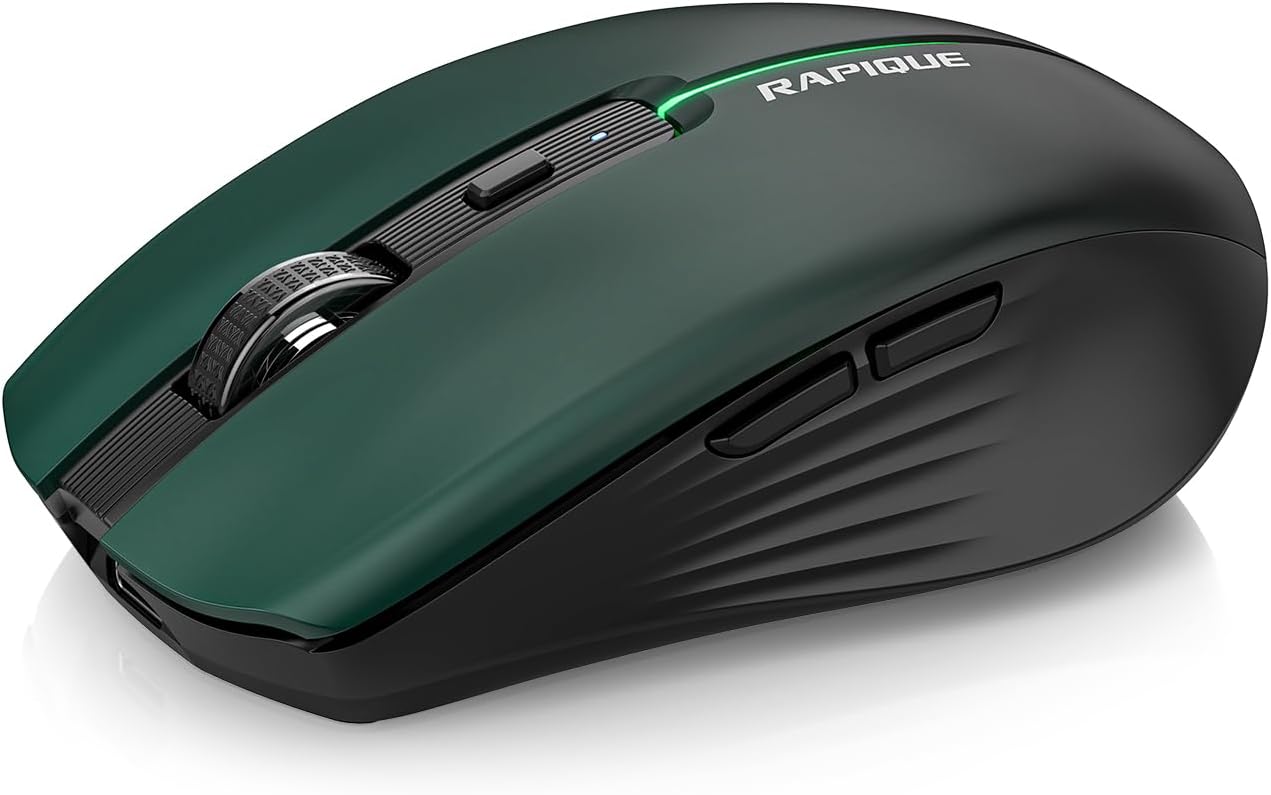
Image 1.1: The RAPIQUE R110 Bluetooth Wireless Mouse, showcasing its green gradient design.
2. Šta se nalazi u kutiji
Molimo Vas da provjerite da li se u Vašem paketu nalaze svi artikli:
- Bluetooth Wireless Mouse (R110) x 1
- USB-C kabel za punjenje x 1
- Korisnički priručnik x 1
3. Proizvod je gotovview
3.1 Ključne karakteristike
- Premium Deep Green-to-Black Design: Features a gradient finish with a sleek black middle and bottom shell.
- Triple-Mode Wireless Connectivity: Supports Bluetooth 5.1 (BT1 & BT2) and 2.4GHz USB receiver for seamless switching between up to three devices.
- Fast USB-C Charging & Auto Sleep: Equipped with a 650mAh rechargeable battery, charges via USB-C, and enters auto-sleep after 90 seconds of inactivity to conserve power.
- Silent Clicks & Adjustable DPI: Reduces clicking and scrolling noise by up to 90% and offers adjustable DPI settings (800/1200/1600) for precise control.
- Ergonomic & Durable Build: Contoured shape with six responsive buttons, including forward/back side keys, designed for comfort and tested for over 5 million clicks.
- Široka kompatibilnost: Compatible with Windows 8/10/11, Android, and macOS via Bluetooth 5.1, and non-Bluetooth devices via 2.4G USB receiver. Supports iOS 14 or later for iPhones and iPads.
3.2 Identifikacija komponente

Slika 3.1: Rastavljeno view illustrating the gradient coating, primers, and ABS material of the mouse shell.
The R110 mouse features a gradient coating and UV coating for enhanced comfort. Its construction includes durable ABS material.

Slika 3.2: Detaljno view of the mouse highlighting anti-slip texture, colorful breathing light, DPI adjustment button, and the mode indicator on the underside.
- Lijevi/Desni klik: Silent click design.
- Točak za pomicanje: Za vertikalno skrolovanje.
- DPI dugme: Adjusts mouse sensitivity (800/1200/1600 DPI). Long-press to toggle decorative LED light.
- Dugmad za naprijed/nazad: Nalazi se sa strane radi navigacije.
- USB-C priključak za punjenje: Located at the front of the mouse.
- Dugme za promjenu načina rada: Located on the bottom, cycles between 2.4G, BT1, and BT2 modes.
- Mode Indicators (LEDs): Lights on the bottom indicate current connection mode (Red for 2.4G, Green for BT1, Blue for BT2).
- Pohrana USB prijemnika: Compartment on the bottom for the 2.4G USB receiver.
4. Podešavanje
4.1 Punjenje miša
Before first use, fully charge the mouse. Connect the supplied USB-C cable to the mouse's charging port and the other end to a USB power source (e.g., computer USB port, USB wall adapter). The charging indicator light will illuminate during charging and automatically extinguish when fully charged.

Image 4.1: The USB-C charging port and the charging indicator light on the RAPIQUE R110 mouse.
4.2 Povezivanje miša
The R110 mouse offers three connection modes: 2.4G USB and two Bluetooth 5.1 channels (BT1, BT2). You can connect to up to three different devices simultaneously and switch between them.

Image 4.2: Visual guide for connecting the mouse in 2.4G, BT1, and BT2 modes.
4.2.1 2.4G USB Connection (Plug & Play)
- Pronađite USB prijemnik koji se nalazi u odjeljku na dnu miša.
- Umetnite USB prijemnik u dostupan USB priključak na vašem računaru ili uređaju.
- Slide the mode switch on the bottom of the mouse to the "2.4G" position (indicated by a red LED).
- Miš će se automatski povezati s vašim uređajem.
4.2.2 Bluetooth veza (BT1 / BT2)
- Slide the mode switch on the bottom of the mouse to either the "BT1" (green LED) or "BT2" (blue LED) position.
- Press and hold the mode button on the bottom of the mouse for 3-5 seconds until the corresponding LED (green for BT1, blue for BT2) flashes rapidly. This indicates the mouse is in pairing mode.
- On your device (computer, tablet, phone), open Bluetooth settings.
- Traži new devices and select "RAPIQUE R110" (or similar name) from the list.
- Once paired, the LED will stop flashing and remain solid, indicating a successful connection.
Note: For iOS devices, Bluetooth 5.1 support requires iOS 14 or later.
5. Uputstvo za upotrebu
5.1 Prebacivanje između povezanih uređaja
To switch between devices connected via 2.4G, BT1, or BT2, simply slide the mode switch on the bottom of the mouse to the desired connection mode. The corresponding LED will light up.
5.2 Podešavanje DPI osjetljivosti
The mouse has three adjustable DPI settings: 800, 1200, and 1600. Press the DPI button located behind the scroll wheel to cycle through these settings. Each press will change the sensitivity, allowing you to find your preferred cursor speed.

Image 5.1: Illustration of DPI adjustment and the silent click mechanism.
5.3 LED kontrola svjetla
The R110 mouse features a decorative LED light. To toggle this light on or off, long-press the DPI button.
5.4 Funkcija automatskog spavanja
To conserve battery life, the mouse will automatically enter sleep mode after 90 seconds of inactivity. To wake the mouse, simply click any button or move the mouse.
6. Održavanje
- čišćenje: Za čišćenje miša koristite meku, suhu krpu. Za tvrdokornu prljavštinu, lagano je očistite.ampIsperite krpu vodom. Izbjegavajte upotrebu jakih hemikalija ili abrazivnih materijala.
- Skladištenje: When not in use for extended periods, store the mouse in a cool, dry place. Ensure the mouse is turned off to preserve battery life.
- Održavanje baterije: Recharge the mouse when the battery is low. Avoid fully discharging the battery frequently to prolong its lifespan.
- USB prijemnik: When transporting the mouse, store the 2.4G USB receiver in its dedicated compartment on the bottom of the mouse to prevent loss.
7. Otkrivanje problema
| Problem | Mogući uzrok | Rješenje |
|---|---|---|
| Miš ne reaguje. | Low battery; Incorrect connection mode; USB receiver not properly inserted (2.4G mode); Bluetooth not paired. | Charge the mouse. Ensure the mode switch is set correctly (2.4G, BT1, or BT2). For 2.4G, re-insert the USB receiver. For Bluetooth, re-pair the mouse with your device. |
| Kretanje kursora je nepravilno ili sporo. | Low DPI setting; Dirty optical sensor; Uneven surface. | Press the DPI button to increase sensitivity. Clean the optical sensor on the bottom of the mouse. Use the mouse on a clean, flat surface or mouse pad. |
| Nije moguće povezivanje putem Bluetootha. | Mouse not in pairing mode; Device Bluetooth off; Interference. | Ensure the mouse is in BT1 or BT2 mode and the LED is flashing rapidly (pairing mode). Turn on Bluetooth on your device. Move closer to the device or away from other wireless devices. |
| Miš se često isključuje. | Low battery; Too far from receiver/device; Interference. | Charge the mouse. Ensure the mouse is within the effective range (up to 10m/33ft). Reduce interference from other wireless devices. |
8. Specifikacije
| Feature | Detalj |
|---|---|
| Broj modela | R110 |
| Povezivanje | Bluetooth 5.1 (BT1, BT2), 2.4G Wireless (USB Receiver) |
| DPI postavke | 800 / 1200 / 1600 DPI |
| Vrsta baterije | Rechargeable Lithium Polymer (650mAh) |
| Port za punjenje | USB-C |
| Životni vijek klika | Preko 5 miliona klikova |
| Tihi klik | Yes (90% noise reduction) |
| Automatsko spavanje | Nakon 90 sekundi neaktivnosti |
| Kompatibilnost | Windows 8/10/11, Android, macOS, iOS 14+ (for iPhones/iPads) |
| Dimenzije | 102 mm (4.17 in) x 64 mm (2.51 in) x 35 mm (1.37 in) |
| Težina artikla | 3.84 unce |

Image 8.1: Dimensions of the RAPIQUE R110 mouse and its compact size when held in hand.
9. Garancija i podrška
RAPIQUE products are designed for reliability and performance. For warranty information and technical support, please refer to the official RAPIQUE webweb-mjesto ili direktno kontaktirajte njihovu korisničku službu. Sačuvajte račun kao dokaz o kupovini za reklamacije u slučaju garancije.
Za dodatnu pomoć, možete posjetiti RAPIQUE Store on Amazon.