
1. Proizvod je gotovview
The AstroAI L7 Mini Portable Tire Inflator is a compact, cordless air compressor designed for convenient inflation of various items, including car tires, motorcycle tires, bicycle tires, and sports balls. It features a digital pressure gauge, auto shut-off function, and multiple preset inflation modes.
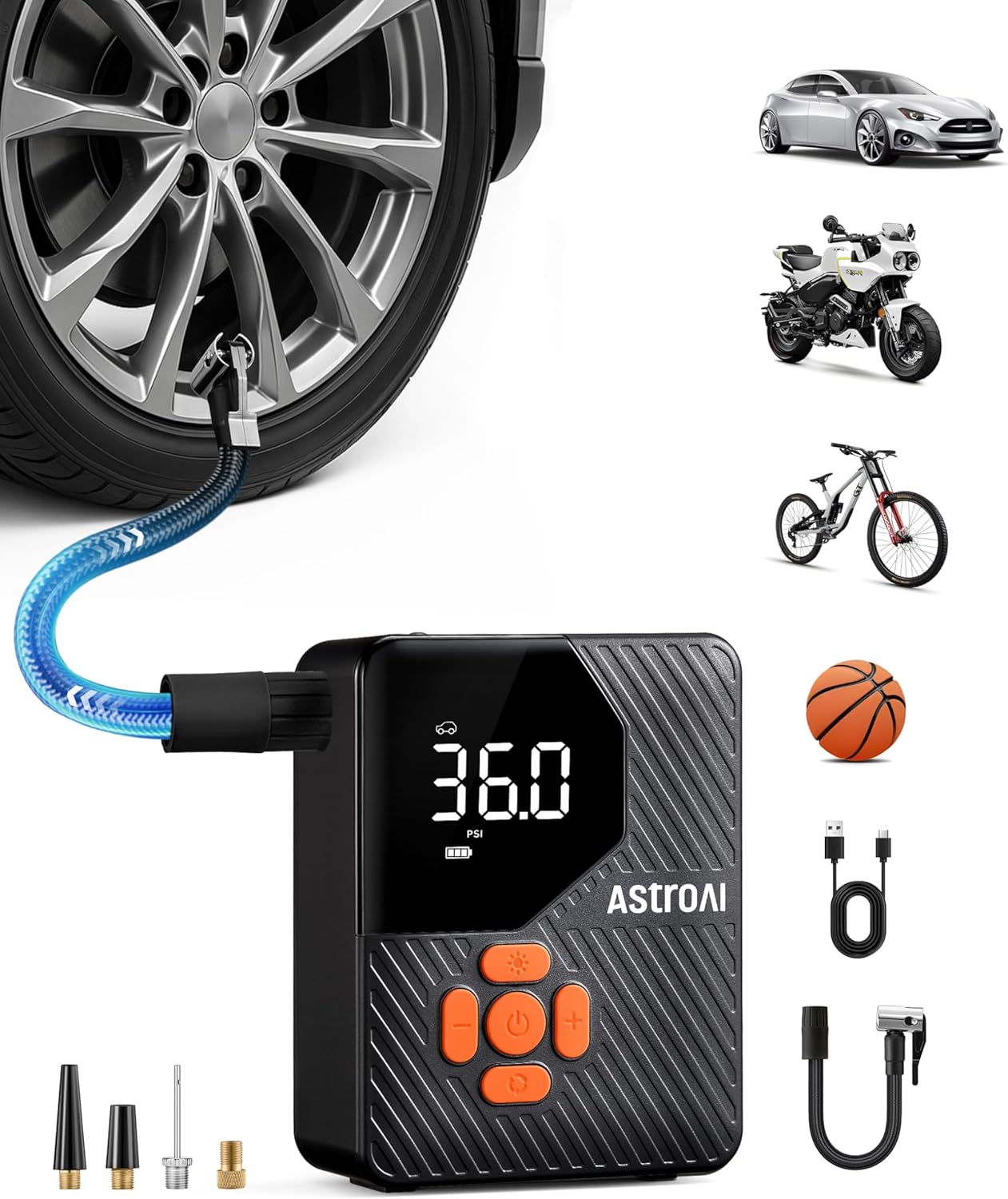
Image 1.1: AstroAI L7 Mini Portable Tire Inflator and its applications.
Sadržaj paketa:
- Bežični pumpa za gume × 1
- Brzi konektor× 1
- USB kabel za punjenje × 1
- Air Nozzles× 1 (various types)
- Adapter igličastog ventila × 1
- Presta na Schrader adapter× 1
- Uputstvo za upotrebu× 1
2. Sigurnosne informacije
Please read all safety instructions before using the AstroAI L7 Mini Portable Tire Inflator to prevent injury or damage to the device. Keep this manual for future reference.
- Ne ostavljajte inflator bez nadzora dok radi.
- Čuvati van domašaja djece.
- Do not operate near flammable liquids or gases.
- Ensure the correct pressure setting for the item being inflated to avoid over-inflation.
- Nakon duže upotrebe, ostavite uređaj da se ohladi kako biste spriječili pregrijavanje.
- Store the inflator in a dry, cool place.
3. Podešavanje i punjenje
3.1 Početno punjenje
Before first use, fully charge the inflator. Connect the provided USB charging cord to the inflator's charging port and a suitable USB power source (e.g., wall adapter, car charger, power bank). The battery indicator on the display will show charging status.

Image 3.1: The inflator's battery capacity allows for multiple inflations on a single charge.
3.2 Pričvršćivanje crijeva za zrak i mlaznica
- Screw the quick connector onto the inflator's air outlet.
- Select the appropriate air nozzle or adapter for the item you intend to inflate.
- Attach the selected nozzle/adapter to the quick connector.

Image 3.2: Included accessories for various inflation needs.
4. Uputstvo za upotrebu
4.1 Uključivanje/isključivanje
Press and hold the power button for 1.5 seconds to turn the inflator on or off.

Image 4.1: Quick start guide for inflation.
4.2 Odabir načina napuhavanja i jedinica
- Odabir načina rada: Press the 'M' button to cycle through the 5 preset modes: Car, Motorcycle, Bicycle, Ball, and Custom. Each mode has a default pressure setting.
- Odabir jedinice: In any mode, press the 'U' button to switch between pressure units: PSI, BAR, KPA, and KG/CM².

Image 4.2: Smart one-press presetting and unit selection.
4.3 Podešavanje željenog pritiska
After selecting a mode, use the '+' and '-' buttons to adjust the target pressure value. The display will show the current pressure and the target pressure.
4.4 Proces inflacije
- Connect the appropriate nozzle/adapter to the item's valve stem. Ensure a secure connection to prevent air leakage.
- The display will show the current pressure of the item.
- Press the power button to start inflation. The inflator will automatically stop once the preset target pressure is reached.
- Disconnect the nozzle from the item.

Image 4.3: Inflating a car tire with the AstroAI L7 Mini.
4.5 Funkcija automatskog isključivanja
The inflator is equipped with an auto shut-off feature that automatically stops inflation once the preset pressure is achieved. This prevents over-inflation and ensures safety.

Image 4.4: The auto shut-off feature provides safe and efficient inflation.
4.6 Flashlight Modes
The built-in flashlight has three modes: Flashlight, Strobe, and SOS. Press the flashlight button to cycle through these modes. This feature is useful for low-light conditions or emergency signaling.

Image 4.5: The 3-mode flashlight for various situations.
5. Održavanje
5.1 Čišćenje
Obrišite vanjski dio pumpe za naduvavanje mekom,amp krpu. Ne koristite jake hemikalije ili abrazivna sredstva za čišćenje. Prije skladištenja provjerite je li uređaj suh.
5.2 Skladištenje
Store the inflator in a cool, dry place, away from direct sunlight and extreme temperatures. Keep all accessories organized to prevent loss.
5.3 Njega baterija
To prolong battery life, charge the inflator regularly, even if not in frequent use. Avoid fully discharging the battery for extended periods.
6. Otkrivanje problema
| Problem | Mogući uzrok | Rješenje |
|---|---|---|
| Inflator se ne uključuje. | Slaba baterija; Dugme za napajanje nije držano dovoljno dugo. | Napunite bateriju; Pritisnite i držite dugme za napajanje 1.5 sekunde. |
| Inflator se ne naduvava. | Hose not securely connected; Target pressure not set; Battery too low. | Ensure hose is tightly screwed; Set a target pressure; Charge the battery. |
| Netačno očitavanje pritiska. | Hose not properly connected to valve; Sensor malfunction. | Reconnect hose securely; Contact customer support if issue persists. |
| Uređaj se pregrijava tokom upotrebe. | Produženi neprekidni rad. | Allow the device to cool down for 10-15 minutes before resuming use. |
7. Specifikacije
| Feature | Detalj |
|---|---|
| Brand | AstroAI |
| Model | L7 Mini (ACL7MINIOR) |
| Izvor napajanja | Battery Powered |
| Maksimalni pritisak | 150 PSI |
| Jedinice pritiska | PSI, BAR, KPA, KG/CM² |
| Dimenzije proizvoda | 3.15 x 1.89 x 4.17 inča |
| Težina artikla | 1.19 funte |
| Vrsta baterije | Punjiva litijum-jonska (unutrašnja) |
| Načini rada svjetiljke | Flashlight, Strobe, SOS |
Note: The maximum pressure capability is 150 PSI. The value of 36 PSI mentioned in some specifications refers to a common recommended pressure for standard car tires.
Regarding battery type, the device uses an internal rechargeable lithium-ion battery, not standard 'A' batteries as might be implied by a typo in the raw specifications.
8. Garancija i podrška
8.1 Informacije o garanciji
The AstroAI L7 Mini Portable Tire Inflator typically comes with a 2 godine garancije from the date of purchase. This warranty covers defects in materials and workmanship under normal use. Please retain your proof of purchase for warranty claims. For specific warranty terms and conditions, refer to the warranty card included in your package or visit the official AstroAI website.
8.2 Korisnička podrška
For technical assistance, troubleshooting, or warranty inquiries, please contact AstroAI Customer Support. You can usually find contact information on the official AstroAI webweb-mjestu ili putem prodavača gdje ste kupili proizvod.
Webstranica: www.astroai.com
Email: support@astroai.com