1. Uvod
This instruction manual provides detailed guidance for the proper use and maintenance of your Generic AWSBH22 remote control. This remote is designed as a replacement for various soundbar systems, including Aiwa AWSBH22, VMA X-bar, and Geepa GMS11152 models. Please read this manual thoroughly before operating the device to ensure optimal performance and longevity.
2. Sigurnosne informacije
- Ne izlažite daljinski upravljač direktnoj sunčevoj svjetlosti, izvorima toplote ili ekstremnim temperaturama.
- Izbjegavajte ispuštanje daljinskog upravljača ili njegovo izlaganje jakim udarcima.
- Ne uranjajte daljinski upravljač u vodu ili bilo koju drugu tekućinu.
- Držite baterije van domašaja dece. Ako se proguta, odmah potražite medicinsku pomoć.
- Odložite korištene baterije u skladu s lokalnim propisima. Ne miješajte stare i nove baterije, niti različite vrste baterija.
- Ako se daljinski upravljač ne koristi duži period, izvadite baterije kako biste spriječili curenje.
3. Sadržaj paketa
Molimo Vas da provjerite da li Vaš paket sadrži sljedeće stavke:
- 1 x Generic AWSBH22 Remote Control
- (Batteries are not included and must be purchased separately.)
4. Proizvod je gotovview
The Generic AWSBH22 remote control is designed for intuitive operation of your compatible soundbar system. Below is an illustration of the remote with its key functions.
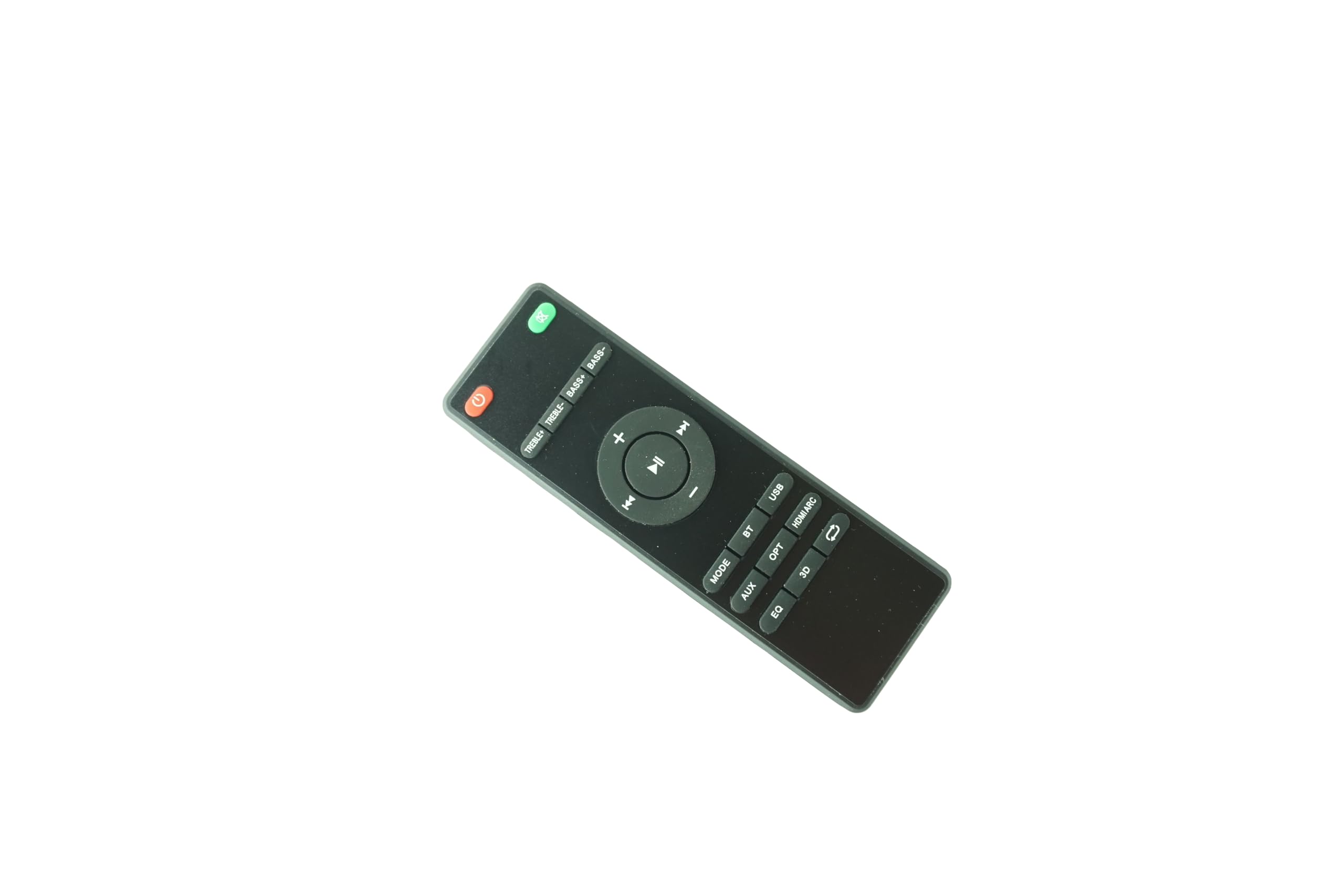
Figure 1: Generic AWSBH22 Remote Control. This image displays the full layout of the remote control, including power, volume, playback, input selection, and sound adjustment buttons.
Funkcije dugmadi:
- Dugme za napajanje (crveno, gore desno): Turns the soundbar system on or off.
- Mute Button (Green, top right): Isključuje ili uključuje zvuk.
- Jačina zvuka (+): Povećava nivo glasnoće.
- Stišavanje (-): Smanjuje nivo glasnoće.
- Play/Pause (Center button): Starts or pauses media playback.
- Previous Track (Left arrow): Preskače na početak trenutne ili prethodne pjesme.
- Next Track (Right arrow): Prelazak na sljedeću pjesmu.
- UPUTE: Cycles through different audio input modes.
- AUX: Selects Auxiliary input.
- OPT: Odabire optički ulaz.
- HDMI ARC: Selects HDMI Audio Return Channel input.
- BT: Selects Bluetooth input for wireless connection.
- USB: Selects USB input for media playback.
- EQ: Cycles through Equalizer presets (e.g., Music, Movie, News).
- 3D: Activates or deactivates 3D audio mode.
- Repeat/Loop (Arrow icon): Toggles repeat or loop playback modes (functionality may vary by device).
- TREBLE+ / TREBLE-: Adjusts the treble level up or down.
- BASS+ / BASS-: Adjusts the bass level up or down.
5. Podešavanje
5.1 Instalacija baterije
- Pronađite odeljak za baterije na poleđini daljinskog upravljača.
- Gurnite poklopac pretinca za baterije.
- Umetnite dvije (2) AAA baterije, pazeći da pozitivni (+) i negativni (-) terminali budu pravilno poravnati s oznakama unutar odjeljka.
- Čvrsto zatvorite poklopac odeljka za baterije.
Note: 2 AAA batteries are required and are not included with the remote control.
6. Uputstvo za upotrebu
This remote control is an infrared (IR) replacement remote. It operates by sending IR signals to your compatible soundbar system. Ensure there is a clear line of sight between the remote control and the soundbar's IR receiver.
6.1 Osnovni rad
- Uključivanje/isključivanje: Pritisnite Snaga button to turn your soundbar on or off.
- Podešavanje jačine zvuka: Koristite Jačina zvuka + i Zapremina - dugmad za podešavanje nivoa zvuka.
- Isključi zvuk: Pritisnite Mute button to temporarily silence the audio. Press again to restore sound.
6.2 Odabir ulaznog izvora
To switch between different audio sources, press the corresponding input button:
- UPUTE: Ciklično pregledava dostupne ulaze.
- AUX: For devices connected via a 3.5mm auxiliary cable.
- OPT: For devices connected via an optical digital cable.
- HDMI ARC: For devices connected via HDMI ARC.
- BT (Bluetooth): Za bežični audio streaming sa uređaja koji podržavaju Bluetooth.
- USB: For media playback from a USB storage device.
6.3 Podešavanje zvuka
- EQ: Press to cycle through preset equalizer modes (e.g., Standard, Movie, Music, Voice).
- 3D: Press to enable or disable 3D surround sound effects.
- TREBLE+ / TREBLE-: Podešava izlaz zvuka visokih frekvencija.
- BASS+ / BASS-: Podešava izlaz zvuka niske frekvencije.
7. Održavanje
7.1 Čišćenje
To clean the remote control, wipe it gently with a soft, dry cloth. Do not use abrasive cleaners, waxes, or solvents as they may damage the surface.
7.2 Zamjena baterije
Replace the batteries when the remote control's response becomes sluggish or stops functioning. Follow the battery installation steps outlined in Section 5.1. Always replace both batteries at the same time with new AAA batteries.
8. Otkrivanje problema
| Problem | Mogući uzrok | Rješenje |
|---|---|---|
| Daljinski upravljač ne radi. |
|
|
| Neke funkcije ne rade. |
|
|
9. Specifikacije
- Model: AWSBH22
- Brand: Generic
- Vrsta: Infracrveni (IR) daljinski upravljač
- Izvor napajanja: 2 x AAA baterije (nisu uključene)
- Kompatibilni uređaji: Aiwa AWSBH22, VMA X-bar, Geepa GMS11152 Soundbar Speaker Systems
- Boja: Crna
- Maksimalni broj podržanih uređaja: 1
10. Garancija i podrška
10.1 Informacije o garanciji
This product is sold as a replacement remote control. Specific warranty details may vary by retailer or region. Please retain your purchase receipt for any warranty claims. The manufacturer, Easytry, provides this product.
10.2 Korisnička podrška
For further assistance or inquiries regarding this remote control, please contact your point of purchase or refer to the contact information provided by the seller. Ensure to mention the model number AWSBH22 when seeking support.
