
AVMATRIX PKC4000-NDI
AVMATRIX PKC4000-NDI PTZ kontroler kamere - uputstvo za upotrebu
Model: PKC4000-NDI
1. Uvod
Thank you for choosing the AVMATRIX PKC4000-NDI PTZ Camera Controller. This device is designed for professional live streaming, church, and conference applications, offering intuitive control over PTZ cameras. Featuring a 5-inch touch screen and a 4D joystick, it provides precise control over camera functions such as pan, tilt, zoom, focus, and iris. This manual will guide you through the setup, operation, maintenance, and troubleshooting of your controller.
2. Sigurnosne informacije
Molimo vas da pročitate i razumjete sva sigurnosna uputstva prije upotrebe uređaja. Sačuvajte ovaj priručnik za buduću upotrebu.
- Ne izlažite uređaj kiši, vlazi ili ekstremnim temperaturama.
- Osigurajte odgovarajuću ventilaciju kako biste spriječili pregrijavanje.
- Use only the provided power adapter or a compatible PoE source.
- Avoid placing heavy objects on the controller.
- Ne pokušavajte rastavljati ili modificirati uređaj. Za sve servisne radove obratite se kvalificiranom osoblju.
- Clean the device with a soft, dry cloth. Avoid liquid cleaners.
3. Sadržaj paketa
Provjerite da li se u vašem paketu nalaze sve dolje navedene stavke:
- AVMATRIX PKC4000-NDI PTZ Camera Controller x1
- 12V DC adapter za napajanje x1
- Tally Connector x1
- Korisnički priručnik (ovaj dokument)
4. Proizvod je gotovview
The PKC4000-NDI controller features a robust design with a clear 5-inch touch screen and a precise 4D joystick for comprehensive camera control.
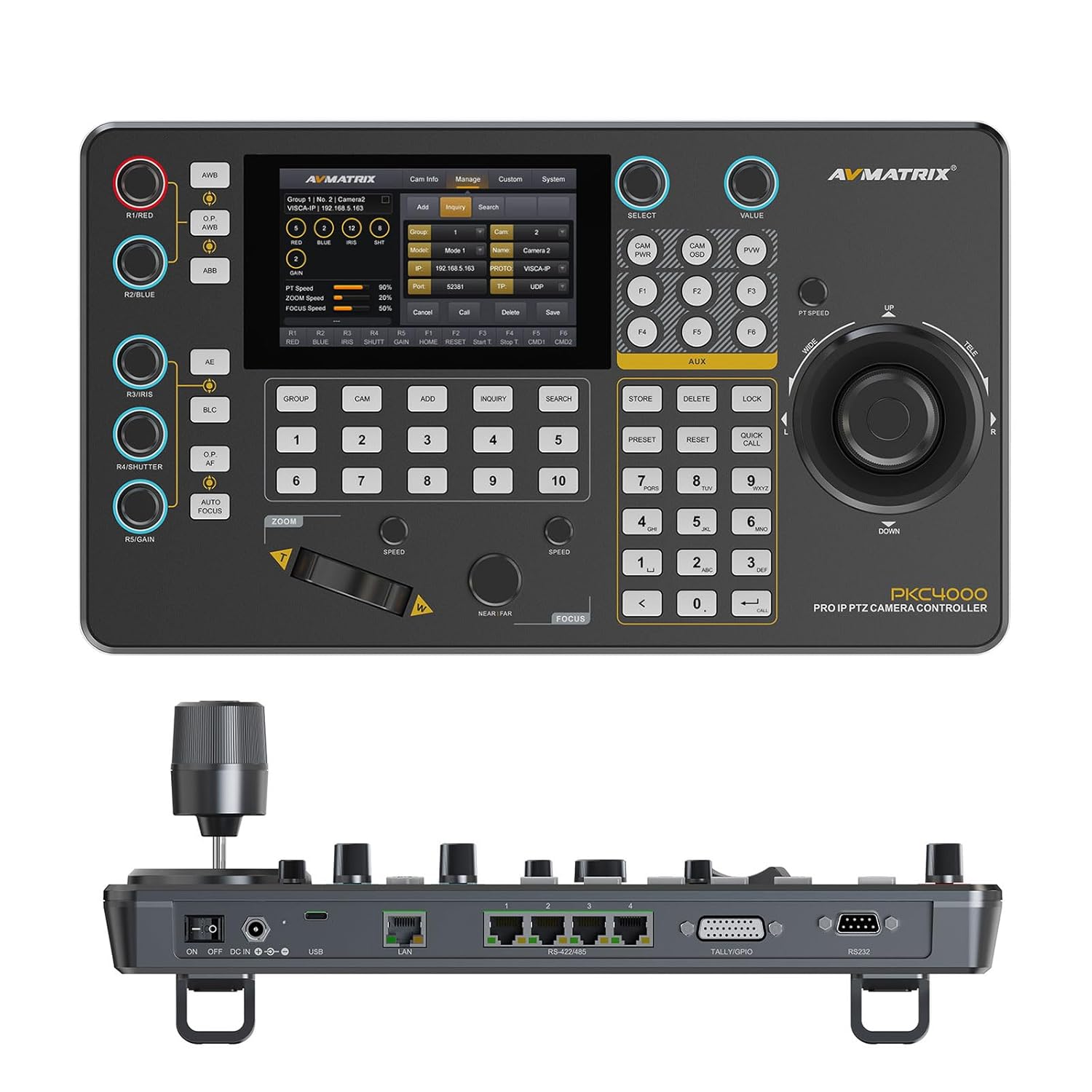
Slika 4.1: Prednja strana view of the PKC4000-NDI Controller
Ključne karakteristike:
- Universal Compatibility & Protocol Support: Supports IP and serial control protocols including VISCA, VISCA-IP, ONVIF, PELCO P&D, and NDI (NDI for Optional). Works with AVMATRIX PTZ cameras and most major PTZ brands.
- Fast Setup with Intuitive Touchscreen: Equipped with a 5-inch full-color touchscreen and menu knob for quick setup and operation.
- Smooth, Professional PTZ Control: Precise control over pan, tilt, zoom, focus, iris, shutter, and more. Supports up to 100 camera shortcuts (10 groups x 10 cameras).
- PoE & Flexible Power Options: Supports both Power over Ethernet (PoE) and traditional DC power for simplified cabling.

Figure 4.2: PKC4000-NDI Key Features Overview
5. Podešavanje
5.1 Početno povezivanje
Follow these steps to set up your PKC4000-NDI controller:
- Priključak za napajanje: Connect the 12V DC power adapter to the 'DC IN' port on the rear of the controller, or connect an Ethernet cable from a PoE-enabled switch to the 'LAN (PoE)' port.
- Mrežna veza: For IP control, connect an Ethernet cable from your network switch to the 'LAN (PoE)' port.
- Serijska veza (opciono): For RS-232, RS-422, or RS-485 control, connect the appropriate serial cables from your PTZ cameras to the corresponding ports on the controller.
- Tally/GPIO (Optional): Connect Tally lights or GPIO devices to the Tally/GPIO port as needed.
- Uključeno: Flip the 'ON/OFF' switch to the 'ON' position. The controller will boot up and display the main interface on the 5-inch touch screen.

Figure 5.1: Rear Panel Control Interfaces
5.2 Konfiguracija kamere
After initial power-up, you will need to configure your PTZ cameras. The controller supports automatic IP address assignment for quick setup.
- Navigate to the 'CAM' or 'System' menu on the touch screen.
- Select 'Add Camera' and follow the on-screen prompts to discover and add your cameras via IP or serial connection.
- Assign each camera to a group and address for easy recall. The controller can manage up to 100 IP cameras (10 groups x 10 cameras).
6. Uputstvo za upotrebu
6.1 Osnovni rad
The PKC4000-NDI provides intuitive control through its touch screen and physical controls.
- Izbor kamere: Use the numeric keypad or the 'CAM' menu on the touch screen to select the camera you wish to control.
- Kontrola džojstikom: The 4D joystick allows for smooth and precise control of Pan, Tilt, and Zoom. Rotate the joystick for zoom control.
- Exposure Controls: Dedicated knobs and buttons allow quick adjustment of Exposure, Iris, Focus, and Gain.
- Preset Recall: Store and recall up to 255 camera presets using the 'PRESET' and numeric buttons.
6.2 Interfejs ekrana osjetljivog na dodir
The 5-inch touch screen provides access to advanced settings and real-time monitoring.
- Navigacija menijem: Tap on menu icons to access camera settings, network configurations, system preferences, and more.
- Praćenje u realnom vremenu: The NDI version supports video decoding for real-time monitoring of camera feeds directly on the 5-inch screen. This allows for visual confirmation of camera movements and adjustments.

Figure 6.1: Real-time Video Preview on Touch Screen
6.3 Track Recording and Playback
The controller supports track loop function, allowing you to record camera pan, tilt, and zoom movements and replay them whenever needed without manual control.
- Access the 'Track' function from the touch screen menu.
- Initiate recording of your desired camera movements.
- Save the recorded track for future playback.

Figure 6.2: Track Recording and Playback Feature
7. Održavanje
7.1 Čišćenje i njega
To ensure the longevity and optimal performance of your PKC4000-NDI controller, follow these maintenance guidelines:
- čišćenje: Use a soft, dry, lint-free cloth to clean the exterior of the controller, including the touch screen. Do not use liquid cleaners, aerosols, or solvents.
- Skladištenje: When not in use for extended periods, store the controller in a cool, dry place away from direct sunlight and extreme temperatures.
- Rukovanje: Handle the joystick and buttons with care to prevent mechanical damage.
8. Otkrivanje problema
8.1 Uobičajeni problemi i rješenja
If you encounter problems with your controller, refer to the table below for possible solutions.
| Problem | Mogući uzrok | Rješenje |
|---|---|---|
| Kontroler se ne uključuje. | No power supply; Power adapter faulty; PoE not active. | Check power adapter connection; Ensure PoE switch is active; Try a different power outlet. |
| Cannot control camera. | Incorrect camera IP/serial settings; Network issue; Camera not powered on. | Verify camera IP address and protocol settings; Check network cables; Ensure camera is powered on and accessible. |
| No video preview na ekranu. | NDI stream not active; Network congestion; Camera not sending video. | Ensure camera is configured for NDI output; Check network bandwidth; Verify camera video output settings. |
| Joystick/buttons unresponsive. | Firmware issue; Hardware malfunction. | Restart the controller; Check for firmware updates; Contact technical support if problem persists. |
9. Specifikacije
9.1 Tehničke specifikacije
Detailed technical specifications for the AVMATRIX PKC4000-NDI PTZ Camera Controller:
| Kategorija | Parametar | PKC4000-NDI |
|---|---|---|
| Veze | Interfejsi | IP(RJ45)x1, RS-232x1, RS-485/RS-422x4, TALLYx1, USB2.0 (For upgrade) |
| IP protokol | ONVIF, VISCA-IP, NDI | |
| Serial Protocol | PELCO-D, PELCO-P, VISCA | |
| Brzina serijskog prijenosa | 2400, 4800, 9600, 19200, 38400, 115200 bps | |
| LAN priključak | 100M×1 (PoE/PoE+: IEEE802.3 af/at) | |
| Korisnička sučelja | Display | 5 inčni ekran osetljiv na dodir |
| Knob | Quickly control iris, shutter speed, gain, auto exposure, white balance, etc. | |
| Joystick | Pomicanje / nagib / zumiranje | |
| Camera Group | 10 (Each group connect up to 10 cameras) | |
| Adresa kamere | Do 100 | |
| Camera Preset | Do 255 | |
| Snaga | Snaga | PoE/DC 7~24V |
| Potrošnja energije | PoE: <8W, DC: <8W | |
| Životna sredina | Radna temperatura | -20℃~60℃ |
| Temperatura skladištenja | -20℃~70℃ | |
| Dimenzija | Dimenzija (LWD) | 340mm×195mm×49.5mm/ 340mm×195mm×110mm(With joystick) |
| Težina | Net:1730g, Gross:2360g | |
| Generale | Broj modela | NW-PKC4000-NDI |
| Proizvođač | NW-AVMATRIX | |
| Datum izlaska | 1. marta 2025 |

Slika 9.1: Detaljne specifikacije i dimenzije
10. Garancija i podrška
10.1 Informacije o garanciji
The AVMATRIX PKC4000-NDI PTZ Camera Controller is backed by a 1 godine ograničene garancije od datuma kupovine. Ova garancija pokriva nedostatke u materijalu i izradi pri normalnoj upotrebi. Ne pokriva štetu uzrokovanu zloupotrebom, nezgodom, neovlaštenom modifikacijom ili vanjskim uzrocima.
10.2 Tehnička podrška
For technical assistance, troubleshooting, or warranty claims, please contact AVMATRIX customer support. We offer doživotna tehnička podrška za naše proizvode.
Please have your product model number (PKC4000-NDI) and purchase information ready when contacting support.
Ask a question about this manual
Ask about setup, troubleshooting, compatibility, parts, safety, or missing instructions. Manuals+ will review the question and use this page’s manual context to help answer it.