
Uvod
Thank you for choosing the Cherub WST-670 Rechargeable Clip-On Tuner. This compact and versatile tuner is designed for precise tuning of various musical instruments, including chromatic, guitar, ukulele, and violin. Featuring a high-contrast color LCD display and a long-lasting rechargeable battery, it offers convenience and accuracy for musicians of all levels.
Sadržaj paketa
Molimo Vas da provjerite paket za sljedeće stavke:
- 1 x Cherub WST-670 Clip-On Tuner
- 1 x USB kabl za punjenje
- 1 x Korisnički priručnik (ovaj dokument)
Product Overview
The Cherub WST-670 tuner features a robust clip mechanism and a clear display for easy readability. Its intuitive controls allow for quick mode selection and precise tuning.

Slika: Front view of the Cherub WST-670 Clip-On Tuner, showing the display and clip mechanism.

Image: Close-up of the Cherub WST-670 Tuner's color LCD display, showing tuning indicators and battery level.
Ključne karakteristike:
- Načini podešavanja: Chromatic (C), Guitar (G), Ukulele (U), Violin (V).
- Punjiva baterija: Built-in Li-Po battery provides over 10 hours of continuous use per charge.
- LCD ekran visokog kontrasta: Bright and clear color display shows tuning status.
- Podesivi klip: Strong and flexible clip for optimal viewing kut.
- Automatsko isključivanje: Automatically turns off to maximize battery life.
Setup
1. Charging the Tuner
Before first use, fully charge the tuner. The built-in rechargeable battery ensures long operation time.
- Connect the included USB charging cable to the tuner's charging port.
- Drugi kraj USB kabla priključite na standardni USB adapter za napajanje (nije uključen) ili na USB priključak računara.
- The battery indicator on the display will show charging status. Once fully charged, the indicator will show a full battery.
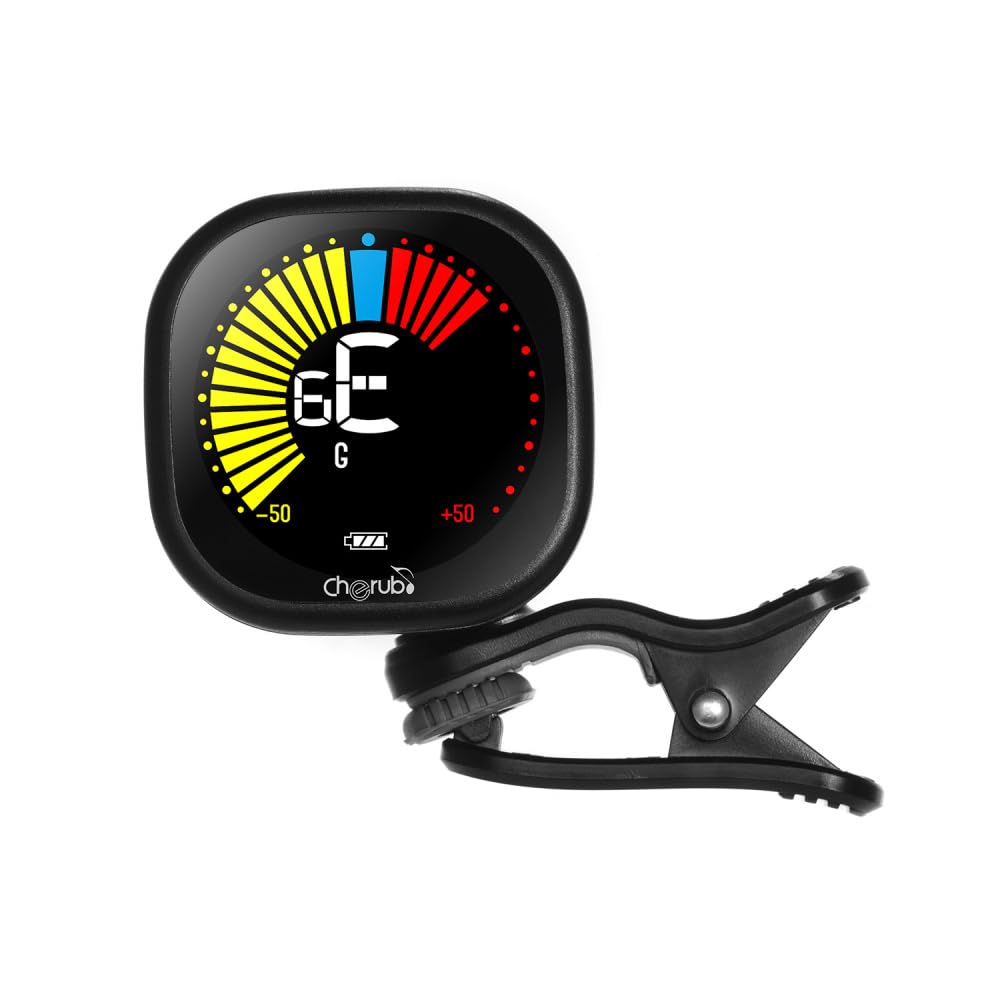
Image: Diagram illustrating how to connect the USB charging cable to the Cherub WST-670 Tuner for recharging.
2. Pričvršćivanje štimera
The clip-on design allows for easy attachment to the headstock of your instrument.
- Gently open the clip and attach it securely to the headstock of your guitar, ukulele, or violin.
- Adjust the tuner's display angle for optimal visibility.

Image: The Cherub WST-670 Tuner securely clipped onto the headstock of an acoustic guitar.
Uputstvo za upotrebu
1. Uključivanje/isključivanje
- To power on, press and hold the power button (usually marked with a power symbol) for a few seconds.
- To power off, press and hold the power button again. The tuner also features an auto power-off function to save battery.
2. Selecting Tuning Mode
The WST-670 supports multiple tuning modes:
- Chromatic (C): For all instruments, displays the exact note.
- Guitar (G): Optimizovano za štimovanje gitare.
- Ukulele (U): Optimizovano za štimanje ukulele.
- Violin (V): Optimizovano za štimovanje violine.
To change the tuning mode, press the "MODE" button repeatedly until the desired mode (C, G, U, or V) is displayed on the screen.
3. Štimovanje instrumenta
- Ensure the tuner is powered on and the correct tuning mode is selected for your instrument.
- Pluck a single string on your instrument. The tuner will detect the vibration and display the note.
- Tumačenje prikaza:
- If the needle points to the left and the display is red/yellow, the note is flat. Tighten the string.
- If the needle points to the right and the display is red/yellow, the note is sharp. Loosen the string.
- When the note is in tune, the needle will be centered, and the display will turn green.
- Ponovite za sve žice dok instrument ne bude savršeno naštiman.
Održavanje
Čišćenje
To clean the tuner, use a soft, dry cloth. Do not use liquid cleaners or abrasive materials, as they may damage the display or casing.
Battery Care
- Izbjegavajte često potpuno pražnjenje baterije kako biste produžili njen vijek trajanja.
- If storing the tuner for an extended period, charge it to about 50% capacity and recharge every few months.
- Use only the provided USB cable or a compatible cable for charging.
Rješavanje problema
Tuner not turning on:
- Ensure the battery is charged. Connect the tuner to a USB power source and allow it to charge for at least 30 minutes before attempting to power on again.
- Čvrsto pritisnite i držite dugme za napajanje nekoliko sekundi.
Neprecizno podešavanje:
- Check that the tuner is securely clipped to the instrument's headstock. Loose attachment can affect vibration detection.
- Ensure the correct tuning mode (C, G, U, or V) is selected for your instrument.
- Tune in a quiet environment to avoid interference from external sounds.
- If using Chromatic mode, ensure you are aware of the specific notes for your instrument's standard tuning.
Displej je zatamnjen ili treperi:
- The battery might be low. Recharge the tuner using the provided USB cable.
Specifikacije
| Brand: | Cherub |
| Model: | WST-670 |
| Načini podešavanja: | Chromatic (C), Guitar (G), Ukulele (U), Violin (V) |
| Raspon detekcije: | A0 (27.50 Hz) - C8 (4186 Hz) |
| Metoda detekcije: | piezo (isječak) |
| Referentna visina: | 440 Hz |
| Preciznost podešavanja: | +/-1 cent |
| Napajanje: | Built-in Rechargeable Li-Po Battery (3.7V 180mAh) |
| Težina artikla: | 30 g / 1.1 oz |
| Dimenzije proizvoda: | 10.5 x 9.5 x 5 cm (približno 4.1 x 3.7 x 2 inča) |
Garancija i podrška
This product comes with a standard manufacturer's warranty. For specific warranty details, please refer to the documentation provided at the time of purchase or contact your retailer. For technical support or further assistance, please contact the customer service department of your retailer.
Note: The guitar shown in images is for illustration purposes only and is not included with the tuner.