
Uvod
Thank you for choosing Gsangoo USB C Wired Headphones. These earphones are designed to provide a high-fidelity audio experience with convenient wired control and broad compatibility with USB Type-C devices. This manual provides essential information for setup, operation, and maintenance to ensure optimal performance and longevity of your product.

Image: Gsangoo USB C Wired Headphones, showcasing the earbuds and USB-C connector.
Karakteristike proizvoda
- USB C Connectivity: Designed for devices without a 3.5mm audio jack, offering direct digital audio transmission.
- Comfortable & Ergonomic Design: Shaped to fit the ear's natural curve for extended wear comfort.
- Magnetne slušalice: Integrated magnets help prevent cable tangling when not in use.
- Zvuk visokog kvaliteta: Features a 14.2mm sound driver for immersive audio reproduction.
- In-line Control & HD Microphone: Allows for volume adjustment, music playback control, and clear hands-free calls.
- Izdržljiva konstrukcija: Made with a lightweight ABS shell and TPE wire for enhanced durability and service life.
- Napredni DAC čip: Ensures wide compatibility and stable, high-quality sound transmission.
Setup
To begin using your Gsangoo USB C Wired Headphones, simply plug the USB Type-C connector into the compatible port on your device. No additional drivers or software are typically required. The headphones are designed for immediate plug-and-play functionality.

Image: Illustration of connecting the USB Type-C headphones to a device, highlighting the port and built-in DAC chip.
Uputstvo za upotrebu
The in-line control unit allows for easy management of audio and calls:
- Povećavanje glasnoće: Tap the '+' button once.
- Smanjivanje jačine zvuka: Tap the '-' button once.
- Pusti/pauziraj muziku: Jednom dodirnite centralno dugme.
- Sljedeća pjesma: Tap the center button twice.
- Prethodna pjesma: Tap the center button three times.
- Odgovori na poziv: Tap the center button once during an incoming call.
- Završi poziv: Tap the center button once during an active call.
- odbiti poziv: Tap the center button three times during an incoming call.
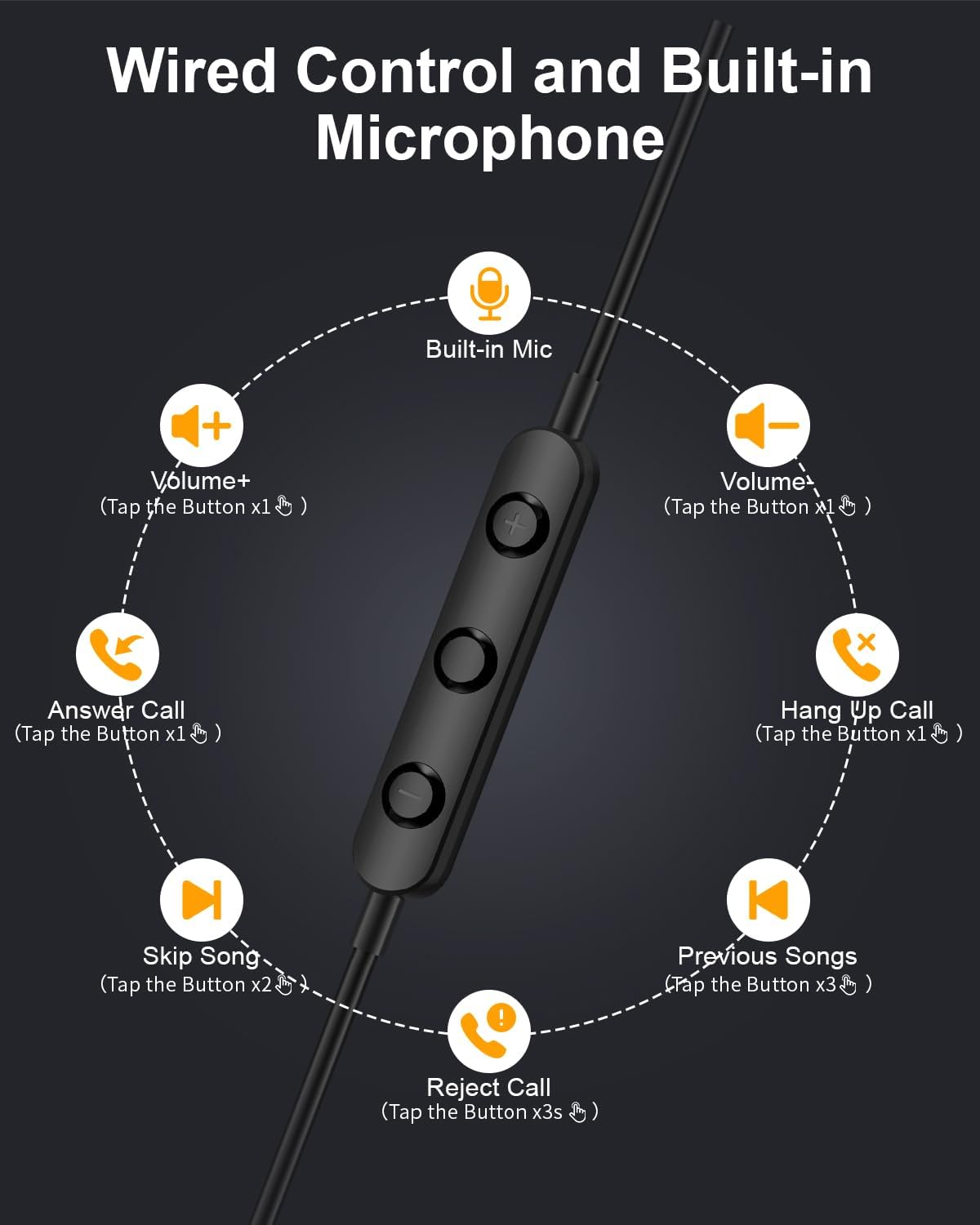
Image: Diagram illustrating the functions of the in-line control buttons for volume, music, and call management.
Kompatibilnost
These USB C wired earphones are compatible with a wide range of devices that feature a USB Type-C audio output and do not have a 3.5mm headphone jack. Please note: These headphones are not compatible with devices that have both a USB-C jack and a 3.5mm jack, as the device may prioritize the 3.5mm port.
Kompatibilni uređaji uključuju:
- Za Apple: iPhone 17/17 Air/17 Pro/16/16 Pro/16 Pro Max/15/15 Plus/15 Pro/15 Pro Max, iPad 10th Gen/iPad Air 4th/5th/11/13 inch/iPad Pro 11/12.9/iPad Mini 6th.
- Za Samsung: Galaxy S25 Ultra/S25/S24 Ultra/S24/S23 FE/S23/S23 Ultra/S22/S22 Ultra/S21 FE/S21/S21 Ultra/S20 FE/S20 Ultra/Z Flip6/Z Fold5/A55/A54/A16 5G/A56 5G/A34 5G/A53 5G/A33 5G.
- Za Google: Pixel 9 Pro/8 Pro/8/7/7 Pro/7a/6a/6/6 Pro.
- For OnePlus: 12R/12/11R/11/10T/10 Pro/9/Nord/8T.
- And other Phone USB C devices without a 3.5mm jack.

Image: Visual guide to USB C headphone compatibility, showing various devices and emphasizing the requirement for a USB-C only audio port.
Održavanje
Pravilna njega će produžiti vijek trajanja vaših slušalica:
- čišćenje: Nježno obrišite slušalice i kabel mekom, suhom krpom. Izbjegavajte upotrebu jakih hemikalija ili abrazivnih materijala.
- Skladištenje: When not in use, store the headphones in the provided storage bag to prevent tangling and damage. The magnetic design helps keep the earbuds together.
- Izbjegavajte vlagu: Ove slušalice nisu vodootporne. Držite ih dalje od tekućina i visoke vlažnosti.
- Pažljivo rukujte: Avoid pulling the cable forcefully or bending the connector at sharp angles.

Image: Close-up of the magnetic earbuds, demonstrating how they connect to prevent tangling.
Rješavanje problema
Ako imate problema sa slušalicama, pogledajte sljedeća uobičajena rješenja:
- Nema zvuka:
- Provjerite je li USB-C konektor potpuno umetnut u vaš uređaj.
- Provjerite postavke jačine zvuka na vašem uređaju.
- Verify that your device supports audio output via its USB-C port and does not have a 3.5mm jack that might be prioritized.
- Test the headphones with another compatible device to rule out a device-specific issue.
- Mikrofon ne radi:
- Uvjerite se da su slušalice dobro povezane.
- Provjerite postavke ulaza mikrofona na vašem uređaju.
- Uvjerite se da mikrofon nije blokiran.
- Sound Quality Issues (e.g., static, distortion):
- Provjerite je li konektor čist i bez prljavštine.
- Pokušajte reproducirati različite audio izvore kako biste utvrdili je li problem u sadržaju.
- Kontrole ne reaguju:
- Provjerite da li su slušalice pravilno povezane.
- Some older devices or specific apps may have limited support for in-line controls.
If these steps do not resolve the issue, please contact Gsangoo customer support for further assistance.
Specifikacije
| Naziv modela | 945-Black-USBC |
| Priključak za slušalice | USB C |
| Tehnologija povezivanja | Žičani |
| Materijal | Acrylonitrile Butadiene Styrene (ABS) Shell, Thermoplastic Elastomer (TPE) Wire |
| Tip kontrole | Button Control (Push Button) |
| Cable Feature | Tangle Free |
| Težina artikla | 0.634 unci (0.02 kilograma) |
| Nivo vodootpornosti | Nije vodootporan |
| Vrsta audio drajvera | Dynamic Driver |
| Oblik slušalice | Bud (In Ear) |
| Funkcije kontrole buke | Passive Noise Cancellation, Sound Isolation |
| Podržava Bluetooth tehnologiju | br |
| Posebna karakteristika | Lagana |
| Dimenzije proizvoda | 1 x 1 x 0.3 inča |
Garancija i podrška
Gsangoo is committed to providing high-quality products and customer satisfaction. We offer after-sales service to address any questions or concerns you may have regarding your USB C Wired Headphones.
For product support, troubleshooting assistance, or warranty inquiries, please contact Gsangoo customer service through the platform where you purchased the product or visit the official Gsangoo store page.
We aim to respond to all inquiries within 24 hours to provide satisfactory assistance.