
1. Proizvod je gotovview
The Lisowod L62Pro is a compact and versatile home projector designed to deliver a high-quality viewing experience. Featuring Android TV 14 and Whale OS, it provides access to a vast library of applications. With 1000 ANSI lumens brightness and support for 4K resolution, it ensures clear and vibrant images. Advanced image correction features like automatic vertical keystone, 4D/4P keystone, and electric focus simplify setup, while Wi-Fi 6 and bidirectional Bluetooth 5.4 offer seamless connectivity for streaming and audio.

Figure 1: The Lisowod L62Pro Projector showcasing its Android TV 14.0 interface.
Ključne karakteristike:
- Whale OS & Android TV 14: Access to over 10,000 applications for direct streaming.
- True Full HD 1080P & 4K Support: Pruža oštre i detaljne slike.
- 1000 ANSI lumena: Bright projection suitable for various lighting conditions.
- Automatic & Manual Keystone Correction: Includes auto vertical keystone and 4D/4P manual correction for flexible placement.
- Electric Focus & 50-100% Zoom: Easy image adjustment without moving the projector.
- Wi-Fi 6 & Bidirectional Bluetooth 5.4: High-speed, zero-latency wireless connectivity for streaming and audio.
- tihi rad: Radi sa niskim nivoom buke od 30dB.
- Dug životni vek: Light source rated for 90,000 hours of use.
- Široka kompatibilnost: Connects to various devices via HDMI, USB, AV, and 3.5mm audio jack.
2. Vodič za postavljanje
2.1 Raspakivanje i postavljanje
Carefully remove the projector and all accessories from the packaging. Place the projector on a stable, flat surface or mount it according to your preference (tabletop, stand, or ceiling projection are supported).

Figure 2: Flexible projection methods including tabletop, stand, and ceiling mounting.
2.2 Priključak za napajanje
- Spojite adapter za napajanje na ulazni priključak za napajanje projektora.
- Uključite adapter za napajanje u odgovarajuću električnu utičnicu.
- The projector will typically enter standby mode, indicated by a power indicator light.
2.3 Početno uključivanje
Press the power button on the projector or the remote control to turn on the device. The projector will boot up and display the Android TV interface.
2.4 Podešavanje slike
The L62Pro features automatic and electric adjustments for optimal image display:
- Automatska vertikalna korekcija Keystone: The projector will automatically detect and correct vertical image distortion when moved.
- 4D/4P korekcija trapezoidnog izobličenja: Use the remote control to manually adjust horizontal and corner distortions for a perfectly rectangular image from any angle.
- električni fokus: Press the focus button on the remote control to achieve a clear image. This adjustment takes approximately 3 seconds.
- Funkcija zumiranja: Adjust the image size from 50% to 100% using the remote control without physically moving the projector.
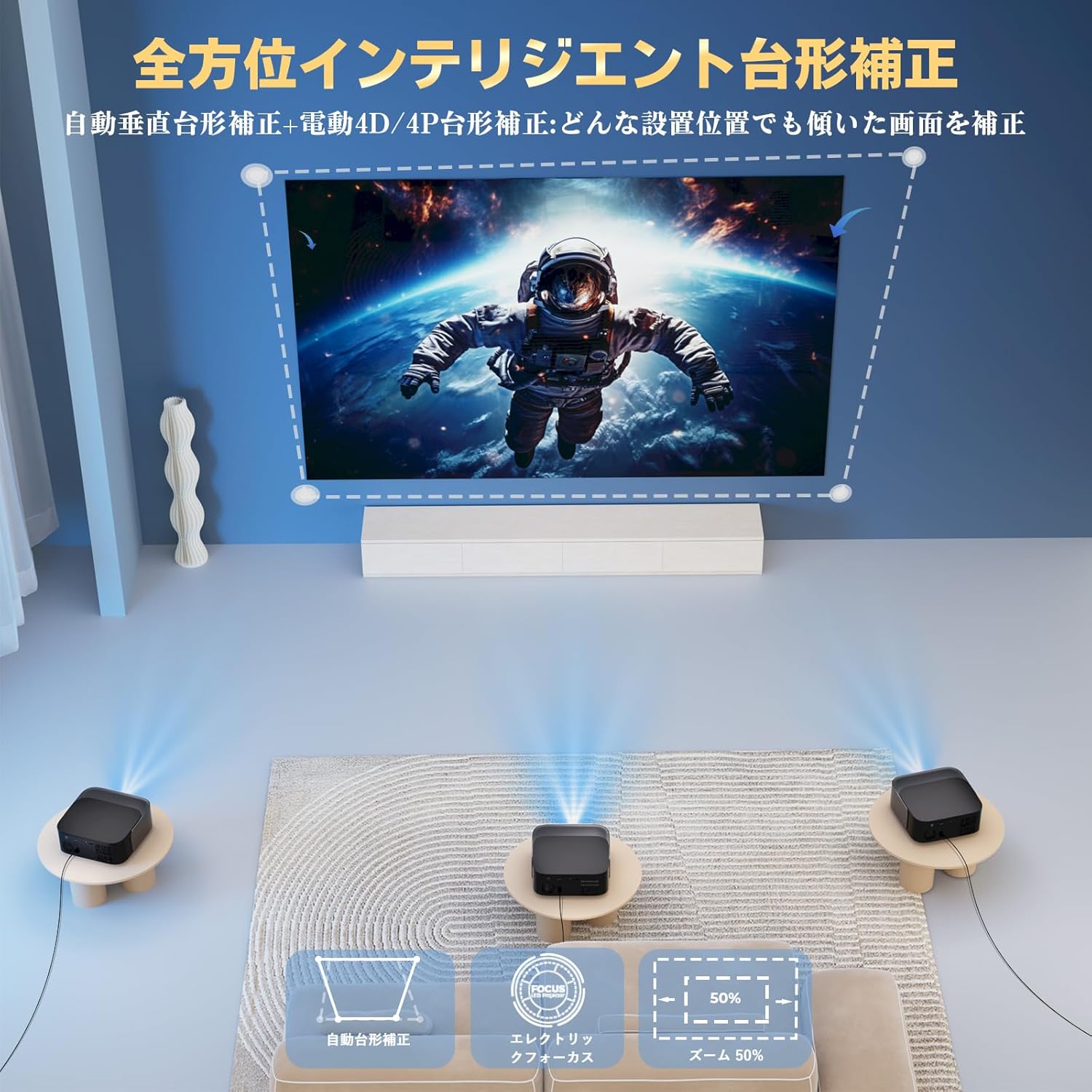
Figure 3: Visual representation of automatic keystone correction, electric focus, and zoom capabilities.
2.5 Povezivanje vanjskih uređaja
The L62Pro offers multiple connectivity options:
- HDMI: Connect gaming consoles (PS4, Switch), PCs, or other HDMI-enabled devices.
- USB: Priključite USB diskove za reprodukciju medija.
- OD: Povežite starije uređaje pomoću AV kabla.
- 3.5 mm audio priključak: Povežite žičane slušalice ili eksterne zvučnike.

Figure 4: Multi-functional compatibility with various devices via different input ports.
3. Uputstvo za upotrebu
3.1 Navigating Android TV 14 & Whale OS
Use the provided remote control to navigate the user interface. The home screen displays various applications and content recommendations. You can directly launch streaming services like Netflix, YouTube, and Disney+ without needing a separate browser.

Figure 5: The projector's Whale OS interface with direct access to numerous applications.
3.2 Wi-Fi povezivost (Wi-Fi 6)
The projector supports Wi-Fi 6 for high-speed, zero-latency internet connectivity. To connect:
- Go to Settings on the home screen.
- Odaberite Mreža i Internet.
- Odaberite svoju Wi-Fi mrežu i unesite lozinku.
3.3 Bluetooth Audio (Bidirectional Bluetooth 5.4)
The L62Pro features bidirectional Bluetooth 5.4, allowing it to function in two ways:
- Režim projektora: Connect Bluetooth headphones or external speakers to the projector for enhanced audio.
- Način zvučnika: Connect your smartphone or other devices to the projector via Bluetooth to use the projector's built-in HiFi speakers as a standalone audio system.

Figure 6: Bidirectional Bluetooth 5.4 enables versatile audio connections.
4. Održavanje
4.1 Čišćenje objektiva
To maintain optimal image clarity, regularly clean the projector lens using a soft, lint-free cloth specifically designed for optical lenses. Avoid using abrasive materials or harsh chemicals.
4.2 Ventilacija
Ensure that the projector's ventilation openings are not blocked to prevent overheating. Adequate airflow is crucial for the projector's performance and longevity.
4.3 Light Source Lifespan
The L62Pro features a durable light source with an impressive lifespan of 90,000 hours, significantly reducing the need for frequent replacements compared to traditional projectors.
4.4 Ažuriranja softvera (OTA)
The projector supports Over-The-Air (OTA) updates, ensuring that your device always runs on the latest system version with improved features and performance. Connect to the internet to receive automatic updates.
5. Otkrivanje problema
If you encounter any issues with your Lisowod L62Pro projector, please refer to the following common troubleshooting steps:
- Nema prikazane slike:
- Ensure the projector is powered on and the power indicator light is active.
- Check all cable connections (HDMI, USB) are secure.
- Provjerite je li na projektoru odabran ispravan ulazni izvor.
- If using screen mirroring, ensure your device is properly connected and mirroring is enabled.
- Slika je mutna:
- Use the electric focus function on the remote control to adjust clarity.
- Ensure the projector lens is clean and free of dust or smudges.
- Check that the projection surface is flat and smooth.
- Nema zvuka:
- Adjust the volume on both the projector and the connected source device.
- Ako koristite eksterne zvučnike ili slušalice, provjerite da li su pravilno povezani putem Bluetootha ili 3.5 mm audio priključka.
- Check audio settings on the projector to ensure output is directed correctly.
- Problemi s povezivanjem (Wi-Fi/Bluetooth):
- Ensure Wi-Fi or Bluetooth is enabled on the projector and the device you are trying to connect.
- Check Wi-Fi network password if connection fails.
- Move closer to the Wi-Fi router or Bluetooth device to improve signal strength.
- Ponovo pokrenite projektor i povezani uređaj.
- Daljinski upravljač ne reaguje:
- Zamijenite baterije u daljinskom upravljaču.
- Provjerite da nema prepreka između daljinskog upravljača i IR prijemnika projektora.
- Usmjerite daljinski upravljač direktno prema projektoru.
6. Specifikacije
| Brand | Lisowod |
| Broj modela | L62Pro |
| Dimenzije proizvoda | 20 x 15 x 5 cm |
| Težina artikla | 1.57 kilograma |
| Rezolucija | 1920 x 1080 (Full HD), 4K Supported |
| Osvetljenost | 1000 ANSI lumeni |
| Tehnologija povezivanja | Bluetooth 5.4, Wi-Fi 6, HDMI, USB, 3.5mm Audio Jack, AV |
| Wattage | 60 W |
| Vijek trajanja izvora svjetlosti | 90,000 sati |
| Nivo buke | 30dB |
| Ispravka Keystone-a | Automatic Vertical, 4D/4P Manual |
| Focus | Električni fokus |
| Funkcija zumiranja | 50-100% Optical Zoom |
| Preporučena upotreba | Versatile for entertainment, business, and educational purposes. |
7. Garancija i podrška
Lisowod stands behind the quality of the L62Pro projector. We offer a 36-month unconditional exchange or refund service from the date of purchase. Additionally, comprehensive technical support is available to assist you with any questions or issues you may encounter.
For warranty claims or technical assistance, please contact our support team through the contact information provided in your product packaging or on the official Lisowod website. Our specialized team is ready to provide prompt and reliable support.