
1. Uvod
This user manual provides detailed instructions for the installation, operation, and maintenance of your BoyKeep D112-10 Light Bulb Security Camera. Please read this manual thoroughly before using the product to ensure proper functionality and safety.

Figure 1.1.1: BoyKeep D112-10 Light Bulb Security Camera (10-pack). This image displays the product as a bundle of ten light bulb-shaped security cameras.
2. Proizvod je gotovview
2.1. Sadržaj paketa
The package for the BoyKeep D112-10 Light Bulb Security Camera (10-pack) includes:
- 10 x BoyKeep D112-10 Light Bulb Security Camera bodies
- Korisnički priručnik (ovaj dokument)
2.2. Ključne karakteristike
- 1080P High-Resolution Video: Pruža jasne i detaljne slike.
- Noćni vid u boji: Poboljšana vidljivost u uslovima slabog osvjetljenja.
- 24/7 Real-time Motion Alerts: Notifies your device upon motion detection.
- Dvosmjerni razgovor: Ugrađeni mikrofon i zvučnik za komunikaciju.
- One-Touch Connection: Simplifies pairing with your device.
- Više uređaja Viewing & Sharing: Monitor multiple cameras and share access.
- Cloud & Memory Card Storage: Flexible recording options (memory card not included).
- 360° panoramsko okretanje i 95° nagib: Wide area coverage with remote control.
- Jednostavna instalacija: Designed for standard E27 light sockets.
2.3. Komponente kamere

Figure 2.3.1: Camera Component Diagram. This image illustrates the various parts of the BoyKeep D112-10 camera, including the E27 light socket base, enhanced WiFi module, microphone, 4 array LEDs, HD lens, 4 white LEDs, light sensor, memory card slot, and reset button. Dimensions are also shown: 6 cm (2.35 in) width and 15 cm (5.9 in) height.
3. Podešavanje
3.1. Instalacija
The BoyKeep D112-10 camera is designed for easy installation into a standard E27 light bulb socket.
- Iskljuciti: Ensure the power to the light socket is turned off before installation to prevent electrical shock.
- Uvrnuti: Carefully screw the camera into a standard E27 light socket until it is securely fastened.
- Uključeno: Vratite napajanje u utičnicu svjetla. Kamera će se uključiti i pokrenuti sekvencu pokretanja.
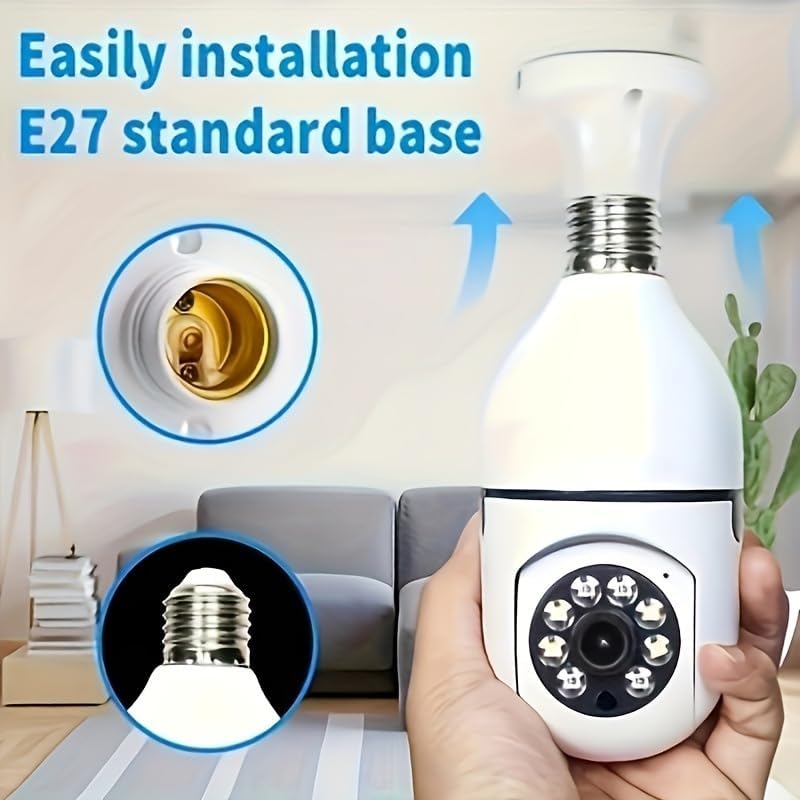
Slika 3.1.1: Jednostavna instalacija. This image demonstrates the simple process of screwing the camera into a standard E27 light bulb socket for quick setup.
3.2. Preuzimanje aplikacije i povezivanje
To operate the camera, you need to download the dedicated mobile application.
- Preuzmi aplikaciju: Traži the "BoyKeep" app (or specified app name in product packaging) on your smartphone's app store (Google Play Store for Android or Apple App Store for iOS).
- Registracija/Prijava: Otvorite aplikaciju i slijedite upute na ekranu da biste registrirali novi račun ili se prijavili ako ga već imate.
- Dodaj uređaj: In the app, select "Add Device" or the '+' icon. Choose the camera type (e.g., "Smart Camera" or "Light Bulb Camera").
- Povežite se na Wi-Fi: Ensure your smartphone is connected to a 2.4GHz Wi-Fi network. The camera only supports 2.4GHz Wi-Fi. Follow the app's instructions to connect the camera to your Wi-Fi network. This usually involves scanning a QR code generated by the app with the camera, or entering Wi-Fi credentials.
- Završetak: Once connected, the camera will appear in your device list within the app.
Napomena: Ensure your Wi-Fi router supports 2.4GHz and that your phone is connected to the 2.4GHz band during setup. 5GHz networks are not supported by this device.
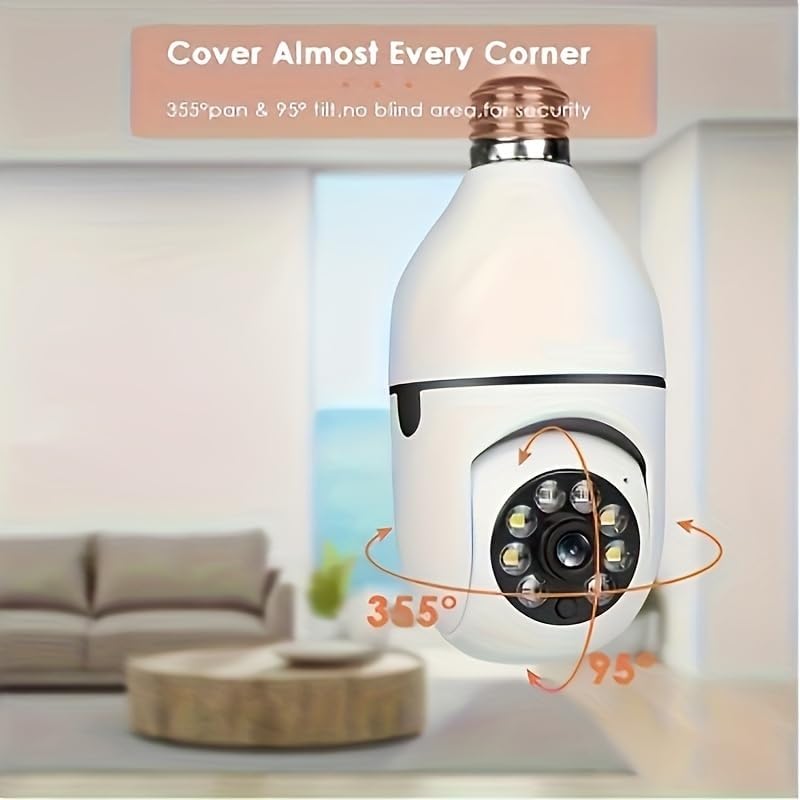
Figure 3.2.1: Wi-Fi Connection and Two-Way Talk. This diagram illustrates how the camera connects to a 2.4GHz Wi-Fi network and enables two-way communication between the camera and a smartphone or computer via the internet, allowing for interactions like speaking to a delivery person.
4. Uputstvo za upotrebu
4.1. Uživo View i Reprodukcija
- Uživo View: Open the app and select the camera from your device list to view live feed.
- Reprodukcija: Pristup snimljen footage by selecting the "Playback" option within the camera's interface in the app. You can navigate through the timeline to view konkretnih događaja.
4.2. Kontrola panoramiranja i nagiba
The camera offers 360° horizontal pan and 95° vertical tilt capabilities.
- Kontrola: U živo view interface of the app, use the directional controls (usually a joystick or arrow icons) to remotely adjust the camera's viewing kut.
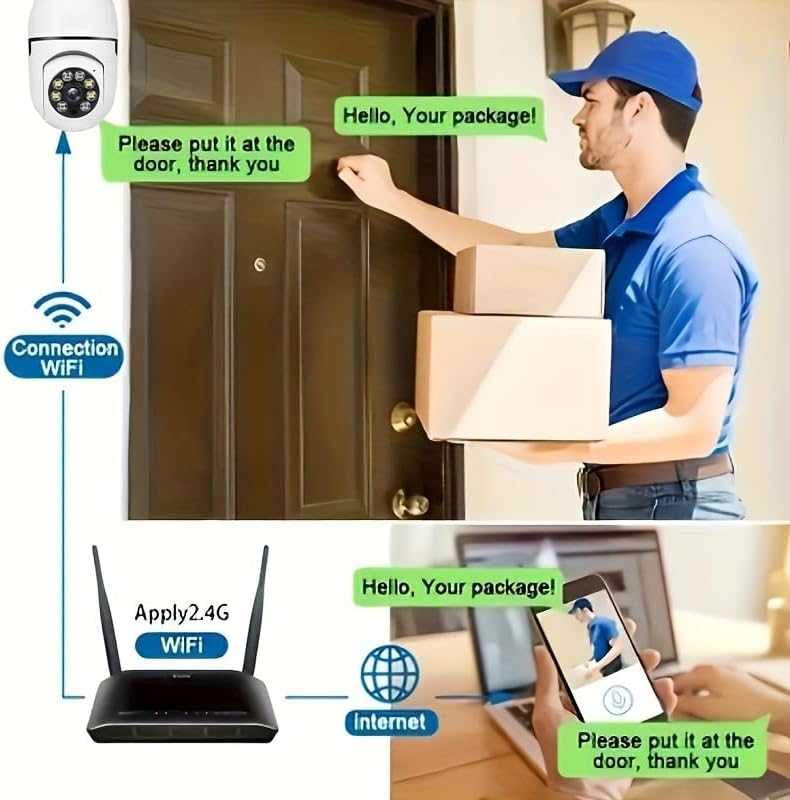
Figure 4.2.1: Pan and Tilt Coverage. This image demonstrates the camera's ability to cover almost every corner with its 355° pan and 95° tilt functions, eliminating blind spots for comprehensive security.
4.3. Detekcija pokreta i upozorenja
- Omogući/onemogući: Navigate to the camera settings in the app to enable or disable motion detection.
- Osjetljivost: Adjust the motion detection sensitivity level to minimize false alarms.
- Upozorenja: When motion is detected, the camera will send push notifications to your smartphone. Recorded events will be stored in the cloud (if subscribed) or on the inserted memory card.
4.4. Dvosmjerni audio
- Aktiviraj: U živo view, tap the microphone icon to speak through the camera's speaker. Tap it again to mute.
- slušaj: The camera's microphone is active during live view, allowing you to hear audio from the camera's vicinity.
- Poziv jednim dodirom: If available, press the physical one-touch call button on the camera (if present) to initiate a call to your linked smartphone.
4.5. Režimi noćnog vida
The camera supports both infrared and full-color night vision.
- Automatski način rada: The camera automatically switches between day and night vision based on ambient light.
- Infracrveni noćni vid: Pruža jasne crno-bijele slike u potpunom mraku.
- Noćni vid u punom koloru: Utilizes built-in white LEDs to provide color images in low light, similar to daytime viewing. This mode can be activated manually or set to trigger upon motion detection.

Figure 4.5.1: Smart Dual Light LED Night Vision. This image compares the visual output of infrared night vision (top, black and white) and full-color night vision (bottom, color) provided by the camera's smart dual light LEDs, showcasing improved visibility in low-light conditions.
4.6. Opcije skladištenja
- Memory Card (MicroSD): Insert a compatible MicroSD card (up to 128GB, Class 10 or higher recommended, not included) into the camera's memory card slot for local storage of recordings. The camera supports 24/7 continuous recording to the memory card.
- Cloud Storage: The camera offers cloud storage services (e.g., a 30-day trial may be included). Refer to the app for subscription details and management.
5. Održavanje
- čišćenje: Za čišćenje objektiva i kućišta kamere koristite meku, suhu krpu. Ne koristite tekuća sredstva za čišćenje ili abrazivne materijale.
- Ažuriranja firmvera: Regularly check the app for firmware updates. Keeping the firmware updated ensures optimal performance and security.
- Stabilnost mreže: Osigurajte da je vaša Wi-Fi mreža stabilna i jaka na lokaciji kamere za nesmetan rad.
- Uslovi okoline: The camera is designed for indoor use. Avoid exposing it to extreme temperatures, direct sunlight, or high humidity.
6. Otkrivanje problema
| Problem | Mogući uzrok | Rješenje |
|---|---|---|
| Kamera se ne uključuje. | No power to the light socket; camera not screwed in properly. | Provjerite da li je utičnica za svjetlo uključena. Čvrsto zavrnite kameru u utičnicu. |
| Nije moguće povezati se na Wi-Fi. | Incorrect Wi-Fi password; connecting to 5GHz network; weak Wi-Fi signal. | Verify Wi-Fi password. Ensure you are connecting to a 2.4GHz network. Move camera closer to router or use a Wi-Fi extender. Reset camera and try again. |
| Obavještenja o kretanju nisu primljena. | Motion detection disabled; app notifications turned off; low sensitivity. | Enable motion detection in app settings. Check phone's notification settings for the app. Increase motion detection sensitivity. |
| Loš kvalitet videa. | Slab Wi-Fi signal; prljav objektiv. | Improve Wi-Fi signal strength. Clean the camera lens with a soft, dry cloth. |
| Dvosmjerni audio ne radi. | Mikrofon/zvučnik isključen u aplikaciji; problemi s mrežom. | Provjerite postavke zvuka u aplikaciji. Osigurajte stabilnu mrežnu vezu. |
7. Specifikacije
| Feature | Detalj |
|---|---|
| Naziv modela | D112-10 |
| Video Rezolucija | 1080P |
| Povezivanje | 2.4 GHz Wi-Fi (IEEE 802.11b/g/n) |
| Izvor napajanja | Corded Electric (E27 Light Socket) |
| Opseg pomeranja/nagiba | 355° vodoravno, 95° okomito |
| Night Vision | Infrared & Full-Color Night Vision |
| Opcije skladištenja | MicroSD kartica (do 128 GB, nije uključena), pohrana u oblaku |
| Audio | Two-Way Talk (Built-in Mic & Speaker) |
| Unutrašnja/vanjska upotreba | Indoor |
| Dimenzije (tijelo kamere) | Approx. 6 cm (2.35 in) diameter, 15 cm (5.9 in) height |
| Uključene komponente | Telo kamere |
8. Informacije o garanciji
BoyKeep products are manufactured to the highest quality standards. This product comes with a standard manufacturer's warranty. Please refer to the product packaging or the official BoyKeep webweb-mjesto za specifične uvjete i odredbe garancije, uključujući detalje o trajanju i pokriću.
9. Korisnička podrška
For technical support, troubleshooting assistance, or any inquiries regarding your BoyKeep D112-10 Light Bulb Security Camera, please contact our customer support team:
- Online podrška: Visit the official BoyKeep store on Amazon: BoyKeep Store
- Podrška putem e-pošte: Refer to the contact information provided in your product packaging or on the BoyKeep website.
When contacting support, please have your product model number (D112-10) and purchase details ready.