
Uvod
Thank you for choosing the CREATE Speaker Retro. This portable Bluetooth speaker combines a classic retro design with modern audio technology, offering versatile connectivity and powerful sound. This manual will guide you through the setup, operation, and maintenance of your new speaker to ensure optimal performance and longevity.

Image: The CREATE Speaker Retro, highlighting its elegant retro aesthetic and compact form factor.
Važna sigurnosna uputstva
- Prije upotrebe proizvoda pažljivo pročitajte sva uputstva.
- Sačuvajte ovaj priručnik za buduću upotrebu.
- Ne izlažite zvučnik vodi ili prekomjernoj vlazi. Ovaj proizvod je nije vodootporan.
- Ne postavljajte u blizini izvora toplote kao što su radijatori, grijalice, peći ili drugi uređaji (uključujući ampLifiers) koji proizvode toplotu.
- Koristite samo dodatke/pribor koje je odredio proizvođač.
- Isključite ovaj aparat iz struje tokom grmljavine ili kada ga ne koristite duže vreme.
- Sav servis prepustite kvalifikovanom serviseru.
Sadržaj paketa
The CREATE Speaker Retro package includes:
- CREATE Speaker Retro Portable Bluetooth Speaker (1 unit)
- USB-C kabl za punjenje
- Korisnički priručnik (ovaj dokument)
Controls and Ports Overview
Upoznajte se s kontrolama i priključcima zvučnika:

Slika: Detaljna view of the speaker's top control panel.
- Gumb za jačinu zvuka: Podešava ukupnu jačinu zvuka.
- bas dugme: Podešava nivo basa.
- Visokotonsko dugme: Podešava nivo visokih tonova.
- Prekidač za odabir ulaza: Toggles between AUX, Bluetooth (BT), and USB input modes.
- Prekidač: Uključuje/isključuje zvučnik.
- AUX ulaz (3.5 mm): Za povezivanje eksternih audio uređaja putem audio kabla.
- USB port: Za reprodukciju sa USB memorije.
- DC-IN 5V Port: Za punjenje zvučnika.
- Indikatorsko svjetlo: Prikazuje status napajanja, status punjenja i status Bluetooth uparivanja.
Setup
1. Punjenje zvučnika
Before first use, fully charge the speaker. Connect the provided USB-C charging cable to the DC-IN 5V port on the speaker and the other end to a compatible USB power adapter (not included) or a computer's USB port. The indicator light will show the charging status. A full charge takes approximately 4-5 hours.
- Punjenje: Indicator light glows (color may vary).
- Potpuno napunjen: Indicator light turns off or changes color.
2. Uključivanje / isključivanje napajanja
To power on the speaker, flip the Prekidač za napajanje to the "ON" position. To power off, flip the switch to the "OFF" position.
Uputstvo za upotrebu
1. Bluetooth režim
The speaker features Bluetooth 5.2 for wireless audio streaming with a range of up to 10 meters.
- Uključite zvučnik.
- Postavite Prekidač za biranje ulaza to "BT/AUX" and then ensure it's in Bluetooth mode (indicator light will blink, indicating pairing mode).
- Na pametnom telefonu, tabletu ili drugom uređaju s omogućenom Bluetooth vezom omogućite Bluetooth i potražite dostupne uređaje.
- Select "CREATE Speaker Retro" from the list.
- Once paired, the indicator light will stop blinking and remain solid. You can now play music wirelessly.
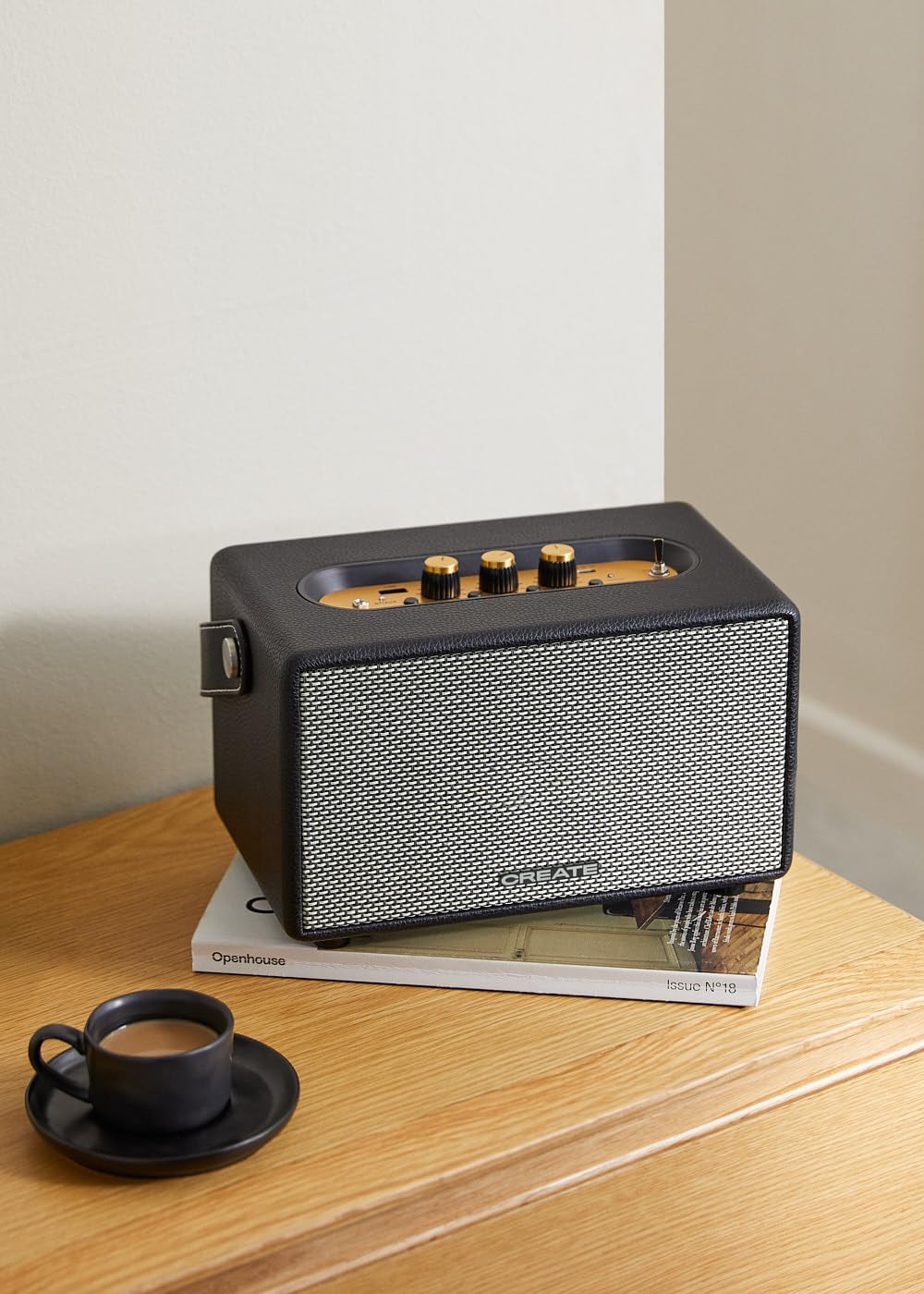
Image: Connecting to the speaker via Bluetooth from a mobile device.
2. Režim reprodukcije sa USB-a
Pusti audio files direktno sa USB fleš diska.
- Uključite zvučnik.
- Umetnite USB fleš disk koji sadrži audio files into the USB port.
- Postavite Prekidač za biranje ulaza to "USB". The speaker will automatically begin playing music from the USB drive.

Image: Inserting a USB drive for direct audio playback.
3. AUX ulazni režim
Povežite eksterne audio uređaje pomoću 3.5 mm audio kabla.
- Uključite zvučnik.
- Spojite jedan kraj 3.5 mm audio kabela (nije uključen) na AUX ulaz port na zvučniku.
- Connect the other end of the cable to the headphone jack or audio output of your external device (e.g., MP3 player, laptop).
- Postavite Prekidač za biranje ulaza to "AUX". The speaker will now play audio from your connected device.
4. Podešavanje zvuka
Use the dedicated knobs on the control panel to fine-tune your audio experience:
- Rotirajte Tipka za jačinu zvuka to increase or decrease the overall sound level.
- Rotirajte Bass Knob to adjust the low-frequency sounds.
- Rotirajte Treble Knob to adjust the high-frequency sounds.
Održavanje
Čišćenje
To clean the speaker, use a soft, dry cloth. Do not use abrasive cleaners, waxes, or solvents as they may damage the finish. Avoid spraying liquids directly onto the speaker.
Skladištenje
Kada se ne koristi duži period, zvučnik čuvajte na hladnom i suhom mjestu, dalje od direktne sunčeve svjetlosti i ekstremnih temperatura. Prije skladištenja provjerite je li zvučnik potpuno napunjen kako biste sačuvali vijek trajanja baterije.
Battery Care
The speaker is equipped with a built-in rechargeable battery. To maximize battery life:
- Izbjegavajte često potpuno pražnjenje baterije.
- Recharge the battery regularly, even if the speaker is not used often.
- Ne izlažite zvučnik temperaturama iznad 45°C (113°F) ili ispod 0°C (32°F).
Rješavanje problema
If you encounter any issues with your CREATE Speaker Retro, please refer to the following common problems and solutions:
| Problem | Mogući uzrok | Rješenje |
|---|---|---|
| Zvučnik se ne uključuje. | Baterija je prazna. | Charge the speaker for 4-5 hours using the USB-C cable. |
| Nema zvuka iz zvučnika. | Jačina zvuka je preniska; pogrešan način unosa; uređaj nije pravilno povezan. | Increase volume. Ensure the correct input mode (BT, USB, AUX) is selected. Reconnect Bluetooth device or AUX cable. |
| Bluetooth uparivanje nije uspjelo. | Zvučnik nije u načinu uparivanja; uređaj je izvan dometa; smetnje. | Ensure speaker is in Bluetooth pairing mode (blinking indicator). Move device closer to speaker (within 10m). Turn off other Bluetooth devices. |
| Reprodukcija sa USB-a ne radi. | Incorrect input mode; USB drive not formatted correctly or no compatible files. | Ensure "USB" input mode is selected. Check USB drive for compatible audio files (npr. MP3). Pokušajte s drugim USB pogonom. |
| Play/Pause button not responding. | Potencijalni hardverski problem ili softverski kvar. | Restart the speaker. If the issue persists, contact customer support. (Note: A user review mentioned this issue.) |
Specifikacije
| Naziv modela | SPEAKER RETRO |
| Broj modela | 181643_452174 |
| Dimenzije (D x Š x V) | 17 x 26 x 15 cm |
| Težina | 2.5 kg |
| Max. Speaker Output Power | 40 W |
| Način audio izlaza | Stereo (2.0 kanal) |
| Tehnologija povezivanja | Bluetooth 5.2, USB, AUX (3.5mm) |
| Bluetooth domet | Do 10 metara |
| Kapacitet baterije | 3000 mAh |
| Trajanje baterije | Do 5 sati (u zavisnosti od upotrebe) |
| Vrijeme punjenja | Pribl. 4-5 sati |
| Kontrolni metod | Touch (knobs and switches) |
| Boja | Crna |
| Vodootporan | br |
Garancija i podrška
Informacije o garanciji
The CREATE Speaker Retro comes with a standard manufacturer's warranty. Please retain your proof of purchase for warranty claims. The warranty covers defects in materials and workmanship under normal use. It does not cover damage caused by misuse, accidents, unauthorized modifications, or exposure to water.
For specific warranty terms and conditions, please refer to the warranty card included with your product or contact CREATE customer service.
Korisnička podrška
If you have any questions, require technical assistance, or need to report an issue that cannot be resolved using the troubleshooting guide, please contact CREATE customer support.
You can find more information and contact details on the official CREATE website or through their Amazon brand store: