

1. Proizvod je gotovview
The OWON HDS241 is a versatile 3-in-1 handheld device integrating a single-channel oscilloscope, a 24000-count digital multimeter, and a 100kHz signal generator. Designed for both outdoor and indoor use, it offers a compact form factor with powerful measurement capabilities for various electrical and electronic applications.

Image 1.1: The OWON HDS241 device, highlighting its oscilloscope, multimeter, and signal generator functions.
2. Sigurnosne informacije
Before using the OWON HDS241, please read and understand all safety instructions to prevent electric shock, injury, or damage to the device. Keep this manual for future reference.
- Opća sigurnost: Always use the device within its specified voltage and current limits. Do not operate the device in wet or damp uslovima.
- Sigurnost sonde: Ensure probes are correctly connected and rated for the measurement being performed. Avoid touching exposed wiring or components when the device is powered on.
- Sigurnost baterije: Use only the specified battery type. Do not disassemble, crush, or expose the battery to extreme temperatures.
- Održavanje: Za sve servisne radove obratite se kvalifikovanom osoblju. Ne pokušavajte sami popravljati uređaj.
3. Ključne karakteristike
- digitalni multimetar: 4 1/2 digit True RMS digital multimeter for measuring AC/DC voltage/current, resistance, diode, capacitance, and continuity. Maximum input voltage is AC 750V, DC 1000V.
- Signal Waveform Generator: 1-channel 100 kHz generator supporting sine, square, ramp, and pulse wave outputs. Maximum output amplitude is 2.5 Vpp.
- osciloskop: Waveform refresh rate up to 10,000 wfms/s, 40MHz bandwidth, and real-time sampling rate up to 250MSa/s. Features auto-setup, multiple measurement functions, 8K record length, cursor measurement, and slow scan mode for long-term signal monitoring.
- Kompaktan dizajn: Portable form factor with a 3.5-inch high-definition color LCD screen, suitable for various environments.
- Dug vijek trajanja baterije: Low-power design with a 2000 mAh high-capacity lithium battery and standard Type-C port for charging and power bank compatibility.
4. Sadržaj paketa
The standard package for the OWON HDS241 includes:
- OWON HDS241 Handheld Oscilloscope Unit
- Test Leads for Multimeter
- Osciloskopska sonda
- USB kabel tipa C
- Korisnički priručnik (ovaj dokument)
Note: Additional accessories such as a BNC-to-alligator clip cable or carrying case may need to be purchased separately.
5. Raspored i kontrole uređaja
Familiarize yourself with the physical components and controls of the HDS241.

Slika 5.1: Prednja i bočna strana view of the OWON HDS241 with key controls and ports labeled. Labels include: signal input connector, display area, multifunction keys, channel key, mode switching key, system settings, save settings, power button, relative value/activation menu key, multimeter input port, horizontal time base setting/signal adjustment, return key, range switch/measurement menu key, arrow keys, auto range/auto setting key, hold value/Stop/Run key, probe compensation output (2.5V/1kHz square wave or signal generator output), USB charging/communication interface, approximate weight (0.6 kg host, excluding battery), gross weight (1.2 kg).
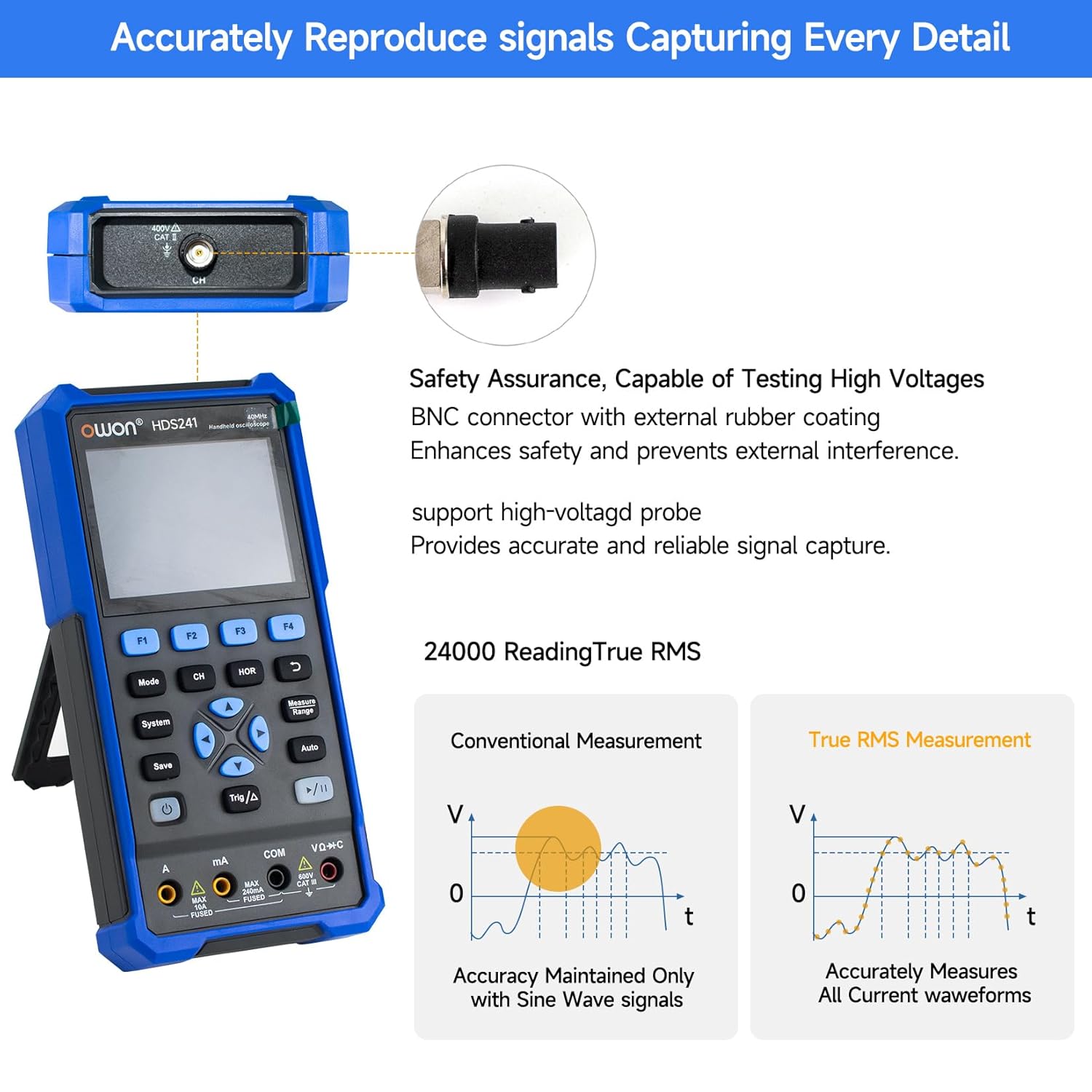
Image 5.2: Detail of the BNC connector, designed for safety and signal integrity, with external rubber coating.
6. Početno podešavanje
6.1 Punjenje uređaja
The HDS241 is equipped with a built-in 2000 mAh lithium battery. Before first use, fully charge the device using the provided USB Type-C cable and a compatible power adapter (not included) or a computer USB port.
- Connect the USB Type-C cable to the device's Type-C port.
- Povežite drugi kraj kabla na USB izvor napajanja.
- Indikator punjenja će pokazati status punjenja.

Image 6.1: The USB Type-C charging port and internal battery compartment, emphasizing long-lasting performance.
6.2 Uključivanje/isključivanje
Pritisnite i držite Snaga dugme za uključivanje ili isključivanje uređaja.
7. Načini rada
The HDS241 features three primary operating modes: Oscilloscope, Multimeter, and Signal Generator. Press the Mode dugme za prebacivanje između ovih funkcija.
7.1 Režim osciloskopa
In Oscilloscope mode, the device displays real-time waveforms, allowing for detailed analysis of electrical signals. Connect the oscilloscope probe to the BNC connector on the top of the device.
- Automatsko podešavanje: Pritisnite Auto dugme za automatsko skaliranje i pozicioniranje talasnog oblika.
- Mjerenja: Koristite Mjera menu (accessed via F1) to select automatic measurements like Frequency, Period, Amplitude, Max, Min, Peak-to-Peak, and RMS.
- Mjerenja kursora: Activate cursor measurements (accessed via F2) to manually measure voltage (ΔV) and time (ΔT) differences between points on the waveform.
- Postavke okidača: Adjust trigger type, level, and mode using the Trig/Δ dugme.
- Horizontal/Vertical Controls: Use the navigation arrows to adjust time base (horizontal) and voltage scale (vertical).

Slika 7.1.1: Primjeramples of oscilloscope display features including dual sampling mode, high refresh rate, 8 types of auto-measurements, and cursor measurements.

Slika 7.1.2: Primjeramples of actual measured waveforms, demonstrating the oscilloscope's signal capture capabilities for different signal types.
7.2 Režim multimetra
In Multimeter mode, the HDS241 functions as a digital multimeter. Connect the test leads to the appropriate input ports (VΩ+C, COM, A, mA) at the bottom of the device.
- Izbor funkcije: Koristite Mode button to cycle through measurement types (Voltage, Current, Resistance, Capacitance, Diode, Continuity).
- Automatsko rangiranje: The device supports auto-ranging for convenient measurement.
- Zadržavanje podataka: Koristite Sačuvaj button or a dedicated hold function (if available) to freeze the current reading.
7.3 Režim generatora signala
The Signal Generator mode allows the device to output various waveforms. Connect the output to the circuit under test using the appropriate cable (e.g., BNC to alligator clips, not included).
- Odabir talasnog oblika: Use the F-keys to select sine, square, ramp, or pulse waveforms.
- Podešavanje parametara: Adjust frequency and amplitude using the navigation arrows. The maximum output amplitude is 2.5 Vpp.
8. Upravljanje podacima
The HDS241 supports data transfer to a computer via its USB Type-C port for further analysis and record-keeping.
- Povezivanje na PC: Use the provided USB Type-C cable to connect the device to your computer.
- softver: Refer to the OWON website for any necessary drivers or software to facilitate data transfer and analysis.
- Pohranjivanje podataka: Koristite Sačuvaj button to store waveform images, settings, or measurement data directly on the device.
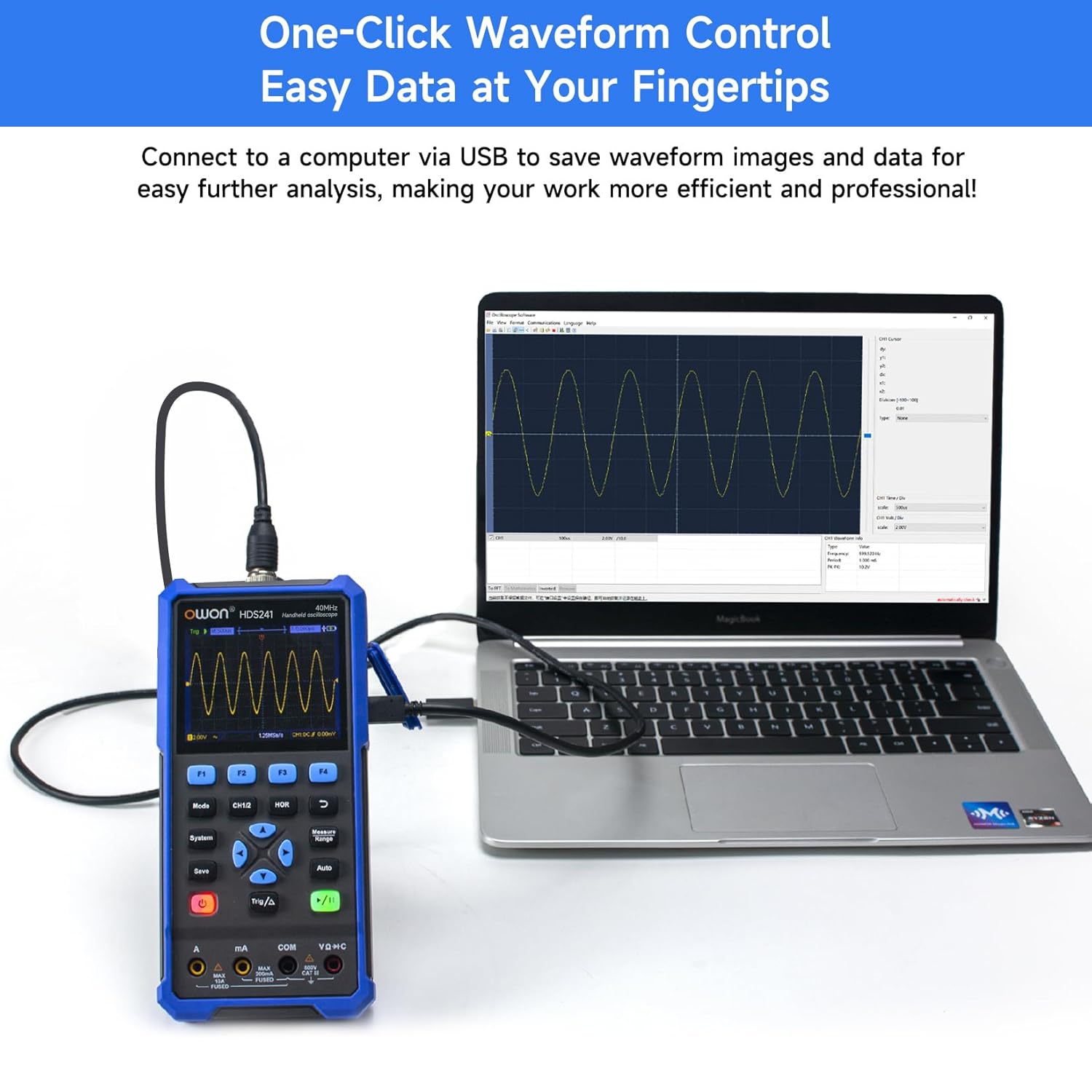
Image 8.1: The OWON HDS241 connected to a computer for data transfer and analysis, enabling easy waveform control.
9. Održavanje
- čišćenje: Uređaj čistite mekom, suhom krpom. Ne koristite abrazivna sredstva za čišćenje ili rastvarače.
- Skladištenje: Uređaj čuvajte na hladnom i suhom mjestu, dalje od direktne sunčeve svjetlosti i ekstremnih temperatura.
- Održavanje baterije: For long-term storage, ensure the battery is partially charged (around 50%) and recharge it every few months to maintain battery health.
- Kalibracija sonde: Periodically calibrate the oscilloscope probe using the dedicated probe compensation output to ensure accurate measurements.
10. Otkrivanje problema
| Problem | Mogući uzrok | Rješenje |
|---|---|---|
| Uređaj se ne uključuje. | Slaba ili prazna baterija. | Connect the device to a power source using the USB Type-C cable and allow it to charge. |
| U osciloskopskom režimu se ne prikazuje talasni oblik. | Probe not connected correctly; signal too small or too large; incorrect time base or voltage skala. | Ensure probe is securely connected. Press Auto for automatic setup. Adjust vertical and horizontal scales manually. Check trigger settings. |
| Očitavanja multimetra su netačna. | Test leads not properly connected; incorrect measurement function selected; external interference. | Verify test lead connections. Ensure the correct measurement mode (voltage, current, resistance) is selected. Minimize external electrical noise. |
| Signal generator output is not as expected. | Incorrect waveform type, frequency, or amplitude set. | Check the selected waveform, frequency, and amplitude settings in the signal generator menu. |
11. Tehničke specifikacije
Specifikacije osciloskopa:
| Parametar | Vrijednost |
|---|---|
| Bandwidth | 40MHz |
| Kanal | 1 |
| Sampling Rate | 250MSa / s |
| Acquisition Mode | Sample, Peak Detect |
| Record Length | Maks. 8K |
| Display | LCD od 3.5 inča |
| Brzina osvježavanja talasnog oblika | 10,000 wfms/s |
| Input Coupling | DC, AC, Ground |
| Input Impedance | 1 MΩ±2%, in parallel with 16 pF±10 pF |
| Slabljenje sonde | 1X, 10X, 100X, 1000X |
| Max Input Voltage | 400V (DC + AC, PK-PK) |
| Sensitivity Resolution | 10mV/div-10V/div |
| Okomita rezolucija | 8 bit |
| Horizontalna skala | 5ns/div-1000s/div, step 1-2-5 |
| Tip okidača | Edge |
| Trigger Mode | Auto, Normal, Single |
| Auto Measurement | Period, Frequency, Mean, PK-PK, Max, Min, Amplitude, RMS |
| Cursor Measurement | ΔV, ΔT |

Image 11.1: Detailed oscilloscope specifications.
Digital Multimeter Specifications:
| Parametar | Vrijednost |
|---|---|
| Prikaz broja | 4½ digits (max 24000 counts) |
| Test Modes | Voltage, Current, Resistance, Capacitance, Diode, Continuity |
| Max Input Voltage | AC 750V, DC 1000V |
| Maks. ulazna struja | AC 10A, DC 10A |
| Automatski domet | Da |
| True RMS | Da |

Image 11.2: Detailed digital multimeter specifications.
Signal Waveform Generator Specifications:
| Parametar | Vrijednost |
|---|---|
| Talasni oblici | Sinus, kvadrat, Ramp, Puls |
| Izlazna frekvencija | 10Hz-100KHz |
| Amplitude | 2Vpp-2.5Vpp |

Image 11.3: Detailed signal waveform generator specifications.
Opće specifikacije:
- Dimenzije: 9.6 x 3.8 x 19.8 cm
- Težina artikla: 1.2 kilograma
- Izvor napajanja: Battery Powered (2000 mAh Lithium Battery)
- Boja: Plava
- Certifikati: CE, True RMS
12. Garancija i podrška
OWON products are designed for reliability and performance. For warranty information, technical support, or service inquiries, please refer to the official OWON webstranicu ili kontaktirajte svog lokalnog distributera.
- Garantni period: Standard manufacturer's warranty applies. Please check your purchase documentation for specific terms and duration.
- tehnička podrška: Visit the OWON official website for FAQs, software downloads, and contact information for technical assistance.
- Povratak: Refer to the retailer's return policy for details on product returns and exchanges.