
1. Proizvod je gotovview
The WANBO T-Type Ceiling Mount is a robust and adjustable mounting solution designed specifically for the Wanbo X5 Pro home projector. Constructed from high-quality aluminum alloy, this mount provides a secure and stable platform for ceiling installation. Its adjustable design allows for precise positioning of your projector, ensuring optimal viewing angles. The minimalist aesthetic integrates seamlessly into various room decors.
2. Sadržaj paketa
Prije nego što nastavite s instalacijom, provjerite da li su sve komponente prisutne u paketu.
- Montažna ruka
- Pribor za montažu (vijci, tiplovi)
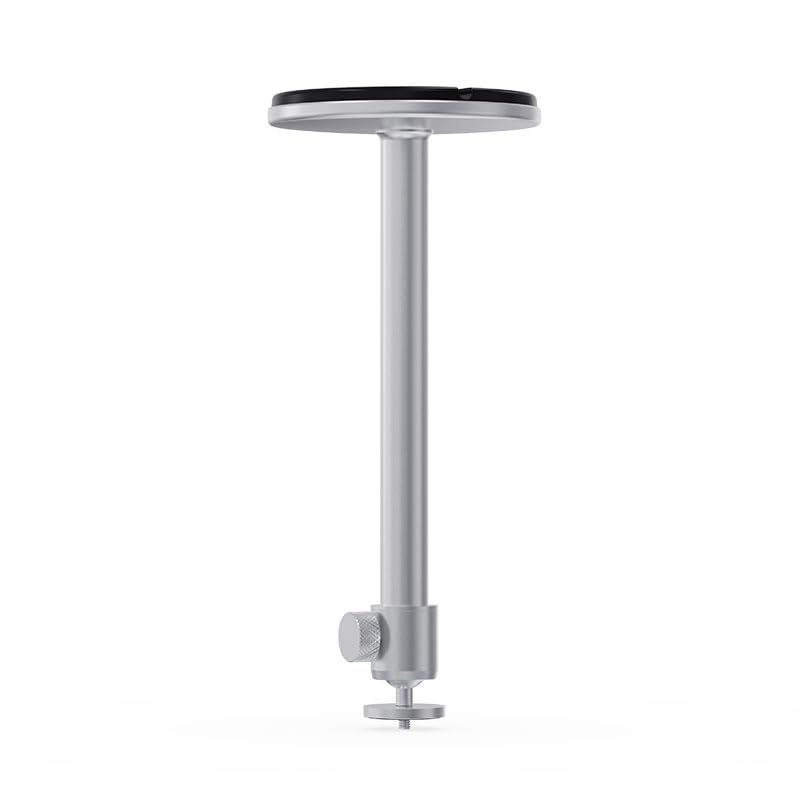
Image 2.1: Components of the WANBO T-Type Ceiling Mount, including the main arm and the ceiling base.
3. Sigurnosne informacije
- Prije instalacije pažljivo pročitajte sva uputstva.
- Ensure the mounting surface (ceiling) can safely support the combined weight of the mount and the projector (maximum 10 pounds).
- Koristite odgovarajući alat i zaštitnu opremu tokom instalacije.
- If unsure about installation, consult a qualified professional.
- Do not overtighten screws, as this may damage the mount or the projector.
- Držite djecu i kućne ljubimce dalje od područja instalacije.
4. Postavljanje i instalacija
Follow these steps to securely install your WANBO T-Type Ceiling Mount.
4.1 Identify Mounting Location
- Choose a suitable location on the ceiling that provides a clear projection path and is structurally sound.
- Ensure there are no electrical wires or plumbing in the drilling path.
4.2. Sastavite nosač
- Attach the mounting arm to the circular ceiling base by screwing them together. Ensure it is hand-tightened securely.

Image 4.1: The WANBO T-Type Ceiling Mount fully assembled before ceiling installation.
4.3 Mount to Ceiling
- Hold the assembled mount against the chosen ceiling location and mark the drilling points through the holes in the circular base.
- Drill pilot holes into the ceiling at the marked points. Use appropriate drill bits for your ceiling material.
- Insert the provided wall anchors (if necessary for your ceiling type) into the pilot holes.
- Align the mount's base with the drilled holes and secure it to the ceiling using the provided screws. Ensure the mount is firmly attached and does not wobble.
4.4 Attach Projector
- Locate the mounting screw hole on the bottom of your Wanbo X5 Pro projector.
- Align the projector's mounting hole with the threaded screw at the end of the mount's arm.
- Carefully screw the projector onto the mount until it is secure. Do not overtighten.
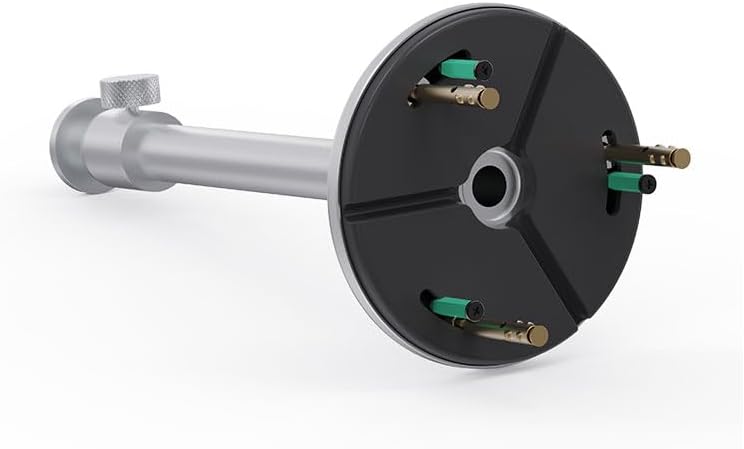
Image 4.2: Detail of the projector attachment mechanism on the mount.
5. Uputstvo za upotrebu
The WANBO T-Type Ceiling Mount offers adjustable features for optimal projector positioning.
5.1 Podešavanje visine
The mount features a telescoping design. To adjust the height, loosen the knob on the side of the mounting arm, extend or retract the arm to the desired length (up to 13.0 inches), and then tighten the knob firmly to secure the position.
5.2 Rotating the Projector
The mount allows for rotation. Gently rotate the projector to achieve the desired horizontal angle. Ensure the projector is stable after adjustment.
6. Održavanje
- čišćenje: Obrišite nosač mekom, suhom krpom. Ne koristite abrazivna sredstva za čišćenje ili rastvarače.
- Periodične kontrole: Povremeno provjeravajte sve vijke i spojeve kako biste bili sigurni da su čvrsto zategnuti i sigurni.
- Ograničenje težine: Ne prekoračujte maksimalnu nosivost od 10 funti.
7. Otkrivanje problema
- Nosač se čini nestabilnim: Ensure all mounting screws are securely tightened to the ceiling and the projector is firmly attached to the mount. Verify the ceiling structure is adequate.
- Difficulty adjusting height/rotation: Loosen the adjustment knob sufficiently before attempting to move the arm or rotate the projector. Do not force adjustments.
- Projector not level: Re-adjust the rotation and ensure the ceiling mount itself is installed level.
8. Specifikacije
| Brand | WANBO |
| Naziv modela | T-Type Ceiling Mount |
| Broj modela | WBUS-T-X5 Pro (WBCA01) |
| Kompatibilni uređaji | Wanbo X5 Pro Projector |
| Vrsta montaže | Ceiling Mount |
| Materijal | Aluminijumska legura |
| Boja | Srebro |
| Maksimalni kapacitet težine | 10 funti (4.5 kg) |
| Težina artikla | 0.7 funti (0.32 kg) |
| Dužina ruke | 13.0 inča (33 cm) |
| Dodatne karakteristike | Podesivo, rotirajuće |
9. Garancija i podrška
9.1 Informacije o garanciji
This WANBO T-Type Ceiling Mount comes with a 1 godine garancije proizvođača od datuma kupovine. Ova garancija pokriva nedostatke u materijalu i izradi pri normalnoj upotrebi. Ne pokriva štetu uzrokovanu nepravilnom instalacijom, zloupotrebom, nezgodama ili neovlaštenim modifikacijama.
9.2 Korisnička podrška
For technical assistance, warranty claims, or any questions regarding your WANBO T-Type Ceiling Mount, please contact WANBO customer support through the official WANBO website or your retailer's support channels. Please have your model number (WBUS-T-X5 Pro) and proof of purchase ready when contacting support.