
1. Uvod
Hvala na kupoviniasing the LONPOO LP-816 Compact Micro HiFi System. This manual provides essential information for the safe and efficient operation of your new audio system. Please read this manual thoroughly before use and retain it for future reference.
2. Sigurnosna uputstva
- Izvor napajanja: Osigurajte napajanje voltage odgovara nazivnoj vrijednosti navedenoj na uređaju.
- ventilacija: Ne blokirajte ventilacijske otvore. Osigurajte dovoljno prostora oko uređaja za pravilan protok zraka.
- Voda i vlaga: Ne izlažite uređaj kiši, vlazi ili kapanju/prskanju tekućina. Ne stavljajte predmete napunjene tekućinom, poput vaza, na uređaj.
- toplina: Držite uređaj dalje od izvora toplote kao što su radijatori, grijalice, peći ili drugi uređaji (uključujući ampLifiers) koji proizvode toplotu.
- čišćenje: Isključite uređaj iz zidne utičnice prije čišćenja. Koristite samo meku, suhu krpu. Ne koristite tekuća sredstva za čišćenje ili aerosolna sredstva za čišćenje.
- servisiranje: Ne pokušavajte sami servisirati ovaj proizvod. Sve servise prepustite kvalificiranom servisnom osoblju.
- plasman: Postavite uređaj na stabilnu, ravnu površinu kako biste spriječili njegov pad.
3. Sadržaj paketa
Provjerite da li se u vašem paketu nalaze sve dolje navedene stavke:
- LONPOO LP-816 Micro HiFi System Unit
- Daljinski upravljač
- Adapter za napajanje
- FM antena
- Korisnički priručnik (ovaj dokument)
4. Proizvod je gotovview
4.1 Front and Rear Panel Controls
Familiarize yourself with the various buttons, ports, and indicators on your LP-816 system.
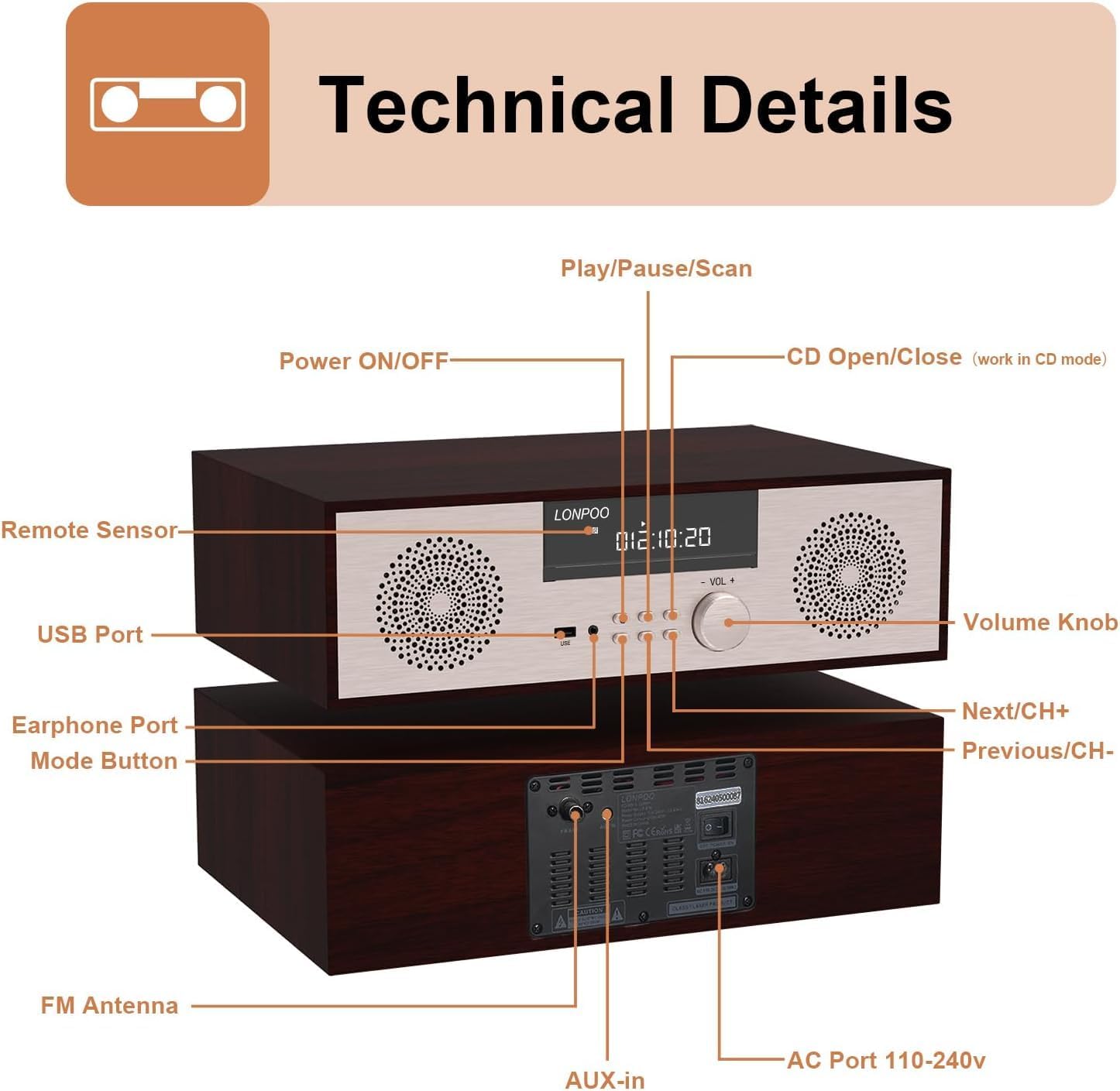
Slika: Prednja i zadnja strana view of the LONPOO LP-816 system, highlighting the LCD display, control buttons, volume knob, USB port, earphone port, mode button, remote sensor, CD compartment, AUX-in, FM antenna port, and AC power port.
- Uključivanje/isključivanje: Uključuje ili isključuje jedinicu.
- LCD ekran: Prikazuje trenutni način rada, informacije o pjesmi, frekvenciju i vrijeme.
- Odjeljak za CD-ove: Za umetanje audio CD-ova.
- USB port: Connect USB flash drives for audio playback.
- Port za slušalice: 3.5 mm priključak za povezivanje slušalica.
- Dugme za način rada: Switches between CD, FM, Bluetooth, AUX, and USB modes.
- Play/Pause/Scan Button: Controls playback and initiates FM scan.
- Dugme Dalje/CH+: Skips to the next track or FM preset.
- Dugme Prethodno/CH-: Skips to the previous track or FM preset.
- Gumb za jačinu zvuka: Podešava jačinu zvuka.
- Daljinski senzor: Prima signale sa daljinskog upravljača.
- AUX ulaz: 3.5 mm priključak za povezivanje eksternih audio uređaja.
- FM antena: Connects the included FM antenna for radio reception.
- AC Port 110-240V: Povezuje adapter za struju.
4.2 Daljinski upravljač
The remote control provides convenient access to all functions of the LP-816 system.

Image: Close-up of the LONPOO LP-816 remote control, showing various buttons for power, mode selection, volume, track control, EQ, and numeric input.
Umetnite dvije AAA baterije (nisu uključene) u daljinski upravljač, pazeći na ispravan polaritet.
5. Podešavanje
5.1 Postavljanje
Place the LP-816 system on a flat, stable surface. Ensure there is adequate space around the unit for proper ventilation. Avoid placing it near strong magnetic fields or direct sunlight.
5.2 Spajanje FM antene
Connect the supplied FM antenna to the 'FM Antenna' port on the rear of the unit. Extend the antenna fully for optimal FM reception.
5.3 Priključak za napajanje
Connect the power adapter to the 'AC Port 110-240V' on the rear of the unit, then plug the adapter into a wall outlet.
6. Uputstvo za upotrebu
6.1 Uključivanje/isključivanje napajanja
Press the 'Power ON/OFF' button on the front panel or the remote control to turn the unit on or off.
6.2 Reprodukcija CD-a
To play an audio CD:
- Press the 'Mode' button until 'CD' mode is selected on the display.
- Press the 'CD Open/Close' button (if available on the unit or remote) or gently insert the CD into the slot. The unit will automatically load the CD.
- The CD will begin playing automatically. If not, press the 'Play/Pause' button.
- Use the 'Next/CH+' and 'Previous/CH-' buttons to skip tracks.
- Press 'Play/Pause' to pause or resume playback.

Image: The LONPOO LP-816 system with its CD player compartment open, ready to accept a disc.
6.3 FM radio
Za slušanje FM radija:
- Press the 'Mode' button until 'FM' mode is selected.
- Automatsko skeniranje: Press and hold the 'Play/Pause/Scan' button to automatically scan and save available FM stations.
- Ručno podešavanje: Use the 'Next/CH+' and 'Previous/CH-' buttons to manually tune to a specific frequency.
- Odabir unaprijed postavljenih postavki: Use the 'Next/CH+' and 'Previous/CH-' buttons (short press) to cycle through saved preset stations.

Image: The LONPOO LP-816 system displaying an FM radio frequency (87.50 MHz) on its screen, with a visual representation of the FM band.
6.4 Bluetooth veza
Za povezivanje Bluetooth uređaja:
- Press the 'Mode' button until 'BT' (Bluetooth) mode is selected. The display will show 'BT' and the unit will enter pairing mode.
- On your Bluetooth-enabled device (e.g., smartphone), enable Bluetooth and search for available devices.
- Select 'LP-816' from the list of devices.
- Once paired, the unit will indicate a successful connection, and you can play audio from your device through the LP-816.

Image: The LONPOO LP-816 system displaying 'BT' on its screen, with a smartphone nearby showing a successful Bluetooth connection to 'LP-816'.
6.5 Priključak AUX-ulaza
To play audio from an external device via AUX-in:
- Connect a 3.5mm audio cable (not included) from the headphone jack or line-out of your external device to the 'AUX-in' port on the rear of the LP-816.
- Press the 'Mode' button until 'AUX' mode is selected.
- Play audio from your external device. The sound will be output through the LP-816 speakers.
6.6 Reprodukcija s USB-a
Za reprodukciju zvuka files USB fleš diska:
- Insert a USB flash drive into the 'USB Port' on the front panel.
- Press the 'Mode' button until 'USB' mode is selected.
- Uređaj će automatski prepoznati i početi reproducirati kompatibilni audio files sa USB diska.
- Use the 'Next/CH+' and 'Previous/CH-' buttons to skip tracks.

Image: A close-up of the LONPOO LP-816 system's front panel, showing a USB flash drive inserted into the USB port.
6.7 Izlaz za slušalice
Connect standard 3.5mm headphones to the 'Earphone Port' on the front panel for private listening. When headphones are connected, sound will no longer be output from the main speakers.
7. Održavanje
7.1 Čišćenje
To clean the unit, first unplug it from the power outlet. Use a soft, dry, lint-free cloth to wipe the exterior surfaces. Do not use abrasive cleaners, waxes, or solvents as they may damage the finish.
7.2 Održavanje CD plejera
Handle CDs by their edges to avoid fingerprints and scratches. If a CD is dirty, wipe it gently with a soft, dry cloth from the center outwards. Do not use solvents or abrasive cleaners on CDs.
8. Otkrivanje problema
| Problem | Mogući uzrok | Rješenje |
|---|---|---|
| Nema struje | Kabl za napajanje nije priključen; Utičnica nije aktivna | Provjerite je li kabel za napajanje sigurno spojen. Pokušajte s drugom utičnicom. |
| Nema zvuka | Volume too low; Mute function active; Incorrect mode selected; Headphones connected | Increase volume. Deactivate mute. Select correct input mode. Disconnect headphones. |
| CD se ne reproducira | CD inserted incorrectly; CD is dirty or scratched; CD format not supported | Reinsert CD correctly. Clean or replace CD. Ensure CD is an audio CD. |
| Bluetooth se ne povezuje | Bluetooth not in pairing mode; Device too far; Device already connected to another unit | Provjerite je li uređaj u BT načinu rada za uparivanje. Približite uređaj. Isključite uređaj s drugih uređaja. |
| Loš FM prijem | Antena nije izvučena; Slab signal; Smetnje | Extend and adjust FM antenna. Relocate unit for better signal. |
9. Specifikacije
- Model: LP-816
- Dimenzije proizvoda (D x Š x V): 15.8 x 10.5 x 4.5 inča
- Težina artikla: 11.57 funte
- Tehnologija povezivanja: Pomoćni, Bluetooth, USB
- Vrsta zvučnika: Stereo
- Audio izlaz: 40 vati RMS
- Karakteristike: CD Player, FM Radio, Bluetooth, AUX-in, Headphone Output, DSP Technology
10. Garancija i podrška
LONPOO products are designed and manufactured to the highest quality standards. For warranty information and technical support, please refer to the warranty card included with your product or visit the official LONPOO webSačuvajte račun kao dokaz o kupovini.