
Orange Pi Orange Pi 4A 2GB
Orange Pi 4A 2GB jednopločni računar Korisnički priručnik
Model: Orange Pi 4A 2GB
1. Uvod
Welcome to the user manual for the Orange Pi 4A 2GB Single Board Computer. This document provides essential information for setting up, operating, maintaining, and troubleshooting your device. The Orange Pi 4A 2GB is a versatile and powerful single board computer designed for a wide range of applications, from embedded systems to educational projects and intelligent edge computing.
It features an Allwinner T527 octa-core processor, a RISC-V co-processor, and a Neural Processing Unit (NPU) for AI acceleration, offering robust performance for various tasks.
2. Proizvod je gotovview
2.1 Ključne karakteristike
- Visoke performanse: Based on Allwinner T527 octa-core Cortex-A55 + HiFi4 DSP + RISC-V multi-core heterogeneous industrial-grade processor.
- Ubrzanje umjetne inteligencije: Supports 2TOPS NPU for intelligent AI acceleration applications.
- Memorija: Equipped with 2GB LPDDR4/4X RAM.
- Video mogućnosti: Provides H.265 4K@60fps and H.264 4K@60fps video decoding, and H.264 4K@25fps video encoding.
- RISC-V Co-processor: Innovative use of co-processors with RISC-V architecture for real-time control, motion control, fast startup, low-power standby, and system security.
- Rich Extensibility: Includes Gigabit Ethernet, PCIe 2.0, USB 2.0, MIPI-CSI, MIPI-DSI, and a 40-Pin expansion interface.
- Podrška za operativni sistem: Compatible with Ubuntu, Debian, Android 13, and other operating systems.
- Advanced GPU: Features Mali-G57 GPU with Valhall architecture for smoother 3D graphics interaction.
2.2 Board Components
The Orange Pi 4A 2GB board is designed with various ports and components for comprehensive functionality. Below is an image illustrating the main components and their locations.

Figure 1: Orange Pi 4A 2GB Board with Labeled Components. This image highlights key features such as the Allwinner T527 processor, 40-Pin headers, various USB ports, HDMI, Ethernet, MIPI-CSI, MIPI-DSI, and power input.
Ključne komponente uključuju:
- Allwinner T527 Processor: The central processing unit.
- LPDDR4/4X RAM: Onboard memory for system operations.
- USB 2.0 portovi: For connecting peripherals like keyboards, mice, and storage devices.
- Gigabitni Ethernet port: Za žičanu mrežnu povezivost.
- HDMI priključak: For video output to displays.
- MIPI-CSI & MIPI-DSI: Interfaces for camera and display modules.
- 40-Pin Expansion Interface: GPIO pins for connecting sensors, actuators, and other custom hardware.
- Type-C/Power Port: Za napajanje.
- Utor za microSD karticu: For operating system storage.
- eMMC Interface: For onboard storage (if applicable to specific model variant).
- M.2 M-Key 2280 PCIe NVMe SSD Slot: For high-speed storage expansion.

Slika 2: Vrh View of the Orange Pi 4A 2GB Single Board Computer. This image provides a clear overhead view of the board's layout and primary components.
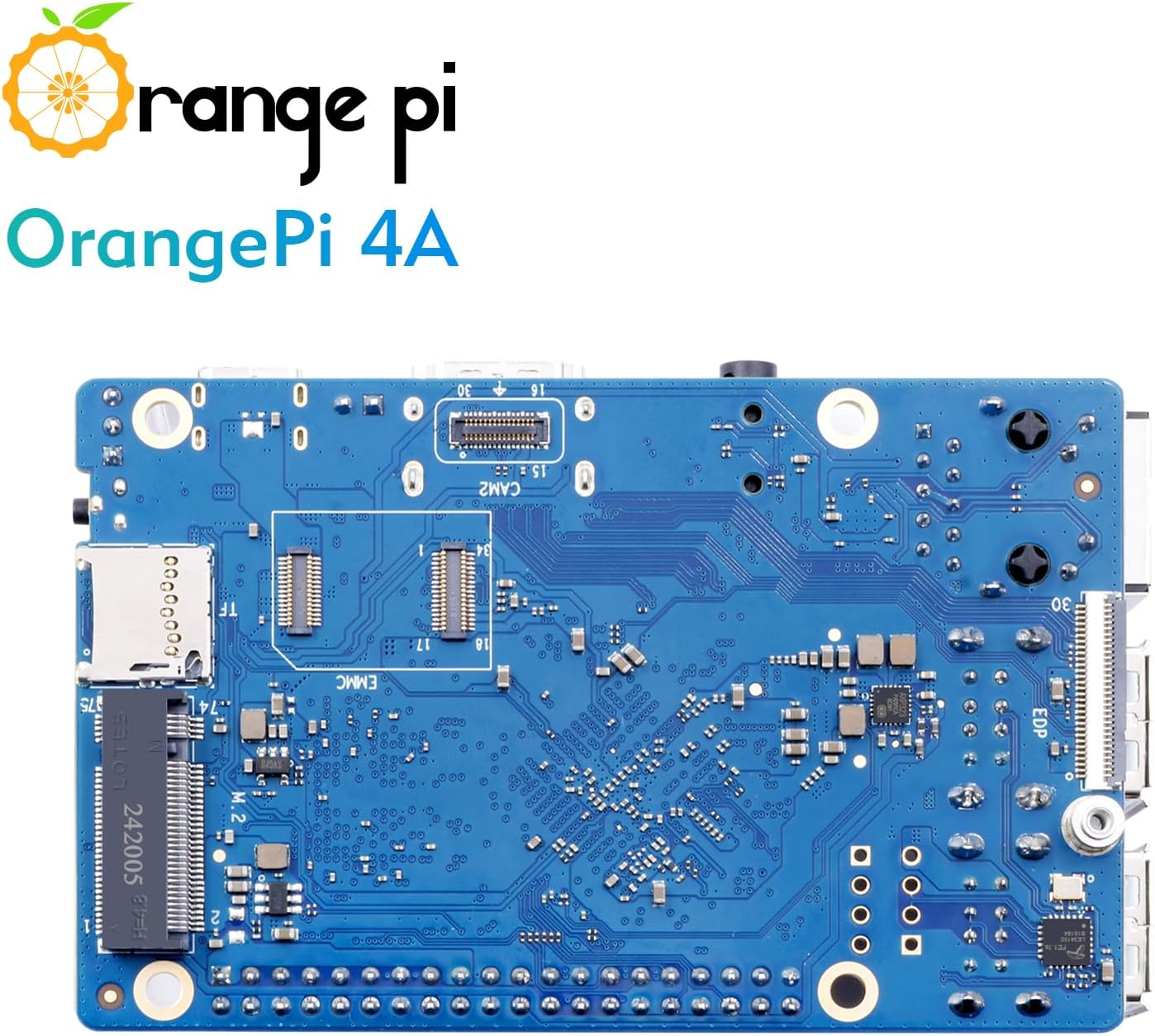
Slika 3: Dno View of the Orange Pi 4A 2GB Single Board Computer. This image shows the underside of the board, including the eMMC interface and M.2 slot.
2.3 Šta se nalazi u kutiji
- Orange Pi 4A 2GB Single Board Computer
Note: Additional accessories such as power supply, microSD card, HDMI cable, and case are typically sold separately.
3. Podešavanje
3.1 Preparing the Operating System
- Download OS Image: Visit the official Orange Pi website or community forums to download a compatible operating system image (e.g., Ubuntu, Debian, Android 13) for the Orange Pi 4A.
- Prepare Storage: Insert a high-quality microSD card (Class 10 or higher, minimum 8GB recommended) into your computer's card reader. Alternatively, if using eMMC, follow specific flashing instructions for eMMC.
- Flash OS Image: Use an imaging tool (e.g., Balena Etcher, Win32 Disk Imager) to write the downloaded OS image to the microSD card. Ensure you select the correct drive to avoid data loss.
- Umetnite MicroSD karticu: Once the flashing process is complete, safely eject the microSD card from your computer and insert it into the microSD card slot on the Orange Pi 4A board.
3.2 Povezivanje perifernih uređaja
- Prikaz: Connect an HDMI cable from the Orange Pi 4A's HDMI port to your monitor or TV.
- tastatura i miš: Plug your USB keyboard and mouse into the USB 2.0 ports on the board.
- Mreža (opcionalno): For wired internet access, connect an Ethernet cable from your router/switch to the Gigabit Ethernet port on the Orange Pi 4A.
- Napajanje: Connect a compatible 5V/3A (or higher) USB Type-C power adapter to the Type-C power port on the board. Ensure the power supply is stable and provides sufficient current.
3.3 Prvo pokretanje
After connecting all necessary peripherals and the power supply, the Orange Pi 4A should automatically power on and begin the boot process. You should see output on your connected display. The initial boot may take longer as the system configures itself.
4. Uputstvo za upotrebu
4.1 Osnovna upotreba
Once the operating system has booted, you can interact with the Orange Pi 4A like a standard computer. Depending on the OS installed, you will have a desktop environment or a command-line interface.
- Okruženje radne površine: Navigate using the mouse and keyboard. Open applications, browse the web, and manage files.
- Komandna linija: For server or headless applications, use SSH to connect remotely or interact directly via a connected terminal.
4.2 Mrežna povezivost
- Wi-Fi: If your OS image supports it, configure Wi-Fi settings through the network manager in the desktop environment or via command-line tools (e.g., `nmcli`, `wpa_supplicant`). The Orange Pi 4A supports Wi-Fi 5.0.
- Bluetooth: Enable and pair Bluetooth devices (e.g., headphones, keyboards) through the OS's Bluetooth settings. The board supports Bluetooth 5.0 and BLE.
- Ethernet: Wired connection is usually plug-and-play. Ensure your router provides DHCP or configure static IP settings if required.
4.3 Upravljanje softverom
Regularly update your operating system and installed software to ensure security and optimal performance. For Debian/Ubuntu-based systems, use the following commands in a terminal:
sudo apt update
sudo apt upgrade
For Android, use the built-in system update features.
5. Održavanje
5.1 Hlađenje
While the Orange Pi 4A is designed for efficiency, prolonged heavy loads can generate heat. Consider the following for optimal thermal management:
- Pasivno hlađenje: Ensure adequate airflow around the board. Avoid placing it in enclosed spaces without ventilation.
- Heatsinks: For continuous high-performance tasks, consider attaching a heatsink to the main processor (Allwinner T527).
- Active Cooling (Fans): If operating in high ambient temperatures or under extreme loads, a small fan can be connected to the appropriate fan headers (if available) or powered externally to provide active cooling.
5.2 Čišćenje
Keep the board clean and free from dust and debris. Use a soft, dry brush or compressed air to gently remove dust. Avoid using liquids or abrasive cleaners.
5.3 Ažuriranja softvera
Regularly check for and apply operating system and firmware updates. These updates often include performance improvements, bug fixes, and security patches.
6. Otkrivanje problema
6.1 Uobičajeni problemi i rješenja
- Nema pokretanja/Nema prikaza:
- Ensure the power supply is adequate (5V/3A minimum) and securely connected.
- Verify the microSD card is properly inserted and the OS image was flashed correctly. Try re-flashing the image.
- Check HDMI cable connection and ensure the monitor is on the correct input.
- Problemi s mrežnom vezom:
- Za Ethernet, provjerite kabelsku vezu i status rutera.
- For Wi-Fi, double-check Wi-Fi credentials and ensure the Wi-Fi module is enabled in the OS.
- Periferni uređaj nije prepoznat:
- Pokušajte spojiti periferni uređaj na drugi USB priključak.
- Ensure the peripheral does not require more power than the USB port can provide.
- Check if necessary drivers are installed in the operating system.
- Nestabilnost/Padovi sistema:
- Ensure proper cooling to prevent overheating.
- Verify the integrity of your microSD card.
- Perform a software update to fix potential bugs.
6.2 Traženje dodatne pomoći
If you encounter issues not covered here, consider the following resources:
- Orange Pi Official Webstranica: Check for updated documentation, FAQs, and forum support.
- Forumi zajednice: Engage with the Orange Pi community. Many common issues have already been discussed and resolved by other users.
- Online resursi: Traži solutions on general Linux or single board computer forums, as many issues are not specific to Orange Pi.
7. Specifikacije
Below are the detailed technical specifications for the Orange Pi 4A 2GB Single Board Computer:
| Feature | Specifikacija |
|---|---|
| Procesor | Allwinner T527 Octa-core Cortex-A55 (1.8 GHz) + HiFi4 DSP + RISC-V Co-processor |
| NPU | 2 TOPS |
| RAM | 2GB LPDDR4/4X |
| GPU | Mali-G57 with Valhall architecture |
| Video Decoding | H.265 4K@60fps, H.264 4K@60fps |
| Video Encoding | H.264 4K@25fps |
| Povezivanje | Gigabit Ethernet, Wi-Fi 5.0, Bluetooth 5.0 (BLE) |
| USB portovi | Više USB 2.0 portova |
| Display Output | HDMI, MIPI-DSI |
| Ulaz kamere | MIPI-CSI |
| Proširenje | 40-Pin GPIO header, PCIe 2.0, M.2 M-Key 2280 NVMe SSD slot |
| Skladištenje | MicroSD card slot, eMMC interface (optional) |
| Operativni sistemi | Ubuntu, Debian, Android 13 |
| Dimenzije | Approx. 89mm x 56mm (2 x 1 x 0.5 inches) |
| Težina | Pribl. 0.05 unci |
8. Garancija i podrška
8.1 Garancija proizvođača
Orange Pi products typically come with a limited manufacturer's warranty covering defects in materials and workmanship. Please refer to the official Orange Pi website or your point of purchase for specific warranty terms and conditions, as these may vary by region and retailer.
8.2 Tehnička podrška
As an open-source hardware platform, Orange Pi benefits from a strong global community. For technical support, it is highly recommended to utilize the following resources:
- Official Orange Pi Forums: The primary source for community-driven support, where users and developers share knowledge and solutions.
- dokumentacija: Comprehensive guides and tutorials are often available on the official Orange Pi website.
- Online zajednice: Various independent forums, blogs, and social media groups dedicated to single board computers and open-source hardware can provide valuable assistance.
When seeking support, provide clear details of your issue, including the model (Orange Pi 4A 2GB), operating system version, and any error messages encountered.
Ask a question about this manual
Ask about setup, troubleshooting, compatibility, parts, safety, or missing instructions. Manuals+ will review the question and use this page’s manual context to help answer it.