
1. Proizvod je gotovview
The EXVIST H.265 1080P 60fps PoE VGA Encoder is a high-performance device designed for converting VGA video signals into H.265/H.264 encoded streams. It supports various streaming protocols, including RTMP, RTSP, HLS, and UDP, making it suitable for live broadcasting, video conferencing, CCTV, and digital signage applications. With Power over Ethernet (PoE) capability and a VGA loopout, this encoder offers flexible installation and real-time monitoring.
2. Ključne karakteristike
- High-Quality H.264/H.265 Encoding: Supports 1080P resolution at 60fps with efficient compression for clear video and minimal bandwidth usage.
- Power Over Ethernet (PoE): Powers the encoder directly through the Ethernet connection, simplifying setup and reducing cable clutter.
- VGA Loopout for Local Display: Provides a VGA output for direct connection to a local monitor, enabling real-time video monitoring.
- Multiple Protocols Supported: Compatible with RTSP, RTMP, HLS, and UDP protocols for versatile integration with various streaming platforms and systems.
- Širok spektar primjena: Ideal for IP television systems, live event broadcasts, digital signage, and CCTV monitoring across diverse environments.
3. Sadržaj paketa
- EXVIST H.265 1080P 60fps PoE VGA Encoder (Model ON-VGA-16DP)
- Uputstvo za upotrebu
- Power Adapter (if PoE is not used)
4. Izgled uređaja
Familiarize yourself with the ports and indicators on the encoder unit.

Slika 4.1: Front and Rear Panel of the EXVIST VGA Encoder. The front panel includes PWR (Power indicator), RUN (Operation indicator), Microphone input, VGA IN, and VGA OUT ports. The rear panel features a Reset button, DC12V power input, and a NETWORK port (supporting PoE).
- PWR indikator: Svijetli kada je uređaj uključen.
- RUN indikator: Flashes during normal operation.
- Ulaz za mikrofon: 3.5mm audio input for external microphone.
- VGA IN: Connects to the VGA video source.
- VGA IZLAZ: VGA loopout for connecting to a local display.
- Dugme RESET: Press and hold to restore factory default settings.
- DC12V: Power input for standard power adapter (if PoE is not used).
- NETWORK: RJ45 Ethernet port for network connection and PoE power input.
5. Upute za postavljanje
5.1 Fizička veza
- Connect your VGA video source (e.g., computer, camcorder) to the VGA IN port on the encoder using a VGA cable.
- If local monitoring is required, connect a VGA display to the VGA OUT port on the encoder using a VGA cable.
- Connect an Ethernet cable from your network switch (preferably a PoE-enabled switch) to the NETWORK port on the encoder. If using a non-PoE switch, connect the provided DC12V power adapter to the DC12V luka.
- Optionally, connect an external microphone to the Ulaz za mikrofon luka.
- Proverite da li je Pwr indicator is illuminated and the RUN indicator is flashing, indicating the device is powered on and operating.
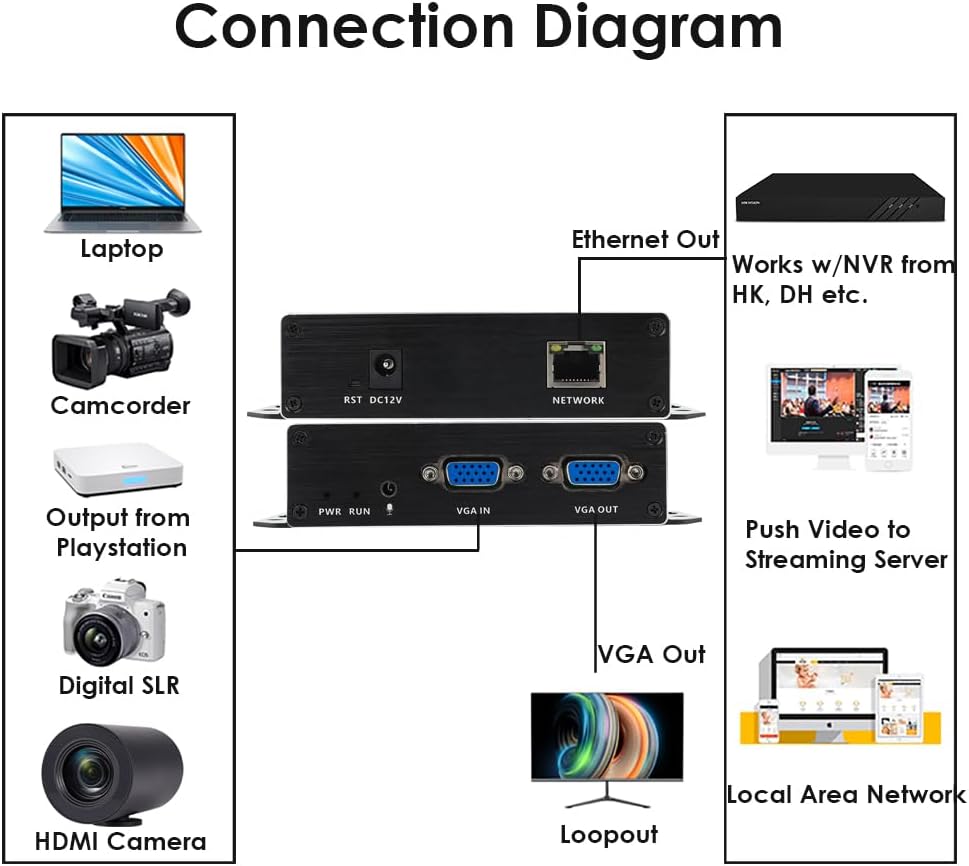
Slika 5.1: Typical Connection Diagram for the EXVIST VGA Encoder.
5.2 Network Configuration and Web Pristup interfejsu
The encoder typically has a default IP address (e.g., 192.168.1.168). To access the web interfejs:
- Ensure your computer is on the same network segment as the encoder. You may need to temporarily set your computer's IP address to be in the same subnet (e.g., 192.168.1.x).
- Otvori a web browser (e.g., Chrome, Firefox) and enter the encoder's default IP address (e.g., http://192.168.1.168) u adresnoj traci.
- Log in using the default username and password (refer to the device label or included documentation for default credentials, commonly admin/admin or admin/123456).
- Once logged in, you can configure network settings (e.g., static IP, DHCP) to integrate the encoder into your existing network infrastructure.
6. Uputstvo za upotrebu
6.1 Postavke videa i zvuka
U okviru web interface, navigate to the Video/Audio settings to configure input and output parameters.

Slika 6.1: Audio Settings in the Web Interface.
- Audio ulaz: Select the desired audio source (e.g., VGA embedded audio, external microphone).
- Samples: Podesite audio sampling rate.
- Codec type: Choose the audio encoding format (e.g., AAC).
- Brzina prijenosa: Set the audio bitrate for quality and bandwidth control.
- Kanal: Select audio channels (e.g., Stereo, Mono).
- Izlazna jačina: Adjust the output audio level.
- Ne zaboravite da kliknete Sačuvaj after making changes.
6.2 Streaming Configuration (RTMP, RTSP, HLS, UDP)
The encoder supports various streaming protocols. Configure them under the 'Push' or 'Network' sections of the web interfejs.

Slika 6.2: RTMP Streaming Settings in the Web Interface.
- RTMP: For live streaming to platforms like YouTube, Facebook Live, Twitch. Enter the Stream Server URL and Stream Key in the 'Video push' field (e.g.,
rtmp://a.rtmp.youtube.com/live2/streamkey). Enable the stream and select the push mode. - RTSP: For surveillance systems or media servers. Configure the RTSP URL and stream mode (Complex, Video, Audio).
- HLS/UDP: Configure as per your specific application requirements.
- Always click Sačuvaj after modifying streaming settings.

Slika 6.3: Supported Protocols by the EXVIST VGA Encoder.
7. Održavanje
- čišćenje: Za čišćenje uređaja koristite meku, suhu krpu. Izbjegavajte tekuća sredstva za čišćenje ili rastvarače.
- ventilacija: Ensure the encoder is placed in a well-ventilated area to prevent overheating. Do not block ventilation openings.
- Ažuriranja firmvera: Periodically check the EXVIST official webstranica za ažuriranja firmvera kako bi se osigurale optimalne performanse i pristup novim funkcijama.
- Upravljanje kablovima: Provjerite da li su svi kablovi sigurno spojeni i da nisu pod naprezanjem.
8. Otkrivanje problema
- Nema napajanja: Check power connections. If using PoE, ensure the network switch port provides power. If using a power adapter, ensure it is correctly connected and the outlet is functional.
- No Video Output (Loopout): Verify VGA cable connections. Ensure the video source is active and outputting a signal.
- Nema mrežne veze: Check Ethernet cable. Verify network settings (IP address, subnet mask, gateway) in the encoder's web interface. Ensure your computer is on the same subnet for initial access.
- Problemi sa streamingom: Double-check streaming protocol settings (RTMP URL, RTSP URL, etc.). Ensure internet connectivity and sufficient bandwidth. Verify firewall settings on your network.
- Forgot Password/Settings: Koristite RESET button on the rear panel to restore factory default settings. Note that this will erase all custom configurations.
9. Specifikacije
| Feature | Specifikacija |
|---|---|
| Broj modela | ON-VGA-16DP |
| Video ulaz | 1xVGA |
| Video izlaz | 1x VGA Loopout |
| Video Encoding | H.265 / H.264 |
| Rezolucija | Up to 1080P @ 60fps |
| Audio ulaz | 3.5mm Microphone, VGA Embedded Audio |
| Streaming Protocols | RTMP, RTSP, HLS, UDP, HTTP, Multicast, TS/SRT, ONVIF |
| Mrežni interfejs | 1x RJ45 Ethernet (PoE supported) |
| Napajanje | DC 12V or Power over Ethernet (PoE) |
| Dimenzije proizvoda | 4.33 x 2.95 x 0.98 inča (110 x 75 x 25 mm) |
| Težina artikla | 6.1 unce (173 grama) |
| Radna temperatura | 0°C do 50°C (32°F do 122°F) |
10. Informacije o garanciji
This EXVIST product comes with a Limited Warranty. Please refer to the warranty card included with your product or visit the official EXVIST webstranicu za detaljne uslove i odredbe u vezi sa garancijskim pokrićem i trajanjem.
11. Korisnička podrška
For technical assistance, troubleshooting, or product inquiries, please contact EXVIST customer support through their official website or the contact information provided in your product packaging. When contacting support, please have your product model number (ON-VGA-16DP) and purchase details ready.