
1. Uvod
The Fenton Pulse65 is a versatile portable party speaker designed for various events and environments. It delivers powerful sound, offers wireless connectivity, and features dynamic lighting. This manual provides essential information for the safe and optimal use of your Pulse65 speaker.
Ključne karakteristike:
- 60W RMS (140W max) output for clear, powerful sound with deep bass.
- Bluetooth 5.3 for wireless streaming and stereo pairing (TWS).
- Dynamic multicolour light show synchronized with music.
- IPX4 splashproof design for outdoor use.
- Integrated 12-hour rechargeable battery.
- Includes a wireless UHF microphone and remote control.
- USB playback and FM radio functionality.
2. Sigurnosne informacije
Molimo pročitajte i razumite sva sigurnosna uputstva prije upotrebe ovog proizvoda. Sačuvajte ovaj priručnik za buduću upotrebu.
- Otpornost na vodu: The Pulse65 is IPX4 splashproof. Do not immerse the speaker in water or expose it to heavy rain. Ensure all port covers are securely closed when used near water.
- Izvor napajanja: Use only the specified charging cable and power adapter. Do not attempt to open or modify the battery compartment.
- ventilacija: Ne blokirajte ventilacijske otvore. Osigurajte dovoljan protok zraka oko zvučnika.
- čišćenje: Isključite napajanje prije čišćenja. Koristite meku, suhu krpu. Ne koristite tekuća sredstva za čišćenje ili aerosole.
- temperatura: Avoid extreme temperatures. Do not expose to direct sunlight for extended periods or place near heat sources.
- djeca: Čuvati izvan dohvata djece. Ovaj proizvod nije igračka.
3. Sadržaj paketa
Provjerite da li su sve stavke prisutne u paketu:
- Fenton Pulse65 Portable Party Speaker
- Bežični UHF mikrofon
- Daljinski upravljač
- USB kabl za punjenje
- Uputstvo za upotrebu
4. Podešavanje
4.1. Početno punjenje
Before first use, fully charge the speaker. Connect the provided USB charging cable to the speaker's charging port and a suitable USB power adapter (not included). The charging indicator will show the charging status. A full charge provides approximately 12 hours of playback, depending on usage volume and light effects.
4.2. Uključivanje / isključivanje napajanja
Pritisnite i držite Snaga dugme na kontrolnoj tabli da biste uključili ili isključili zvučnik.
4.3. Podešavanje bežičnog mikrofona
The included wireless UHF microphone is pre-paired with the speaker. Ensure the microphone has fresh batteries (not included) and is powered on. The microphone's display will indicate its status.

Image: The Fenton Pulse65 speaker shown with its wireless microphone and remote control, illustrating the complete package.
5. Uputstvo za upotrebu
5.1. Control Panel Overview
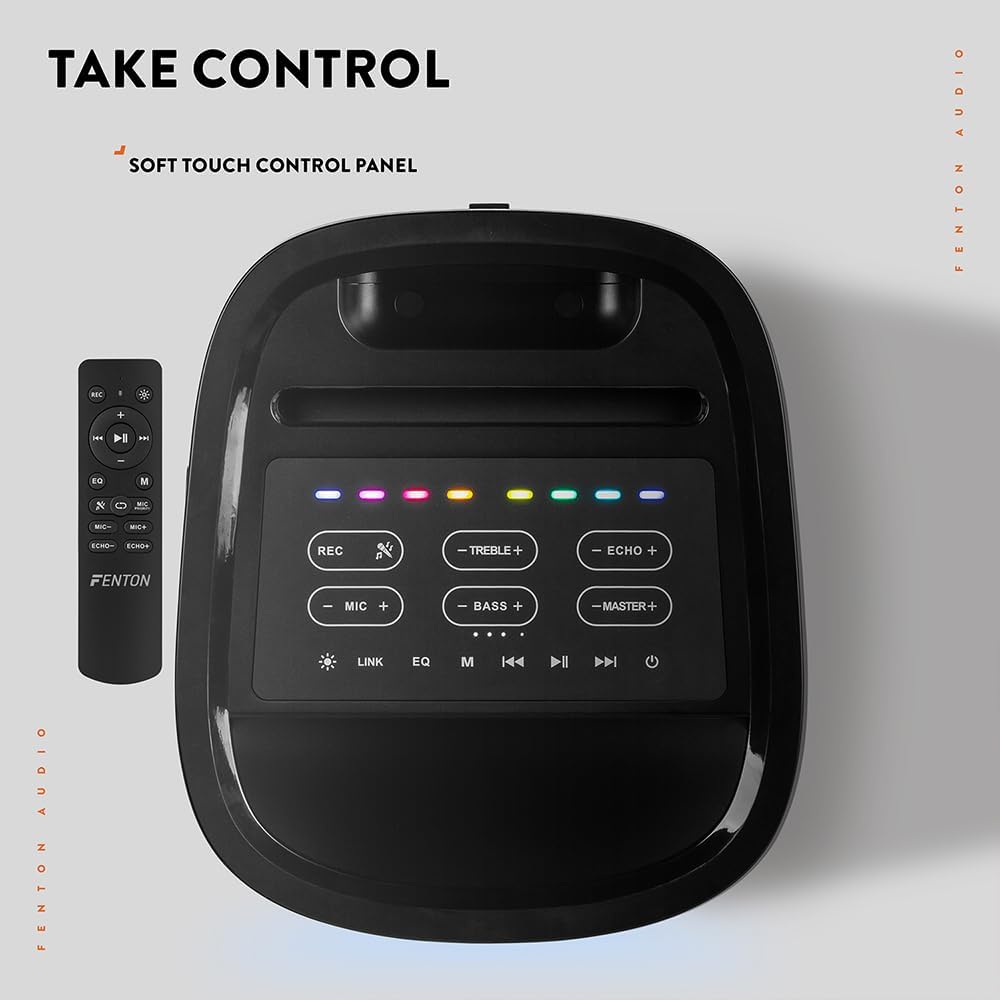
Slika: Pogled odozgo prema dolje view of the Fenton Pulse65 speaker's soft-touch control panel, alongside the remote control, highlighting various buttons for audio and light adjustments.
The top panel features soft-touch controls for various functions:
- REC: Snimite audio.
- TREBLE +/-: Podesite nivoe visokih tonova.
- ECHO +/-: Podesite efekat odjeka mikrofona.
- MIKROFONI +/-: Podesite jačinu zvuka mikrofona.
- BASS +/-: Podesite nivoe basa.
- MASTER +/-: Adjust overall master volume.
- LINK: Activate TWS (True Wireless Stereo) pairing.
- EQ: Prođite kroz unaprijed postavljene postavke ekvilajzera.
- M (Način): Switch between input modes (Bluetooth, USB, FM Radio, AUX).
- Pusti/pauza: Reprodukcija ili pauziranje reprodukcije zvuka.
- Prethodna/Sljedeća: Skip tracks or tune FM radio stations.
- Snaga: Uključite/isključite zvučnik.
5.2. Bluetooth veza
- Turn on the Pulse65 speaker.
- Pritisnite M (režim) button until the Bluetooth indicator lights up or you hear a Bluetooth pairing prompt.
- Na svom mobilnom uređaju omogućite Bluetooth i potražite dostupne uređaje.
- Select "Fenton Pulse65" from the list.
- Nakon povezivanja, zvučnik će potvrditi zvučnim signalom.

Image: The Fenton Pulse65 speaker with a smartphone placed in its integrated dock, illustrating the Bluetooth streaming and charging capabilities.
5.3. Uparivanje putem pravog bežičnog stereo sistema (TWS)
To link two Pulse65 speakers for stereo sound:
- Ensure both Pulse65 speakers are powered on and in Bluetooth mode, but not connected to any device.
- Na jednom zvučniku (ovo će biti primarni zvučnik) pritisnite LINK button. It will search for another Pulse65.
- The primary speaker will automatically connect to the secondary speaker. Once connected, you will hear a confirmation tone.
- Now, connect your mobile device to the primary Pulse65 speaker via Bluetooth as described in section 5.2.
- Zvuk će se sada reprodukovati stereo preko oba zvučnika.
5.4. USB reprodukcija
Umetnite USB fleš disk koji sadrži MP3 audio zapis files into the USB port on the back of the speaker. The speaker will automatically switch to USB mode and begin playback. Use the Play/Pause and Previous/Next buttons to control playback.
5.5. FM radio
- Pritisnite M (režim) dugme za prebacivanje u FM radio mod.
- Pritisnite i držite Pusti/Pauza dugme za automatsko skeniranje i spremanje dostupnih FM stanica.
- Koristite Prethodno/Sljedeće dugmad za navigaciju kroz sačuvane stanice.
5.6. Ulazi za mikrofon i gitaru
The speaker features dedicated inputs for a wired microphone and a guitar on the rear panel. Connect your devices to these ports. Use the MIC +/- i ECHO +/- controls on the top panel to adjust the microphone's volume and echo effect.

Image: A composite image showing the rear panel of the Fenton Pulse65 speaker with its various input ports, and a front view of the speaker with a microphone, illustrating connectivity options.
5.7. Režimi svjetla
The multicolour LED lights on the speaker can be controlled via the remote control or specific buttons on the control panel (if available, refer to the remote for full control). Cycle through different light patterns or turn them off as desired.

Slika: Krupni plan view of the Fenton Pulse65 speaker, highlighting its multicolour LED light ring on the front grille, indicating its splashproof design.
6. Održavanje
6.1. Čišćenje
Obrišite vanjski dio zvučnika mekom, suhom ili blago natopljenom krpomamp cloth. Do not use abrasive cleaners, waxes, or solvents. Ensure all port covers are closed before cleaning if using a damp tkanina.
6.2. Skladištenje
Zvučnik čuvajte na hladnom i suhom mjestu, dalje od direktne sunčeve svjetlosti i ekstremnih temperatura. Ako ga skladištite duži period, punite bateriju do otprilike 50% svakih nekoliko mjeseci kako biste održali njeno zdravlje.
6.3. Održavanje baterije
To prolong battery life, avoid fully discharging the battery frequently. Recharge the speaker when the low battery indicator appears. Do not expose the battery to excessive heat.
7. Otkrivanje problema
If you encounter issues with your Fenton Pulse65, refer to the following common problems and solutions:
| Problem | Mogući uzrok | Rješenje |
|---|---|---|
| Zvučnik se ne uključuje. | Slaba baterija; Dugme za napajanje nije pravilno pritisnuto. | Potpuno napunite zvučnik. Pritisnite i držite dugme za napajanje nekoliko sekundi. |
| Nema zvuka iz zvučnika. | Preniska jačina zvuka; Nepravilan način unosa; Uređaj nije povezan. | Increase master volume. Press 'M' to select correct input mode. Ensure Bluetooth device is connected or USB is inserted correctly. |
| Bluetooth uparivanje nije uspjelo. | Zvučnik nije u režimu uparivanja; Uređaj je previše udaljen; Smetnje. | Ensure speaker is in Bluetooth mode and not connected to another device. Move device closer to speaker. Turn off other Bluetooth devices. |
| Mikrofon ne radi. | Microphone off; Low battery in mic; Mic volume too low. | Ensure wireless mic is powered on. Replace mic batteries. Increase MIC volume on speaker. |
| Uparivanje TWS-a nije uspjelo. | Zvučnici su već povezani s uređajem; Zvučnici su previše udaljeni. | Disconnect both speakers from any Bluetooth devices. Ensure both are in Bluetooth mode. Place speakers close together during pairing. |
8. Specifikacije
- Brand: Fentone
- Model: Puls65
- Maksimalna izlazna snaga zvučnika: 140 vati (vrh)
- Frekvencijski odziv: 12000 Hz
- Tehnologija povezivanja: Bluetooth 5.3
- Način audio izlaza: Stereo
- Vrsta montaže: Tabletop
- Vrsta zvučnika: Na otvorenom
- Dimenzije proizvoda: 49 x 34.5 x 39.5 cm
- Težina: 7.6 kg
- baterija: 1 Nonstandard Battery (included), 12-hour playback
- IP ocjena: IPX4 (otporan na prskanje)
- Proizvođač: Tronios BV
- Zemlja porijekla: Kina

Image: The Fenton Pulse65 speaker displayed with its approximate dimensions (40cm height, 32cm width, 27cm depth) and an icon indicating 12 hours of battery life.
9. Garancija i podrška
For warranty information and customer support, please refer to the documentation provided with your purchase or visit the official Fenton brand store. You can find more information and contact details at the Fenton Brand Store.