
1. Sigurnosne informacije
Please read and understand all safety instructions before using the Alonefire SV119 UV LED Flashlight. Failure to follow these instructions may result in injury or damage to the product.
- UV Radiation Exposure: This flashlight emits powerful 365nm UV light. Avoid direct exposure of UV light to eyes and skin. Prolonged exposure can be harmful.
- Nosite zaštitne naočale: Always wear the provided UV protection glasses when operating the flashlight to shield your eyes from UV radiation.
- Vruća površina: The flashlight head may become hot during extended use. Avoid touching the hot surface directly.
- Sigurnost baterije: Use only the specified Lithium-ion battery. Do not attempt to disassemble, puncture, or expose the battery to extreme temperatures or fire.
- djeca: Držite baterijsku lampu van domašaja djece.
2. Sadržaj paketa
Provjerite da li su sve stavke prisutne u paketu:
- Alonefire SV119 UV LED Flashlight
- USB-C kabl za punjenje
- UV Protection Glasses
- Rechargeable Lithium-ion Battery (pre-installed or separate)

Image: Contents of the Alonefire SV119 package, including the flashlight, USB-C cable, and yellow UV protection glasses.
3. Proizvod je gotovview
The Alonefire SV119 is a powerful 90W UV LED flashlight designed for various detection and curing applications. Its key features include:
- Visokokvalitetna UV LED: Equipped with 9 pieces of 4-core 365nm UV LEDs, providing up to 90W power consumption and 10000mW light output.
- Black Filter Lens: Features a hardened black optical filter lens to filter out ambient visible light, ensuring a purer and more powerful UV output.
- Izdržljiva konstrukcija: Made from high-quality aluminum alloy for enhanced heat dissipation and durability.
- USB-C punjivi: Convenient USB-C charging port for easy and versatile recharging.
- Digitalni LCD ekran: An innovative LCD screen displays the battery power level numerically.
- Obrnuto punjenje: Can function as a power bank to charge other devices via its USB-A output port.

Image: The Alonefire SV119 UV LED flashlight highlighting its 9-core 365nm UV LEDs and various detection and curing applications.

Image: A visual comparison demonstrating the effectiveness of 365nm UV light compared to 395nm UV light for mineral fluorescence.
4. Podešavanje
4.1 Instalacija baterije
- Odvrnite zadnji poklopac lampe.
- If the battery is not pre-installed, insert the provided Lithium-ion battery with the positive (+) terminal facing towards the flashlight head.
- Važno: If there is a plastic insulating disc on the battery's positive or negative terminal, remove it before installation.
- Čvrsto zašrafite zadnji poklopac.
4.2 Početno punjenje
Before first use, fully charge the flashlight battery.
- Pronađite USB-C priključak za punjenje na tijelu svjetiljke.
- Connect the provided USB-C cable to the flashlight and plug the other end into a compatible USB power adapter (not included) or a computer USB port.
- The LCD display will show the charging progress. A full charge is indicated by '100%' on the display.
- Vrijeme punjenja je otprilike 7 sata za potpuno punjenje.

Image: The Alonefire SV119 flashlight being charged via its USB-C port, with the LCD screen displaying the battery charge level.
5. Uputstvo za upotrebu
5.1 Uključivanje/isključivanje i odabir načina rada
- Uključeno: Press the power button located on the side of the flashlight.
- Odabir načina rada: The flashlight typically has two brightness modes (strong and medium). Press the power button repeatedly to cycle through these modes.
- Iskljuciti: Press and hold the power button for a few seconds until the light turns off.
5.2 Razumijevanje LCD ekrana
The integrated LCD display provides real-time information about the battery status.
- When the flashlight is in use, the display shows the remaining battery percentage.
- During charging, it indicates the charging progress.
5.3 Reverse Charging Function
The SV119 can act as a portable power bank to charge other USB-powered devices.
- Locate the USB-A output port on the flashlight.
- Connect your device's charging cable to the USB-A port on the flashlight.
- Svjetiljka će početi puniti vaš uređaj.
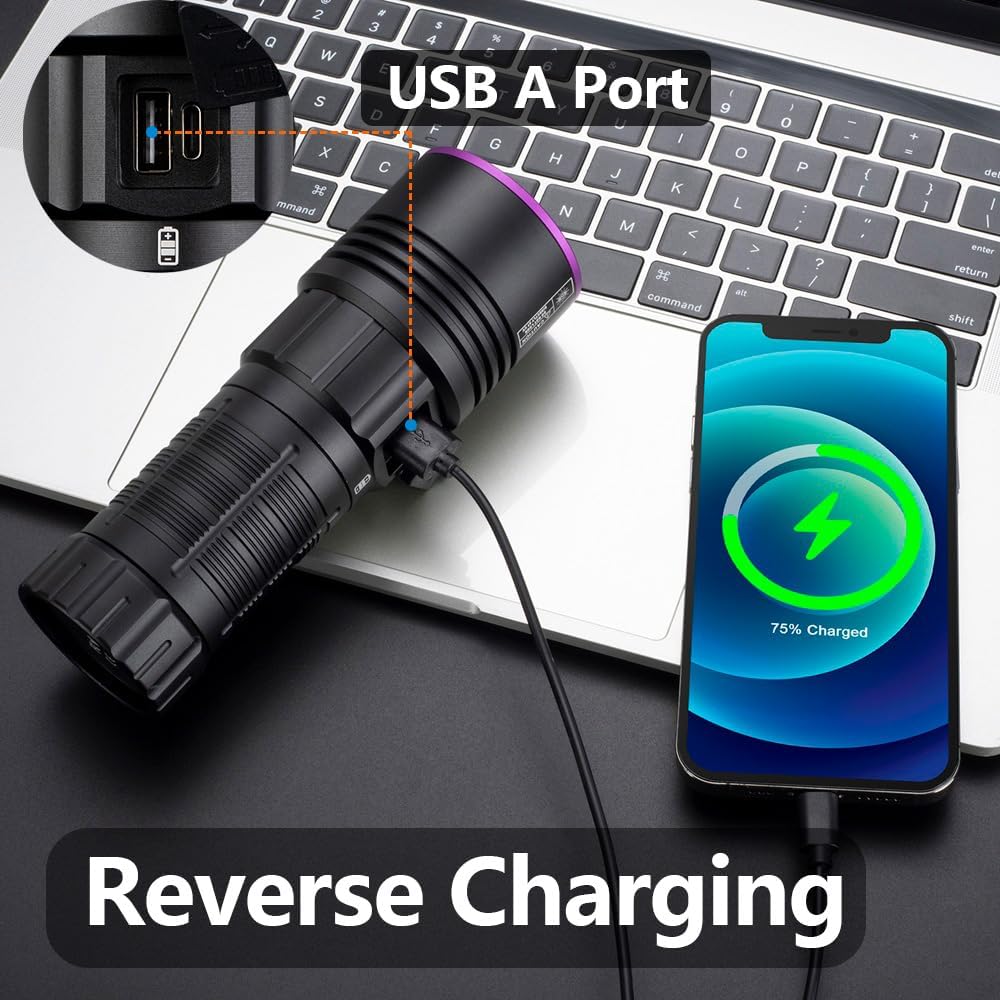
Image: The Alonefire SV119 flashlight demonstrating its reverse charging capability by powering a smartphone.
5.4 Aplikacije
The 365nm UV light is suitable for various applications:
- Detekcija mrlja kućnih ljubimaca: Identify hidden pet urine, ringworm, and other biological stains on carpets, furniture, and floors.
- Detekcija škorpiona: Scorpions fluoresce under 365nm UV light, making them easier to spot in dark environments.
- Mineral and Amber Identification: Many minerals and amber exhibit fluorescence under UV light, aiding in identification.
- Currency and Document Authentication: Verify security features on banknotes, passports, and other official documents.
- Resin Curing: Accelerate the curing process of UV-sensitive resins.
- Detekcija curenja: Detect leaks in HVAC systems or automotive fluids when used with UV-sensitive dyes.

Image: A demonstration of the UV flashlight's ability to reveal hidden pet urine stains on a carpet, showing a 'before' view under normal light and an 'after' view under UV light.
6. Održavanje
6.1 Čišćenje
- Obrišite tijelo svjetiljke mekom krpomamp tkanina.
- Za objektiv koristite krpu za čišćenje objektiva i rastvor za čišćenje kako biste izbjegli ogrebotine.
- Nemojte koristiti abrazivna sredstva za čišćenje ili rastvarače.
6.2 Briga o bateriji i skladištenje
- Recharge the battery regularly, even if not frequently used, to maintain its lifespan.
- Čuvajte baterijsku lampu na hladnom i suvom mestu dalje od direktne sunčeve svetlosti i ekstremnih temperatura.
- Ako skladištite bateriju duži period, napunite je do približno 50% kapaciteta.
7. Otkrivanje problema
- Lampa se ne uključuje:
- Uvjerite se da je baterija ispravno instalirana i potpuno napunjena.
- Check if the plastic insulating disc has been removed from the battery terminals.
- Čvrsto zategnite zadnji poklopac.
- Baterija se ne puni:
- Provjerite je li USB-C kabel pravilno spojen i na svjetiljku i na izvor napajanja.
- Pokušajte s drugim USB-C kabelom ili adapterom za napajanje.
- Provjerite da li je izvor napajanja funkcionalan.
- Weak light output:
- Baterija je možda slaba; napunite je.
- Provjerite je li objektiv čist i bez prepreka.
- LCD display not working or inaccurate:
- U potpunosti napunite bateriju.
- Ako se problem nastavi, kontaktirajte korisničku podršku.
8. Specifikacije
| Feature | Specifikacija |
|---|---|
| Brand | Alonefire |
| Broj modela | SV119 |
| Izvor svjetlosti | 9x 4-core 365nm UV LED |
| Snaga | 90 Watts |
| Luminous Flux | 10000 milivata |
| Materijal | Aluminijumska legura |
| Vrsta baterije | 1x Lithium-ion (included) |
| Port za punjenje | USB-C |
| Posebne karakteristike | Rechargeable, Digital Display, Reverse Charging |
| Težina | 580 g |
| Dimenzije (paket) | 19.9 x 13.2 x 6.3 cm |
| Nivo vodootpornosti | Nije vodootporan |
9. Garancija i podrška
9.1 Informacije o garanciji
Specific warranty details for the Alonefire SV119 are not provided in this manual. Please refer to the retailer or manufacturer's official webstranicu za najnoviju politiku garancije.
9.2 Korisnička podrška
For technical assistance, troubleshooting beyond this manual, or inquiries regarding your product, please contact Alonefire customer support through their official channels or the retailer where the product was purchased.