
Uvod
Thank you for choosing the TECKNET TK-MS017 Ergonomic Wireless Vertical Mouse. This manual provides detailed instructions for setting up, operating, maintaining, and troubleshooting your new mouse. Designed for comfort and efficiency, this vertical mouse helps reduce wrist strain during prolonged use.

The TECKNET Ergonomic Vertical Mouse, designed for comfortable use.
Karakteristike proizvoda
- Ergonomski vertikalni dizajn: Mimics a natural handshake posture to reduce wrist and arm pressure, preventing discomfort from prolonged use.
- Podesivi DPI: 5 levels of DPI (800/1600/2400/3200/4800) for precise tracking and adaptable sensitivity.
- Tihi klikovi: 99% noise reduction for a quiet working environment. (Forward/Backward buttons are not silent).
- 6 Dugmad: Includes standard left/right click, scroll wheel, DPI switch, and convenient forward/backward buttons for web navigacija.
- Stable 2.4G Wireless Connection: Provides a reliable connection up to 10 meters with a plug-and-play USB receiver.
- Dug vijek trajanja baterije: Features an independent power switch and automatic sleep function to conserve battery, offering up to 24 months of use.
- Široka kompatibilnost: Supports Windows 11/10/8/7/XP, Mac OS X10.4, Chrome OS, and Linux.

Comparison of vertical ergonomic grip and traditional mouse grip, highlighting reduced wrist tension with the vertical design.
Uputstva za postavljanje
- Instalirajte baterije:
Locate the battery compartment on the underside of the mouse. Open the cover and insert two AA batteries (not included), ensuring correct polarity. Close the battery cover securely.

The underside of the mouse, illustrating the battery compartment and the storage slot for the USB receiver.
- Povežite USB prijemnik:
Remove the USB receiver from its storage slot next to the battery compartment. Plug the receiver into an available USB port on your computer (PC, laptop, Mac, Chromebook, or tablet).
- Uključeno:
Flip the ON/OFF switch on the bottom of the mouse to the "ON" position. The mouse should automatically connect to your device. No additional drivers are typically required for most operating systems.
Uputstvo za upotrebu
Funkcije dugmadi
- Lijevi klik: Standardni odabir i aktivacija.
- Desni klik: Otvara kontekstne menije.
- Točak za pomicanje: Pomiče dokumente i web stranice vertikalno. Može se pritisnuti i za funkcionalnost klika srednjim tasterom miša.
- Dugme za promjenu DPI-ja: Located near the scroll wheel. Press to cycle through DPI settings (800/1600/2400/3200/4800). The red indicator light will flash to confirm the change.
- Dugme naprijed: Navigira naprijed u web pretraživači ili file explorers. (Not supported on Mac OS).
- Dugme za nazad: Navigacija unazad web pretraživači ili file explorers. (Not supported on Mac OS).
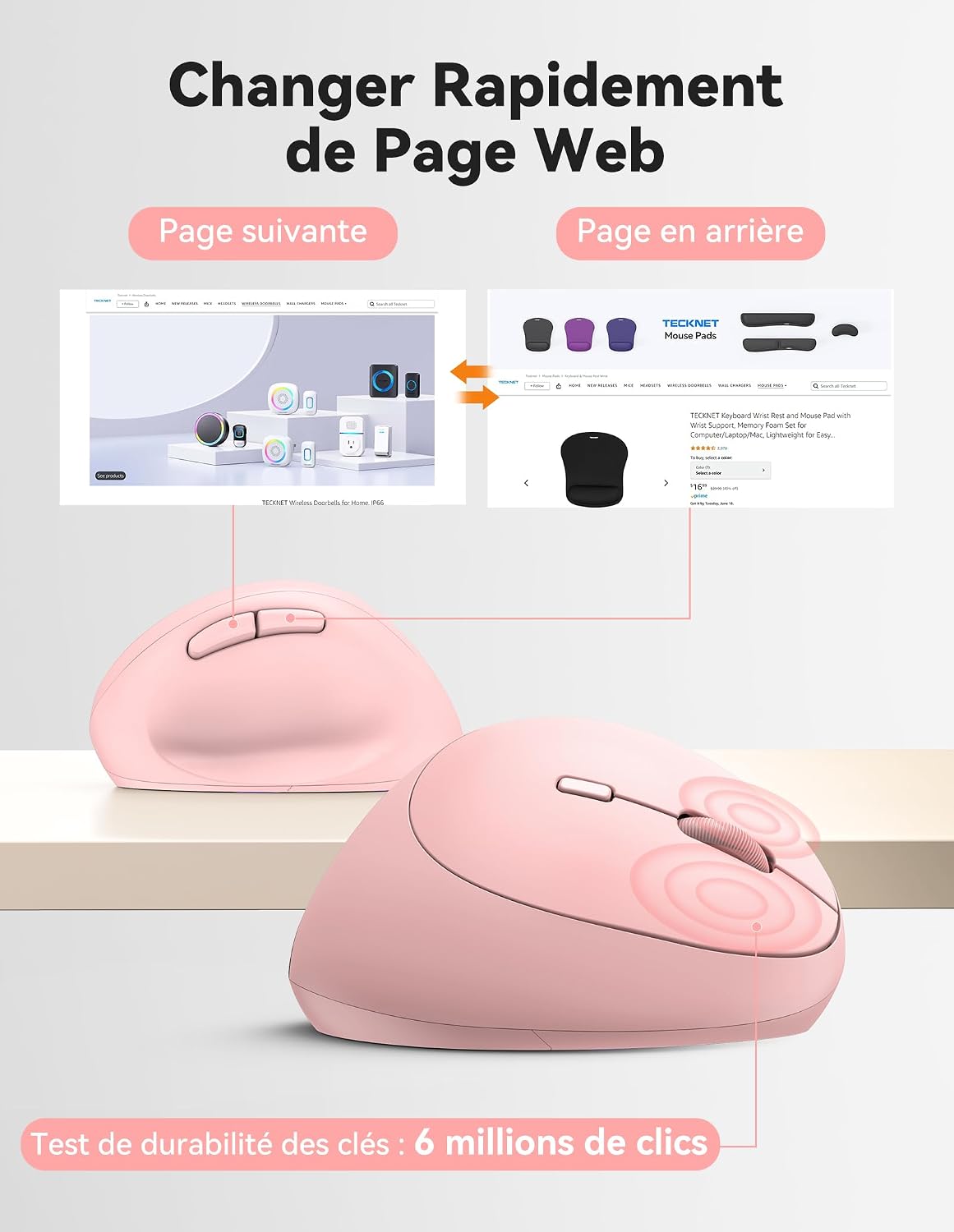
Diagram illustrating the location and function of each button on the TECKNET vertical mouse.
DPI podešavanje
The mouse offers 5 adjustable DPI levels to suit various tasks and preferences. Press the DPI switch button to change the cursor speed. The red indicator light will flash a corresponding number of times to indicate the current DPI setting:
- Flash X1: 800 DPI (Web Navigation)
- Flash X2: 1600 DPI (Excel Editing)
- Flash X3: 2400 DPI (Video Editing)
- Flash X4: 3200 DPI (Photoshop)
- Flash X5: 4800 DPI (Gaming Track)

Visual representation of the 5 adjustable DPI levels for different usage scenarios.
Režim uštede energije
To conserve battery life, the mouse will automatically enter sleep mode after 8 minutes of inactivity. To wake it up, simply move the mouse or click any button.
Održavanje
- čišćenje: Za čišćenje miša koristite meku, suhu krpu. Izbjegavajte upotrebu jakih hemikalija ili abrazivnih materijala.
- Zamjena baterije: When the mouse performance degrades or the cursor becomes erratic, it's time to replace the batteries. Ensure you use fresh AA batteries and dispose of old batteries responsibly.
- Skladištenje: When not in use for extended periods, turn off the mouse using the ON/OFF switch to further conserve battery life. Store the USB receiver inside the mouse's battery compartment to prevent loss.
Rješavanje problema
- Miš ne reaguje:
- Provjerite je li miš UKLJUČEN.
- Provjerite jesu li baterije pravilno instalirane i dovoljno napunjene. Zamijenite ih ako je potrebno.
- Provjerite je li USB prijemnik sigurno priključen u ispravan USB priključak. Pokušajte s drugim USB priključkom.
- Približite miš USB prijemniku kako biste isključili probleme s dometom.
- Ponovo pokrenite računar.
- Nepravilno kretanje kursora:
- Očistite optički senzor na donjoj strani miša.
- Ensure you are using the mouse on a suitable surface. The mouse is designed to track on various surfaces like resin, wood, fabric, paper, and metal. Avoid highly reflective or transparent surfaces.
- Podesite DPI postavku na niži nivo ako je kursor previše osjetljiv.
- Dugmad za naprijed/nazad ne rade na Macu:
These side buttons are not supported by Mac OS. This is a system limitation, not a mouse malfunction.
Specifikacije
| Brand | TECKNET |
| Broj modela | TK-MS017 |
| Tehnologija povezivanja | 2.4G Wireless (Radio-frequency) |
| Tehnologija detekcije pokreta | Optički |
| DPI nivoi | 800, 1600, 2400, 3200, 4800 |
| Broj dugmadi | 6 |
| Hand Orientation | U redu |
| Dimenzije proizvoda | 10.5D x 6.5Š centimetara |
| bežični domet | Do 10 metara |
| Izvor napajanja | 2 x AA baterije (nisu uključene) |
| Prosječno trajanje baterije | Do 24 mjeseci |
| Kompatibilni operativni sistemi | Windows 11/10/8/7/XP, macOS X10.4+, Chrome OS, Linux |
Garancija i podrška
TECKNET provides a 36-month support period for registered products. If you encounter any issues during the use of this product, please contact the professional TECKNET customer service team for assistance.
For more information and support, please visit the official TECKNET webweb-mjesto ili direktno kontaktirajte njihovu korisničku službu.
Webstranica: TECKNET trgovina na Amazonu