
eppfun AK3040Pro
eppfun USB C Bluetooth Adapter Instruction Manual
Model: AK3040Pro
Product Overview
The eppfun AK3040Pro is a versatile USB-C Bluetooth 5.2 audio adapter designed to provide wireless audio connectivity for various devices. It features low-latency audio transmission, a bundled analog microphone for voice chat, and broad compatibility with gaming consoles and computers.
- APTX-Adaptive Technology: Minimizes audio delay to approximately 60ms for synchronized audio and video, ideal for gaming and media consumption.
- Napredni Bluetooth 5.2: Offers enhanced stability, faster speeds, and extended range compared to older Bluetooth versions.
- Bežična komunikacija: Includes a mini analog microphone for clear voice chat.
- Plug & Play: Jednostavno podešavanje bez potrebe za instalacijom drajvera.
- Podrška za audio kodek: Supports aptxX-LL, SBC, Aptx, Aptx adaptive, and Aptx-HD. Note that your headphones must also support the same standard for optimal performance.
- Široka kompatibilnost: Compatible with PS4/5, Windows 8/10/11, Nintendo Switch OS, Linux OS, and Mac OS.
Sadržaj kutije
Nakon otvaranja paketa, naći ćete sljedeće artikle:
- 1 x eppfun AK3040Pro USB C Bluetooth Adapter
- 1 x Analog Microphone
- 1 x Uputstvo za upotrebu
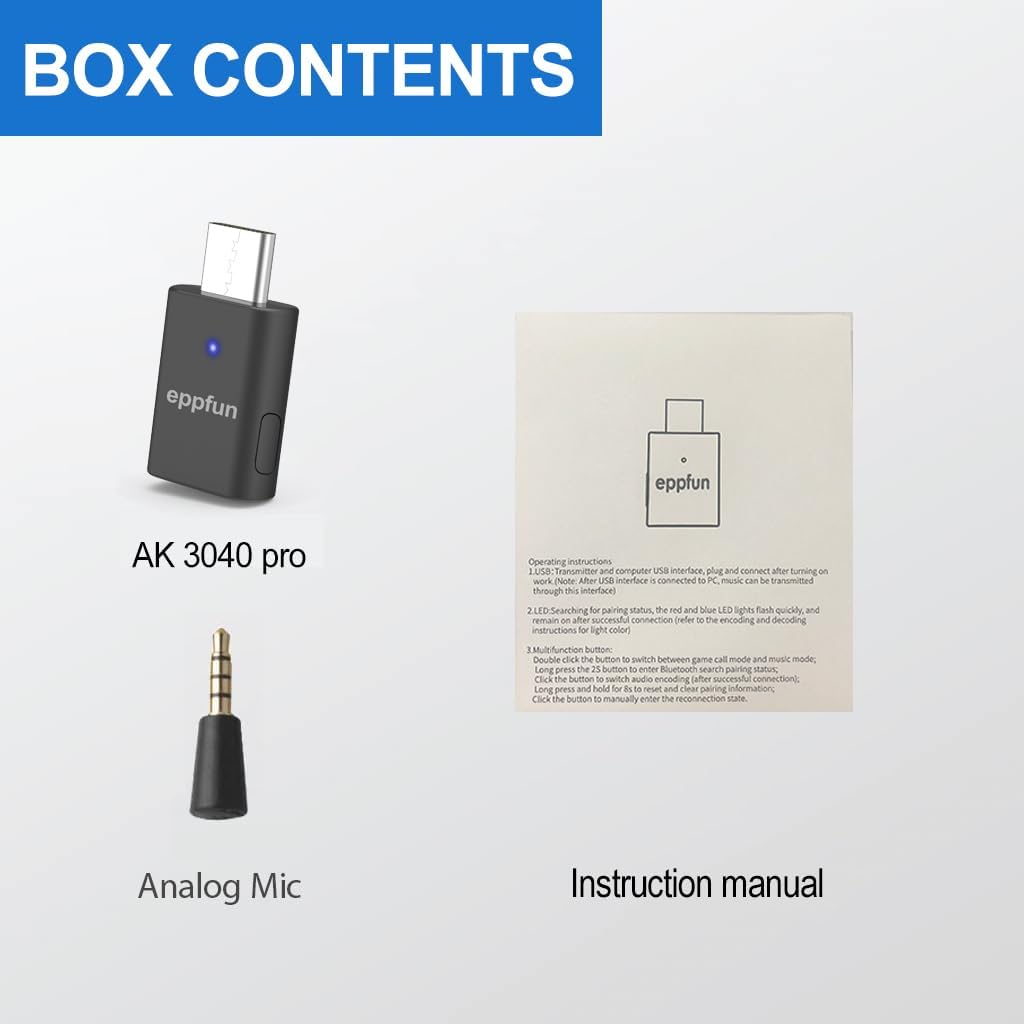
Image: Contents of the eppfun AK3040Pro package, including the adapter, microphone, and manual.
Vodič za postavljanje
The eppfun AK3040Pro is designed for easy setup, requiring no driver installation for most compatible devices.
Initial Connection and Pairing
Umetnite adapter: Plug the eppfun AK3040Pro USB-C Bluetooth adapter into an available USB 2.0/3.0 port on your device (e.g., PS5, Nintendo Switch, PC, Mac).

Image: The eppfun AK3040Pro USB C Bluetooth Adapter.
Automatski način uparivanja: For the first time use, the LED indicator on the adapter will automatically flash red and blue, indicating it has entered pairing mode.
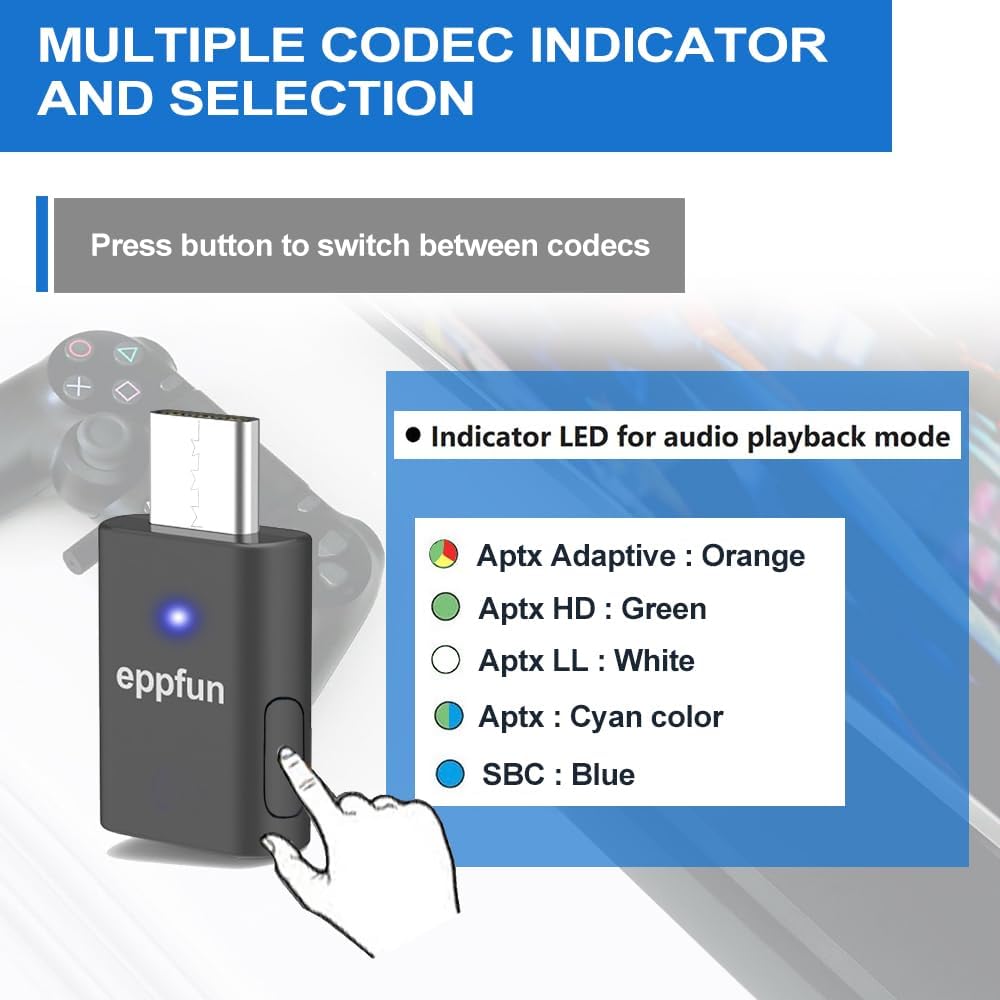
Image: The eppfun AK3040Pro adapter connected to a laptop, illustrating its plug-and-play functionality.
Pair with Your Audio Device: Put your Bluetooth headphones or speaker into their pairing mode. The adapter will automatically connect to your device. Once successfully paired, the LED indicator will remain steadily lit.

Image: The eppfun AK3040Pro adapter connected to a PS5, demonstrating its use as a gaming companion.
Connect the Analog Microphone: If you intend to use voice chat, plug the included mini analog microphone into the 3.5mm jack on your controller (e.g., PS5 controller) or directly into the adapter if it has a dedicated port for it.

Image: Multi-device compatibility diagram for the eppfun AK3040Pro, highlighting its use with audio devices and various platforms.
Uputstvo za upotrebu
Odabir kodeka
The AK3040Pro supports multiple audio codecs. You can switch between them by pressing the button on the adapter. The LED indicator color will change to reflect the active codec:
- Aptx Adaptive: Narandžasta LED
- Aptx HD: Zelena LED
- Aptx LL: Bijela LED
- Aptx: Cyan color LED
- SBC: Plava LED

Image: Codec indicator and selection guide for the eppfun AK3040Pro, showing how to switch codecs via the button.

Image: The eppfun AK3040Pro adapter connected to a PS5, demonstrating its use as a gaming companion.
Duplex Mode (Game Call + Music)
When using the adapter with PS4 or PS5, it may automatically switch to "Duplex mode" for game calls and music. In this mode, the audio quality might decrease, potentially with some sizzling noise.
To switch back to music-only mode (if not needed for calls), double-click the button on the adapter.

Image: The eppfun AK3040Pro adapter connected to a Nintendo Switch, enabling wireless audio for gaming.
Održavanje
To ensure the longevity and optimal performance of your eppfun AK3040Pro adapter, please follow these simple maintenance guidelines:
- čišćenje: Koristite meku, suhu krpu za brisanje adaptera. Izbjegavajte upotrebu tečnih sredstava za čišćenje ili abrazivnih materijala.
- Skladištenje: Adapter čuvajte na hladnom i suhom mjestu, dalje od direktne sunčeve svjetlosti i ekstremnih temperatura.
- Rukovanje: Handle the adapter gently. Avoid dropping it or subjecting it to strong impacts.
- Održavanje luke: Ensure the USB-C port and the 3.5mm jack (if used for the mic) are free from dust and debris.
Rješavanje problema
If you encounter issues with your eppfun AK3040Pro, please refer to the following common solutions:
- Cannot Pair or Connect:
If your headphones have been previously connected to other Bluetooth devices, their internal Bluetooth connection information might not be automatically cleared. To resolve this, you need to reset your headphones and clear any previous pairing information before attempting to match them with the AK3040Pro. This is especially common with high-end Bluetooth earphones like Apple or Beat earphones.
- Poor or Intermittent Sound Quality:
The sound quality can be affected by the audio decoding codec in use. If you experience poor or intermittent sound, try switching the audio decoding codec by pressing the button on the adapter. Ensure your headphones also support the selected codec for optimal performance. The product supports APTX/APTX LL/SBC/APTX HD/APTX adaptive.
- Duplex Mode Audio Issues (PS4/PS5):
When connected to PS4 or PS5, the adapter may automatically enter Duplex mode (game call + music), which can result in decreased music quality or sizzling noise. To return to music-only mode, double-click the button on the adapter.
Image: Troubleshooting tips for common issues like pairing and sound quality.
Specifikacije
| Feature | Detalj |
|---|---|
| Brand | eppfun |
| Broj modela | AK3040Pro |
| Hardversko sučelje | USB tip C |
| Data Link Protocol | Bluetooth, USB |
| Bluetooth verzija | 5.2 |
| Podržani audio kodeci | aptxX-LL, SBC, Aptx, Aptx adaptive, Aptx-HD |
| Kompatibilni uređaji | Desktop, Game Console, Headphone, Smartphone, Windows, Mac OS, PS4, PS5, Nintendo Switch, Linux |
| Težina artikla | 0.32 unci (približno 9 grama) |
| Dimenzije paketa | 4.84 x 3.58 x 0.67 inča |
Garancija i podrška
eppfun is committed to providing high-quality audio and video products. If you encounter any issues that cannot be resolved using the troubleshooting guide, or if you have questions regarding product quality or infringement, please contact our customer service.
For further assistance, you can visit our official website or contact us via email:
- Webstranica: www.eppfun.com
- Email: service@eppfun.com
Ovaj uređaj je u skladu sa dijelom 15 FCC pravila. Rad je podložan sljedeća dva uslova: (1) Ovaj uređaj ne smije uzrokovati štetne smetnje i (2) Ovaj uređaj mora prihvatiti sve primljene smetnje, uključujući smetnje koje mogu uzrokovati neželjeni rad.
©2024 All rights reserved. eppfun and the eppfun logo are trademarks of ChangSheng. Made in China.
Ask a question about this manual
Ask about setup, troubleshooting, compatibility, parts, safety, or missing instructions. Manuals+ will review the question and use this page’s manual context to help answer it.