
1. Uvod
Thank you for choosing the 5 Core 4-Channel Audio Mixer (Model MX 4CH ORG). This compact and versatile mixer is designed for various audio applications, including DJ setups, studio recording, karaoke, and live streaming. It features multiple input options, phantom power, Bluetooth connectivity, a USB audio interface, and built-in effects to enhance your sound. Please read this manual thoroughly to ensure proper setup, operation, and longevity of your device.
2. Važna sigurnosna uputstva
- Prije upotrebe uređaja pažljivo pročitajte ova uputstva.
- Sačuvajte ovaj priručnik za buduću upotrebu.
- Obratite pažnju na sva upozorenja na proizvodu i u uputama za upotrebu.
- Slijedite sva uputstva.
- Nemojte koristiti ovaj aparat u blizini vode.
- Čistite samo suhom krpom.
- Ne blokirajte ventilacijske otvore. Instalirajte u skladu s uputama proizvođača.
- Ne postavljajte u blizini izvora toplote kao što su radijatori, grejni registri, peći ili drugi uređaji (uključujući ampLifiers) koji proizvode toplotu.
- Nemojte narušiti sigurnosnu svrhu polariziranog ili uzemljenog utikača. Polarizovani utikač ima dva noža od kojih je jedan širi od drugog. Utikač sa uzemljenjem ima dva noža i treći uzemljeni utikač. Široka oštrica ili treći zupci su osigurani za vašu sigurnost. Ako isporučeni utikač ne stane u vašu utičnicu, obratite se električaru za zamjenu zastarjele utičnice.
- Zaštitite kabl za napajanje od gaženja ili priklještenja, posebno na utikačima, utičnicama i na mjestu gdje izlaze iz uređaja.
- Koristite samo dodatke/pribor koje je naveo proizvođač.
- Isključite ovaj aparat iz struje tokom oluja sa grmljavinom ili kada se ne koristi duži vremenski period.
- Sav servis prepustite kvalifikovanom servisnom osoblju. Servisiranje je potrebno kada je uređaj oštećen na bilo koji način, kao što je oštećen kabl za napajanje ili utikač, prolivena tečnost ili su predmeti upali u aparat, ako je uređaj bio izložen kiši ili vlazi, ne radi normalno , ili je odbačeno.
3. Proizvod je gotovview
The 5 Core 4-Channel Audio Mixer is a compact and powerful tool for audio enthusiasts. It features a user-friendly interface with clearly labeled controls for easy operation.
3.1 Ključne karakteristike
- 4-Channel Mixing: Two mono channels and two stereo channels for versatile input options.
- XLR & 1/4" Inputs: Supports both balanced XLR and unbalanced 1/4" inputs.
- +48V fantomsko napajanje: Provides power for condenser microphones on mono channels.
- Bluetooth 5.4 povezivanje: Besprijekorno bežično strimovanje zvuka sa kompatibilnih uređaja.
- USB audio interfejs: Connects to a computer for direct recording and playback.
- 2-pojasni ekvilajzer: High and Low frequency controls on each channel for sound shaping.
- Delay Effects: Built-in delay and repeat effects to add depth to your mix.
- Kompaktan i prenosiv dizajn: Lightweight and easy to transport for various setups.
3.2 Mixer Layout and Controls
Familiarize yourself with the various inputs, outputs, and controls on your mixer. Refer to the diagram below for a visual guide.
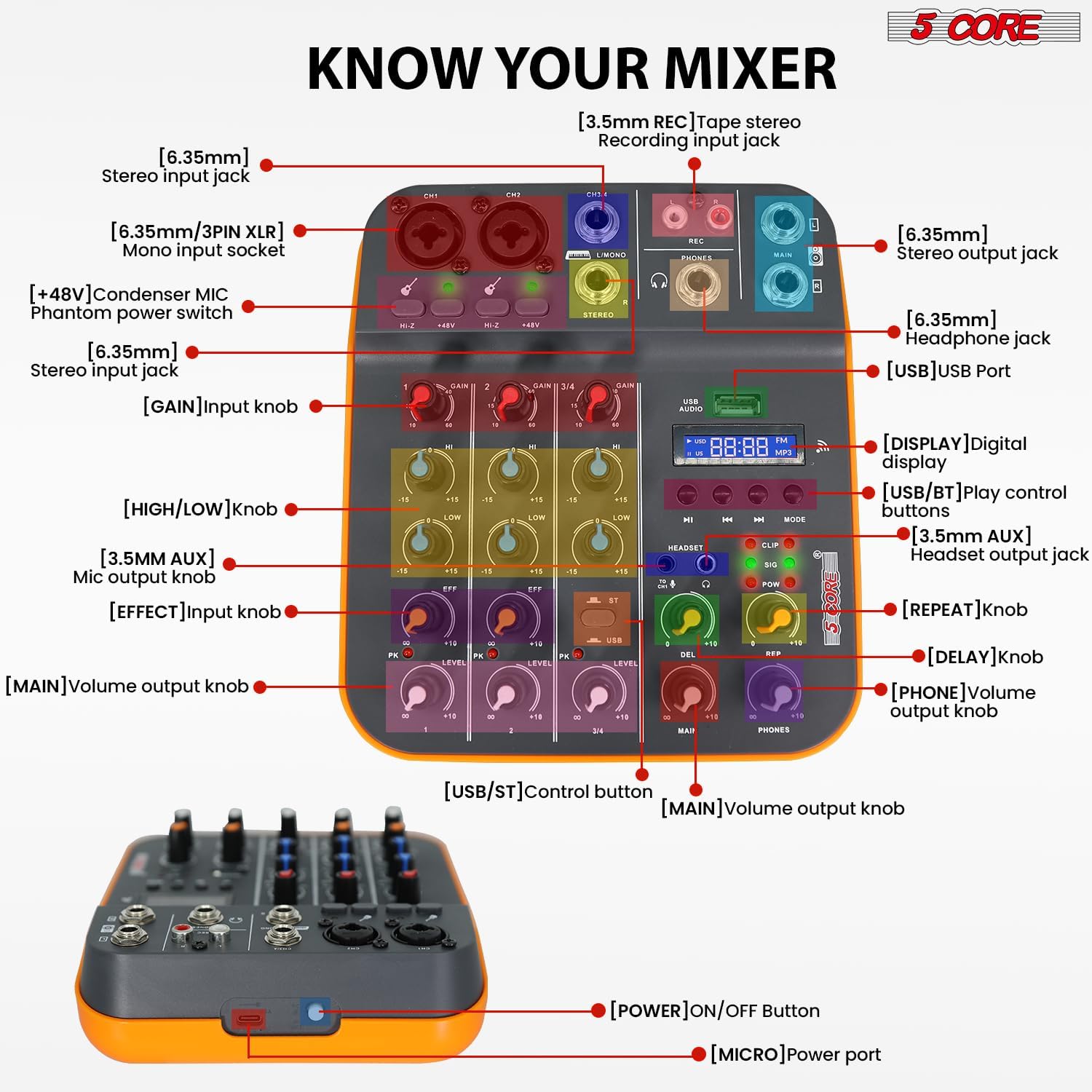
Figure 3.2.1: Front Panel Layout and Controls. This image displays the top view of the 5 Core 4-Channel Audio Mixer with various components labeled, including XLR/1/4" mono input sockets, stereo input jacks, REC output, MAIN output, PHONES output, USB port, digital display, and control knobs for GAIN, HIGH, LOW, EFF (Effect), LEVEL, DEL (Delay), REP (Repeat), MAIN, and PHONES volume. Also shown are the +48V phantom power switches and HI-Z switches.
- [6.35mm/3PIN XLR] Mono input socket: For connecting microphones or mono instruments.
- [HI-Z] Switch: For high impedance inputs, typically for guitars.
- [+48V] Condenser MIC Phantom power switch: Aktivira fantomsko napajanje za kondenzatorske mikrofone.
- [6.35mm] Stereo input jack: For connecting stereo line-level devices.
- [GAIN] Input knob: Podešava ulaznu osjetljivost za svaki kanal.
- [HIGH/LOW] knob: 2-band equalizer for adjusting high and low frequencies.
- [EFF] Effect knob: Kontroliše količinu efekta primijenjenog na kanal.
- [LEVEL] Main volume output knob: Adjusts the overall volume of each channel.
- [USB] USB Port: For connecting to a computer or USB drive.
- [DISPLAY] Digital display: Prikazuje trenutni način rada i informacije o stazi.
- [USB/BT] Play control buttons: Controls for USB/Bluetooth playback (Play/Pause, Skip, Mode).
- [HEADSET] Headset output jack: Za povezivanje slušalica.
- [DEL] Delay knob: Adjusts the delay time of the effect.
- [REP] Repeat knob: Adjusts the number of repetitions for the delay effect.
- [MAIN] Volume output knob: Controls the overall main output volume.
- [PHONES] Volume output knob: Controls the headphone output volume.
- [POWER] ON/OFF Button: Located on the side/rear for turning the unit on/off.
- [MICRO] Power port: USB power input.
4. Vodič za postavljanje
4.1 Powering the Mixer
The mixer can be powered in three ways:
- Računar: Connect the mixer to a computer's USB port using a USB cable.
- adapter za napajanje: Use a standard USB power adapter (not included) to connect to a wall outlet.
- Power bank: For portable use, connect to a power bank (not included).
Ensure the power source provides sufficient voltage (5V/2A recommended). Once connected, press the [POWER] ON/OFF button to turn on the mixer.
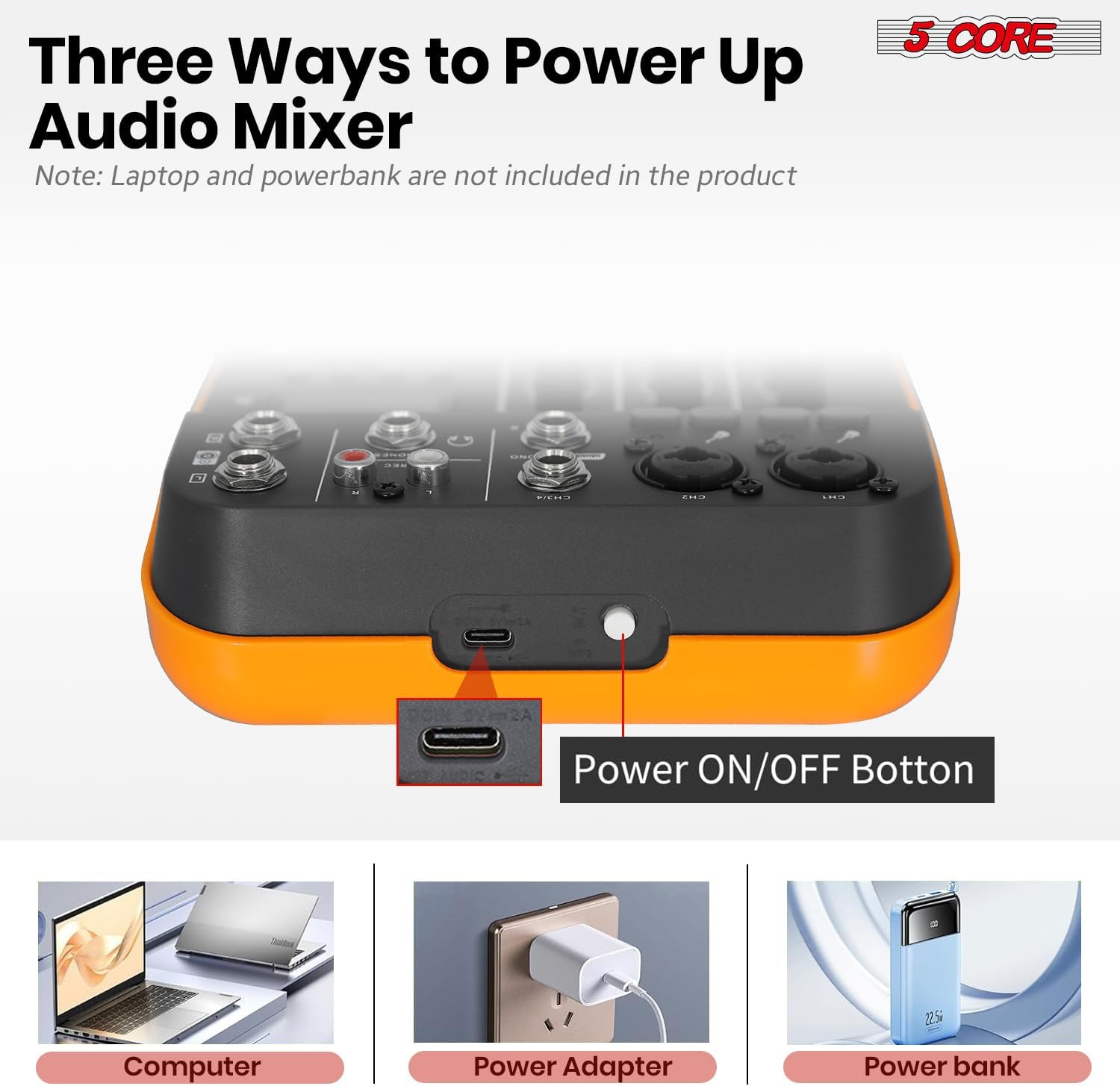
Figure 4.1.1: Powering Options for the Audio Mixer. This image illustrates connecting the mixer to a laptop, a wall adapter, and a power bank for power supply.
4.2 Povezivanje mikrofona i instrumenata
- Mono Inputs (CH1, CH2): Use XLR or 1/4" cables to connect microphones or mono instruments.
- Fantomska snaga: For condenser microphones, press the +48V switch on the respective channel. The indicator light will illuminate. Caution: Do not activate +48V phantom power for dynamic microphones or ribbon microphones unless specified by the manufacturer, as it may cause damage.
- High Impedance (HI-Z): If connecting a guitar or bass directly, press the HI-Z switch for optimal signal.
- Stereo Inputs (CH3/4): Use 1/4" cables to connect stereo line-level devices such as keyboards, media players, or other mixers.

Figure 4.2.1: Phantom Power and Input Connections. This image highlights the +48V phantom power switch and the XLR/1/4" combo inputs for microphones and instruments.
4.3 Connecting to a Computer for Recording (USB Audio Interface)
The mixer features a built-in USB audio interface for direct connection to your computer, enabling recording and playback.
- Connect the mixer's USB port to your computer using a USB cable.
- Your computer should automatically detect the mixer as an audio device. No special drivers are usually required for basic functionality.
- Open your preferred Digital Audio Workstation (DAW) software (e.g., Audacity, GarageBand, Ableton Live).
- In your DAW's audio settings, select the mixer as your input and output device.
- You can now record audio from the mixer into your computer and play back audio from your computer through the mixer.

Figure 4.3.1: USB Audio Interface for PC Recording. This image depicts the mixer connected to a laptop, demonstrating its use as an audio interface for music production.

Figure 4.3.2: Computer to Mixer Audio Signal Flow. This diagram shows how computer music signals can be sent to the audio mixer and how audio mixer signals can be recorded by a computer program, with an emphasis on switching to PC mode.
4.4 Bluetooth povezivost
The mixer supports Bluetooth 5.4 for wireless audio streaming from your smartphone, tablet, or other Bluetooth-enabled devices.
- Pritisnite MODE button on the mixer until "BT" appears on the digital display.
- On your Bluetooth device, search for available devices and select "5 CORE MIXER" (or similar name).
- Once paired, you can stream audio wirelessly to the mixer. Use the play control buttons (PLAY/PAUSE, SKIP) on the mixer to control playback.

Figure 4.4.1: Seamless Wireless Connectivity. This image illustrates the mixer's Bluetooth capability, showing it connected to a smartphone for wireless music streaming.
4.5 Izlazne veze
- Main Output (MAIN): Povežite se sa glavnim zvučnicima ili amplifier using 1/4" cables.
- Izlaz za slušalice (PHONES): Connect your headphones to the 1/4" headphone jack for monitoring.
- REC Output (REC): Use for dedicated recording devices.

Figure 4.5.1: Versatile Compatibility. This image demonstrates the mixer's ability to connect with a wide range of audio equipment, including headphones, smartphones, power amplifiers, and wireless microphones.
5. Uputstvo za upotrebu
5.1 Osnovno miješanje
- Set GAIN: Podesite GAIN knob for each input channel to achieve an optimal input level. Avoid clipping (indicated by the PK/CLIP light).
- Podešavanje ekvilajzera: Koristite HIGH i LOW dugmad za oblikovanje tona svakog kanala.
- Primijenite efekte: Okrenite EFF knob to send a portion of the channel's signal to the built-in effects processor.
- Set Channel Level: Podesite NIVO knob for each channel to balance the mix.
- Glavni volumen: Control the overall output volume using the MAIN dugme za jačinu zvuka.
5.2 Using Delay Effects
The mixer includes built-in delay and repeat effects.
- DEL (Delay): Adjust this knob to control the delay time.
- REP (ponovi): Adjust this knob to control the number of repetitions for the delay effect.
- Osigurajte EFF knob on the desired channel is turned up to send signal to the effects processor.
5.3 USB/MP3 Playback
Umetnite USB disk koji sadrži MP3 files into the USB port. Use the play control buttons (PLAY/PAUSE, SKIP, MODE) to navigate and play tracks. The digital display will show track information.
5.4 Monitoring
Povežite slušalice na PHONES jack and adjust the PHONES volume knob to monitor your mix without affecting the main output.
6. Održavanje
- čišćenje: Use a soft, dry cloth to clean the mixer's surface. Do not use liquid cleaners or solvents.
- Skladištenje: Mikser čuvajte na hladnom i suhom mjestu, dalje od direktne sunčeve svjetlosti i ekstremnih temperatura.
- Rukovanje: Izbjegavajte ispuštanje ili izlaganje miksera jakim udarcima.
- ventilacija: Uvjerite se da otvori za ventilaciju nisu blokirani kako biste spriječili pregrijavanje.
7. Otkrivanje problema
7.1 Nema zvučnog izlaza
- Provjerite je li mikser uključen.
- Ensure all cables are securely connected to the correct inputs and outputs.
- Proverite da li je MAIN volume and individual channel NIVO knobs are turned up.
- Check the volume levels on your connected speakers or amplifier.
- If using headphones, ensure the PHONES volume knob is turned up.
7.2 Microphone Not Working / Low Volume
- Ensure the microphone is connected to a mono input (CH1 or CH2).
- Podesite GAIN knob for the microphone channel.
- If using a condenser microphone, ensure +48V phantom power is activated for that channel.
- Test the microphone with another device to confirm it is functional.
7.3 Problemi s Bluetooth vezom
- Ensure the mixer is in Bluetooth mode (display shows "BT").
- Make sure your Bluetooth device is within range and Bluetooth is enabled.
- Pokušajte odvojiti i ponovo upariti uređaj.
- Ensure no other devices are actively connected to the mixer via Bluetooth.
7.4 Recording Issues via USB
- Verify the USB cable is properly connected between the mixer and your computer.
- Check your computer's sound settings and your DAW's audio preferences to ensure the mixer is selected as the input device.
- Podesite MAIN output level on the mixer, as this often controls the signal sent to the USB output.
8. Specifikacije
| Feature | Detalj |
|---|---|
| Brand | 5 JEZGRO |
| Model | MX 4CH ORG |
| Kanal br. | 4 (2 mono, 2 stereo) |
| Vrsta materijala | Plastika |
| Voltage | 100-240V (Input), 5V (Operating) |
| Bluetooth verzija | 5.4 |
| Snimanje sa računara | Da (putem USB-a) |
| Equalizer | 2-Band EQ (High, Low) per channel |
| Fantomska snaga | +48V |
| USB povezivanje | Yes (Audio Interface, MP3 Playback) |
| Efekti | Delay, Repeat |
| Frekvencijski odziv | 20Hz - 20kHz |
| Dimenzije proizvoda | 3"D x 8"Š x 9"H |
| UPC | 810144135113 |
9. Jamstvo i podrška
Ovaj proizvod dolazi sa a 1-mjesečna garancija from the date of purchase. For warranty claims or technical support, please contact 5 Core customer service through the retailer where the product was purchased or visit the official 5 Core webstranica za kontakt informacije.
Molimo sačuvajte dokaz o kupovini radi provjere garancije.
10. Videozapisi proizvoda
10.1 5 Core Audio Mixer 4 Channel DJ Soundboard Overview
Ovaj video pruža brz pregledview of the 5 Core 4-Channel Audio Mixer, highlighting its key features such as 2 mono and 2 stereo channels, Bluetooth 5.4, USB connectivity, MP3 playback, +48V phantom power, 2-band EQ, and delay effects. It demonstrates the mixer's suitability for recording, mixing, and performance.
10.2 Audio Mixer USB Interface XLR Mixing Console 4 Channel Features
This video showcases the 5 Core 4-Channel Audio Mixer, emphasizing its 2 mono and 2 stereo channels, Bluetooth 5.4, USB and MP3 capabilities, +48V phantom power for studio microphones, 20Hz to 20kHz frequency range, delay effects, and 2-band EQ. It highlights the mixer's lightweight and orange design, suitable for various audio production needs.