
1. Uvod
This manual provides essential information for the proper use and maintenance of your EBTOOLS 8-Inch 2-in-1 Pocket PC Computer. Please read this guide thoroughly before operating the device to ensure optimal performance and longevity. This compact and versatile device features an 8-inch touchscreen, a 360-degree rotating design, and runs on Windows 11 Pro.

Image: The EBTOOLS 8-Inch 2-in-1 Pocket PC shown in its tablet configuration, with a scenic road displayed on the screen.
2. Sadržaj paketa
Provjerite da li se sve stavke navedene u nastavku nalaze u paketu vašeg proizvoda:
- 1 x EBTOOLS 8-Inch 2-in-1 Laptop
- 1 x kabl za napajanje
- 1 x adapter za napajanje (US utikač)
- 2 x User Manuals (this document is one of them)

Image: The EBTOOLS 8-Inch 2-in-1 Pocket PC, its power supply cord, and the US plug adapter, laid out as they would appear in the package.
3. Proizvod je gotovview
The EBTOOLS 8-Inch 2-in-1 Pocket PC is designed for portability and versatility. It features a compact form factor and a 360-degree rotating display, allowing it to function as both a laptop and a tablet.
Ključne karakteristike:
- procesor: N100 CPU, capable of up to 3.4GHz frequency.
- Memorija: 12GB LPDDR5 RAM memorije.
- Skladištenje: 512GB M.2 SSD, expandable up to 2TB.
- Prikaz: 8-inch touchscreen with 360-degree rotation.
- Povezivanje: WiFi6 (2.4G/5G band) and Bluetooth 5.2.
- kamera: 2MP 30 Frame HD built-in front camera for video calls.
- tastatura: Edge-less full-size QWERTY keyboard with integrated touchpad.
- baterija: Built-in 5000mAh polymer lithium battery, providing 4-6 hours of use.
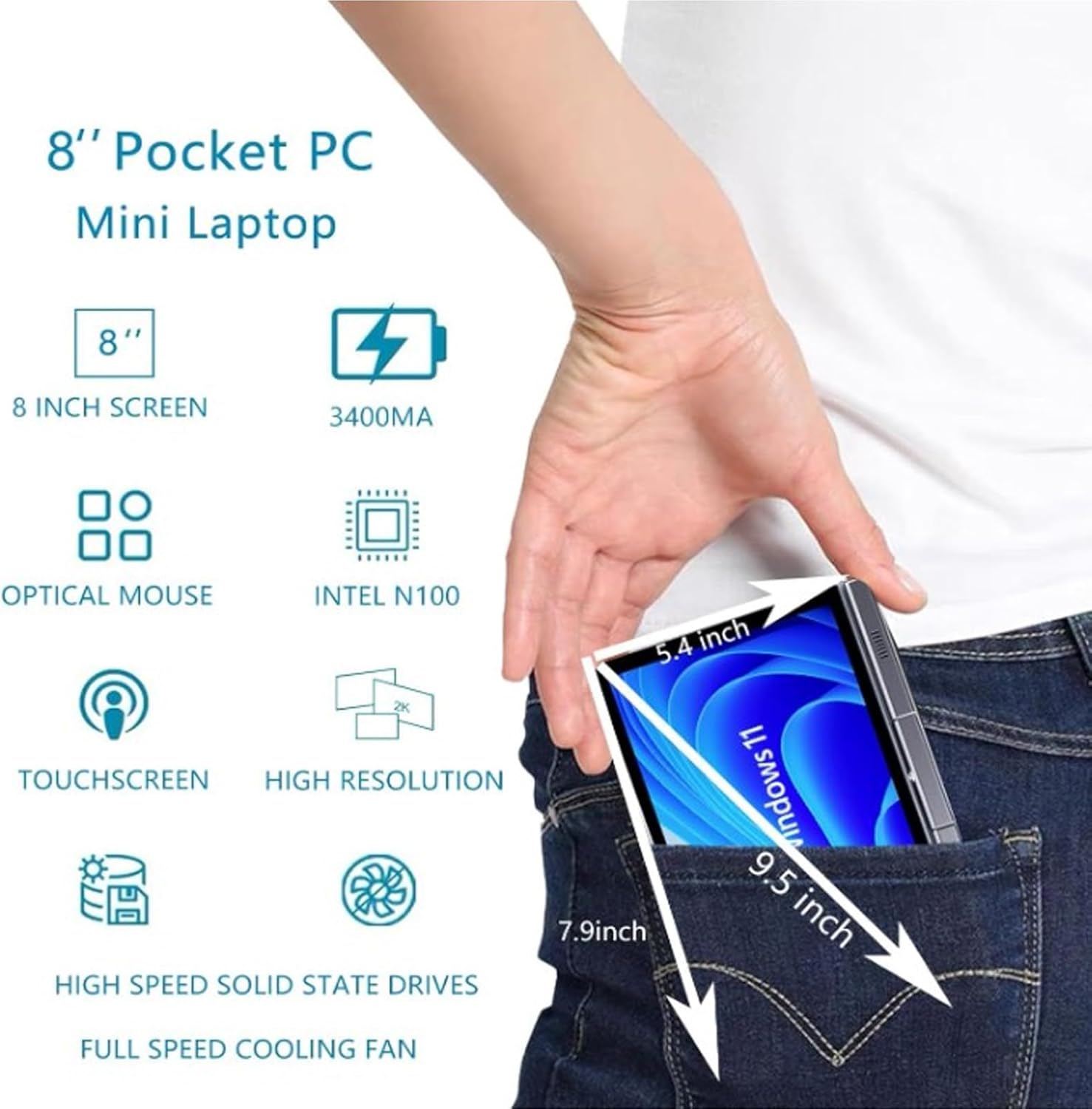
Image: A visual representation of the 8-inch Pocket PC's compact dimensions, demonstrating its portability by showing it fitting into a standard pocket.

Image: A labeled diagram highlighting the various ports (USB 3.0, Type-C, Audio, RJ45) and keyboard components (Front Camera, Speaker, Power Light, Power Button, Left/Right/Middle Mouse Buttons) of the EBTOOLS 8-Inch 2-in-1 Pocket PC.
4. Podešavanje
4.1 Početno uključivanje i punjenje
- Napunite uređaj: Before first use, connect the power adapter to the Type-C port on the device and plug it into a power outlet. Allow the device to charge fully. The power light indicator will show charging status.
- Uključeno: Press and hold the Power Button located on the keyboard deck until the screen illuminates.
- Početno podešavanje: Slijedite upute na ekranu da biste dovršili proces instalacije sustava Windows 11 Pro, uključujući odabir jezika, mrežnu vezu i kreiranje korisničkog računa.
The device is designed for immediate use upon completion of the initial Windows setup.
5. Uputstvo za upotrebu
5.1 Tastatura i tačped
- The device features an edge-less full-size QWERTY keyboard for typing.
- The integrated touchpad supports standard mouse functions, including moving the pointer, scrolling, and left/right clicks. The left, right, and middle mouse buttons are clearly indicated on the diagram.
5.2 Rad na ekranu osjetljivom na dodir
- The 8-inch display is a multi-touch screen. Use gestures such as tap, swipe, pinch-to-zoom, and rotate for navigation and interaction with applications.
5.3 Rotacija od 360 stepeni
- The display can be rotated 360 degrees to switch between laptop mode (traditional clamshell) and tablet mode (screen folded back against the base).
- When in tablet mode, the keyboard is automatically disabled to prevent accidental input.
5.4 Povezivanje perifernih uređaja
- USB 3.0: Connect external devices such as USB drives, mice, or keyboards to the USB 3.0 port.
- Tip C: Koristi se za punjenje i prijenos podataka.
- High Definition Multimedia Interface (HDMI): Connect an external monitor or projector using an HDMI cable for extended display.
- 3.5mm Standard Headphone Jack: Povežite slušalice ili spoljne zvučnike.
- RJ45 mrežni port: Spojite Ethernet kabel za žičanu internetsku vezu.
5.5 Bežično povezivanje
- WiFi6: Access wireless networks (2.4G and 5G bands) for internet connectivity. Enable Wi-Fi through Windows settings.
- Bluetooth 5.2: Pair with Bluetooth-enabled devices such as headphones, speakers, or other peripherals. Enable Bluetooth through Windows settings.
6. Održavanje
6.1 Čišćenje
- Za čišćenje ekrana i vanjskih površina koristite meku krpu koja ne ostavlja dlačice. Za tvrdokorne mrlje, lagano obrišiteampOperite krpu vodom ili sredstvom za čišćenje ekrana.
- Izbjegavajte upotrebu jakih hemikalija, abrazivnih sredstava za čišćenje ili aerosolnih sprejeva direktno na uređaju.
- Prije čišćenja provjerite je li uređaj isključen i isključen iz utičnice.
6.2 Skladištenje
- Uređaj čuvajte na hladnom i suhom mjestu, dalje od direktne sunčeve svjetlosti i ekstremnih temperatura.
- If storing for an extended period, ensure the battery is charged to approximately 50% to preserve battery health.
7. Otkrivanje problema
This section addresses common issues you might encounter with your EBTOOLS 8-Inch 2-in-1 Pocket PC.
7.1 Uređaj se ne uključuje
- Ensure the device is fully charged. Connect the power adapter and wait a few minutes before attempting to power on again.
- Verify the power adapter and cable are securely connected and the power outlet is functional.
- Pokušajte držati dugme za napajanje 10-15 sekundi da biste izvršili hard reset.
7.2 Wi-Fi or Bluetooth Connectivity Issues
- Check if Wi-Fi or Bluetooth is enabled in Windows settings.
- Restart the device and your wireless router/Bluetooth device.
- Ensure you are within range of the Wi-Fi network or Bluetooth device.
- Update wireless drivers if available.
7.3 Ekran osjetljiv na dodir ne reaguje
- Ponovo pokrenite uređaj.
- Provjerite je li ekran čist i bez prljavštine.
- Check for any system updates that might include touchscreen driver fixes.
7.4 Kratak vijek trajanja baterije
- Prilagodite postavke napajanja u sustavu Windows kako biste optimizirali potrošnju baterije.
- Zatvorite nepotrebne aplikacije koje rade u pozadini.
- Smanjite svjetlinu ekrana.
- Ensure the device is not running resource-intensive tasks continuously.
8. Specifikacije
| Feature | Specifikacija |
|---|---|
| Operativni sistem | Windows 11 Pro |
| Veličina ekrana | 8 inča |
| Procesor | N100 CPU (up to 3.4GHz) |
| RAM | 12GB LPDDR5 |
| Skladištenje | 512GB M.2 SSD (supports up to 2TB) |
| Prednja kamera | 2MP 30 Frame HD Built-In Camera |
| Bluetooth | BT 5.2 |
| Wireless Fidelity Type | 2.4G / 5G Band (WiFi6) |
| Interfejsi | 1 x USB3.0, 1 x 3.5mm Standard Headphone Jack, 1 x High Definition Multimedia Interface Port, 1 x Type-C, 1 x RJ45 Network Port |
| Vrsta baterije | Ugrađena 5000mAh polimer litijumska baterija |
| Trajanje baterije | 4-6 sati (tipična upotreba) |
| Težina artikla | 2.68 funte (otprilike 1.22 kg) |
| Dimenzije paketa | 9.45 x 7.09 x 2.36 inča |
9. Garancija i podrška
9.1 Jamstvo za proizvod
Specific warranty details for your EBTOOLS 8-Inch 2-in-1 Pocket PC are typically provided with your purchase documentation or on the manufacturer's official website. Please refer to these resources for information regarding warranty coverage, duration, and terms.
9.2 Korisnička podrška
For technical assistance, troubleshooting beyond this manual, or warranty claims, please contact EBTOOLS customer support. Contact information can usually be found on the product packaging, the manufacturer's webweb-mjestu ili putem vašeg prodavača.
When contacting support, please have your product model number (EBTOOLS9pxf4058ch-12) and purchase information readily available.