
1. Uvod
Thank you for choosing the Kapbom G4-5 360 IP Wi-Fi Bulb Security Camera. This manual provides essential information for the proper installation, operation, and maintenance of your device. Please read this manual thoroughly before use and retain it for future reference.
2. Proizvod je gotovview
The Kapbom G4-5 is a versatile security camera designed to provide comprehensive surveillance with its 360-degree panoramic view and smart features. It integrates seamlessly into standard E27 light bulb sockets for easy installation.
Ključne karakteristike:
- 360 ° panoramsko View: Ensures complete coverage of the environment, eliminating blind spots with full camera rotation for continuous monitoring.
- Wi-Fi Connectivity for Remote Monitoring: Monitor everything in real-time via the companion application on your smartphone, from anywhere.
- Napredni noćni vid: Obtain clear and detailed images even in low-light conditions, thanks to integrated infrared technology.
- Inteligentna detekcija pokreta: Receive automatic alerts on your phone as soon as the camera identifies suspicious movements, allowing for immediate response.
- Dvosmjerni zvuk: Communicate with individuals in the monitored environment for security, convenience, or direct control.

Slika 2.1: Detaljno view of the Kapbom G4-5 camera components. This image highlights the E27 light socket for power, the integrated WiFi module, the microphone, white and infrared LEDs for illumination and night vision, HD lenses for clear imaging, a light sensor for automatic mode switching, and the reset button and SD card slot for local storage and device management.
3. Sadržaj paketa
Molimo Vas da provjerite sadržaj paketa nakon otvaranja. Ako bilo koji artikl nedostaje ili je oštećen, obratite se prodavaču.
- Kapbom G4-5 360 IP Wi-Fi Bulb Security Camera
- Uputstvo za upotrebu
- Mounting Accessories (if applicable, e.g., screws, wall plugs)
4. Podešavanje
4.1 Fizička instalacija
- Ensure the power to the light socket is turned off before installation.
- Carefully screw the Kapbom G4-5 camera into a standard E27 light bulb socket.
- Turn on the power to the light socket. The camera will power on and initiate its self-test sequence.

Slika 4.1: The Kapbom G4-5 camera installed in a universal light socket. This image illustrates the camera's design for easy integration into existing E27 bulb fixtures, highlighting its compatibility and the associated 'Yoosee' application for control and monitoring.
4.2 Preuzimanje aplikacije i kreiranje računa
- Download the companion app (e.g., "Yoosee" or specified app) from your smartphone's app store (iOS App Store or Google Play Store).
- Otvorite aplikaciju i slijedite upute na ekranu da biste kreirali novi račun ili se prijavite ako ga već imate.
4.3 Uparivanje kamere
- In the app, tap the "+" icon or "Add Device" to begin the pairing process.
- Select the option for "Wi-Fi Camera" or "Smart Bulb Camera".
- Follow the app's instructions to connect the camera to your Wi-Fi network. This typically involves scanning a QR code generated by the app or entering your Wi-Fi credentials.
- Wait for the camera to connect. A voice prompt or indicator light will confirm successful connection.
- Nakon povezivanja, možete imenovati kameru i započeti praćenje.
5. Uputstvo za upotrebu
After successful setup, you can access and control your camera through the companion app.
5.1 Uživo View i kontrola panoramiranja/nagiba
- Otvorite aplikaciju i odaberite svoju kameru s popisa uređaja da biste pristupili prijenosu videa uživo.
- Use the on-screen joystick or swipe gestures to pan (horizontal) and tilt (vertical) the camera lens for a 360-degree view.
5.2 Dvosmjerni audio
- Dodirnite ikonu mikrofona u toku prijenosa uživo view govoriti preko zvučnika kamere.
- Tap the speaker icon to listen to audio from the camera's environment.
5.3 Snimanje i reprodukcija
- The camera supports continuous recording or motion-triggered recording to a microSD card (not included) or cloud storage (subscription may be required).
- To view snimljeno footage, navigate to the "Playback" or "History" section in the app.
5.4 Detekcija pokreta i upozorenja
- Omogućite detekciju pokreta u postavkama kamere unutar aplikacije.
- Adjust sensitivity levels and set up alert notifications to receive instant alerts on your smartphone when motion is detected.
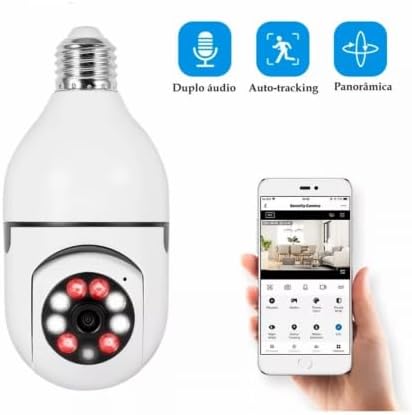
Slika 5.1: The Kapbom G4-5 camera alongside a smartphone displaying its control application. The app interface features icons for 'Dual Audio', 'Auto-tracking', and 'Panoramic' view, illustrating the camera's interactive functionalities for comprehensive monitoring and communication.
6. Održavanje
6.1 Čišćenje
- Prije čišćenja provjerite je li kamera isključena.
- Use a soft, dry cloth to wipe the camera lens and body. Do not use liquid cleaners or abrasive materials.
6.2 Ažuriranja firmvera
- Regularly check the app for available firmware updates. Updates can improve performance, add new features, and enhance security.
- Follow the in-app instructions for firmware updates. Do not power off the camera during an update.
6.3 Upravljanje SD karticom
- If using a microSD card for storage, ensure it is formatted periodically through the app to maintain optimal recording performance.
- Replace the microSD card if it becomes corrupted or reaches its end of life.
7. Otkrivanje problema
If you encounter issues with your Kapbom G4-5 camera, refer to the following common problems and solutions:
- Kamera se ne uključuje: Ensure the light socket has power and the camera is screwed in correctly. Test the socket with a regular bulb.
- Nije moguće povezivanje na Wi-Fi:
- Ensure your Wi-Fi network is 2.4GHz (5GHz networks are generally not supported).
- Provjerite tačnost lozinke za Wi-Fi.
- Približite kameru svom Wi-Fi ruteru.
- Reset the camera using the reset button (refer to Figure 2.1 for location) and try pairing again.
- Nema slike ili je slika mutna:
- Provjerite brzinu vaše internet veze.
- Očistite sočivo fotoaparata mekom, suvom krpom.
- Dvosmjerni audio ne radi:
- Provjerite da li su aplikaciji na vašem pametnom telefonu odobrena dopuštenja za mikrofon i zvučnik.
- Provjerite postavke jačine zvuka i na telefonu i u aplikaciji.
- Obavještenja o kretanju nisu primljena:
- Provjerite je li detekcija pokreta omogućena u postavkama aplikacije.
- Provjerite postavke obavještenja na telefonu kako biste bili sigurni da je aplikaciji dozvoljeno slanje obavještenja.
- Podesite osjetljivost detekcije pokreta.
8. Specifikacije
| Brand | Kapbom (Generic) |
| Naziv modela | G4-5 (camera h45) |
| Tehnologija povezivanja | Bežično (Wi-Fi 2.4 GHz) |
| Application Environment | Outdoor Security (suitable for covered outdoor areas) |
| Posebne karakteristike | HD Resolution, Motion Sensor, Night Vision, Two-Way Audio, Barking Detection, Frame Rate Control |
9. Garancija i podrška
Specific warranty information for the Kapbom G4-5 camera is not provided in this manual. Please refer to the warranty card included with your product or contact your retailer for details regarding warranty coverage and support services.