
1. Uvod
This manual provides essential information for setting up, operating, and maintaining your VIZIO 32-inch V-Series Smart HD TV, model VHD32M-0810. This television features a 720p Full Array LED display, integrated smart TV capabilities, Bluetooth connectivity, and built-in support for Apple AirPlay 2 and Chromecast.

Slika 1.1: Prednja strana view of the VIZIO 32-inch V-Series Smart HD TV showcasing its smart interface.
2. Šta se nalazi u kutiji
Verify that all the following components are included with your VIZIO TV:
- VIZIO 32-inch V-Series Smart HD TV
- Power Cable
- Daljinski upravljač
- TV stalak (2 komada)
3. Podešavanje
3.1 Fizička postavka
Your VIZIO TV can be placed on a flat surface using the included stand or mounted on a wall (wall mount sold separately).
Pričvršćivanje TV postolja:
- Pažljivo postavite televizor licem prema dolje na meku, čistu površinu kako biste spriječili oštećenje ekrana.
- Poravnajte svaki dio postolja s odgovarajućim utorima na donjoj strani televizora.
- Pričvrstite dijelove postolja pomoću priloženih vijaka. Pazite da su čvrsto zategnuti.

Image 3.1: VIZIO TV with its stand attached, ready for placement.
Montaža na zid:
If you plan to wall-mount your TV, refer to the instructions provided with your specific wall mount kit. Ensure the mount is compatible with VESA standards for a 32-inch television.
3.2 Priključak za napajanje
Connect the power cable to the AC IN port on the back of the TV, then plug the other end into a working electrical outlet.

Image 3.2: Rear panel of the VIZIO TV with input ports visible.
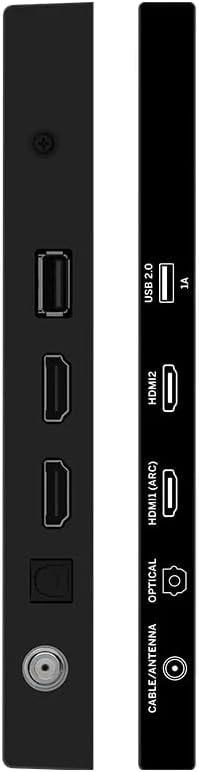
Slika 3.3: Bočna strana view of the VIZIO TV highlighting connectivity ports.
3.3 Početno podešavanje
Prilikom prvog uključivanja, TV će vas voditi kroz proces početnog podešavanja. To uključuje:
- Odabir jezika: Odaberite željeni jezik.
- Mrežna veza: Connect to your home Wi-Fi network using the built-in WiFi 5 dual-band technology for faster and more reliable streaming.
- Podešavanje računa: Follow on-screen prompts to set up or log in to your VIZIO account to access smart features and apps.
- Skeniranje kanala: If using an antenna, perform a channel scan to find available over-the-air broadcasts.
4. Uputstvo za upotrebu
4.1 Daljinski upravljač
The included remote control provides full functionality for navigating your VIZIO Smart TV. It features dedicated buttons for popular streaming services, input selection, and menu access.
Ključne funkcije daljinskog upravljača:
- Dugme za napajanje: Uključuje ili isključuje TV.
- Dugme za unos: Cycles through available input sources (HDMI, USB, etc.).
- Navigation Pad (Arrow Buttons & OK): Koristi se za kretanje kroz menije i odabir opcija.
- Pojačavanje/stišavanje glasnoće: Podešava jačinu zvuka.
- Kanal gore/dolje: Mijenja TV kanale (ako je primjenjivo).
- Namjenski gumbi za aplikacije: Quick access to services like Netflix, Prime Video, Hulu, etc.
- Dugme Meni/Postavke: Pristupa meniju postavki televizora.
Video 4.1: Demonstration of the VIZIO TV remote control and user interface navigation.
4.2 Funkcije pametnog TV-a
Your VIZIO V-Series TV offers a comprehensive smart platform for entertainment:
- Aplikacije za prijenos: Access a wide range of pre-installed and downloadable applications such as Netflix, Prime Video, Disney+, Hulu, YouTube, and more.
- VIZIO WatchFree+: Enjoy hundreds of free channels and movies without subscription fees.
- Apple AirPlay 2: Strimujte sadržaj direktno sa svojih Apple uređaja na TV.
- Ugrađen Chromecast: Cast your favorite entertainment from your phone, tablet, or laptop directly to the TV.
4.3 Povezivanje
The TV provides various connectivity options:
- Bluetooth: Pair wireless headphones or speakers for a personalized audio experience.
- USB: Povežite USB uređaje za reprodukciju medija.
- HDMI: Multiple HDMI ports for connecting external devices like gaming consoles, Blu-ray players, or cable boxes.
- Wi-Fi 5: High-speed wireless internet connection for streaming and smart features.
4.4 Postavke slike i zvuka
Prilagodite svoj viewiskustvo slušanja i zvuka putem menija postavki televizora:
- Načini slike: Select from various preset picture modes (e.g., Vivid, Calibrated Dark, Game, Sports) or customize settings like brightness, contrast, and color.
- Načini zvuka: Adjust audio settings, including presets for different content types, and leverage DTS Virtual X for an enhanced audio experience.
5. Specifikacije
| Feature | Detalj |
|---|---|
| Brand | VIZIO |
| Broj modela | VHD32M-0810 |
| Veličina ekrana | 32 inča |
| Display Technology | LED (Full Array) |
| Rezolucija | 720p |
| Refresh Rate | 60 Hz |
| Tehnologija povezivanja | Bluetooth, USB, Wi-Fi |
| Posebne karakteristike | Chromecast Built-in, Apple AirPlay 2, DTS Virtual X |
| Težina artikla | 12.27 funte |
| Dimenzije proizvoda | 6.6 x 28.18 x 18.9 inča |
6. Održavanje
- Čišćenje ekrana: Use a soft, lint-free cloth specifically designed for electronics. Avoid harsh chemicals or abrasive materials.
- Čišćenje okvira: Wipe the TV frame with a soft, damp tkanina.
- Ažuriranja softvera: Ensure your TV's software is up-to-date for optimal performance and security. Updates are typically downloaded automatically when connected to the internet.
7. Otkrivanje problema
If you encounter issues with your VIZIO TV, try the following steps:
- Nema napajanja:
- Provjerite je li kabel za napajanje sigurno spojen i na televizor i na električnu utičnicu.
- Ensure the outlet is functional by plugging in another device.
- Nema slike/zvuka:
- Provjerite je li na TV-u odabran ispravan ulazni izvor.
- Check all HDMI or other video/audio cables for secure connections.
- Pazite da jačina zvuka nije isključena ili postavljena prenisko.
- Problemi s mrežnom vezom:
- Ponovo pokrenite Wi-Fi ruter i modem.
- Provjerite mrežne postavke televizora kako biste bili sigurni da je povezan na ispravnu mrežu.
- Move the TV closer to the router if signal strength is weak.
- Daljinski upravljač ne reaguje:
- Zamijenite baterije u daljinskom upravljaču.
- Provjerite da nema prepreka između daljinskog upravljača i IR senzora televizora.
- Opći problemi performansi:
- Izvršite meko resetiranje tako što ćete isključiti televizor iz električne utičnice na 60 sekundi, a zatim ga ponovo uključiti.
- If issues persist, consider performing a factory reset (refer to the TV's on-screen settings for this option, as it will erase all personalized settings).
8. Garancija i podrška
This VIZIO TV is offered as an Amazon Renewed product. Amazon Renewed products are backed by the Amazon Renewed Guarantee, which provides a replacement or refund within 90 days of receipt if the product does not work as expected.
For further assistance, please refer to the VIZIO support website or contact Amazon customer service for Amazon Renewed product inquiries.
Additional protection plans may be available for purchase separately, offering extended coverage beyond the Amazon Renewed Guarantee.