
1. Uvod
Hvala na kupoviniasing the LONPOO Mini Hi-Fi Amplifier AMP-615B. This 2-channel stereo ampLifier je dizajniran za pružanje visokokvalitetnog zvuka amplification for your passive speakers, offering versatile connectivity options including Bluetooth 5.3, Optical, Coaxial, USB, and AUX inputs. This manual provides detailed instructions for setup, operation, and maintenance to ensure optimal performance and longevity of your device.
2. Sigurnosna uputstva
- Izvor napajanja: Osigurajte amplifier is connected to a power supply within the specified voltage range (AC 100-240V ~ 50/60Hz).
- ventilacija: Ne blokirajte ventilacijske otvore. Osigurajte dovoljan protok zraka oko uređaja kako biste spriječili pregrijavanje.
- Vlaga: Zadrži amplifier away from water, moisture, and high humidity environments. Do not operate with wet hands.
- toplina: Izbjegavajte postavljanje uređaja u blizinu izvora topline kao što su radijatori, grijalice, peći ili drugi uređaji koji proizvode toplinu.
- čišćenje: Isključite kabel za napajanje prije čišćenja. Koristite suhu, meku krpu. Ne koristite tekuća sredstva za čišćenje ili aerosolna sredstva za čišćenje.
- servisiranje: Ne pokušavajte sami servisirati ovaj proizvod. Sve servise prepustite kvalificiranom servisnom osoblju.
- plasman: Postavite uređaj na stabilnu, ravnu površinu kako biste spriječili njegov pad.
3. Sadržaj paketa
Pažljivo raspakujte kutiju i provjerite da li su sve dolje navedene stavke prisutne i u dobrom stanju. Ako bilo koja stavka nedostaje ili je oštećena, obratite se prodavaču.

The package includes the LONPOO Mini Hi-Fi Amplifier, a remote control for convenient operation, an AC power cord, an optical cable for digital audio, and a quick start guide.
- 1x LONPOO Mini Hi-Fi Ampdizalica (AMP-615B)
- 1x daljinski upravljač
- 1x AC kabel za napajanje
- 1x Optički kabel
- 1x Korisnički priručnik (Kratki vodič)
4. Proizvod je gotovview
4.1 Prednja ploča

The front panel features Treble and Bass controls, a multi-function knob for volume and input selection, AUX IN, USB input, IR receiver, and an indicator light.
- Kontrola visokih tonova: Adjusts high-frequency audio levels.
- BASS kontrola: Adjusts low-frequency audio levels.
- Multi-Function Knob (VOLUME +/- / MODE / POWER ON/OFF):
- Rotate: Adjusts volume.
- Short Press: Cycles through input modes (Bluetooth, AUX, USB, Coaxial, Optical).
- Long Press: Powers the unit On/Off.
- AUX ULAZ (3.5 mm): Audio input for devices with a 3.5mm audio jack.
- USB ulaz: Za reprodukciju zvuka files from a USB flash drive (supports MP3, WAV formats).
- IR (Infrared) Receiver: Prima signale sa daljinskog upravljača.
- Indikatorsko svjetlo: Displays the current status/input mode:
- Red: Standby (Power Off)
- Plava: Bluetooth ulaz
- Zelena: AUX ulaz
- Yellow: Coaxial Input
- Light Blue: Optical Input
4.2 Zadnja ploča
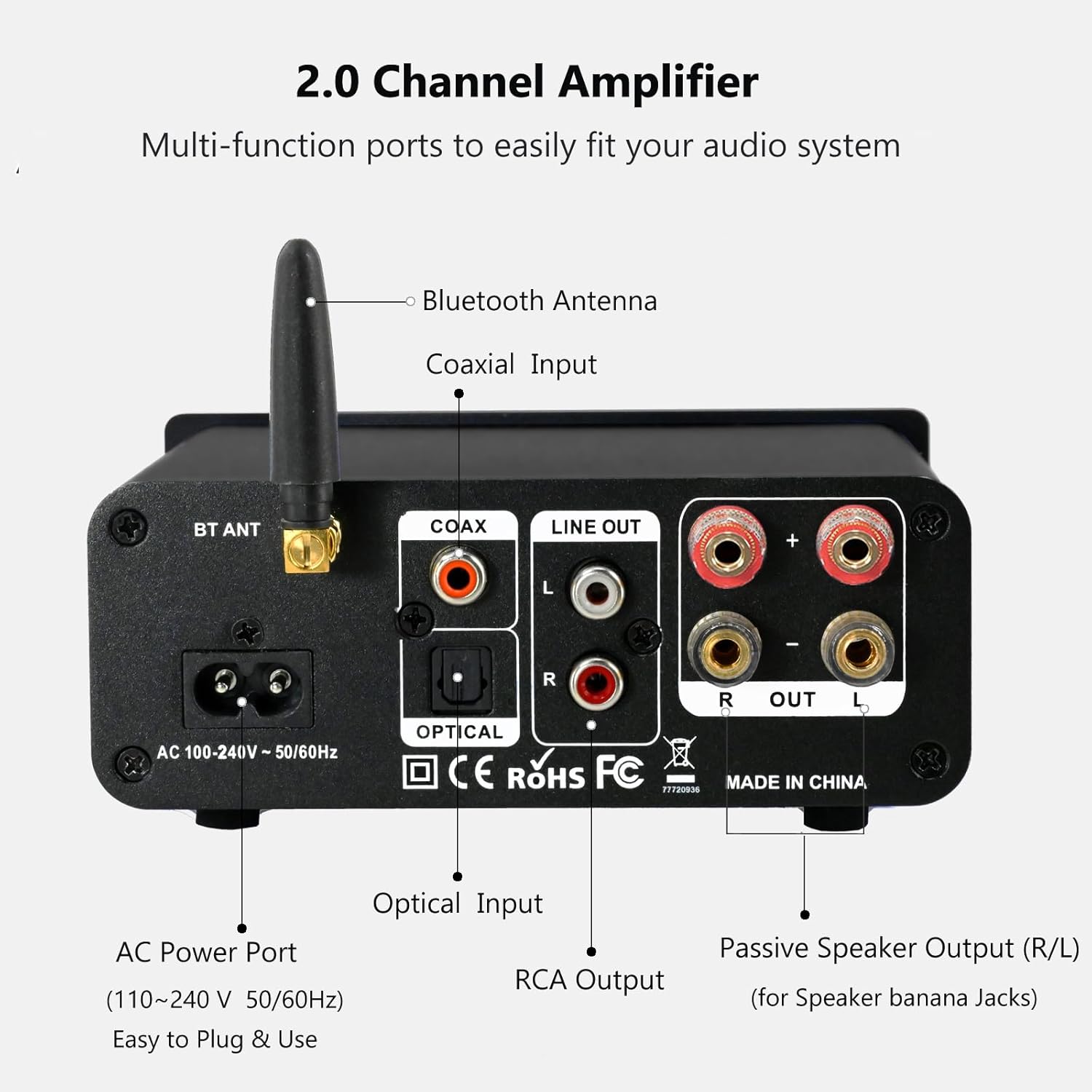
The rear panel provides connections for the Bluetooth antenna, Coaxial and Optical inputs, RCA Line Out, passive speaker outputs, and the AC power port.
- BT ANT (Bluetooth Antenna): Connect the included Bluetooth antenna for optimal wireless range and stability.
- COAX (Coaxial Input): Digital audio input for devices with a coaxial output.
- OPTICAL (Optical Input): Digital audio input for devices with an optical (Toslink) output.
- LINE OUT (RCA L/R): Analog audio output for connecting to powered speakers or a subwoofer.
- PASSIVE SPEAKER OUTPUT (R/L): Connect passive speakers using banana plugs or bare speaker wire.
- AC POWER PORT: Connect the supplied AC power cord (100-240V ~ 50/60Hz).
5. Podešavanje
5.1 Povezivanje zvučnika

The LONPOO Mini Hi-Fi Amplifier seamlessly integrates with your home audio setup, providing clear sound to passive bookshelf speakers.
- Pasivni zvučnici: Povežite svoje pasivne zvučnike za policu sa PASSIVE SPEAKER OUTPUT (R/L) terminals on the rear panel. Ensure correct polarity (+ to + and - to -) for each speaker. You can use banana plugs or strip the speaker wire ends and insert them into the terminals.
- Powered Speakers/Subwoofer: If you wish to connect powered speakers or a subwoofer, use an RCA cable to connect them to the LINE OUT (RCA L/R) portove na zadnjoj ploči.
5.2 Povezivanje audio izvora
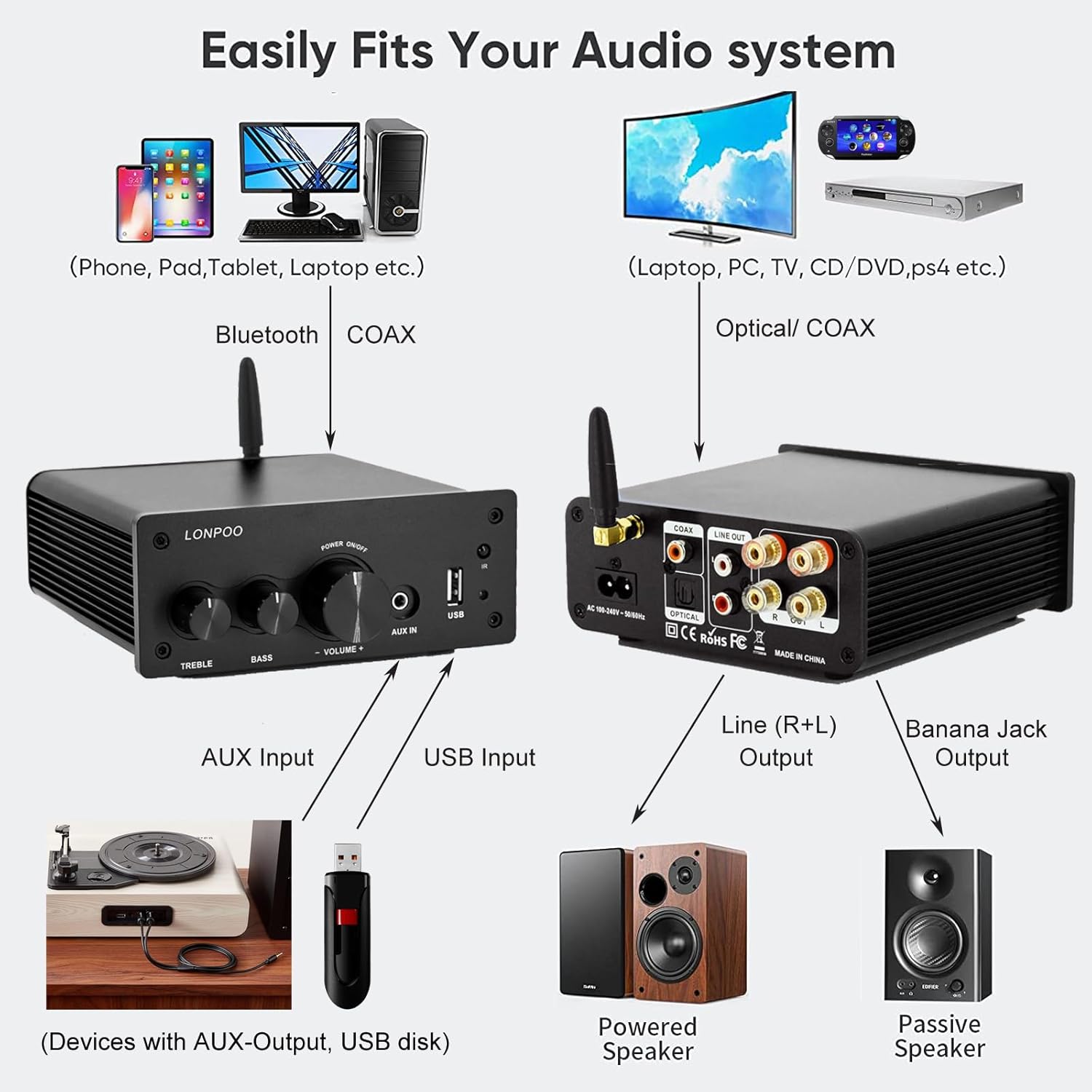
This diagram illustrates how the amplifier connects to a wide range of audio sources and output devices, including phones, PCs, TVs, CD players, powered speakers, and passive speakers.
- Bluetooth: Ensure the Bluetooth antenna is connected to the BT ANT luka.
- AUX ulaz: Connect your smartphone, tablet, or other audio device using a 3.5mm audio cable to the AUX IN priključak na prednjoj ploči.
- USB ulaz: Umetnite USB fleš disk koji sadrži MP3 ili WAV audio zapis files into the USB ulaz priključak na prednjoj ploči.
- optički ulaz: Connect your TV, CD player, or game console with an optical output to the OPTIČKI port on the rear panel using the provided optical cable.
- Koaksijalni ulaz: Connect your TV, DVD player, or other audio source with a coaxial output to the COAX port na zadnjoj ploči.
5.3 Priključak za napajanje
Spojite priloženi kabel za napajanje izmjeničnom strujom na AC POWER PORT na zadnjoj ploči amplifier, then plug the other end into a wall outlet.
6. Uputstvo za upotrebu
6.1 Uključivanje/isključivanje napajanja
Za napajanje amplifier, dugi pritisak the Višenamjensko dugme on the front panel. The indicator light will illuminate. To power off, dugi pritisak the knob again.
6.2 Odabir ulaza
To select an audio input source, kratak pritisak the Višenamjensko dugme. Each short press will cycle through the available inputs: Bluetooth, AUX, USB, Coaxial, and Optical. The Indikatorska lampica will change color to reflect the active input mode (refer to Section 4.1 for color codes).
6.3 Podešavanje jačine zvuka
Rotirajte Višenamjensko dugme u smjeru kazaljke na satu za povećanje jačine zvuka i suprotno od smjera kazaljke na satu za smanjenje.
6.4 Kontrola tona
Koristite TREBLE i BASS knobs on the front panel to adjust the high and low frequencies of the audio output according to your preference.
6.5 Bluetooth uparivanje

Connect your smartphone or other Bluetooth-enabled devices wirelessly to the amplifier for convenient audio streaming.
- Ensure the Bluetooth antenna is securely connected.
- Uključite amplifier and select the Bluetooth input mode (the indicator light will turn blue).
- Na uređaju koji podržava Bluetooth (npr. pametni telefon, tablet) potražite dostupne Bluetooth uređaje.
- Select "LONPOO AMP-615" from the list to pair.
- Nakon uparivanja, amplifier will play a confirmation sound, and you can stream audio wirelessly.
6.6 Reprodukcija s USB-a

The amplifier supports direct audio input via 3.5mm AUX and USB, allowing for plug-and-play functionality with various devices.
Umetnite USB fleš disk u USB ulaz port. The amplifier will automatically detect and begin playing supported audio files (MP3, WAV). Use the remote control for playback functions like play/pause, next/previous track.
6.7 Daljinski upravljač
The included remote control allows for convenient operation of the amplifier from a distance. Functions include:
- Uključivanje/isključivanje
- Pojačavanje/stišavanje zvuka
- Mute
- Input Source Selection (BT, AUX, USB, COAX, OPT)
- USB Playback Controls (Play/Pause, Next/Previous Track)
7. Otkrivanje problema
If you encounter any issues with your LONPOO Mini Hi-Fi Amplifier, please refer to the following troubleshooting guide:
| Problem | Mogući uzrok | Rješenje |
|---|---|---|
| Nema izlaza zvuka |
|
|
| Poor sound quality (distortion, low volume) |
|
|
| Problemi sa Bluetooth vezom |
|
|
| Optical/Coaxial audio dropouts or no sound |
|
|
| Zujanje ili zujanje |
|
|
8. Specifikacije
| Broj modela | AMP-615 |
| Izlazna snaga | 100W + 100W (ukupno 200W) |
| Kanali | 2.0 Stereo |
| Bluetooth verzija | 5.3 |
| Inputs | Bluetooth, Optical, Coaxial, USB, 3.5mm AUX |
| Izlazi | RCA Line Out (L/R), Passive Speaker Output (Banana Jack compatible) |
| Napajanje | AC 100-240V ~ 50 / 60Hz |
| Dimenzije (Š x V x D) | 132 mm x 55 mm x 140 mm (približno 5.19 x 2.16 x 5.51 inča) |
| Težina | 1.09 kg (približno 2.4 lbs) |
| Uključene komponente | Hi-Fi Amplifier, AC Cable, Remote Control, Optical Cable |
9. Održavanje
- čišćenje: Disconnect the power before cleaning. Use a soft, dry cloth to wipe the exterior of the ampNe koristite abrazivna sredstva za čišćenje ili rastvarače.
- Skladištenje: Ako pohranjujete ampAko uređaj koristite duže vrijeme, isključite ga iz napajanja i čuvajte na hladnom i suhom mjestu.
- Upravljanje kablovima: Osigurajte da su svi kablovi uredno posloženi i da nisu pod napetošću kako biste spriječili oštećenja.
10. Garancija i podrška
This product comes with a standard manufacturer's warranty. For specific warranty details, please refer to the documentation provided with your purchase or contact your retailer. For technical support, troubleshooting assistance, or inquiries regarding spare parts, please contact LONPOO customer service or your authorized dealer. Information regarding spare parts availability is currently unavailable.