
LIECTROUX X6
LIECTROUX X6 Robotic Vacuum Cleaner and Mop User Manual
Model: X6
Uvod
This manual provides essential information for the safe operation, maintenance, and troubleshooting of your LIECTROUX X6 Robotic Vacuum Cleaner and Mop. Please read this manual thoroughly before using the product and retain it for future reference. The LIECTROUX X6 is designed to provide efficient and comprehensive cleaning for various floor types, utilizing advanced navigation and smart features.
Product Overview
Ključne karakteristike
- Moć dubinskog čišćenja: 6500Pa suction for efficient cleaning of hard floors, pet hair, and carpets.
- LSD LIDAR Navigation: Precise navigation and mapping for systematic cleaning.
- Precision Mapping: Customizable cleaning routes and schedules for personalized cleaning.
- Wi-Fi povezivanje: Control and schedule cleanings remotely through the app or voice assistants.
- upravljanje glasom: Kompatibilno s glasovnim asistentima za upravljanje bez upotrebe ruku.
- Napredni sistem filtriranja: Captures 99.97% of dust, dirt, and allergens for cleaner air.
- Daljinski upravljač i kontrola aplikacija: Schedule cleanings, adjust settings, and monitor progress remotely.
- Pet Hair and Allergy Friendly: Effectively picks up pet hair, dust, and allergens for a cleaner environment.
Uključene komponente
- 1 x Robotic Vacuum
- 1 x Dock za punjenje
- 1 x adapter za punjenje
- 1 x 2-u-1 kanta za prašinu i rezervoar za vodu
- 2 x Pairs of Side Brushes
- 2 x Re-usable Wet Mopping Cloth
- 1 x Krpa za brisanje
- 1 x četka za čišćenje
- 2 x HEPA filter
- 1 x Uputstvo za upotrebu
Vizuelni prikazi proizvoda
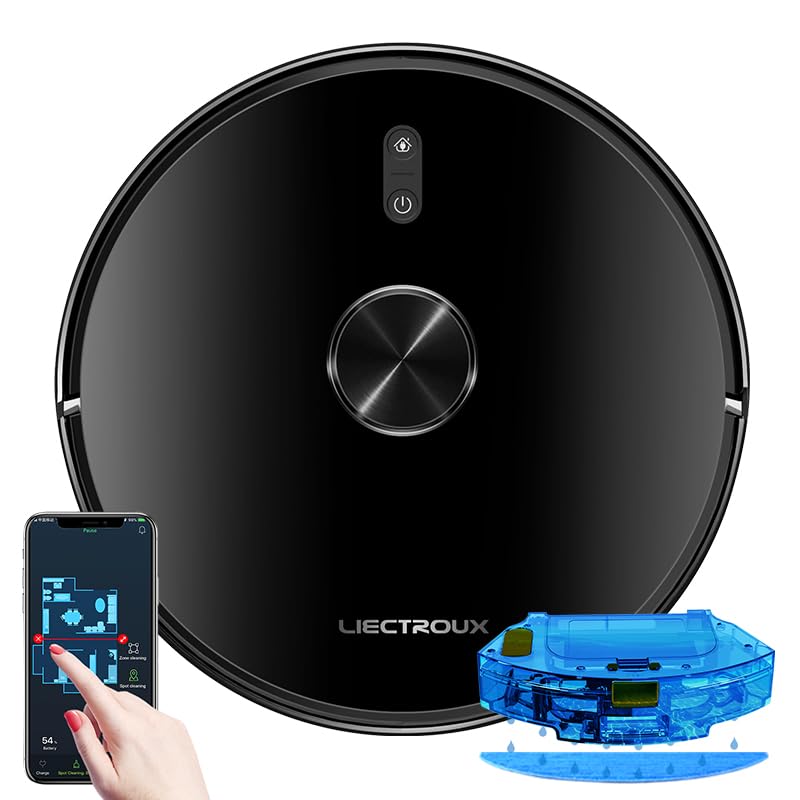
Figure 1: The LIECTROUX X6 Robotic Vacuum Cleaner and Mop, showcasing its sleek design, the accompanying mobile app interface for control, and the integrated water tank for mopping functionality.

Figure 2: Illustration of the integrated dust box and water tank system, highlighting the 400ml large dust box and 235ml large water tank, designed for effortless and worry-free cleaning. It also shows the sweeping, vacuuming, and mopping functions.

Figure 3: The LDS laser radar metering system in action, demonstrating its capabilities for LDS laser navigation, precision mapping, multi-layer map management, Y-routed floor mopping, and custom deep cleaning.

Figure 4: The mobile application interface displaying visual maps for whole house cleaning, including features like house-wide cleaning, routed cleaning, specified-area cleaning, scheduled cleaning tasks, and suction level adjustment.

Figure 5: Depiction of multiple custom cleaning modes for efficient and thorough cleaning, such as Selective Areas Cleaning, Cleaning Order, Restricted Zone Setting, Palm Virtual Blocker, and Areas Cleaning Frequency.

Figure 6: Illustration of the comprehensive breakthrough in Micro Electric Control and Air Pump Water Tank technology, showing different levels of wet mopping: Basic (Low), Normal (Medium), and Deep (High).
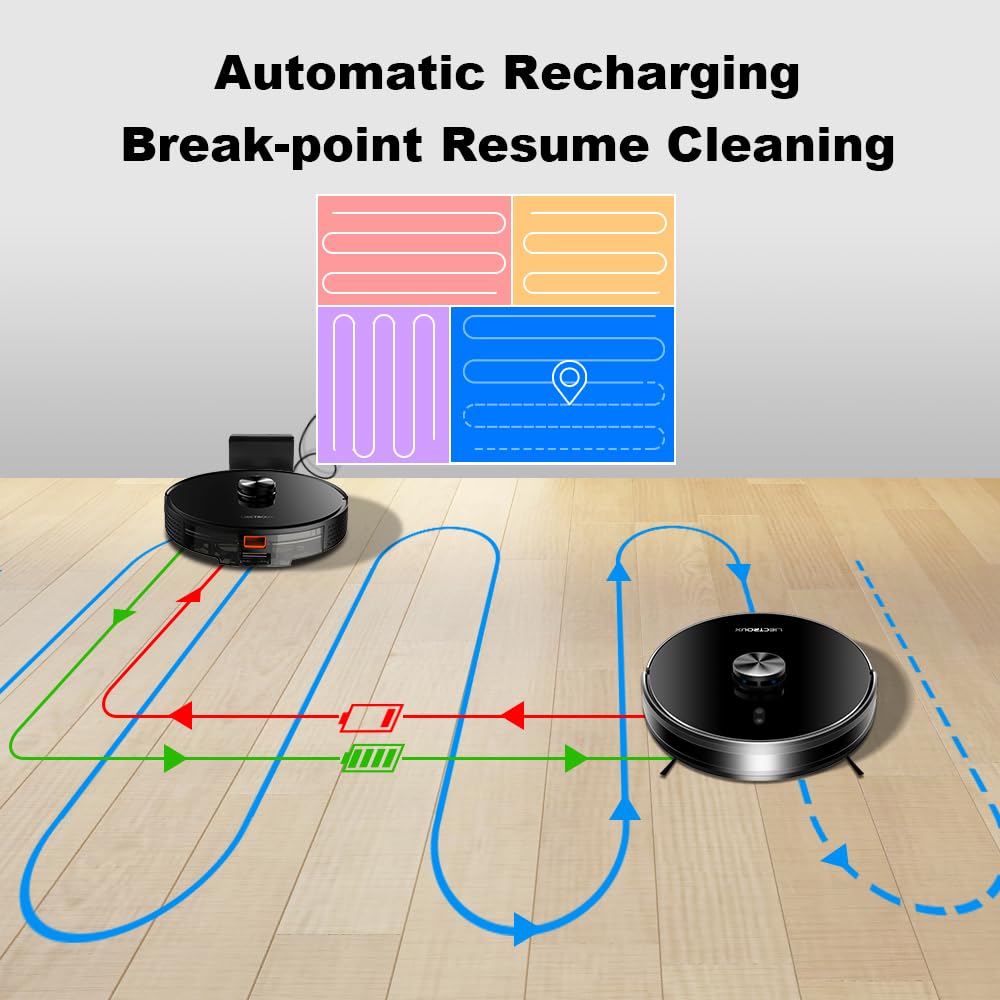
Figure 7: Diagram illustrating the automatic recharging feature and breakpoint resume cleaning, where the robot returns to its charging dock when battery is low and resumes cleaning from where it left off once sufficiently charged.

Figure 8: Visual representation of the Y-routed cleaning pattern, designed for repeated mopping and sweeping, imitating artificial kneeling-type cleaning for thorough stain removal.

Figure 9: Depiction of the multi-layer map management feature, allowing for areas segmentation, areas consolidation, recovering partition, and areas naming across multiple floors (1F to 6F shown).

Slika 10: Krupni plan view of key internal components, including the dustbin with double filters, the Japan-imported brushless motor, and the floating V-shaped roller brush, designed for efficient debris collection.
Setup
1. Raspakivanje
Carefully remove all components from the packaging. Ensure all included items listed in the "Included Components" section are present. Remove any protective films or packing materials from the robot and charging dock.
2. Postavljanje priključne stanice za punjenje
- Postavite punjač uz zid na tvrdu, ravnu površinu.
- Osigurajte da ima najmanje 0.5 metara (1.6 stopa) čistog prostora sa obje strane doka i 1.5 metara (4.9 stopa) ispred njega.
- Keep the area free of obstacles, such as furniture or power cords, that could obstruct the robot's return to the dock.
- Spojite adapter za napajanje na stanicu za punjenje i uključite ga u zidnu utičnicu.
3. Početna naplata
Place the robot onto the charging dock, ensuring the charging contacts align. The robot will begin charging automatically. For optimal battery life, fully charge the robot before its first use. The indicator light on the robot will show charging status.
4. Instalacija i povezivanje aplikacije
- Download the official LIECTROUX app from your mobile device's app store (iOS or Android).
- Open the app and follow the on-screen instructions to create an account and add your LIECTROUX X6 robot.
- Ensure your Wi-Fi network is 2.4GHz, as the robot may not support 5GHz networks.
- Aplikacija će vas voditi kroz proces povezivanja robota s vašom kućnom Wi-Fi mrežom.
Uputstvo za upotrebu
1. Pokretanje ciklusa čišćenja
- Od Robota: Press the power button on the robot once to start an automatic cleaning cycle.
- Iz aplikacije: Open the LIECTROUX app, select your robot, and tap "Start Cleaning" or choose a specific cleaning mode.
- upravljanje glasom: If connected to a voice assistant (e.g., Amazon Alexa, Google Assistant), use voice commands like "Alexa, tell [Robot Name] to start cleaning."
2. Režimi čišćenja
- Automatsko čišćenje: Robot inteligentno navigira i čisti cijelo dostupno područje.
- Čišćenje na licu mjesta: Directs the robot to clean a specific small area intensively. Ideal for spills or concentrated dirt.
- čišćenje zona: Use the app to define specific zones on the map for the robot to clean.
- Planirano čišćenje: Set up recurring cleaning times and days through the app.
- Restricted Zones/Virtual Walls: Use the app to draw virtual boundaries or restricted zones on the map to prevent the robot from entering certain areas.
3. Funkcija brisanja
- Fill the water tank with clean water. Do not use cleaning solutions that are not approved by LIECTROUX.
- Pričvrstite krpu za brisanje na rezervoar za vodu.
- Insert the 2-in-1 dustbin and water tank into the robot.
- Select a mopping mode or a combined vacuuming and mopping mode via the app. Adjust water flow levels (Low, Medium, High) as needed.
4. Pausing and Resuming
Press the power button on the robot or use the app to pause a cleaning cycle. Press again to resume. If the robot returns to the charging dock due to low battery, it will automatically resume cleaning from where it left off once sufficiently charged.
5. Returning to Charging Dock
The robot will automatically return to its charging dock when the battery is low or when a cleaning cycle is complete. You can also manually send it back via the app or by pressing and holding the power button on the robot.
Održavanje
Regular maintenance ensures optimal performance and extends the lifespan of your LIECTROUX X6. Always power off the robot before performing any maintenance.
1. Pražnjenje kante za prašinu
- Press the dustbin release button and pull out the 2-in-1 dustbin and water tank.
- Otvorite poklopac kante za prašinu i ispraznite njen sadržaj u kantu za smeće.
- Frequency: After each use or when full.
2. Čišćenje filtera
- Izvadite HEPA filter i spužvasti filter iz posude za prašinu.
- Tap the filters gently to remove dust. Do not wash HEPA filters with water.
- The sponge filter can be rinsed with water and air-dried completely before reinstallation.
- Frequency: Weekly, replace HEPA filter every 3-6 months.
3. Čišćenje glavne četke
- Okrenite robota i uklonite poklopac glavne četke.
- Izvadite glavnu četku. Koristite priloženi alat za čišćenje kako biste uklonili dlake i ostatke zapetljane oko četke.
- Frequency: Weekly.
4. Čišćenje bočnih četkica
- Inspect side brushes for damage or tangled hair.
- If necessary, remove the side brushes (they usually snap on/off) and clean them. Replace if worn.
- Frequency: Monthly, replace every 3-6 months.
5. Čišćenje senzora i kontakata za punjenje
- Wipe the cliff sensors (located on the bottom of the robot), wall sensors, and charging contacts on both the robot and the charging dock with a clean, dry cloth.
- Frequency: Monthly.
6. Cleaning the Mopping Cloth
- Remove the mopping cloth after each mopping cycle.
- Rinse it thoroughly with water and allow it to air dry completely before storing or reattaching.
- Frequency: After each mopping use.
Rješavanje problema
If your LIECTROUX X6 encounters an issue, refer to the following common problems and solutions:
| Problem | Mogući uzrok | Rješenje |
|---|---|---|
| Robot se ne uključuje niti puni. | Battery is completely depleted; charging contacts are dirty; power adapter not connected. | Ensure robot is properly seated on the charging dock. Clean charging contacts on both robot and dock. Check power adapter connection. |
| Robot se često zaglavi. | Obstacles (cables, rugs); cliff sensors dirty; robot stuck on high thresholds. | Clear obstacles from cleaning path. Clean cliff sensors. Use virtual walls/restricted zones for problematic areas. |
| Slabe usisne performanse. | Dustbin full; filter clogged; main brush tangled; suction inlet blocked. | Empty dustbin. Clean/replace filters. Clean main brush and side brushes. Check suction inlet for blockages. |
| Robot se ne može povezati na Wi-Fi. | Netačna lozinka za Wi-Fi; mreža od 5 GHz; robot previše udaljen od rutera. | Ensure correct 2.4GHz Wi-Fi network is selected. Re-enter password carefully. Move robot closer to router during setup. |
| Funkcija brisanja ne radi. | Water tank empty; mopping cloth not attached; water outlet clogged. | Fill water tank. Ensure mopping cloth is properly attached. Check water outlets for blockages. |
For issues not listed here, please refer to the comprehensive troubleshooting section in the full user manual or contact customer support.
Specifikacije
| Feature | Detalj |
|---|---|
| Brand | LIECTROUX |
| Naziv modela | X6 |
| Snaga usisavanja | 6500Pa |
| Vrsta navigacije | LSD Laser Navigation, Precision Mapping |
| Kapacitet sakupljača prašine | 400ml |
| Kapacitet rezervoara za vodu | 235ml |
| Filter Type | HEPA |
| Trajanje baterije | Do 120 minuta |
| Kontrolni metod | Kontrola aplikacija, upravljanje glasom |
| Dimenzije proizvoda | 33D x 33W x 6H centimetara |
| Težina artikla | 4 kg |
| Boja | Crna |
Garancija i podrška
Your LIECTROUX X6 Robotic Vacuum Cleaner and Mop comes with a standard manufacturer's warranty. Please refer to the warranty card included in your product packaging for specific terms and conditions, including warranty period and coverage details.
For technical support, service, or warranty claims, please contact LIECTROUX customer service. Contact information can typically be found on the official LIECTROUX webweb-mjestu ili na ambalaži proizvoda.
It is recommended to register your product online to receive updates and support.
Ask a question about this manual
Ask about setup, troubleshooting, compatibility, parts, safety, or missing instructions. Manuals+ will review the question and use this page’s manual context to help answer it.