
1. Uvod
Hvala na kupoviniasing the Upperizon Portable Monitor Z-14Q. This manual provides essential information for setting up, operating, and maintaining your new portable display. Please read this manual thoroughly before use to ensure optimal performance and longevity of your device.
The Upperizon Z-14Q is a 14-inch portable monitor featuring a 2K QHD (2160x1440) IPS glossy panel, 100% sRGB color gamut, 430 nits brightness, and a 1500:1 contrast ratio. Its lightweight (490g) and ultra-slim (5mm at thinnest point) design, along with versatile connectivity options (USB Type-C, Mini HDMI), make it ideal for various applications, including work, entertainment, and gaming.

Image: Upperizon Portable Monitor Z-14Q with its protective stand cover.
2. Značajke proizvoda
- Displej visoke rezolucije: 14-inch 2K QHD (2160x1440) IPS glossy panel for crisp, detailed visuals.
- Vibrant Color Accuracy: 100% sRGB color gamut ensures accurate and vivid color reproduction.
- Exceptional Brightness & Contrast: Up to 430 nits brightness and a 1500:1 contrast ratio for clear visibility in various lighting conditions and deep, rich blacks.
- Ultra prenosivi dizajn: Weighs only 490g and is 5mm thin at its slimmest point, making it easy to carry.
- Svestrano povezivanje: Equipped with two USB Type-C ports and one Mini HDMI port for broad compatibility with PCs, smartphones, and gaming consoles.
- Integrated Stand Cover: Includes a detachable magnetic cover that protects the screen and functions as a multi-angle stand.
- Tehnologija za njegu očiju: Features low blue light and flicker-free technology for comfortable extended use.
- Automatic Aspect Ratio Adaptation: Automatically adjusts the aspect ratio to prevent image distortion when displaying content with different ratios.

Image: Comparison illustrating the vividness of a glossy panel versus a matte panel.

Image: Illustration demonstrating the fine detail provided by 2K resolution.

Image: The monitor's lightweight (490g) and ultra-slim (5mm) profile.
3. Sadržaj paketa
Molimo Vas da provjerite paket za sljedeće stavke:
- Upperizon Portable Monitor (Main Unit)
- Magnetic Stand Cover
- USB kabel tipa C na tip C
- HDMI na Mini HDMI kabl
- USB kabel tipa C na tip A
- Korisnički priručnik (japanski)
Note: A power adapter is not included to reduce electronic waste. Please use a compatible USB power adapter (e.g., 5V3A or higher) if external power is required.

Image: All included accessories with the Upperizon Portable Monitor.
4. Upute za postavljanje
4.1 Attaching and Using the Stand Cover
- The protective cover is magnetic. Align the cover with the back of the monitor for easy attachment.
- To use as a stand, fold the cover and attach the designated magnetic area (e.g., section 'A' in the diagram) to the upper part of the monitor's back. This creates a stable triangular support.
- Adjust the monitor's viewing angle freely by utilizing different magnetic sections on the cover.
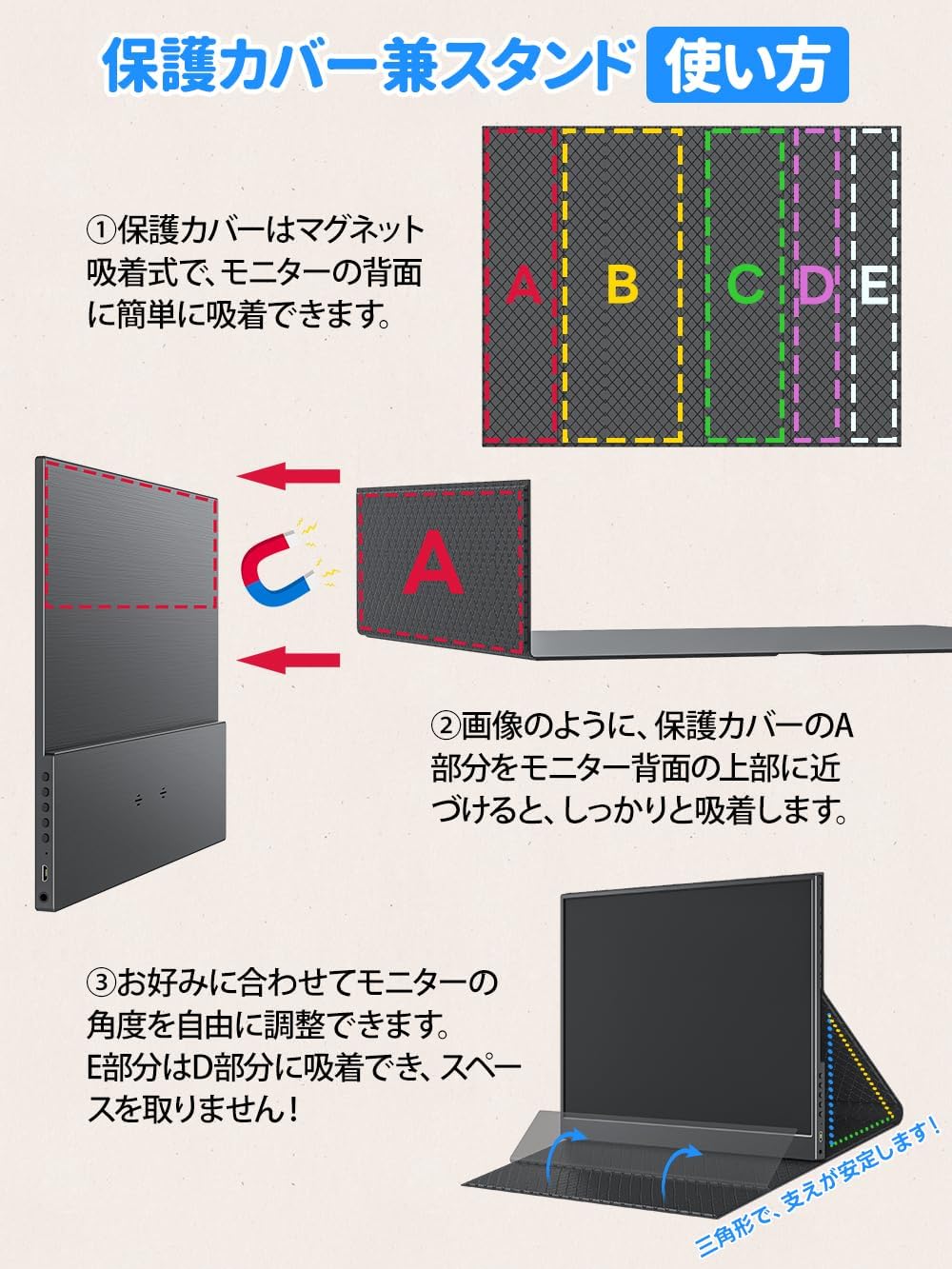
Image: Step-by-step guide for attaching and configuring the magnetic stand cover.
4.2 Povezivanje na uređaje
The monitor supports connection via USB Type-C and Mini HDMI. Ensure your device's ports are compatible.
- USB Type-C veza: Use the provided USB Type-C to Type-C cable. This single cable can transmit both video signal and power simultaneously. Ensure your device's Type-C port supports Thunderbolt 3.0 or later, or DisplayPort Alt Mode.
- HDMI veza: Use the provided HDMI to Mini HDMI cable for video signal. For power, connect a USB Type-C to Type-A cable to a power adapter or a USB-A port on your device.
Important Note for Nintendo Switch Users:
- As of June 2025, the Nintendo Switch 2 does not support video output via a single Type-C cable; connection requires the official dock.
- Older Nintendo Switch models can output video with a single Type-C cable that supports video transmission.

Image: Diagram illustrating a single Type-C cable connection for video and power.
4.3 Napajanje
If the connected device cannot supply sufficient power (e.g., low battery on a smartphone or laptop), the monitor may not function correctly. In such cases, connect an external power source (e.g., a USB power adapter) to one of the monitor's USB Type-C ports using the USB Type-C to Type-A cable.

Slika: Detaljna view of the monitor's ports, including Mini HDMI and USB Type-C.
5. Uputstvo za upotrebu
5.1 Uključivanje/isključivanje napajanja
Press and hold the power button located on the side of the monitor to turn it on or off. A power indicator light will illuminate when the monitor is active.
5.2 Navigacija izbornikom
Use the menu buttons (Up, Down, Menu, Back) on the side of the monitor to access and adjust settings such as brightness, contrast, color mode, and input source.
5.3 Aspect Ratio Management
The monitor features automatic aspect ratio adaptation. This ensures that images are displayed correctly without distortion, even when the source content has a different aspect ratio than the monitor's native 3:2. In some cases, black bars may appear at the top/bottom or sides to maintain the correct aspect ratio.

Slika: prample of automatic aspect ratio adaptation, showing how content is displayed correctly without distortion.
6. Održavanje
- čišćenje: Use a soft, lint-free cloth to gently wipe the screen and body. Do not use abrasive cleaners or solvents.
- Skladištenje: When not in use, store the monitor in a cool, dry place. Always use the protective cover to prevent scratches and damage.
- Rukovanje: Handle the monitor with care due to its slim design. Avoid dropping or subjecting it to strong impacts.
7. Otkrivanje problema
- "No Signal" or "Power Saving" Message:
- Ensure all cables are securely connected. Try re-plugging them.
- Verify that your source device is powered on and outputting a signal.
- If using USB Type-C, confirm that your device's Type-C port supports video output (Thunderbolt 3.0+ or DisplayPort Alt Mode).
- Pokušajte s drugim kabelom ako je dostupan.
- Nedovoljna snaga:
- If the monitor flickers or does not turn on when powered by the connected device, the device's power output may be insufficient.
- Connect an external power adapter (e.g., 5V3A or higher) to the monitor's USB Type-C port for dedicated power.
- Problemi rješavanja:
- The maximum resolution is 2160x1440, but the actual usable resolution depends on your connected device's output capabilities.
- Check your device's display settings to ensure it is configured to output at the desired resolution.
- Black Bars on Screen:
- This is not a malfunction. The monitor's aspect ratio is 3:2. When displaying content with a different aspect ratio, black bars appear to correctly adapt the image without distortion.
8. Specifikacije
| Brand | Upperizon |
| Model | Z-14Q |
| Veličina ekrana | 14 inča |
| Rezolucija | 2160x1440 (2K QHD) |
| Aspect Ratio | 3:2 |
| Tip panela | IPS Glossy |
| Osvetljenost | 430 nita |
| Kontrast Ratio | 1500:1 |
| Gamut boja | 100% sRGB |
| Refresh Rate | 60 Hz |
| Viewing Angle | 178 stepeni |
| Vrijeme odgovora | 5 ms |
| Povezivanje | 2x USB Type-C, 1x Mini HDMI |
| Dimenzije (D x Š x V) | 1 x 30.7 x 22.2 cm (približno 0.39 x 12.09 x 8.74 inča) |
| Težina | 490g |
| Thinnest Part | 5mm |
| Kompatibilni uređaji | Game Consoles, Desktops, Laptops, Smartphones |
9. Garancija i podrška
Your Upperizon Portable Monitor Z-14Q comes with a 2-godišnja garancija proizvođača. We also offer a 30-day free return policy.
If you encounter any issues or have questions during use, please do not hesitate to contact our dedicated support team. We are available via email and phone to assist you.

Image: Summary of support services including return policy and warranty duration.
For further assistance, please refer to the FAQ section on our brand store or contact us directly.
Upperizon Customer Support