
Mesqool e5a70cca-01be-4e29-bb91-9cfc7e32344
Mesqool Emergency Radio Instruction Manual
Model: e5a70cca-01be-4e29-bb91-9cfc7e32344
Marka: Mesqool
1. Uvod
This manual provides detailed instructions for the Mesqool Emergency Radio, a versatile device designed for emergency preparedness and outdoor activities. It features multiple power sources, including a large-capacity rechargeable battery, hand crank, and solar panel, along with AM/FM/SW radio reception, NOAA weather alerts, a powerful flashlight, a reading lamp, and a cell phone charging function.

Figure 1: Mesqool Emergency Radio in Gray Camo, demonstrating phone charging capability.
2. Sadržaj paketa
Molimo označite kućicu za sljedeće stavke:
- Radio za hitne slučajeve
- 5V 2A Adapter and Type C Cord
- Metalna kuka
- Portable Belt
- Priručnik za upotrebu
3. Ključne karakteristike
- NOAA Weather Alert Radio: Receives 7 pre-programmed NOAA weather channels with automatic alert function for severe weather events.
- Višefrekventni radio: Supports AM, FM, and Shortwave (SW) frequencies for broad reception.
- Baterija velikog kapaciteta: Equipped with a 12000mAh rechargeable Li-ion battery for extended operation and device charging.
- Five Power Sources: Rechargeable battery, USB-C input, hand crank, solar panel, and 3 AAA batteries (not included).
- Rasvjeta za hitne slučajeve: Features a bright flashlight (150-300 Lumens) and a 2-level brightness reading lamp (120-250 Lumens).
- SOS alarm: Activates a loud 116dB alarm with flashing red light for emergency signaling.
- Cell Phone Charger: Functions as a power bank to charge mobile devices via USB output.
- LCD ekran: Large, backlit LCD displays radio station, time, and weather channels.
- Trajnost: IPX-3 waterproof and dust-proof rating.
4. Kontrole i komponente
Upoznajte se s kontrolama i priključcima radija:

Slika 2: Prednja strana view of the radio highlighting the large LCD display and control buttons.
- Dugme za napajanje: Press to turn the radio on or off.
- Dugme za traku: Cycles through AM, FM, SW, and Weather Band (WB) modes.
- WX Alert Button: Activates or deactivates the NOAA weather alert function.
- Dugmad za jačinu zvuka +/-: Podešava jačinu zvuka audio izlaza.
- Dugmad za podešavanje +/-: Podešava radio frekvenciju.
- Dugme za zaključavanje: Sprečava slučajno pritiskanje dugmadi.
- Dugme za podešavanje vremena: Used to set the current time displayed on the LCD.
- Dugme za pozadinsko osvjetljenje: Toggles the LCD screen backlight.
- svjetiljka: Located on the left side of the radio. Activated via a dedicated button.
- SOS Control Button: Activates the emergency SOS alarm.
- USB Output Charging Port: Za punjenje eksternih uređaja.
- Type-C Input Charging Port: Za punjenje interne baterije radija.
- 3.5 mm priključak za slušalice: Za privatno slušanje.
- Teleskopska antena: Produžite za bolji radio prijem.
- solarni panel: Located on the top, used for trickle charging.
- ručna ručica: Foldable crank on the back for manual power generation.
- Reading Lamp: Located under the solar panel, flips up for illumination.
- Odjeljak za AAA baterije: Located on the bottom, for optional AAA battery power.
- kompas: Integrated into the portable strap for navigation.

Slika 3: Bočna strana view illustrating the SOS alarm and headphone jack.
5. Power Sources and Charging
The Mesqool Emergency Radio offers five flexible ways to ensure you always have power:
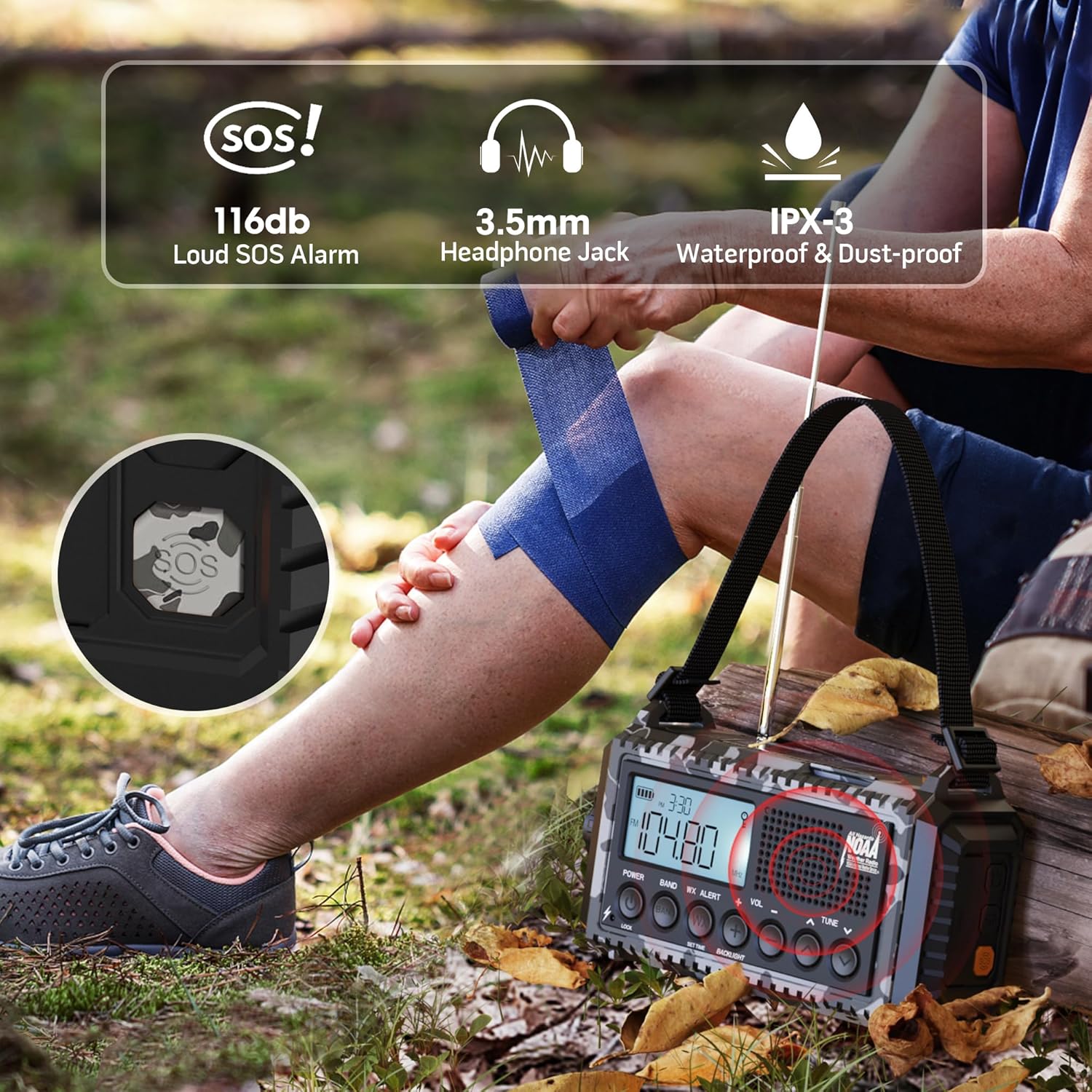
Figure 4: Visual representation of the five power options for the radio.
- 12000mAh Built-in Li-ion Battery: The primary power source. Ensure it is fully charged before extended use.
- Ulaz tipa C (5V/2A): Connect the provided Type-C cable to a compatible USB adapter (not included) for the most efficient charging. The charging indicator lights will show progress.
- ručna ručica: Rotate the hand crank clockwise or counter-clockwise at a steady pace (approx. 130-150 RPM) for 3-5 minutes to generate enough power for short-term use or to initiate charging.
- solarni panel: Place the radio in direct sunlight. The solar panel provides trickle charging to maintain the battery level or extend playtime. It is not intended for full charging from a depleted state.
- 3 AAA Batteries (Not Included): Open the battery compartment on the bottom and insert 3 AAA batteries. This serves as a backup power source when the internal Li-ion battery is low or depleted.
The battery indicator on the LCD screen will show the current charge level. A flashing indicator typically means the battery is low and requires charging.
6. Radio operacije
The radio supports AM, FM, SW, and NOAA Weather Bands.

Figure 5: The radio displaying NOAA Weather Alert functionality.
- Uključivanje/isključivanje: Pritisnite POWER dugme za uključivanje ili isključivanje radija.
- Odabir benda: Pritisnite BAND button repeatedly to cycle through AM, FM, SW, and WB (Weather Band).
- Tuning stanice: Koristite TUNE +/- buttons to manually adjust the frequency. For automatic scanning, press and hold the TUNE +/- button for 2 seconds. The radio will stop on the next available station.
- Kontrola jačine zvuka: Koristite VOL +/- dugmad za podešavanje jačine zvuka slušanja.
- NOAA upozorenje na vremensku prognozu:
- Da biste omogućili, pritisnite WX ALERT button. The 'WX' icon will appear on the LCD.
- The radio will automatically scan 7 NOAA weather channels. When an alert is received, an audible alarm will sound, and the red alert light will flash.
- To disable, press the WX ALERT ponovo dugme.
7. Flashlight and Reading Lamp Operacija
The radio includes integrated lighting features for various situations.

Figure 6: The radio's reading lamp and flashlight in use.
- svjetiljka: Press the dedicated flashlight button on the side of the radio to turn it on. Press again to cycle through brightness levels (if applicable) or turn off.
- Reading Lamp: Flip up the solar panel to reveal the reading lampPritisnite dugme za očitavanjeamp button (often located near the flashlight button) to turn it on. Press again to adjust brightness levels or turn off.
8. SOS Alarm Function
In an emergency, the SOS alarm can be activated to attract attention.
- To activate the SOS alarm, press the SOS button (often a distinct yellow or red button, or integrated with a light button). A loud siren will sound, and a red flashing light will activate.
- Da biste deaktivirali, pritisnite dugme SOS ponovo dugme.
9. Cell Phone Charging
The radio can serve as an emergency power bank for your mobile devices.
- Connect your mobile device to the USB output charging port on the side of the radio using your device's charging cable.
- The radio's internal 12000mAh battery will provide power to your device.
- If the radio's battery is low, you may need to use the hand crank to generate initial power for charging.

Figure 7: The radio connected to a smartphone for charging.
10. Specifikacije
| Feature | Detalj |
|---|---|
| Dimenzije proizvoda | 3.7 x 2.48 x 6.8 inča |
| Težina artikla | 1.46 funte |
| Vrsta baterije | 1 litijum-jonska baterija (uključena) |
| Izvor napajanja | Rechargeable Battery | Solar Panel | Hand Crank | Type-C Input 5V/2A |
| Podržani radio bendovi | AM/FM/7 Pre-Configured NOAA Stations |
| Tehnologija povezivanja | NOAA RADIO |
| Posebne karakteristike | Cellphone USB Charger, Flashlight, Reading Lamp, Strap, Lightweight, SOS Alarm, NOAA Weather Alert |
11. Otkrivanje problema
- Nema napajanja: Ensure the internal battery is charged. Try hand cranking for a few minutes or connecting to a USB power source. Check if AAA batteries are inserted correctly and have charge.
- Slab radio prijem: Extend the telescopic antenna fully. Try repositioning the radio. For AM/SW, rotate the radio for optimal signal.
- NOAA Alert Not Working: Ensure the WX Alert function is enabled. Check if you are within range of a NOAA broadcast.
- Telefon se ne puni: Ensure the radio has sufficient power. Check the USB cable connection. Some devices may require more power than the radio can provide for rapid charging.
- Dugmad ne reagiraju: Check if the Lock function is activated. Deactivate it if necessary.
12. Održavanje
- čišćenje: Obrišite radio mekom, damp tkanina. Nemojte koristiti jake hemikalije ili abrazivna sredstva za čišćenje.
- Skladištenje: Radio čuvajte na hladnom i suhom mjestu, dalje od direktne sunčeve svjetlosti i ekstremnih temperatura.
- Održavanje baterije: For optimal battery life, fully charge the internal Li-ion battery at least once every three months, even if not in use.
- Otpornost na vodu: While IPX-3 rated (splash-proof), avoid submerging the radio in water. Ensure all port covers are securely closed when exposed to moisture.
13. Garancija i podrška
For warranty information, technical support, or service inquiries, please refer to the contact details provided on the product packaging or the official Mesqool webSačuvajte račun kao dokaz o kupovini.
Ask a question about this manual
Ask about setup, troubleshooting, compatibility, parts, safety, or missing instructions. Manuals+ will review the question and use this page’s manual context to help answer it.