
1. Uvod
This manual provides detailed instructions for the proper use, setup, operation, and maintenance of your EBTOOLS Bluetooth Headset. Please read this manual thoroughly before using the product to ensure optimal performance and longevity.
2. Proizvod je gotovview
2.1 Ključne karakteristike
- Rotatable Microphone: Easily adjust the microphone to the optimal angle for clear voice capture.
- Bluetooth 5.0 tehnologija: Ensures faster, more efficient, and stable wireless connectivity with compatible devices.
- Udoban dizajn: Single-ear design with padded ear cushion and flexible headband for extended wear without discomfort.
- Dug vijek trajanja baterije: Up to 17 hours of talk time and 200 hours of standby time on a 2-hour charge.
- Univerzalna kompatibilnost: Works with laptops, cell phones, PCs, tablets, and other Bluetooth-enabled devices. Ideal for office, home, remote work, call centers, VoIP, and Skype.
2.2 Sadržaj paketa
Provjerite da li se sve stavke nalaze u vašem paketu:
- EBTOOLS Bluetooth Headset
- Baza za punjenje
- Micro USB kabl za punjenje
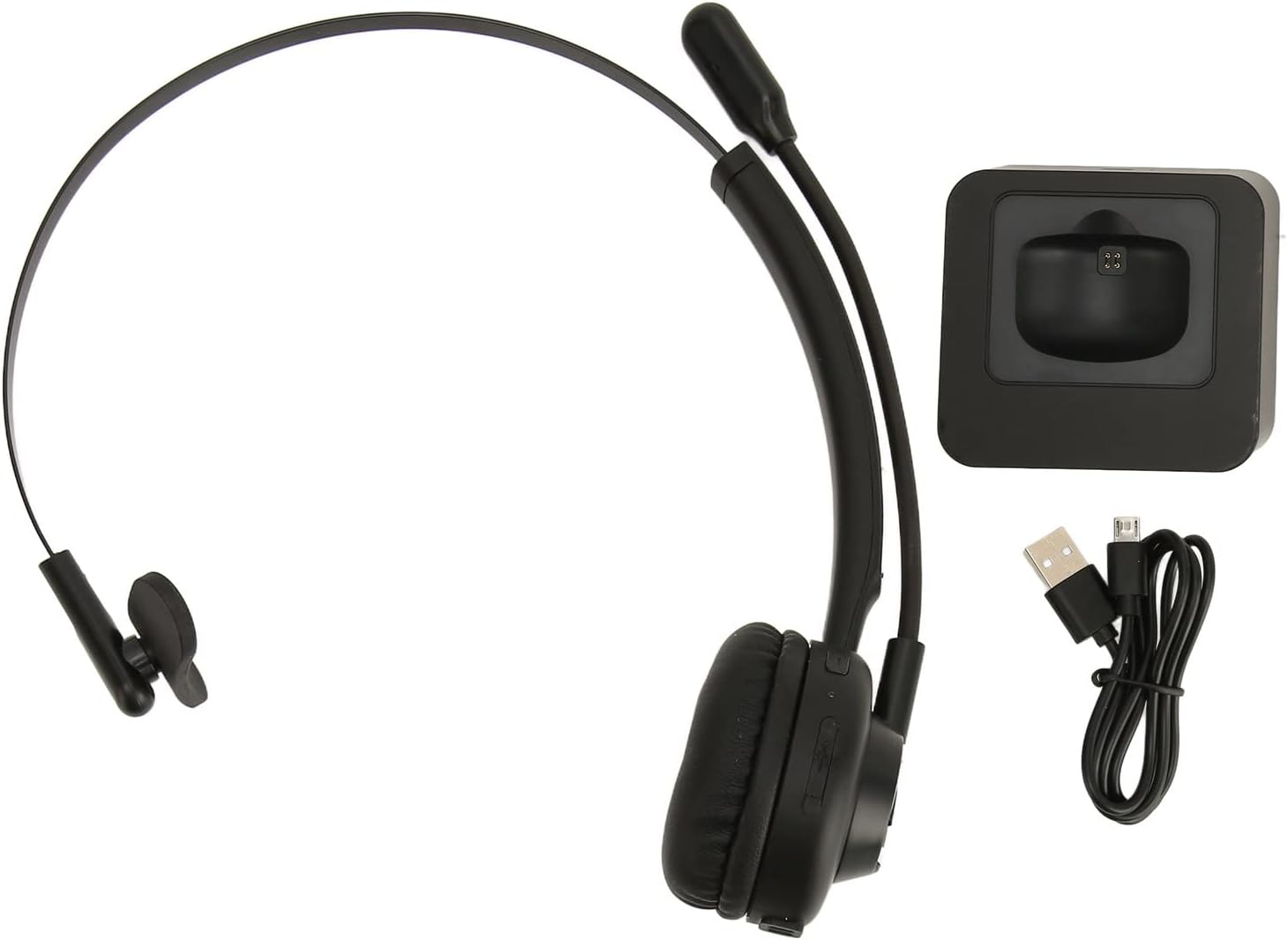
Image: The EBTOOLS Bluetooth Headset, its dedicated charging base, and a Micro USB charging cable, illustrating the complete package contents.
2.3 Headset Controls and Indicators

Image: A detailed diagram highlighting the Micro USB port, LED indicator, Volume Down button, Multifunctional button, and Volume Up button on the EBTOOLS Bluetooth Headset.
- Mikro USB port: For direct charging of the headset.
- LED indikator: Prikazuje status napajanja, punjenja i uparivanja.
- Dugme za jačinu zvuka: Smanjuje jačinu zvuka.
- Multifunkcionalno dugme: Controls power, pairing, call answer/end, and music playback.
- Jačina zvuka + dugme: Povećava jačinu zvuka.
3. Podešavanje
3.1 Punjenje slušalica
Before first use, fully charge the headset. You can charge it using the included charging base or directly via the Micro USB port.
- Connect the Micro USB cable to the charging base and a power source (e.g., computer USB port, USB wall adapter).
- Place the headset onto the charging base, ensuring the charging contacts align. The LED indicator on the headset will show charging status.
- Alternatively, connect the Micro USB cable directly to the headset's Micro USB port and a power source.
- A full charge typically takes approximately 2 hours. The LED indicator will change color or turn off once fully charged.

Slika: Krupni plan view of the headset's earcup, showing the charging contacts designed to connect with the charging base.
3.2 Uparivanje s Bluetooth uređajem
To connect your headset to a device:
- Provjerite jesu li slušalice isključene.
- Pritisnite i držite Multifunkcionalno dugme for approximately 5-7 seconds until the LED indicator flashes red and blue alternately, indicating pairing mode.
- On your device (phone, PC, tablet), enable Bluetooth and search for new devices.
- Select "EBTOOLS Headset" (or similar name) from the list of available devices.
- Once connected, the LED indicator on the headset will typically flash blue slowly or turn solid blue.
- Ako se od vas zatraži lozinka, unesite "0000".
3.3 Nošenje slušalica
The headset is designed for comfort and flexibility.
- Adjust the flexible headband to fit comfortably over your head.
- The single ear design allows you to remain aware of your surroundings.
- Rotate the microphone boom to position it close to your mouth for optimal voice clarity. The microphone can be rotated 180 degrees to be worn on either the left or right ear.

Image: A person wearing the EBTOOLS Bluetooth Headset, demonstrating the comfortable fit and the adjustable, rotatable microphone positioned for clear communication.
4. Uputstvo za upotrebu
4.1 Uključivanje/isključivanje napajanja
- Uključeno: Pritisnite i držite Multifunkcionalno dugme otprilike 3 sekunde dok LED indikator ne zatreperi plavo.
- Iskljuciti: Pritisnite i držite Multifunkcionalno dugme for approximately 3-5 seconds until the LED indicator flashes red and then turns off.
4.2 Podešavanje jačine zvuka
- Pritisnite Glasnoća + dugme to increase the listening volume.
- Pritisnite Jačina zvuka - Dugme da smanjite glasnoću slušanja.
4.3 Upravljanje pozivima
- Odgovori na poziv: Kratko pritisnite Multifunkcionalno dugme kada zazvoni dolazni poziv.
- Završi poziv: Kratko pritisnite Multifunkcionalno dugme tokom poziva.
- odbiti poziv: Pritisnite i držite Multifunkcionalno dugme for approximately 2 seconds when an incoming call rings.
- Ponovno biranje zadnjeg broja: Dvaput pritisnite Multifunkcionalno dugme kada niste na pozivu.
4.4 Music Playback (if supported by device)
- Pusti/pauza: Kratko pritisnite Multifunkcionalno dugme.
- Sljedeća pjesma: Pritisnite i držite Glasnoća + dugme.
- Prethodni zapis: Pritisnite i držite Jačina zvuka - Dugme.
4.5 Korištenje mikrofona
The rotatable microphone ensures your voice is captured clearly.
- Adjust the microphone boom to be approximately 1-2 inches from your mouth.
- The microphone can be rotated 180 degrees to allow wearing the headset on either the left or right ear.

Slika: Krupni plan view of the EBTOOLS headset's flexible microphone boom, highlighting its design for optimal voice pickup.
5. Održavanje
5.1 Čišćenje
- Obrišite slušalice mekom, suhom ili blago natopljenom krpomamp tkanina.
- Nemojte koristiti jake hemikalije, rastvarače za čišćenje ili jake deterdžente.
- Izbjegavajte ulazak vlage u bilo kakve otvore.
5.2 Njega baterija
- Charge the headset regularly, even if not in frequent use, to maintain battery health.
- Izbjegavajte često potpuno pražnjenje baterije.
- Slušalice čuvajte na hladnom i suhom mjestu, dalje od ekstremnih temperatura.
6. Otkrivanje problema
Ako imate problema sa slušalicama, pogledajte sljedeća uobičajena rješenja:
| Problem | Moguće rješenje |
|---|---|
| Slušalice se ne uključuju. | Ensure the headset is charged. Connect it to the charging base or directly via USB. |
| Nije moguće uparivanje s uređajem. | Ensure the headset is in pairing mode (LED flashing red/blue). Turn off and on your device's Bluetooth. Delete previous pairings on your device and try again. Ensure the headset is within range (typically 10 meters). |
| Nema zvuka ili je jačina zvuka niska. | Increase volume on both the headset and your connected device. Ensure the headset is selected as the audio output device on your computer or phone. Re-pair the headset. |
| Mikrofon ne radi. | Ensure the microphone is positioned correctly. Check microphone settings on your connected device to ensure the headset is selected as the input device. |
| Povremena veza. | Move closer to your connected device. Avoid obstacles between the headset and device. Reduce interference from other wireless devices. |
7. Specifikacije
| Feature | Detalj |
|---|---|
| Brand Name | EBTOOLS |
| Broj modela | EBTOOLSrsgvuyg5fc |
| Tehnologija povezivanja | Bluetooth 5.0 |
| Težina artikla | 11.6 unce |
| Dimenzije paketa | 7.09 x 6.69 x 2.36 inča |
| Vrijeme razgovora | Do 17 sati |
| Vrijeme pripravnosti | Do 200 sati |
| Vrijeme punjenja | Približno 2 sata |
8. Garancija i podrška
For warranty information or technical support, please refer to the documentation included with your purchase or contact EBTOOLS customer service through the retailer where the product was purchased. Keep your proof of purchase for warranty claims.