
Uvod
Thank you for choosing the Mesqool CR1025 Digital Alarm Clock Radio. This device combines multiple functions including a digital alarm clock, Bluetooth 5.0 speaker, FM radio, night light, and dual USB charging ports. This manual provides detailed instructions to help you set up and operate your new device effectively.
Sadržaj paketa
- Mesqool CR1025 Digital Alarm Clock Radio
- Adapter za napajanje
- Uputstvo za upotrebu
- C Battery (for backup)
Product Overview
Familiarize yourself with the components and controls of your Mesqool CR1025 Digital Alarm Clock Radio.
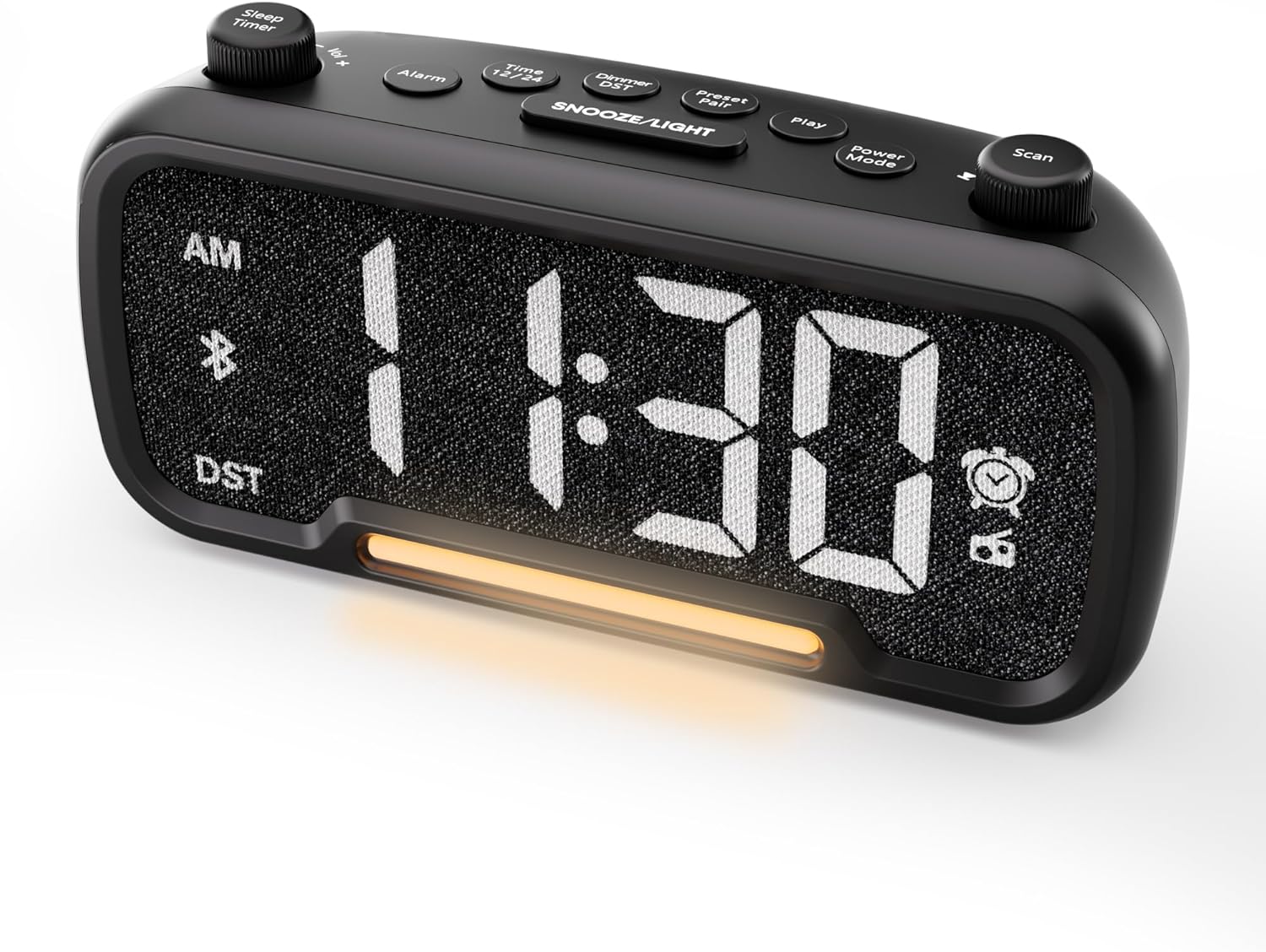

Control Buttons and Knobs:
- Sleep Timer / Vol +/- Knob (Left): Adjusts volume, sets sleep timer duration.
- Dugme alarma: Sets and activates/deactivates alarms.
- Time 12/24 Button: Switches between 12-hour and 24-hour time formats.
- Dimmer / DST Button: Adjusts display brightness, activates/deactivates Daylight Saving Time (DST).
- Preset / Pair Button: Saves FM radio presets, initiates Bluetooth pairing.
- Dugme za reprodukciju: Plays/pauses media in Bluetooth mode.
- Dugme za način rada: Cycles through operating modes (FM, Bluetooth, AUX).
- Scan / TU +/- Knob (Right): Scans FM radio stations, manually tunes FM frequency.
- Dugme ODGOĐAJ/SVJETLO: Activates snooze function, turns night light on/off.

Setup
1. Početno uključivanje
Connect the provided power adapter to the DC 5V IN port on the back of the alarm clock and plug it into a standard wall outlet. The display will light up. Ensure the C battery is installed for backup in case of power outage.

2. Podešavanje vremena
- Pritisnite i držite Vrijeme 12 button for 2 seconds. The hour digits will begin to flash.
- Rotirajte Vol +/- knob (left knob) to adjust the hour.
- Pritisnite Vrijeme 12 ponovo pritisnite dugme. Cifre minuta će početi treptati.
- Rotirajte Vol +/- dugme za podešavanje minuta.
- Pritisnite Vrijeme 12 još jednom pritisnite dugme da biste potvrdili podešavanje vremena.
Video demonstrating how to set the time on the Mesqool Digital Alarm Clock Radio.
3. Format vremena 12/24 sata
To switch between 12-hour and 24-hour time formats, short press the Vrijeme 12 button. The display will change accordingly.
4. Podešavanje ljetnog računanja vremena (DST)
To activate or deactivate DST, press and hold the Dimmer / DST button for 2 seconds. The time will adjust by one hour forward or backward, and the DST indicator will appear or disappear on the display.
Uputstvo za upotrebu
1. Podešavanje alarma
- Pritisnite i držite Alarm button for 2 seconds. The hour digits will flash.
- Rotirajte Vol +/- knob to adjust the desired alarm hour.
- Pritisnite Alarm ponovo pritisnite dugme. Cifre minuta će treptati.
- Rotirajte Vol +/- knob to adjust the desired alarm minute.
- Pritisnite Alarm button again. The alarm sound selection will flash (bell icon for buzzer, radio icon for FM radio). Rotate the Vol +/- knob to choose between buzzer or FM radio as the alarm sound.
- If FM radio is selected, press the Alarm button again. The volume level will flash (L01-L16). Rotate the Vol +/- knob to set the desired alarm volume.
- Pritisnite Alarm button once more to confirm and activate the alarm. The alarm icon will appear on the display.
To deactivate the alarm, short press the Alarm button. The alarm icon will disappear from the display.

Funkcija odgode:
Kada se oglasi alarm, pritisnite SNOOZE / LIGHT button to activate the snooze function for 9 minutes. The alarm will sound again after 9 minutes. To turn off the alarm completely, press any other button except SNOOZE / LIGHT.

2. Rad FM radija
- Pritisnite Power Mode button repeatedly until the radio icon lights up on the display, indicating FM radio mode.
- Auto-Scan and Save Presets: Pritisnite Scan / TU +/- knob (right knob) to automatically search for available FM stations and save them as presets (up to 20 stations). The display will show "P01", "P02", etc., as stations are saved.
- Ručno podešavanje: Rotirajte Scan / TU +/- knob to manually browse frequencies.
- Podsjetite unaprijed postavljene postavke: Kratko pritisnite Unaprijed postavljeno / uparivanje dugme za kretanje kroz sačuvane predefinisane stanice.
- Podesite glasnoću: Rotirajte Vol +/- knob (left knob) to adjust the radio volume (L01-L16).

Video demonstrating how to set the FM radio alarm on the Mesqool Digital Alarm Clock Radio.
3. Rad Bluetooth zvučnika
- Pritisnite Power Mode button repeatedly until the Bluetooth icon (bt) starts flashing on the display, indicating pairing mode.
- On your mobile device, enable Bluetooth and search for "CR1025" in the list of available devices.
- Select "CR1025" to pair. Once connected, the Bluetooth icon will stop flashing and remain solid.
- You can now play audio from your device through the alarm clock's speaker.
- Koristite Vol +/- knob on the alarm clock or your mobile device to adjust the volume.
- Pritisnite Igraj dugme za reprodukciju ili pauziranje zvuka.

Video demonstrating how to set up Bluetooth on the Mesqool Digital Alarm Clock Radio.
4. Rad noćnog svjetla
The alarm clock features a gentle night light. To turn the night light on or off, short press the SNOOZE / LIGHT dugme.

5. Dimmer Setting
The display brightness can be adjusted to 5 levels. Short press the Dimmer / DST button to cycle through the brightness levels (L01-L05). Select the level that best suits your environment.

6. Sleep Timer Setting
The sleep timer allows you to set a duration for the FM radio or Bluetooth speaker to play before automatically turning off. This is useful for falling asleep to music or podcasts.
- While in FM radio or Bluetooth mode, press the Sleep Timer button. The display will show the current sleep timer duration (e.g., "30" for 30 minutes).
- Rotirajte Sleep Timer / Vol +/- knob to select the desired duration: 15, 30, 60, 90, or 120 minutes. You can also select "OFF" to disable the sleep timer.
- The timer will start counting down, and the device will automatically turn off after the selected duration.
7. USB portovi za punjenje
The alarm clock is equipped with two USB charging ports (Type-C and USB-A) on the back, each providing 5V/1A output. These ports can be used to conveniently charge your smartphone, tablet, or other USB-powered devices.

Rješavanje problema
| Problem | Moguće rješenje |
|---|---|
| Prikaz sata je prazan. | Ensure the power adapter is securely connected to both the clock and a working power outlet. Check if the power outlet is functional. |
| Alarm se ne oglašava. | Verify that the alarm is set and activated (alarm icon visible on display). Check the alarm volume level. Ensure the correct alarm sound (buzzer or FM radio) is selected. |
| Slab FM radio prijem. | Extend the FM antenna fully. Try repositioning the antenna or the clock for better signal. Perform an auto-scan again to find stronger stations. |
| Nije moguće upariti Bluetooth uređaj. | Ensure the clock is in Bluetooth pairing mode (flashing 'bt' icon). Make sure Bluetooth is enabled on your mobile device and it is within range. Forget "CR1025" from your device's Bluetooth list and try pairing again. |
| USB portovi za punjenje ne rade. | Confirm the alarm clock is powered on. Ensure the charging cables are properly connected to both the clock and your device. Try a different USB cable or device to rule out cable/device issues. |
Specifikacije
| Feature | Detalj |
|---|---|
| Brand | Mesqool |
| Broj modela | CR1025 |
| Boja | Crna |
| Display Type | Digitalna LED |
| Dimenzije proizvoda | 6.61 cm D x 3.31 cm Š x 2.32 cm V |
| Izvor napajanja | Corded Electric (AC adapter included) |
| Battery Backup | 1 C baterija (uključena) |
| Bluetooth verzija | V5.0 |
| FM radio frekvencija | 87.5-108MHz |
| FM preseti | Do 20 stanica |
| Zaslon zatamnjivanja | 5 nivoa |
| Zvukovi alarma | Buzzer, FM Radio |
| Trajanje odgode | 9 minuta |
| USB izlaz za punjenje | Type-C & USB-A, 5V/1A each |
| Materijal | Plastika |
| Težina artikla | 0.48 funte (otprilike 7.7 unce) |
Održavanje
- Uređaj čistite mekom, suhom krpom. Ne koristite tekuća sredstva za čišćenje ili abrazivne materijale.
- Držite uređaj dalje od direktne sunčeve svjetlosti, ekstremnih temperatura i visoke vlažnosti.
- Osigurajte odgovarajuću ventilaciju oko uređaja kako biste spriječili pregrijavanje.
- If the device will not be used for an extended period, remove the backup battery.
Sigurnosne informacije
- Ne izlažite uređaj vodi ili vlazi.
- Ne pokušavajte sami rastavljati ili popravljati uređaj. Obratite se kvalifikovanom servisnom osoblju.
- Držite uređaj van domašaja djece.
- Koristite samo priloženi adapter za napajanje. Korištenje neovlaštenih adaptera može oštetiti uređaj i poništiti garanciju.
- Avoid placing the device near heat sources or open flames.
Garancija i podrška
Specific warranty details are not provided in the product information. For warranty claims, technical support, or further assistance, please contact Mesqool customer service through their official webweb-mjesto ili prodavača gdje je proizvod kupljen. Molimo sačuvajte dokaz o kupovini za bilo kakve upite u vezi s garancijom.
Visit the Mesqool Store for more information: Mesqool Official Store