1. Uvod
Hvala na kupoviniasing the Generic HY300 Portable Ultra HD Projector. This device is designed to provide a versatile and powerful projection solution for various needs, including business presentations, home entertainment, and multimedia content display. Its compact design and broad compatibility make it an ideal choice for use in different environments.
This manual provides essential information on the setup, operation, and maintenance of your projector. Please read it thoroughly before using the product to ensure proper function and to maximize your viewing iskustvo.

Figure 1.1: The compact design of the HY300 projector, highlighting its portability.
2. Sigurnosne informacije
To ensure safe operation and prolong the life of your projector, please observe the following safety guidelines:
- ventilacija: Ne blokirajte ventilacijske otvore. Osigurajte dovoljan protok zraka oko projektora kako biste spriječili pregrijavanje.
- Prašina i prljavština: Place the projector in a location free of dust or dirt. Dust can contaminate the internal lenses and affect image quality.
- Napajanje: Use only the provided power cable and ensure the voltage matches the projector's requirements (110V/220V compatible).
- Izloženost tečnosti: Keep the projector away from water or other liquids. Do not operate with wet hands.
- Zaštita očiju: Ne gledajte direktno u sočivo projektora kada je lamp is on, as the bright light can cause eye strain or damage.
- Rukovanje: Pažljivo rukujte projektorom. Izbjegavajte ispuštanje ili izlaganje jakim udarcima.
3. Sadržaj paketa
Provjerite da li su sve stavke prisutne u paketu:
- Generic HY300 Projector
- Power Cable
- Daljinski upravljač
- Korisnički priručnik (ovaj dokument)
4. Proizvod je gotovview
Familiarize yourself with the various ports and features of your HY300 projector:
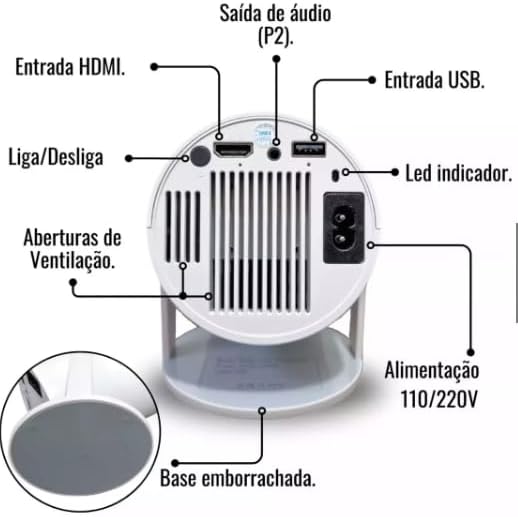
Figure 4.1: Rear panel and connections of the HY300 Projector.
- HDMI ulaz: Connect to devices such as laptops, game consoles, or TV boxes.
- USB ulaz: Spojite USB diskove za reprodukciju medija.
- Audio Output (P2): Spojite vanjske zvučnike ili slušalice.
- Power Input (110V/220V): Spojite kabel za napajanje u električnu utičnicu.
- Dugme za napajanje: Uključuje ili isključuje projektor.
- LED indikator: Displays the power status of the projector.
- Otvori za ventilaciju: Essential for heat dissipation. Do not obstruct.
- Rubberized Base: Pruža stabilnost i sprečava klizanje.
5. Podešavanje
5.1 Postavljanje
Position the projector on a stable, flat surface. The HY300 features a 180-degree flexible projection angle, allowing you to adjust the body to project onto a wall or even the ceiling.
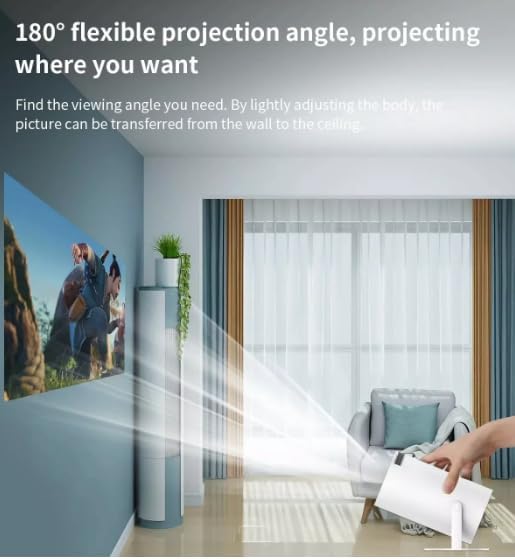
Figure 5.1: Adjusting the projection angle for flexible viewing.
5.2 Priključak za napajanje
- Spojite kabel za napajanje na ulaz za napajanje projektora.
- Plug the other end of the power cable into a 110V or 220V electrical outlet. The projector is bivolt compatible.
5.3 Početno uključivanje
Press the Power Button on the projector or the remote control to turn on the device. The indicator LED will illuminate.
6. Uputstvo za upotrebu
6.1 Osnovna navigacija
The HY300 projector runs on an Android system, allowing for intuitive navigation using the remote control. Use the directional buttons to move through menus and the OK button to select.

Figure 6.1: The projector's smart interface with various applications.
6.2 Podešavanje projekcije
- Fokus: Adjust the focus ring on the projector lens until the image is clear.
- Keystone korekcija: The projector features automatic image correction to adjust for distorted images when the projector is not perfectly perpendicular to the screen.
- zumiranje: The projector has a 1.35x zoom capability, allowing for minor adjustments to the image size without moving the projector.
7. Povezivanje
The HY300 projector offers multiple connectivity options:
- HDMI: Connect to external devices such as TV boxes, laptops, game consoles (PlayStation), or other HDMI-enabled media players.
- USB: Insert a USB flash drive to play media files direktno sa drajva.
- Bluetooth: Connect to external Bluetooth speakers for enhanced audio output. The projector also has a built-in speaker.
- Audio Output (P2): Povežite žičane slušalice ili eksterne zvučnike.
8. Screen Mirroring
The projector supports convenient screen mirroring, allowing you to display content from your smartphone or tablet wirelessly via Wi-Fi.
- Ensure your projector and mobile device are connected to the same Wi-Fi network.
- On the projector's interface, select the screen mirroring application (e.g., 'Miracast' or 'AirPlay' equivalent).
- On your smartphone or tablet, enable screen mirroring/casting (e.g., 'Smart View' on Android, 'Screen Mirroring' on iOS).
- Izaberite projektor sa liste dostupnih uređaja.
- Your device's screen will now be mirrored on the projector.
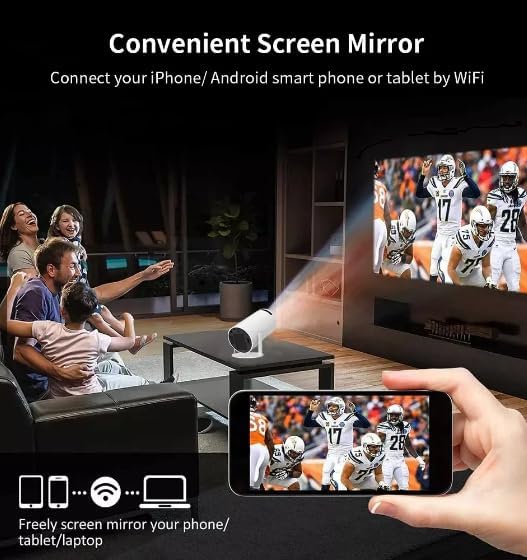
Figure 8.1: Screen mirroring from a smartphone to the projector.
9. Održavanje
Proper maintenance ensures optimal performance and longevity of your projector:
- Čišćenje sočiva: Pažljivo obrišite sočivo projektora mekom krpom koja ne ostavlja dlačice, posebno dizajniranom za optičke površine. Ne koristite abrazivna sredstva za čišćenje.
- Prevencija prašine: As mentioned in the safety section, always place the projector in a clean, dust-free environment to prevent internal lens contamination.
- ventilacija: Regularly check that the ventilation openings are clear of dust and debris. Use a soft brush or compressed air to clean them if necessary.
- Skladištenje: Kada se projektor ne koristi duži period, čuvajte ga na hladnom i suhom mjestu, idealno u originalnom pakovanju ili zaštitnoj futroli.
10. Otkrivanje problema
Ako naiđete na probleme s projektorom, pogledajte sljedeće uobičajene probleme i rješenja:
- Nema slike:
- Provjerite je li kabel za napajanje sigurno spojen i je li projektor uključen.
- Check the input source (HDMI, USB) and ensure it is correctly selected.
- Verify that the connected device (laptop, TV box) is powered on and outputting a signal.
- Podesite prsten za fokusiranje.
- Nema zvuka:
- Check the volume settings on both the projector and the connected source device.
- Ako koristite vanjske zvučnike, provjerite jesu li pravilno spojeni i uključeni.
- If using Bluetooth speakers, ensure they are paired correctly.
- Zamućena slika:
- Podesite fokusni prsten na sočivu projektora.
- Osigurajte da je površina za projekciju ravna i glatka.
- Check for dust on the lens.
- Upozorenje o pregrijavanju:
- Uvjerite se da otvori za ventilaciju nisu blokirani.
- Koristite projektor u dobro prozračenom prostoru.
11. Specifikacije
Detailed technical specifications for the Generic HY300 Projector:
| Feature | Specifikacija |
|---|---|
| Brand | Generic |
| Model | HY300 |
| Optička rezolucija | 1280 x 720 (UltraHD) |
| Osvetljenost | 8000 lumena (200 ANSI lumena) |
| Kontrast Ratio | 3001:1 - 4000:1 |
| Tehnologija projekcije | LED |
| Život izvora svjetlosti | 50,000 sata |
| Veličina projekcije | 40-150 inča |
| Udaljenost projekcije | 1.2 metara do 4 metara |
| Skala ekrana | 4:3 / 16:9 |
| Zoom | 1.35x |
| Operativni sistem | Android |
| Hardversko sučelje | Bluetooth, HDMI, USB |
| Tehnologija povezivanja | HDMI, Wi-Fi, Bluetooth |
| Kompatibilni uređaji | Speakers, Laptops, Game Consoles, Smartphones, Tablets, Televisions |
| Posebne karakteristike | Portable, Automatic Image Correction, Built-in Speaker, Screen Mirroring |
| Voltage | 110 Volts / 220 Volts (Bivolt) |
| DC ulaz | 19V 3A & OTG |
| Težina | 900g |
| Refresh Rate | 60 Hz |
| Vrsta montaže | Freestanding, Tabletop Mount |
12. Garancija i podrška
The Generic HY300 Projector comes with a manufacturer's warranty of 30 dana od datuma kupovine. Molimo sačuvajte svoj dokaz o kupovini za sve zahtjeve u vezi s garancijom.
For technical support or warranty inquiries, please contact your retailer or the manufacturer's customer service. Refer to the product packaging or purchase documentation for specific contact information.


