Uvod
This manual provides essential instructions for setting up, operating, maintaining, and troubleshooting your OPPO Reno 12 F 5G CPH2637 smartphone. Please read this guide thoroughly to ensure proper use and to maximize the device's capabilities.
1. Podešavanje
1.1 Raspakivanje i početni pregled
Pažljivo izvadite sve predmete iz ambalaže. Provjerite da li su prisutne sljedeće komponente:
- OPPO Reno 12 F 5G CPH2637 pametni telefon
- USB kabel tipa C
- Adapter za napajanje
- Alat za izbacivanje SIM kartice
- Vodič za brzi početak (ovaj dokument)
Prije nego što nastavite, provjerite uređaj na bilo kakva fizička oštećenja.
1.2 Umetanje SIM kartica
The OPPO Reno 12 F 5G CPH2637 supports Dual SIM functionality.
- Pronađite ladicu za SIM karticu sa strane uređaja.
- Umetnite alat za izbacivanje SIM kartice u mali otvor pored ladice i lagano pritisnite dok ladic ne iskoči.
- Stavite svoje Nano-SIM kartice u predviđene utore na ladici, pazeći da zlatni kontakti budu okrenuti prema dolje.
- Pažljivo gurnite ladicu nazad u uređaj dok se ne poravna sa stranicom.
1.3 Punjenje uređaja
Prije prve upotrebe, preporučuje se potpuno napuniti uređaj.
- Spojite USB Type-C kabel na priključak za punjenje na dnu telefona.
- Povežite drugi kraj kabla na adapter za napajanje.
- Uključite adapter za napajanje u zidnu utičnicu.
- Indikator punjenja će se pojaviti na ekranu.
1.4 Uključivanje i početna konfiguracija
To power on the device, press and hold the Power button located on the side until the OPPO logo appears. Follow the on-screen instructions to complete the initial setup, including language selection, Wi-Fi connection, Google account setup, and security settings.
2. Uputstvo za upotrebu
2.1 Osnovna navigacija
The OPPO Reno 12 F 5G CPH2637 features a touchscreen interface. Use gestures such as tapping, swiping, pinching, and spreading to interact with the device. The navigation bar at the bottom of the screen typically includes Back, Home, and Recent Apps buttons.
2.2 Upućivanje poziva i slanje poruka
Da biste uputili poziv, otvorite Telefon aplikaciju, unesite broj i dodirnite ikonu poziva. Da biste poslali poruku, otvorite Poruke aplikaciju, dodirnite ikonu nove poruke, unesite primaoca i svoju poruku, a zatim dodirnite pošalji.
2.3 Povezivanje s mrežama
Your device supports both Wi-Fi and 5G cellular networks.
- Wi-Fi: Idi na Postavke > Wi-Fi, turn on Wi-Fi, select your desired network, and enter the password if required.
- 5G mobilni podaci: Ensure your SIM card has an active 5G plan. Go to Settings > Mobile Network > Data usage to manage your cellular data.
2.4 Korištenje kamere
Otvorite Kamera app from your home screen or app drawer. Tap the shutter button to take a photo. Swipe left or right to switch between different camera modes such as Photo, Video, Portrait, and Night. Tap on the screen to focus on a specific area.
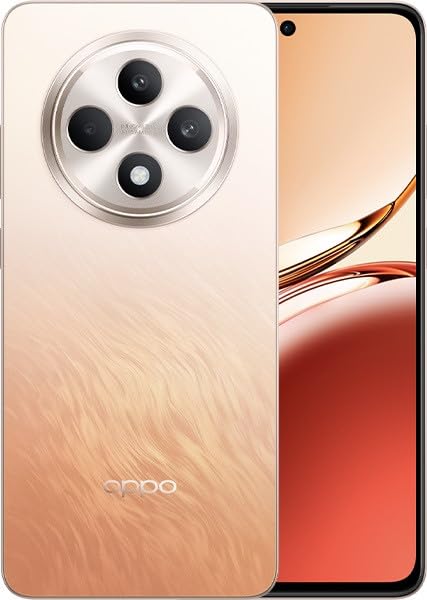
Image: OPPO Reno 12 F 5G CPH2637 smartphone in Amber Orange. This image displays the front and back of the device, highlighting its design and camera module.
2.5 Sigurnosne značajke
The device offers various security options to protect your data:
- Otključavanje otiskom prsta: Registrujte svoje otiske prstiju u Settings > Password & Biometrics > Fingerprint.
- Otključavanje licem: Postavite prepoznavanje lica u Settings > Password & Biometrics > Face.
- Zaključavanje ekrana: Choose a PIN, pattern, or password for screen lock in Settings > Password & Biometrics > Lock screen password.
3. Održavanje
3.1 Čišćenje uređaja
Use a soft, lint-free cloth to clean the screen and body of your phone. Avoid using harsh chemicals, abrasive materials, or aerosol sprays, as these can damage the device's finish and coatings. For stubborn smudges, slightly dampi krpu vodom.
3.2 Ažuriranja softvera
Redovno provjeravajte i instalirajte ažuriranja softvera kako biste osigurali optimalne performanse, sigurnost i pristup novim funkcijama. Idite na Postavke > O uređaju > Ažurirano da provjerite dostupna ažuriranja.
3.3 Njega baterija
To prolong battery life, avoid exposing the device to extreme temperatures. It is recommended to keep the battery charge between 20% and 80% for daily use. Avoid leaving the phone plugged in for extended periods after it is fully charged.
3.4 Upravljanje skladištem
Periodično review i izbrišite nepotrebne files, apps, and media to free up storage space. You can check storage usage in Postavke > O uređaju > Pohrana.
4. Otkrivanje problema
4.1 Uređaj se ne uključuje
If your device does not turn on, ensure it is sufficiently charged. Connect it to the charger for at least 15 minutes, then try pressing and holding the Power button again for 10-15 seconds.
4.2 Problemi s mrežnom vezom
If you experience issues with cellular data or Wi-Fi:
- Uključivanje i isključivanje načina rada u avionu.
- Ponovo pokrenite uređaj.
- For cellular issues, ensure your SIM card is properly inserted and your plan is active.
- For Wi-Fi issues, restart your router and ensure you are within range.
4.3 Rušenje ili zamrzavanje aplikacija
If an app is not responding, try force-closing it from the Recent Apps screen. If the issue persists, clear the app's cache and data in Settings > Apps > [App Name] > Storage usageKao krajnje rješenje, deinstalirajte i ponovo instalirajte aplikaciju.
4.4 Vraćanje na tvorničke postavke
A factory reset will erase all data on your device and restore it to its original factory settings. Back up all important data before performing a factory reset. Idi na Postavke > Postavke sistema > Sigurnosna kopija i resetiranje > Resetiraj telefon > Izbriši sve podatke.
5. Specifikacije
| Feature | Specifikacija |
|---|---|
| Brand | OPPO |
| Naziv modela | Reno 12 F 5G |
| Broj modela | CPH2637 |
| Kapacitet memorije | 256 GB |
| Veličina instalirane RAM memorije | 12 GB |
| Cellular Technology | 5G |
| Tehnologija povezivanja | 5G |
| Broj utora za SIM kartice | Dual SIM |
| Boja | Amber Orange |
| Unos ljudskog interfejsa | Touchscreen |
| Form Factor | Slate |
6. Garancija i podrška
Your OPPO Reno 12 F 5G CPH2637 is covered by a limited warranty. Please refer to the warranty card included in your product packaging for specific terms and conditions, including warranty period and coverage details. For technical support, service inquiries, or further assistance, please visit the official OPPO support webweb-mjesto ili kontaktirajte njihovu telefonsku liniju za korisničku podršku u vašoj regiji.