
Uvod
The Logitech Zone Wireless 2 is a premium noise-canceling headset designed for professional use, offering advanced audio clarity and comfort. This manual provides instructions for setting up, operating, maintaining, and troubleshooting your headset to ensure optimal performance.
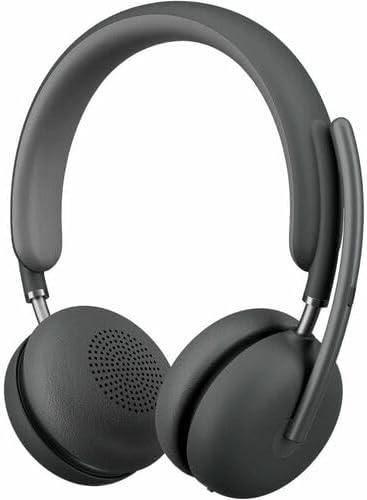
Image: The Logitech Zone Wireless 2 headset, shown in graphite color.
Ključne karakteristike:
- Certificirano za Microsoft Teams: Optimized for Microsoft Teams over native Bluetooth, freeing up a USB port.
- Advanced Call Clarity: Logi Tune app feature suppresses far-end ambient noise for clearer communication.
- Four Noise-Canceling Microphones: Elevate your voice and suppress background sounds.
- Hibridno aktivno poništavanje buke (ANC): Offers ANC high, ANC low, transparency on, and ANC/transparency off modes for focused work.
- Personalizirani zvuk: Custom listening experience via Personal EQ in the Logi Tune mobile app with 40mm drivers.
- Održivi dizajn: Features interchangeable earpads, a replaceable battery, 20% post-consumer recycled plastic, and low-carbon aluminum.
- Bežična sloboda: Connects simultaneously to laptop and mobile phone via Bluetooth with a range of up to 170 ft (50 meters).
- Produženi vijek trajanja baterije: Up to 15 hours talk time and 22 hours listening time (with ANC on).
Setup
1. Šta se nalazi u kutiji
- Logitech Zone Wireless 2 Headset
- Zaštitna torbica
- USB-C kabl za punjenje
- USB-C na USB-A adapter
- Korisnički priručnik (ovaj dokument)
- Ear Cushions (pre-installed, with additional set for replacement)

Image: The Logitech Zone Wireless 2 headset, protective case, USB-C cable, and USB-C to USB-A adapter.
2. Punjenje slušalica
- Connect the USB-C charging cable to the USB-C port on the headset.
- Drugi kraj kabla priključite na USB izvor napajanja (npr. USB priključak računara, adapter za struju).
- The LED indicator on the headset will show charging status. A full charge takes approximately 2 hours.
3. Povezivanje s uređajima
The Zone Wireless 2 headset supports Bluetooth 5.2 for wireless connectivity.
Bluetooth uparivanje:
- Power on the headset by sliding the power switch.
- Press and hold the Bluetooth pairing button on the headset until the LED indicator flashes blue rapidly.
- On your device (laptop, smartphone), go to Bluetooth settings and select "Logitech Zone Wireless 2" from the list of available devices.
- Kada se poveže, LED indikator će postati plavo.

Image: Diagram illustrating the headset's ability to connect simultaneously to a smartphone and a laptop via Bluetooth.
Microsoft Teams Certification:
The headset is certified for Microsoft Teams over native Bluetooth. This allows for a full Teams meeting experience without requiring a separate USB dongle, preserving your device's USB ports.
4. Logi Tune App Installation
For full functionality, including Personal EQ, Advanced Call Clarity, and firmware updates, download and install the Logi Tune application on your computer or mobile device. The app provides a personalized experience and device management.

Image: A laptop screen displaying the Logi Tune application interface, showing device management and settings.
Rukovanje slušalicama
1. Kontrole slušalica
The headset features intuitive controls for managing calls, media, and noise cancellation.

Image: A close-up of the right earcup, showing the power switch, ANC button, and other controls.
- Prekidač: Povucite da uključite ili isključite slušalice.
- Dugmad za jačinu zvuka: Podesite jačinu zvuka.
- Višenamjensko dugme: Play/pause media, answer/end calls.
- ANC dugme: Prođite kroz načine aktivnog poništavanja buke.
- Isključivanje mikrofona: Flip the microphone boom up to mute, down to unmute.
2. Aktivno poništavanje buke (ANC)
The Hybrid ANC feature allows you to control your listening environment. Press the ANC button to switch between modes:
- ANC High: Maximum noise cancellation for noisy environments.
- ANC Low: Reduced noise cancellation for less intrusive background sounds.
- Transparentnost uključena: Omogućava prolaz ambijentalnim zvukovima, održavajući vas svjesnim vaše okoline.
- ANC and Transparency Off: No active noise cancellation or transparency mode.
3. Upotreba mikrofona
The headset features four noise-canceling microphones designed to isolate your voice and suppress background noise during calls. Simply lower the microphone boom to activate the microphone for calls. Raise it to mute.

Image: A man wearing the headset, illustrating the clear audio experience with sound wave graphics around his head.
4. Audio Customization with Logi Tune
Use the Logi Tune app to personalize your audio experience:
- Personal EQ: Adjust audio frequencies to optimize sound for your hearing range.
- Advanced Call Clarity: Further refine noise suppression for incoming audio.
- Ažuriranja firmvera: Ensure your headset has the latest features and performance improvements.
Održavanje
1. Čišćenje
- Obrišite slušalice mekom krpomamp tkanina.
- Izbjegavajte korištenje abrazivnih sredstava za čišćenje ili otapala.
- Ensure all ports are dry before charging or connecting.
2. Earpad and Battery Replacement
The Zone Wireless 2 is designed for longevity with user-replaceable components:
- jastučići za uši: Interchangeable earpads can be replaced to maintain hygiene and comfort. Refer to the Logi Tune app or Logitech support website for instructions on how to replace them.
- baterija: The battery is designed to be replaceable, extending the product's lifespan. Contact Logitech support for information on obtaining and replacing the battery.

Image: The headset disassembled, showing the removable earpads, internal components, and a replaceable battery, highlighting its modular design.
3. Skladištenje
Kada se ne koriste, slušalice čuvajte u zaštitnoj futroli kako biste spriječili oštećenja i održali ih čistima.
Rješavanje problema
- Nema napajanja: Ensure the headset is charged. Connect it to a power source using the USB-C cable.
- Ne mogu se povezati putem Bluetootha:
- Ensure the headset is in pairing mode (LED flashing blue).
- Provjerite postavke Bluetootha na svom uređaju i uvjerite se da je Bluetooth omogućen.
- Pokušajte ponovo pokrenuti i slušalice i uređaj.
- If previously paired, remove the headset from your device's Bluetooth list and re-pair.
- Loš kvalitet zvuka:
- Ensure the headset is within the Bluetooth range (up to 170 ft / 50 meters).
- Provjerite ima li smetnji od drugih bežičnih uređaja.
- Adjust Personal EQ settings in the Logi Tune app.
- Ensure the microphone boom is properly positioned for clear voice pickup.
- ANC ne funkcioniše efikasno:
- Ensure ANC mode is activated (not in Transparency or Off mode).
- Check that the earpads are properly seated and forming a good seal around your ears.
- Problemi s aplikacijom Logi Tune: Ensure the app is updated to the latest version. Restart the app and your headset.
Za dodatnu pomoć, obratite se Logitech podršci website or the Logi Tune application.
Specifikacije
| Feature | Detalj |
|---|---|
| Naziv modela | Zone Wireless 2 |
| Broj modela stavke | 981-001435 |
| Tehnologija povezivanja | Bežično (Bluetooth 5.2) |
| Bluetooth domet | Do 50 metara (170 stope) |
| Priključak za slušalice | USB tip C (za punjenje) |
| Vrsta audio drajvera | Dinamički drajver (40 mm) |
| Frekvencijski opseg | 20 - 20000 Hz |
| Kontrola buke | Hibridno aktivno poništavanje buke |
| Mikrofon | Four noise-canceling mics |
| Trajanje baterije (slušanje) | Do 22 sati (sa uključenim ANC-om) |
| Trajanje baterije (vrijeme razgovora) | Do 15 sati (sa uključenim ANC-om) |
| Vrijeme punjenja | Pribl. 2 sati |
| Težina artikla | 230 grama (8.1 unci) |
| Dimenzije proizvoda | 9 x 8.75 x 2.5 inča |
| Materijal | Plastic (20% post-consumer recycled) |
| Kompatibilni uređaji | Desktops, Laptops (PC, Mac), Smartphones |
| Kontrolni metod | App (Logi Tune), Media Control Buttons |
| UPC | 097855196316 |
Garancija i podrška
Informacije o garanciji
Logitech products are typically covered by a limited hardware warranty. Please refer to the warranty card included with your product or visit the official Logitech website for specific warranty terms and conditions applicable to your region and product model.
Korisnička podrška
For technical assistance, troubleshooting guides, FAQs, and driver downloads, please visit the official Logitech support webstranica:
You can also utilize the Logi Tune application for device management, personalized settings, and access to support resources directly from the app.