
Bobtot EP20
Bobtot prijenosni Bluetooth zvučnik EP20 Korisnički priručnik
Model: EP20
1. Uvod
Thank you for choosing the Bobtot Portable Bluetooth Speaker EP20. This manual provides essential information for setting up, operating, and maintaining your speaker. Please read it thoroughly to ensure optimal performance and longevity of your device.

Image 1.1: Bobtot Portable Bluetooth Speaker EP20. This image displays the white speaker with its handle and the front grille illuminated with colorful RGB lights.
2. Šta se nalazi u kutiji
Carefully unpack your Bobtot EP20 speaker and ensure all items are present:
- EP20 Bluetooth Speaker x1
- Bežični mikrofon x1
- Kabel za punjenje tipa C x1
- Auxiliary Cable x1
- Uputstvo za upotrebu x1

Image 2.1: Package Contents. This image shows the Bobtot EP20 speaker, wireless microphone, Type C charging cable, auxiliary cable, and user manual laid out.
3. Proizvod je gotovview
3.1 Kontrolna tabla

Image 3.1: Speaker Control Panel. This image highlights the buttons on the top of the speaker, including power, volume, play/pause, EQ mode, and RGB light controls.
3.2 Portovi i veze

Image 3.2: Speaker Connection Ports. This image shows the various input ports on the speaker, including Type C charging, 3.5mm AUX, and USB.
4. Podešavanje
4.1 Punjenje zvučnika
- Connect the provided Type C charging cable to the speaker's Type C port.
- Drugi kraj kabla priključite na USB adapter za napajanje (nije uključen) ili na USB port računara.
- Indikatorska lampica punjenja će prikazivati status punjenja. Potpuno punjenje obično traje nekoliko sati.
4.2 Charging the Wireless Microphone
- The wireless microphone is rechargeable. Use a compatible charging cable (often micro-USB, check microphone port) to charge it.
- A charging indicator on the microphone will confirm charging status.
4.3 Uključivanje/isključivanje
- govornik: Press and hold the Power button on the top panel to turn the speaker on or off.
- mikrofon: Press and hold the Power button on the microphone to turn it on or off.
4.4 Bluetooth uparivanje
- Turn on the Bobtot EP20 speaker. It will automatically enter Bluetooth pairing mode, indicated by a flashing LED light.
- Na svom uređaju (pametnom telefonu, tabletu, laptopu) omogućite Bluetooth i potražite dostupne uređaje.
- Select "Bobtot EP20" from the list of devices.
- Nakon povezivanja, zvučnik će emitirati zvučnu potvrdu, a LED lampica će prestati treptati.
4.5 Microphone Auto Connection
The wireless microphone is designed to automatically connect to the Bobtot EP20 speaker when both devices are powered on and within range. No manual pairing is typically required for the microphone.

Image 4.1: Microphone Auto Connection. This image shows the speaker and microphone together, highlighting the automatic connection feature and microphone controls.
5. Uputstvo za upotrebu
5.1 Osnovna reprodukcija zvuka
- Kontrola jačine zvuka: Use the '+' and '-' buttons on the speaker's control panel to adjust the main speaker volume.
- Pusti/pauza: Pritisnite dugme Reprodukuj/Pauziraj da biste pokrenuli ili pauzirali reprodukciju zvuka.
- Navigacija staza: Use the previous/next track buttons (often integrated with volume controls or separate) to skip tracks.
5.2 EQ Mode Adjustment
The speaker features adjustable EQ modes for different listening environments.
- Short press the 'M' (Mode) button on the speaker's control panel to cycle through EQ modes.
- Indoor Mode: Pruža profesionalan uravnotežen zvukfile.
- Način rada na otvorenom: Enhances bass for a more powerful sound in open environments.

Image 5.1: EQ Mode Switch. This image illustrates the difference between Indoor Mode (balanced sound) and Outdoor Mode (deep bass) and indicates the button to press for adjustment.
5.3 RGB svjetlosna moda
The speaker includes dynamic RGB lighting effects.
- Short press the Light button (often indicated by a sun or star icon) on the control panel to cycle through different light modes.
- Long press the Light button to turn the RGB lights off.

Image 5.2: Controllable Dancing RGB Lights. This image shows multiple Bobtot EP20 speakers with different RGB light patterns, demonstrating the dynamic lighting feature.
5.4 Wireless Microphone Functions
- Jačina zvuka mikrofona: Use the volume controls on the microphone itself to adjust its output level.
- Eho efekat: Adjust the echo effect using the dedicated button or dial on the microphone to add or reduce reverb.
- Magični zvučni efekti: The microphone offers 5 different voice-changing effects (e.g., baby, monster, female, male, original voice). Press the designated button to cycle through these effects.

Image 5.3: 5 Voice Changes for Fun. This image shows a family using the microphone with the speaker, illustrating the various voice-changing effects available.
5.5 Multiple Connection Methods
In addition to Bluetooth, the Bobtot EP20 supports several other audio input methods:
- AUX ulaz: Connect non-Bluetooth devices (e.g., projectors, computers) using the provided 3.5mm auxiliary cable. The speaker will automatically switch to AUX mode or require manual selection via the 'M' (Mode) button.
- Reprodukcija sa USB diska: Umetnite USB fleš disk koji sadrži audio fileu USB priključak. Zvučnik će automatski prepoznati i reproducirati muziku s pogona.
- FM radio: Switch to FM radio mode using the 'M' (Mode) button. The speaker can automatically search and save available stations.

Image 5.4: Multiple Connection Methods. This image demonstrates the speaker's versatility by showing it connected to various devices via Bluetooth, AUX, and USB.
6. Održavanje
- čišćenje: Za čišćenje vanjske strane zvučnika koristite meku, suhu krpu. Ne koristite abrazivna sredstva za čišćenje ili rastvarače.
- Održavanje baterije: To prolong battery life, fully charge the speaker before first use. Avoid completely draining the battery frequently. If storing for an extended period, charge the battery to approximately 50% every few months.
- Otpornost na vodu: The speaker is IPX6 water-resistant, meaning it can resist gentle water spray and splashes. Do not submerge the speaker in water or expose it to heavy rain. Ensure all port covers are securely closed before exposure to moisture.
- Skladištenje: Čuvajte zvučnik na hladnom i suhom mjestu, dalje od direktne sunčeve svjetlosti i ekstremnih temperatura.

Image 6.1: IPX6 Water Resistant. This image shows the speaker in an outdoor setting near water, emphasizing its resistance to splashes.
7. Otkrivanje problema
| Problem | Mogući uzrok | Rješenje |
|---|---|---|
| Zvučnik se ne uključuje. | Slaba baterija; Dugme za napajanje nije pravilno pritisnuto. | Potpuno napunite zvučnik. Pritisnite i držite dugme za napajanje nekoliko sekundi. |
| Nema zvuka iz zvučnika. | Jačina zvuka je preniska; Uređaj nije povezan; Neispravan način unosa. | Increase speaker and device volume. Ensure Bluetooth is connected or AUX/USB mode is selected. |
| Bluetooth veza nije uspjela. | Zvučnik nije u režimu uparivanja; Bluetooth uređaja isključen; Previše daleko od zvučnika. | Ensure speaker is in pairing mode. Turn device Bluetooth off/on. Move device closer to speaker (within 100ft/30m). |
| Mikrofon ne radi. | Microphone off; Low battery; Out of range. | Turn on the microphone. Charge the microphone. Ensure microphone is within range of the speaker. |
| Zvuk je izobličen. | Previsoka jačina zvuka; Kvalitet audio izvora. | Reduce speaker and device volume. Try a different audio source. |
8. Specifikacije
| Feature | Detalj |
|---|---|
| Broj modela | EP20 |
| Brand | Bobtot |
| Tehnologija povezivanja | AUX, Bluetooth 5.3, USB |
| Izvor napajanja | Battery Powered |
| Vrsta baterije | Litijum-jonska (8800 mAh) |
| Vrijeme igranja | Do 16 sati (pri 50% volumena) |
| Output Wattage | 20 W (40 W vršno) |
| Otpornost na vodu | IPX6 |
| Težina artikla | 2.33 funti (1.06 kilograma) |
| Dimenzije proizvoda (D x Š x V) | 3.93 x 3.74 x 9.44 inča |
| Materijal | Akrilonitril Butadien Stiren (ABS), Metal |
| Frekvencijski odziv | 18 KHz |
| Nivo buke | 75 decibela |
| Impedansa | 4 Ohm |
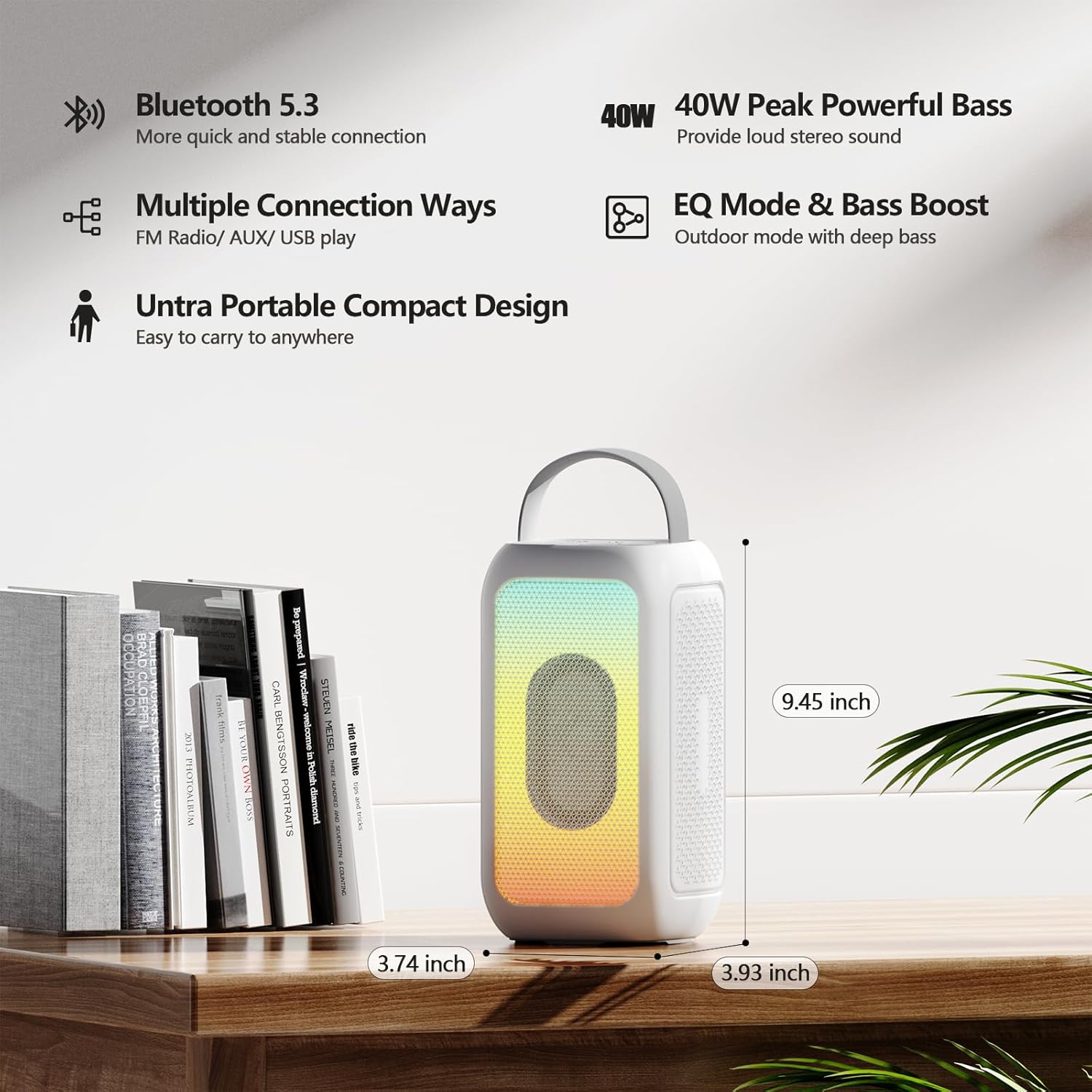
Image 8.1: Product Dimensions. This image provides a visual representation of the speaker's height, width, and depth.
9. Garancija i podrška
For warranty information and customer support, please refer to the documentation included with your purchase or contact the retailer/manufacturer directly. Keep your proof of purchase for any warranty claims.
Manufacturer: MOSWS INTERNATIONAL LIMITED
Ask a question about this manual
Ask about setup, troubleshooting, compatibility, parts, safety, or missing instructions. Manuals+ will review the question and use this page’s manual context to help answer it.