
Uvod
This manual provides instructions for the KRPTQJoo replacement remote control, designed for use with various Denon AV Surround Receiver models, including RC-1075, RC-1077, RC-1079, RC-1080, RC-1084, RC-1085, RC-1098, RC-1099, RC-1104, RC-1105, RC-1024, RC-1108, RC-1107, RC-1117, and RC-1118. This remote serves as a direct replacement and does not require programming. Please note that some buttons may not function if your specific Denon receiver model does not support the corresponding feature. Refer to your original receiver's manual for detailed functionality.

Slika 1: Prednja strana view of the KRPTQJoo replacement remote control, model RC-1115. This image displays the layout of all buttons, including power, input selection, number pad, volume, channel, and navigation controls.
Setup
Instalacija baterije
The remote control requires two (2) AA alkaline batteries (not included). Follow these steps to install the batteries:
- Pronađite odeljak za baterije na poleđini daljinskog upravljača.
- Pritisnite jezičak i pomaknite poklopac baterije prema dolje da biste ga otvorili.
- Umetnite dvije AA baterije, pazeći da pozitivni (+) i negativni (-) terminali budu pravilno poravnati s oznakama unutar odjeljka.
- Gurnite poklopac baterije na svoje mjesto dok ne škljocne sigurno.
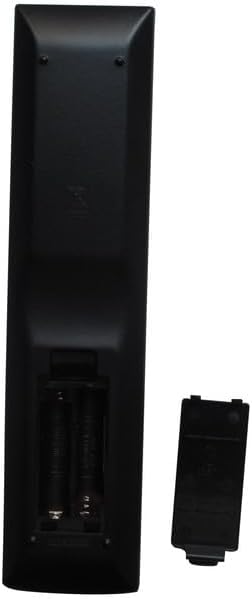
Slika 2: Natrag view of the remote control with the battery compartment open. This image shows the correct orientation for inserting two AA batteries.
Uputstvo za upotrebu
This replacement remote control is designed to function immediately with compatible Denon AV Surround Receivers without any programming. Point the remote directly at your receiver and ensure there are no obstructions between the remote and the receiver's infrared sensor.
Osnovne funkcije
- Napajanje (UKLJ./ISKLJUČ.): Koristite OFF i ON buttons to power your Denon receiver on or off.
- Odabir ulaza: Dugmad kao što su DVD, VCR(iPod), V.AUX, EXT.IN, CD, CD-R/TAPE, AUX, BAND, i TUNER allow you to select different audio/video sources connected to your receiver.
- Kontrola jačine zvuka: Koristite VOLUME + i JAČINA - dugmad za podešavanje nivoa zvuka.
- Isključi zvuk: Pritisnite MUTE button to temporarily silence the audio output. Press again to restore sound.
- Navigacija: The central directional pad (up, down, left, right) and MENU/ENTER button are used for navigating menus on your receiver's display.
- Tastatura sa brojevima: Use the numeric buttons (0-9) for direct input, such as selecting radio presets or track numbers.
For specific functions related to your Denon receiver model, please consult the original Denon user manual.
Održavanje
Čišćenje
To clean the remote control, gently wipe it with a soft, dry cloth. Do not use liquid cleaners, abrasive pads, or chemical solvents, as these can damage the remote's surface or internal components.
Zamjena baterije
Replace batteries when the remote's response becomes sluggish or it stops functioning. Always replace both batteries at the same time with new AA alkaline batteries. Do not mix old and new batteries, or different types of batteries.
Rješavanje problema
- Daljinski ne reaguje:
- Provjerite jesu li baterije pravilno umetnute s ispravnim polaritetom (+/-).
- Zamijenite baterije novim AA alkalnim baterijama.
- Ensure there is a clear line of sight between the remote's infrared emitter and the receiver's sensor.
- Verify that the remote is compatible with your specific Denon receiver model.
- Neki dugmići ne rade:
- This remote is a replacement and may have buttons for features not present on all compatible Denon receiver models. Refer to your original Denon receiver manual to confirm supported functions.
- Kratki radni domet:
- Replace the batteries. Low battery power can reduce the remote's effective range.
- Ensure no strong light sources (e.g., direct sunlight, fluorescent lights) are interfering with the receiver's IR sensor.
Specifikacije
| Brand | KRPTQJoo |
| Kompatibilnost modela | Denon AV Surround Receivers (RC-1075, RC-1077, RC-1079, RC-1080, RC-1084, RC-1085, RC-1098, RC-1099, RC-1104, RC-1105, RC-1024, RC-1108, RC-1107, RC-1117, RC-1118) |
| Tehnologija povezivanja | infracrveni (IR) |
| Maksimalni domet | 8 Meters (approximately 26 feet) |
| Izvor napajanja | 2 x AA alkalne baterije (nisu uključene) |
| Boja | Crna |
| Težina artikla | 1.6 unce |
Podrška
For any issues or questions regarding your KRPTQJoo replacement remote control, please contact the seller directly. The seller aims to provide a quick response within 12 hours to assist with any problems you may encounter.