
1. Uvod
Thank you for choosing the Bobtot B38 5.1 Channel Home Theater System. This system is designed to provide an immersive audio experience for your entertainment needs. Featuring a 4-inch subwoofer with a built-in receiver and five wired satellite speakers, it delivers clear highs, rich mid-range, and deep bass. Its compact design makes it suitable for small to medium-sized rooms, allowing for flexible placement to optimize sound quality.
This manual provides detailed instructions for setting up, operating, and maintaining your home theater system. Please read it thoroughly before use to ensure proper functionality and to maximize your audio experience.

Image: The Bobtot B38 5.1 Channel Home Theater System, showcasing the central subwoofer unit and five wired satellite speakers.
2. Šta se nalazi u kutiji
Upon unpacking your Bobtot B38 Home Theater System, please ensure all the following items are present:
- 1 x Subwoofer sa ugrađenim prijemnikom
- 1 x Centralni zvučnik
- 2 x prednja zvučnika
- 2 x Zadnji zvučnici
- 1 x Daljinski upravljač s punom funkcijom
- 1 x Kratki vodič (Korisnički priručnik)
- 3 x RCA Video Audio Cables
- 1 x 3.5 mm na 2-muška RCA audio stereo kabel
- 1 x koaksijalni kabel
- 1 x FM antenski kabel
- 1 x Optički stereo kabel
- 1 x TV ARC kabel (HDMI)

Image: All components included in the Bobtot B38 package, laid out on a table.
3. Proizvod je gotovview
The Bobtot B38 system comprises a central subwoofer unit and five satellite speakers, designed for a 5.1 channel surround sound experience. The subwoofer houses the main amplifier and various input/output ports.
3.1 Subwoofer and Satellite Speakers
The main unit features a 4-inch subwoofer for powerful bass and a built-in receiver. The five wired satellite speakers (center, two front, two rear) work in conjunction to create an immersive soundstage.

Slika: Detaljna view of the 4-inch subwoofer, illustrating its internal structure.
The compact size of the satellite speakers allows for versatile placement in your room.

Image: A satellite speaker and the subwoofer, with their dimensions indicated.
3.2 Priključci stražnje ploče
The rear panel of the subwoofer features various input and output ports for connecting to your audio sources and the satellite speakers.

Image: The rear panel of the subwoofer, detailing the ARC Input, Optical Input, Coaxial Input, AUX Audio Input (RCA), FM Antenna, DVD Audio Input, and speaker Audio Output ports.
- ARC ulaz: For connecting to TVs with HDMI ARC support.
- optički ulaz: Za digitalnu audio vezu sa kompatibilnih uređaja.
- Koaksijalni ulaz: Za digitalnu audio vezu sa kompatibilnih uređaja.
- AUX Audio Input (RCA): For analog audio connection from various devices.
- FM antena: Za prijem FM radija.
- DVD Audio Input: Specific RCA inputs for DVD players.
- Audio izlaz: RCA jacks for connecting the five wired satellite speakers.
- Izvor napajanja: AC 120V 60Hz 0.5A.
- Prekidač: To turn the unit ON/OFF.
3.3 Kontrole na prednjoj ploči
The front panel of the subwoofer includes essential controls and indicators.

Image: The front panel of the subwoofer with buttons for ST.BY, INPUT, 5.1/2.1, AUTO/M, and ON/OFF Timer.
- ST.BY: Standby button. Press this before selecting the mode every time you turn on the unit.
- ULAZ: Cycles through available input sources (BT/ARC/OPT/COA/DV/AUX/FM/USB).
- 5.1/2.1: Toggles between 5.1 channel surround sound and 2.1 channel stereo mode (only front speakers play).
- AUTO/M: Auto/Manual tuning for FM radio.
- Tajmer za uključivanje/isključivanje: For setting sleep timer.
- Gumb za jačinu zvuka: Podešava glavnu jačinu zvuka.
- Utori za USB/SD kartice: Za direktnu reprodukciju medija.
3.4 Daljinski upravljač
The included full-function remote control allows for convenient operation of your home theater system from a distance.

Image: The remote control for the Bobtot B38 system, showing buttons for power, input selection, 5.1/2.1 channel mode, individual speaker volume control, and other settings.
- Uključivanje/isključivanje: Uključuje ili isključuje sistem.
- Odabir načina unosa: Buttons for BT, ARC, OPT, COA, AUX, USB, FM, DVD.
- Odabir 5.1/2.1 kanala: Toggles between surround sound and stereo.
- Kontrola jačine zvuka: Podešava ukupnu jačinu zvuka sistema.
- Individual Speaker Volume: The remote control allows independent volume adjustment for each speaker and the subwoofer. Refer to the remote control diagram in Section 3.4 for specific buttons.
- Isključi zvuk: Isključuje audio izlaz.
- EQ: Postavke ekvilajzera.
- TUNE+/-: Za podešavanje FM radija.
- CH +/-: For changing FM radio channels.
- Numerička tastatura: Za direktan unos ili odabir kanala.
4. Podešavanje
Follow these steps to set up your Bobtot B38 Home Theater System.
4.1 Priključivanje zvučnika
- plasman: Position your subwoofer and satellite speakers for optimal performance. Ensure the center speaker is placed centrally, front speakers to the left and right of your viewing area, and rear speakers behind you.
- Povežite satelitske zvučnike: Connect the five small wired speakers to the "AUDIO OUTPUT" slots on the rear of the subwoofer. Ensure each speaker is connected to its corresponding output (FL, FR, CEN, SL, SR).
- Uključeno: Turn on the subwoofer using the power switch on the rear panel.
- Select 5.1 Mode: Pritisnite ST.BY button on the front panel or remote. Then, press the 5.1/2.1 button to switch to 5.1 channel mode.

Image: A visual guide demonstrating the four steps of setting up the 5.1 surround sound system, including speaker placement, wired connections, device connections, and sound testing.
Video: A detailed guide on setting up the Bobtot B38 5.1 Home Theater System, covering speaker connections and initial power-on.
4.2 Povezivanje s vanjskim uređajima
The Bobtot B38 system supports various connection methods for different audio sources. Ensure your external device has the appropriate output port to match the subwoofer's input.
4.2.1 HDMI ARC Connection (for TVs)
- Verify TV ARC Output: Check if your TV has an HDMI port labeled "ARC" or "HDMI ARC".
- Povezivanje kabla: Use the provided HDMI ARC cable to connect the TV's ARC port to the "ARC INPUT" port on the subwoofer.
- Odaberite unos: Pritisnite INPUT button on the subwoofer or remote until "ARC" is displayed on the LED screen.
- Postavke zvuka na TV-u: On your TV, navigate to the audio settings and select "HDMI ARC" or "Receiver (HDMI)" as the sound output. Some TVs may automatically detect this. If not, manually select it.
- Važna napomena: The B38 ARC output only supports LPCM 2.0 audio format. Ensure your TV's digital audio output format is set to LPCM 2.0 if you encounter issues.
Video: Demonstrates how to connect the Bobtot B38 to a TV using an HDMI ARC cable and adjust TV audio settings.
4.2.2 Optical Connection (for TVs/Devices)
- Verify Optical Output: Check if your TV or audio device has an optical audio output port.
- Povezivanje kabla: Remove the transparent cap from the optical cable. Connect one end to your device's optical output and the other end to the "OPTICAL INPUT" port on the subwoofer.
- Odaberite unos: Pritisnite INPUT button on the subwoofer or remote until "OPT" is displayed on the LED screen.
- Postavke zvuka uređaja: On your TV or audio device, navigate to the audio settings and select "PCM" (Pulse-code modulation) as the digital audio output format. Do not select "Automatic" or "Bitstream".
4.2.3 Coaxial Connection (for TVs/Devices)
- Verify Coaxial Output: Check if your TV or audio device has a coaxial audio output port.
- Povezivanje kabla: Use the provided coaxial cable to connect your device's coaxial output to the "COAXIAL INPUT" port on the subwoofer.
- Odaberite unos: Pritisnite INPUT button on the subwoofer or remote until "COA" is displayed on the LED screen.
- Postavke zvuka uređaja: On your TV or audio device, navigate to the audio settings and select "PCM" as the digital audio output format. Do not select "Automatic" or "Bitstream".
4.2.4 AUX Input (RCA to RCA Connection)
For devices with RCA stereo audio outputs (e.g., older DVD players, some TVs).
- Povezivanje kabla: Use the provided RCA audio cables (red and white) to connect your device's audio output to the "AUX AUDIO INPUT" (L/R) ports on the subwoofer. Match colors (red to red, white to white).
- Odaberite unos: Pritisnite INPUT button on the subwoofer or remote until "AUX" is displayed on the LED screen.
4.2.5 AUX Input (RCA to 3.5mm Aux Connection)
For devices with a 3.5mm auxiliary output (e.g., smartphones, laptops, some projectors).
- Povezivanje kabla: Use the provided 3.5mm to 2-Male RCA audio stereo cable. Connect the RCA ends to the "AUX AUDIO INPUT" (L/R) ports on the subwoofer and the 3.5mm end to your device's auxiliary output.
- Odaberite unos: Pritisnite INPUT button on the subwoofer or remote until "AUX" is displayed on the LED screen.
4.2.6 DVD Input (3-piece RCA to RCA Connection)
For some older DVD players with multi-channel RCA outputs.
- Povezivanje kablova: Use three RCA to RCA cables. Connect the corresponding outputs from your DVD player (Front L/R, Center/Subwoofer, Rear L/R) to the "DVD AUDIO INPUT" ports on the subwoofer. Match colors.
- Odaberite unos: Pritisnite INPUT button on the subwoofer or remote until "DVD" is displayed on the LED screen.
4.3 Bluetooth veza
Connect your smartphone, tablet, or other Bluetooth-enabled devices wirelessly.
- Odaberite Bluetooth način rada: Pritisnite INPUT button on the subwoofer or remote until "BT" is displayed on the LED screen. The system will enter pairing mode.
- Omogućite Bluetooth na uređaju: Na pametnom telefonu ili tabletu idite na postavke Bluetootha i omogućite Bluetooth.
- Uparite uređaj: Traži "Bobtot B38" in the list of available devices and tap to connect.
- Password (if required): Ako se od vas zatraži lozinka, unesite "0000" (četiri nule).
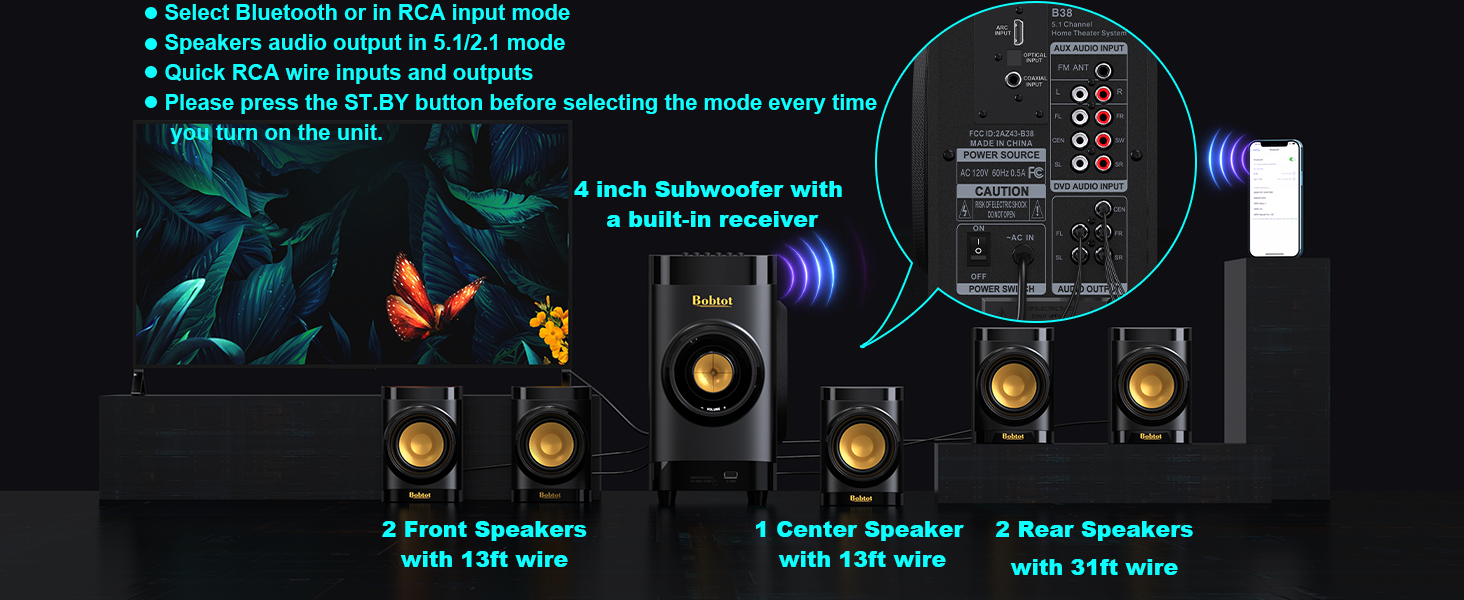
Image: A smartphone displaying Bluetooth settings, showing "Bobtot B38" as an available device for connection.
4.4 Reprodukcija sa USB-a/SD kartice
For direct music playback without an external device.
- Umetni medij: Insert a USB disk or SD card (with music files) into the corresponding slot on the front panel of the subwoofer.
- Odaberite unos: Pritisnite INPUT button on the subwoofer or remote until "USB" or "SD" is displayed on the LED screen.
- Reprodukcija: The system will automatically begin playing music from the inserted media.
5. Uputstvo za upotrebu
Once your system is set up, use the remote control or front panel buttons to manage playback and settings.
- Podešavanje jačine zvuka: Koristite VOL +/- buttons on the remote or the volume knob on the subwoofer to adjust the master volume.
- Individual Speaker Volume: The remote control allows independent volume adjustment for each of the five satellite speakers and the subwoofer. Refer to the remote control diagram in Section 3.4 for specific buttons.
- Isključi zvuk: Pritisnite MUTE button on the remote to temporarily silence the audio. Press again to unmute.
- EQ postavke: Koristite EQ button on the remote to cycle through different equalizer presets.
- FM radio: In FM mode, use TUNE+/- za ručno podešavanje ili AUTO/M for automatic station search. Use CH +/- to navigate saved channels.
- Tajmer za isključivanje: Koristite SLEEP+/- buttons on the remote to set a sleep timer.
6. Postavljanje zvučnika
Proper speaker placement is crucial for achieving the best surround sound experience. Consider the following guidelines:
- Subwoofer: Place the subwoofer on the floor, ideally in a corner or near a wall, to enhance bass response. Experiment with placement to find the best sound for your room.
- Centralni zvučnik: Position the center speaker directly above or below your TV/projector screen, facing the listening area. This speaker handles dialogue.
- Prednji lijevi i desni zvučnik: Place these speakers to the left and right of your TV, at roughly ear level when seated. They should be equidistant from your main listening position.
- Rear Left & Right Speakers: Place these speakers behind your main listening position, slightly to the sides or directly behind, also at ear level. These provide the surround effects.

Image: An illustration of a living room with the Bobtot B38 5.1 system correctly positioned for optimal surround sound.
The satellite speakers are mountable, allowing for wall installation to save space and optimize sound dispersion.
Video: Shows a person installing a satellite speaker on a wall using a screwdriver, demonstrating the mountable feature.
7. Specifikacije
| Brand | Bobtot |
| Naziv modela | B38 |
| Vrsta zvučnika | Surround Sound |
| Konfiguracija kanala surround zvuka | 5.1 |
| Maksimalna izlazna snaga zvučnika | 200 Watts |
| Prečnik subwoofera | 4 inča |
| Speaker Size (Satellite) | 2.75 inča |
| Tehnologija povezivanja | Auxiliary, Bluetooth, Coaxial, Optical, ARC |
| Bluetooth verzija | 5.0 |
| Bluetooth domet | 33 stopa |
| Kompatibilni uređaji | Desktop, Gaming Console, Projector, Smartphone, Television |
| Dimenzije proizvoda | 17"D x 13"Š x 14"H |
| Težina artikla | 14.34 funti (6.52 kilograma) |
| Materijal | Acrylonitrile Butadiene Styrene (ABS), Wood |
| Ulazni voltage | 120 Volts |
| Odnos signala i šuma | 70 dB |
| Frekvencijski odziv | 20 KHz |
| Unutrašnja/vanjska upotreba | Indoor |
8. Otkrivanje problema
If you encounter any issues with your Bobtot B38 Home Theater System, please refer to the following common troubleshooting steps:
- Nema zvuka:
- Ensure all speakers are correctly connected to the subwoofer's audio output ports.
- Verify the power is ON for both the subwoofer and your audio source (TV, DVD player, etc.).
- Check that the correct input mode is selected on the subwoofer (e.g., ARC, OPT, COA, AUX, BT, USB/SD).
- Adjust the master volume and individual speaker volumes.
- For digital inputs (ARC, Optical, Coaxial), ensure your TV/device audio output is set to "PCM" and not "Automatic" or "Bitstream".
- If using ARC, ensure your TV's HDMI ARC output is selected and the B38 supports LPCM 2.0.
- Problemi sa Bluetooth uparivanjem:
- Ensure the subwoofer is in "BT" input mode.
- Make sure Bluetooth is enabled on your device and it's within range (33 feet).
- Forget "Bobtot B38" from your device's Bluetooth list and try pairing again.
- If a password is required, enter "0000".
- izobličeni zvuk:
- Reduce the volume on both the system and your audio source.
- Provjerite sve kablovske spojeve na labavost ili oštećenja.
- Ensure the audio source is not sending an over-amplified signal.
- Daljinski upravljač ne radi:
- Provjerite i zamijenite baterije u daljinskom upravljaču.
- Ensure there are no obstructions between the remote and the subwoofer's sensor.
- Point the remote directly at the subwoofer.
Ako ovi koraci ne riješe problem, obratite se korisničkoj podršci.
9. Održavanje
To ensure the longevity and optimal performance of your Bobtot B38 Home Theater System, follow these maintenance guidelines:
- čišćenje: Use a soft, dry cloth to clean the surfaces of the subwoofer and speakers. Do not use liquid cleaners or abrasive materials, as they may damage the finish.
- ventilacija: Ensure adequate ventilation around the subwoofer to prevent overheating. Do not block any ventilation openings.
- plasman: Izbjegavajte postavljanje sistema na direktnu sunčevu svjetlost, u blizinu izvora toplote ili u područja sa visokom vlagom ili prašinom.
- Kablovi: Povremeno provjeravajte sve kablove na znakove habanja ili oštećenja. Oštećene kablove odmah zamijenite kako biste spriječili probleme s performansama ili sigurnosne rizike.
- Iskljuciti: When not in use for extended periods, it is recommended to turn off the system and unplug it from the power outlet.
10. Garancija i podrška
The Bobtot B38 Home Theater System comes with a Ograničena garancijaMolimo pogledajte garantni list koji se nalazi u vašem paketu za specifične uslove i odredbe.
For technical support, troubleshooting assistance, or warranty claims, please contact Bobtot customer service through the following channels:
- Amazon podrška: Posjetite stranicu proizvoda na Amazon.com and look for customer support options.
- Proizvođač Webstranica: Refer to the official Bobtot webstranica za kontakt informacije i resurse podrške.
- Telefonska podrška: Check your Quick Start Guide for any provided phone numbers for direct support.
Please have your product model number (B38) and purchase details ready when contacting support.