
Uvod
This manual provides detailed instructions for the AULCMEET RC80B replacement remote control, designed for use with Edifier R1280DBs active speakers. Please read this manual carefully to ensure proper operation and to maximize your experience with the product.
Product Overview
The AULCMEET RC80B remote control offers a comprehensive set of functions for your Edifier R1280DBs speakers. Its ergonomic design ensures comfortable handling and intuitive button placement.
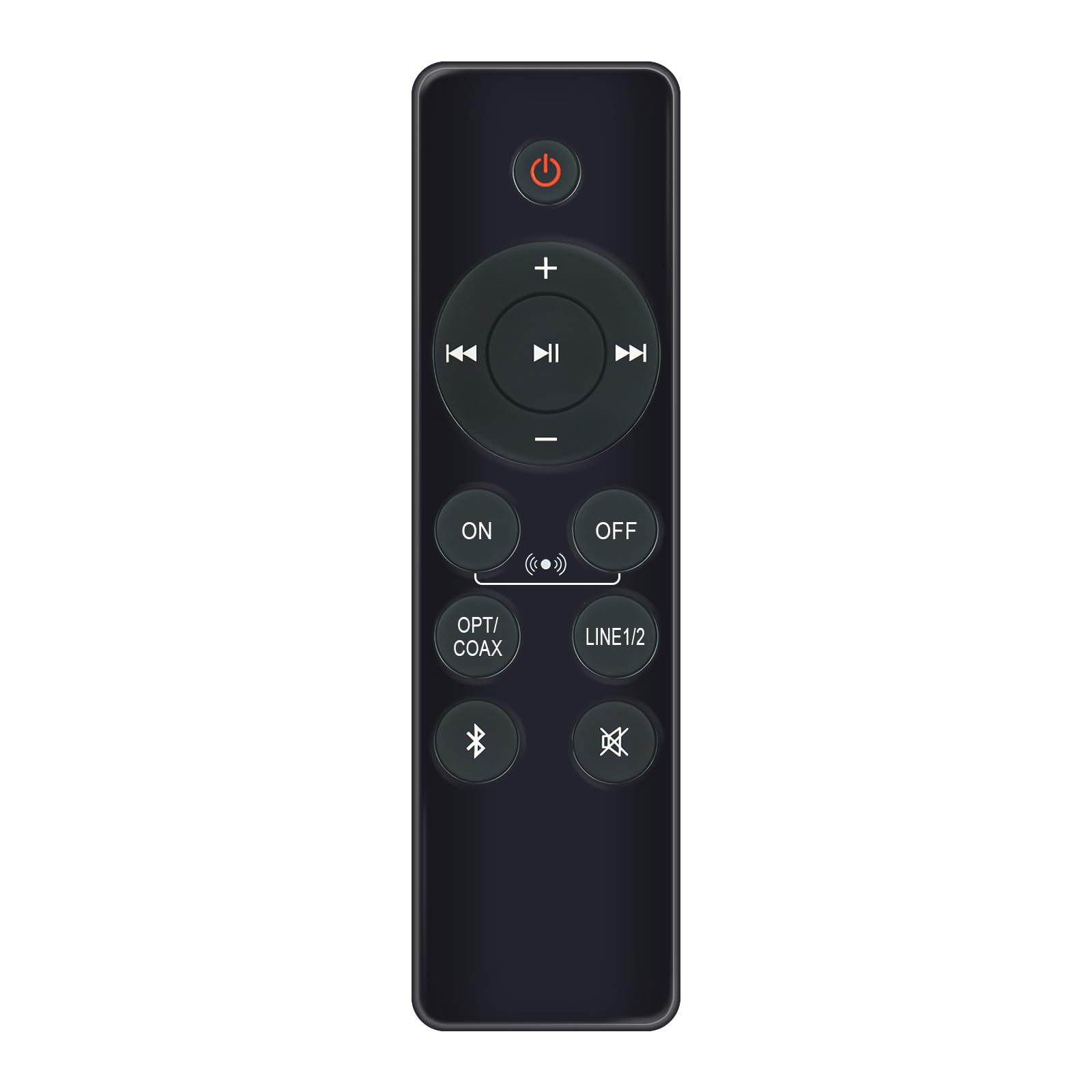
Image: AULCMEET RC80B Replacement Remote Control. The remote measures approximately 13.8 cm (5.43 inches) in length and 3.8 cm (1.5 inches) in width.
Funkcije dugmadi:
- Dugme za napajanje (⏻): Turns the speakers ON or OFF.
- Pojačavanje zvuka (+) / Smanjivanje zvuka (-): Adjusts the speaker volume.
- Prethodna pjesma (⏮) / Next Track (⏭): Skips to the previous or next audio track.
- Pusti/pauziraj (⏯): Plays or pauses audio playback.
- ON / OFF (Input Selection): Toggles between different input modes.
- OPT/COAX: Selects Optical or Coaxial input.
- LINIJA 1/2: Selects Line In 1 or Line In 2 input.
- Bluetooth (☋): Activates or selects Bluetooth input.
- Isključi zvuk (🛇): Mutes or unmutes the speaker audio.
Setup
The AULCMEET RC80B remote control is designed for immediate use without complex setup procedures. Simply install the batteries, and it is ready to operate your compatible Edifier R1280DBs speakers.
Instalacija baterije:
- Pronađite odeljak za baterije na poleđini daljinskog upravljača.
- Otvorite poklopac odeljka za baterije.
- Insert two AAA alkaline batteries, ensuring the correct polarity (+ and -) as indicated inside the compartment.
- Čvrsto zatvorite poklopac odeljka za baterije.
Napomena: No programming or pairing is required for this replacement remote control. It functions directly with the specified Edifier R1280DBs active speakers.
Uputstvo za upotrebu
To operate your Edifier R1280DBs speakers using the AULCMEET RC80B remote control, point the remote directly towards the speakers' infrared receiver. Ensure there are no obstructions between the remote and the speakers.
- Uključivanje/isključivanje: Pritisnite ⏻ button to turn the speakers on or off.
- Podešavanje jačine zvuka: Koristite + i - dugmad za povećanje ili smanjenje jačine zvuka.
- Odabir ulaza: Pritisnite ON/OFF, OPT/COAX, LINIJA 1/2, ili Bluetooth buttons to switch between the available audio input sources.
- Kontrola reprodukcije: When using Bluetooth or other compatible sources, use the ⏮ (Prethodno), ⏭ (Next), and ⏯ (Play/Pause) buttons to control media playback.
- Mute Function: Pritisnite 🛇 dugme za privremeno utišavanje zvuka. Pritisnite ga ponovo da biste vratili zvuk.
Specifikacije
| Brand | AULCMEET |
| Model | RC80B |
| Kompatibilni uređaji | Edifier R1280DBs Active Speakers |
| Boja | Crna |
| Karakteristike | Ergonomski dizajn |
| Komunikacijski interfejs | infracrveni (IR) |
| Broj dugmadi | 30 |
| Maksimalni domet | Približno 33 stopa (10 metara) |
| Vrsta baterije | 2 x AAA alkalne baterije (nisu uključene) |
| Dimenzije (D x Š) | 13.8 cm x 3.8 cm (5.43 in x 1.5 in) |
Rješavanje problema
If you encounter issues with your AULCMEET RC80B remote control, please refer to the following common solutions:
- Daljinski upravljač ne reagira: Ensure the batteries are correctly installed and are not depleted. Replace batteries if necessary.
- Kratak radni domet: Check for any obstructions between the remote and the speaker's IR receiver. Ensure the remote is pointed directly at the speakers. Low battery power can also reduce range.
- Određeno dugme ne radi: Clean the remote control surface and buttons. If the issue persists, the button may be faulty, or the remote may require battery replacement.
- Speakers not responding to any remote: Ensure the speakers are powered on and functioning correctly. Try using the manual controls on the speaker unit if available.
Održavanje
Proper care and maintenance will extend the lifespan of your remote control:
- ČišćenjeObrišite daljinski upravljač mekom, suhom krpom. Ne koristite abrazivna sredstva za čišćenje ili rastvarače.
- Battery Care: Remove batteries if the remote control will not be used for an extended period to prevent leakage.
- Skladištenje: Store the remote control in a cool, dry place, away from direct sunlight and extreme temperatures.
- Izbjegavajte DropsZaštitite daljinski upravljač od fizičkih udara, jer padovi mogu oštetiti unutrašnje komponente.
Garancija i podrška
Specific warranty information for this AULCMEET RC80B replacement remote control is not provided in the product details. For warranty claims, technical support, or further assistance, please contact the seller or manufacturer directly through your purchase platform. Keep your purchase receipt or order number handy for faster service.