
1. Proizvod je gotovview
The llano NP-W235 Dual Battery Fast Charger is designed for efficient charging of Fujifilm NP-W235 batteries. This compact and travel-friendly charger offers simultaneous charging for two batteries, featuring a digital display for instant battery level recognition. It also functions as a secure storage box for batteries and SD cards.

Image 1.1: The llano NP-W235 Dual Battery Fast Charger, showcasing njegov kompaktni dizajn.
Ključne karakteristike:
- Super brzo punjenje: Supports PD3.0 & QC3.0, fully charging two batteries in approximately 3 hours.
- Instant Battery Level Recognition: Digital display shows individual battery power levels and charging status.
- Dvostruka funkcionalnost: Serves as both a charger and a storage box for two batteries and two SD cards.
- Kompaktan i pogodan za putovanja: Lightweight design with a magnetic flip-open lid for secure transport.
- Svestrane opcije punjenja: Compatible with various power sources including car chargers, computers, power banks, and USB-C wall adapters.
- Multiple Safeguards: Ugrađene zaštite od prenaponatage, overcharge, overheating, overcurrent, and short circuits.
2. Upute za postavljanje
- Raspakujte punjač: Carefully remove the llano NP-W235 Dual Battery Fast Charger from its packaging.
- Priključite napajanje: Use the provided USB-C charging cable to connect the charger to a suitable power source. This can be a PD3.0 or QC3.0 compatible wall adapter, a computer USB-C port, a power bank, or a car charger.
- Umetnite baterije: Open the magnetic flip-open lid. Insert up to two Fujifilm NP-W235 batteries into the designated slots. Ensure the battery contacts align correctly with the charger pins.
- Insert SD Cards (Optional): The charger includes slots for two SD cards for convenient storage. Insert your SD cards into these slots if desired.
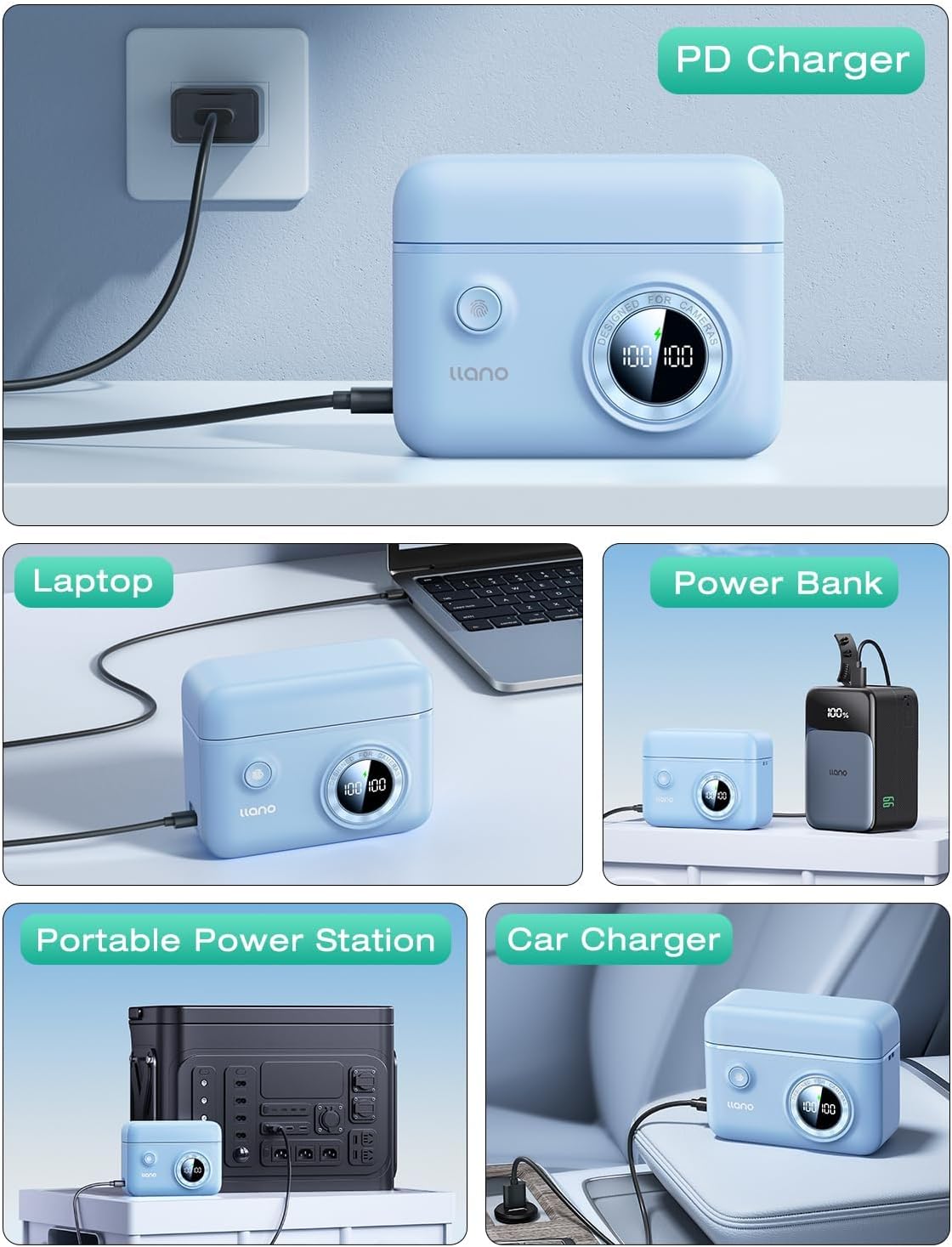
Image 2.1: The charger connected to a power source, demonstrating versatile charging options.
3. Uputstvo za upotrebu
3.1 Proces punjenja
- Once batteries are inserted and the charger is connected to a power source, the digital display will activate.
- The display shows the current charge percentage for each battery independently. A lightning bolt icon indicates active charging.
- Charging typically takes about 3 hours for two fully depleted batteries when using a PD3.0 or QC3.0 compatible power source.
- The display will show "100%" when a battery is fully charged.

Image 3.1: Digital display indicating battery charge levels and charging status.
3.2 Provjera nivoa baterije
- Even when not connected to a power source, pressing the button on the charger will briefly activate the digital display to show the current charge level of the inserted batteries.
- This allows for quick checks of battery readiness before use.
3.3 Funkcija skladištenja
- The magnetic flip-open lid securely holds batteries and SD cards in place, protecting them from dust and accidental disconnections.
- The compact design makes it suitable for travel and storage in camera bags.

Image 3.2: Features of the charger including the magnetic lid and SD card storage.
4. Održavanje
- čišćenje: Use a soft, dry cloth to clean the exterior of the charger. Avoid using liquid cleaners or solvents.
- Skladištenje: Store the charger in a cool, dry place away from direct sunlight and extreme temperatures. Ensure the lid is closed to protect batteries and SD cards from dust.
- Održavanje baterije: For optimal battery life, avoid fully discharging batteries frequently. Store batteries with a partial charge (around 50%) if not used for extended periods.
- Održavanje kablova: Inspect the USB-C cable regularly for any signs of wear or damage. Replace if necessary.
5. Otkrivanje problema
5.1 Charger Not Powering On
- Provjerite izvor napajanja: Ensure the USB-C cable is securely connected to both the charger and a functional power outlet or device.
- Provjerite kabel: Pokušajte koristiti drugi USB-C kabel kako biste isključili mogućnost neispravnog kabela.
- Test Outlet: Plug another device into the power outlet to confirm it is working.
5.2 Batteries Not Charging
- Pravilno umetanje: Ensure batteries are correctly inserted into the slots with contacts aligned.
- Stanje baterije: Check if the batteries themselves are damaged or at the end of their lifespan. Try charging a different, known-good battery.
- Charger Functionality: If the display shows an error or no charging indication, refer to "Charger Not Powering On" steps.
5.3 Sporo punjenje
- Izlaz adaptera za napajanje: For fast charging, use a power adapter that supports PD3.0 or QC3.0 with sufficient wattage (e.g., 18W or higher). Standard USB ports on computers may charge slower.
- Kvalitet kabla: Uvjerite se da koristite visokokvalitetni USB-C kabel koji podržava brzo punjenje.
6. Specifikacije proizvoda
| Brand | llano |
| Broj modela | LJN-CS008 |
| Kompatibilne baterije | Fujifilm NP-W235 |
| Input | USB-C (PD3.0 & QC3.0 compatible) |
| Output Voltage | 8.4 Volts |
| Vrijeme punjenja | Approx. 3 hours for two batteries (with compatible fast charger) |
| Dimenzije proizvoda | 4.3 x 3.3 x 1.7 inča (10.9 x 8.4 x 4.3 cm) |
| Težina artikla | 6.4 unce (181 grama) |
| Dodatne karakteristike | Digital display, SD card storage, magnetic lid, portable lanyard attachment points, anti-slip pads. |
7. Garancija i podrška
For warranty information and customer support, please refer to the documentation included with your purchase or contact llano customer service directly through their official webweb-mjestu ili prodavaču gdje je proizvod kupljen.
Optional protection plans may be available for extended coverage. Please check with your retailer for details on available plans.