
1. Uvod
The PEAKMETER PM8215 is a compact, handheld digital multimeter designed for measuring various electrical parameters. This instrument offers high stability and accuracy, featuring a 4000-count display. It is suitable for a wide range of users, from hobbyists to professionals, for tasks requiring AC/DC voltage, AC/DC current, resistance, frequency, and capacitance measurements, along with continuity and diode testing.
2. Sigurnosne informacije
Always read and understand all safety instructions before operating the multimeter.
- This device complies with safety standards EN61010-1, EN61010-2-033, EN61326, and is rated for CAT. III 600V.
- Ne primjenjivati voltage ili struja koja prelazi maksimalne specificirane granice za multimetar.
- Budite izuzetno oprezni pri radu sa strujnim kolima pod naponom. Visoka volumenizacijatagmogu uzrokovati teške povrede ili smrt.
- Ensure the test leads are in good condition, without any damage to the insulation.
- Do not operate the multimeter if it appears damaged or if the casing je otvoren.
- Odmah zamijenite bateriju kada se pojavi indikator slabe baterije kako biste osigurali tačna očitavanja.
- Uvijek isključite mjerne kablove iz strujnog kola prije promjene funkcija.
3. Proizvod je gotovview
3.1 Ključne karakteristike
- Prikaz: Digitalni displej sa 4000 brojeva.
- Funkcije mjerenja: AC/DC Voltage, AC/DC Current, Resistance, Frequency, Capacitance.
- Posebne funkcije: Buzzer, Continuity Test, Diode Test, Low Battery Indication.
- Načini rada: Auto Range, Auto Power Off.
- prenosivost: Mini pocket design, lightweight (approx. 75g), and ultra-thin (12mm thickness).
- sigurnost: Equipped with a 400mA/250V fuse for protection.
3.2 Fizičke karakteristike




4. Podešavanje
4.1 Instalacija baterije
The PM8215 multimeter is powered by one 3.0V CR2032 button battery.
- Provjerite je li multimetar isključen.
- Pronađite odeljak za baterije na poleđini uređaja.
- Koristite mali odvijač ili novčić da otvorite poklopac baterije.
- Umetnite CR2032 bateriju, pazeći na ispravan polaritet (+/-).
- Dobro zatvorite poklopac baterije.
Napomena: Replace the battery when the low battery indicator appears on the display to maintain measurement accuracy.
5. Uputstvo za upotrebu
5.1 Uključivanje/isključivanje napajanja
To power on the multimeter, rotate the central selector knob from the 'OFF' position to any desired measurement function. To power off, rotate the knob back to the 'OFF' position.
5.2 Auto Range Function
The PM8215 features an auto-ranging function, which automatically selects the appropriate measurement range. This simplifies operation as you do not need to manually select the range for most measurements.
5.3 Funkcije mjerenja
Connect the test leads to the appropriate input jacks and the circuit under test. Select the desired function using the rotary switch.
- DC Voltage (V–): Rotate the knob to the 'V–' position. Connect the red test lead to the positive side and the black test lead to the negative side of the DC voltage izvor.
- AC Voltage (V∼): Rotate the knob to the 'V∼' position. Connect the test leads across the AC voltage izvor.
- DC Current (mA/µA–): Rotate the knob to the 'mA/µA–' position. Use the 'SEL' button to switch between mA and µA. Connect the multimeter in series with the circuit.
- AC Current (mA/µA∼): Rotate the knob to the 'mA/µA∼' position. Use the 'SEL' button to switch between mA and µA. Connect the multimeter in series with the circuit.
- Otpor (Ω): Rotate the knob to the 'Ω' position. Ensure the circuit is de-energized before measuring resistance. Connect the test leads across the component.
- Frekvencija (Hz): Rotate the knob to the 'Hz' position. Connect the test leads across the signal source.
- Kapacitet (F): Rotate the knob to the 'F' position. Ensure the capacitor is discharged before measurement. Connect the test leads across the capacitor.
- Test diode (→|): Rotate the knob to the '→|' position. Connect the red lead to the anode and the black lead to the cathode of the diode. The display will show the forward voltagpad e. Zamijenite mjesta provodnicima kako biste provjerili da li postoji otvoreni strujni krug.
- Continuity Test (♫): Rotate the knob to the '♫' position. If the resistance between the test leads is below a certain threshold (typically 50Ω), the buzzer will sound, indicating continuity.
5.4 Funkcijska dugmad
- SEL (Select): Used to toggle between different measurement types within a single rotary switch position (e.g., AC/DC current, or diode/continuity).
- RANGE: Allows manual selection of measurement ranges, overriding the auto-ranging function. Press repeatedly to cycle through available ranges.
- DRŽI: Zamrzava trenutno očitanje na ekranu. Pritisnite ponovo za otpuštanje.
6. Održavanje
6.1 Čišćenje
Obrišite multimetar casing s oglasomamp cloth and mild detergent. Do not use abrasive cleaners or solvents. Ensure the device is completely dry before use.
6.2 Zamjena baterije
Refer to Section 4.1 for instructions on replacing the CR2032 button battery.
6.3 Zamjena osigurača
The multimeter is equipped with a 400mA/250V fuse. If the current measurement function stops working, the fuse may need replacement. Fuse replacement should only be performed by qualified personnel. Open the casing carefully, replace the fuse with one of identical specifications, and ensure the casing is properly sealed before reuse.
7. Otkrivanje problema
- Bez prikaza: Check if the multimeter is turned ON. Verify battery installation and replace if necessary.
- Netačna očitanja: Ensure test leads are properly connected and not damaged. Verify the correct function is selected for the measurement. Check battery level.
- Mjerenje struje ne radi: The fuse may be blown. Refer to Section 6.3 for fuse replacement.
- Buzzer Not Sounding in Continuity Test: The resistance of the circuit may be too high, or the function is not correctly selected.
8. Specifikacije
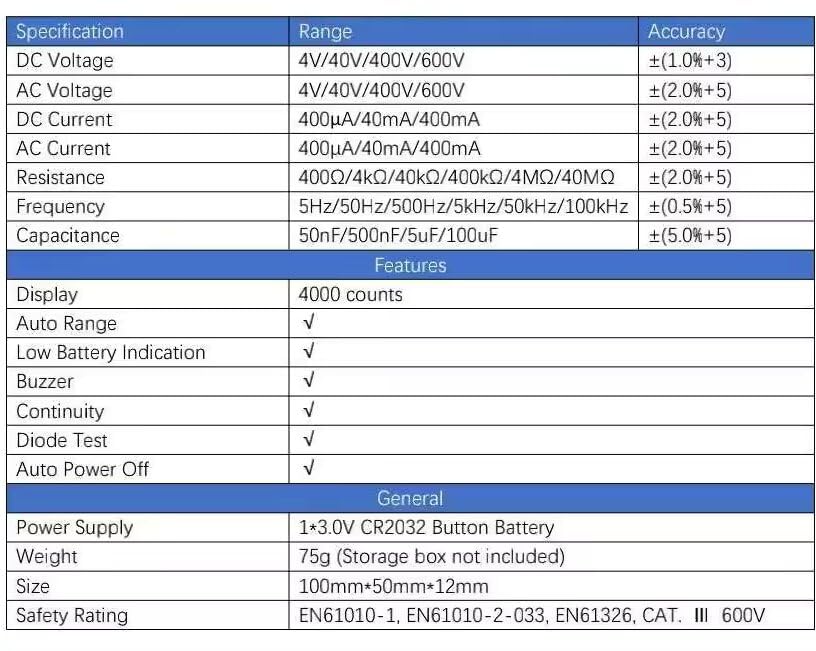
| Specifikacija | Domet | Preciznost |
|---|---|---|
| DC Voltage | 4V/40V/400V/600V | ±(1.0%+3) |
| AC Voltage | 4V/40V/400V/600V | ±(2.0%+5) |
| DC Current | 400µA/40mA/400mA | ±(2.0%+5) |
| AC struja | 400µA/40mA/400mA | ±(2.0%+5) |
| Otpor | 400Ω/4kΩ/40kΩ/400kΩ/4MΩ/40MΩ | ±(2.0%+5) |
| Frekvencija | 5Hz/50Hz/500Hz/5kHz/50kHz/100kHz | ±(0.5%+5) |
| Kapacitet | 50nF/500nF/5uF/100uF | ±(5.0%+5) |
| Karakteristike | ||
| Display | 4000 counts | |
| Automatski domet | √ | |
| Indikacija slabe baterije | √ | |
| Zujalica | √ | |
| Diodni test | √ | |
| Automatsko isključivanje | √ | |
| Generale | ||
| Napajanje | 1*3.0V CR2032 Button Battery | |
| Težina | 75g (Storage box not included) | |
| Veličina | 100mm*50mm*12mm | |
| Safety Rating | EN61010-1, EN61010-2-033, EN61326, CAT. III 600V | |
9. Garancija i podrška
9.1 Informacije o garanciji
The PEAKMETER PM8215 Digital Mini Multimeter comes with a 1 godine garancije from the date of purchase. This warranty covers manufacturing defects and ensures the product meets its specified performance. Please retain your proof of purchase for warranty claims.
9.2 Korisnička podrška
For technical assistance, troubleshooting beyond this manual, or warranty inquiries, please contact your retailer or the manufacturer directly. Refer to the product packaging or the manufacturer's official webweb mjesto za kontakt detalje.