
DVT-C9F24992D65E215A7DD6011D34514A46
Uputstvo za upotrebu
Tucus Remote Control for JVC RM-SUXQ30UW RM-SUXQ30US UX-Q30S UX-Q30B UX-Q30P UX-Q30B UX-Q30W Micro COMPACT COMPONENT Stereo SYSTEM
Model: DVT-C9F24992D65E215A7DD6011D34514A46 | Brand: Generic
Uvod
This manual provides essential information for the setup, operation, and maintenance of your new Tucus replacement remote control. This remote is designed to be compatible with various JVC Micro COMPACT COMPONENT Stereo Systems, including models RM-SUXQ30UW, RM-SUXQ30US, UX-Q30S, UX-Q30B, UX-Q30P, and UX-Q30W. While it is a replacement remote and not the original device's remote, common functions are expected to operate normally. Please review this guide thoroughly to ensure proper use and longevity of your remote control.
Setup
1. Instalacija baterije
The remote control requires two (2) AA batteries (not included) for operation. Follow these steps to install them:
- Pronađite odeljak za baterije na poleđini daljinskog upravljača.
- Pomaknite poklopac pretinca za baterije prema dolje ili prema van da biste ga otvorili.
- Umetnite dvije AA baterije, pazeći da pozitivni (+) i negativni (-) terminali budu pravilno poravnati s oznakama unutar odjeljka.
- Vratite poklopac pretinca za baterije na mjesto dok ne klikne sigurno.

Figure 1: Back of the remote control showing the battery compartment cover.
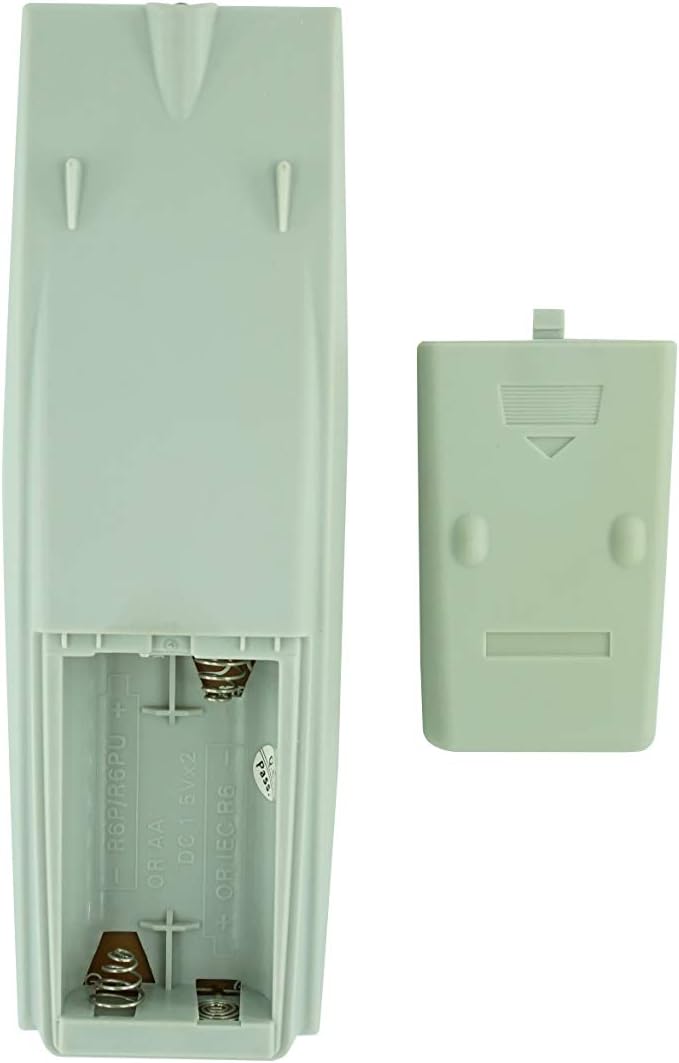
Slika 2: Pretinac za baterije sa uklonjenim poklopcem, spreman za umetanje baterije.
2. Početna upotreba
Once batteries are installed, the remote control is ready for use. Point the remote directly at your JVC Micro COMPACT COMPONENT Stereo System. No additional programming is typically required for this replacement remote for the listed compatible models.
Uputstvo za upotrebu
This remote control provides access to the primary functions of your JVC stereo system. Below is a general overview of common button functions. Please note that while the functionality is guaranteed, the exact button layout may differ slightly from your original remote.

Slika 3: Prednja strana view daljinskog upravljača s rasporedom tipki.
Ključne funkcije:
- STANDBY/ON: Powers the stereo system on or off.
- DISPLAY: Changes or shows display information.
- SAT/TAJMER: Accesses clock and timer settings.
- SPAVANJE: Sets a sleep timer for automatic power off.
- Numeričke tipke (0-9, +10): Direct input for track numbers, radio frequencies, etc.
- BAS / VISOKI TONOVI: Podešava nivo basa i visokih tonova.
- Navigation (UP, DOWN, LEFT, RIGHT, SET): Koristi se za navigaciju i odabir u meniju.
- Playback Controls (PLAY/PAUSE, STOP, FAST FORWARD, REWIND, SKIP): Kontrolira reprodukciju medija.
- Source Selection (CD, TAPE, FM/AM, AUX/MD): Odabire izvor audio ulaza.
- FM MODE / REV.MODE: Toggles FM stereo/mono or tape reverse mode.
- AUTO PRESET: Automatically scans and saves radio stations.
- PRGM / RANDOM / REPEAT: Controls program, random, and repeat playback modes.
- PTY SEARCH / PTY SELECT: For Program Type search and selection on radio.
- DISPLAY / TA/News / Info: Provides additional display information or traffic/news announcements.
- AHB PRO: Aktivira ili deaktivira Active Hyper-Bass PRO.
- JAČINA (+/-): Podešava glavni nivo jačine zvuka.
For specific advanced functions, please refer to the original instruction manual of your JVC Micro COMPACT COMPONENT Stereo System.
Održavanje
Čišćenje daljinskog upravljača
Da biste održali izgled i funkcionalnost daljinskog upravljača, redovno ga čistite:
- Obrišite površinu mekom, suhom krpom.
- Za tvrdokornu prljavštinu, lagano dampOperite krpu vodom ili blagim, neabrazivnim sredstvom za čišćenje. Ne prskajte sredstvo za čišćenje direktno na daljinski upravljač.
- Izbjegavajte upotrebu jakih hemikalija, rastvarača ili abrazivnih spužvi za čišćenje, jer oni mogu oštetiti završnu obradu daljinskog upravljača ili unutrašnje komponente.
Zamjena baterije
Replace batteries when the remote's response becomes sluggish or it stops functioning. Always replace both batteries at the same time with new ones of the same type (AA). Do not mix old and new batteries, or different types of batteries.
Skladištenje
Ako daljinski upravljač nećete koristiti duži period, izvadite baterije kako biste spriječili curenje i potencijalno oštećenje daljinskog upravljača.
Rješavanje problema
- Daljinski ne reaguje:
- Provjerite jesu li baterije pravilno umetnute s ispravnim polaritetom (+/-).
- Zamijenite stare baterije novima.
- Ensure there are no obstructions between the remote control and the stereo system's infrared receiver.
- Provjerite da li se nalazite unutar efektivnog dometa daljinskog upravljača.
- Some buttons not working or unexpected behavior:
- This remote is a replacement and while common functions are supported, the button layout or specific advanced functions might not perfectly match your original remote. Refer to the button layout image in the Operating Instructions section.
- Ensure the stereo system is powered on and set to the correct input source.
- Remote appears damaged:
- If the remote has been dropped or exposed to liquids, internal damage may have occurred. In such cases, replacement may be necessary.
Specifikacije
| Brand | Generic |
| Proizvođač | TUCUS |
| Broj modela | DVT-C9F24992D65E215A7DD6011D34514A46 |
| Kompatibilni modeli | JVC RM-SUXQ30UW, RM-SUXQ30US, UX-Q30S, UX-Q30B, UX-Q30P, UX-Q30W Micro COMPACT COMPONENT Stereo SYSTEM |
| Vrsta materijala | Ostalo |
| Izvor napajanja | 2 x AA baterije (nisu uključene) |
| ASIN | B0D79958PW |
| Datum prve dostupnosti | 17. juna 2024 |
Informacije o garanciji
This product comes with a 3-month warranty from the date of purchase. This warranty covers manufacturing defects and ensures the remote control functions as intended for compatible models. Please retain your proof of purchase for any warranty claims.
Korisnička podrška
If you have any questions regarding the compatibility or functionality of this remote control, or if your specific device model is not listed, please contact the seller directly for assistance. The seller stocks a wide range of remote controls and parts and can confirm suitability for your needs.
For general inquiries or to provide feedback, please refer to the contact information provided by your retailer or the seller.
Ask a question about this manual
Ask about setup, troubleshooting, compatibility, parts, safety, or missing instructions. Manuals+ will review the question and use this page’s manual context to help answer it.