1. Uvod
This manual provides comprehensive instructions for the installation, operation, and maintenance of your Generic Car Navigation Android TS18 Single Motherboard 6+128. This product is designed as a core component for advanced car infotainment systems, offering Android operating system capabilities with 6GB RAM and 128GB internal storage. Please read this manual thoroughly before installation and use to ensure proper function and longevity of the device.
2. Sigurnosne informacije
- Preporučena profesionalna instalacija: Due to the complex nature of car electronics and the need for precise wiring, professional installation by a qualified technician is strongly recommended.
- električna sigurnost: Ensure the vehicle's power is disconnected before attempting any installation or wiring. Incorrect wiring can cause damage to the motherboard, vehicle electronics, or lead to fire hazards.
- Mjere opreza pri rukovanju: The motherboard contains sensitive electronic components. Handle with care, avoiding static electricity discharge. Do not touch exposed circuits.
- Uslovi okoline: Do not expose the device to moisture, extreme temperatures, or direct sunlight for prolonged periods.
- ventilacija: Ensure adequate ventilation around the installed motherboard to prevent overheating.
3. Šta se nalazi u kutiji
The product package includes the following item:
- Generic Car Navigation Android TS18 Single Motherboard 6+128 (Motherboard only)
No additional accessories, cables, or mounting hardware are included with this motherboard.
4. Postavljanje i instalacija
This section outlines the general steps for installing the TS18 Single Motherboard. Professional installation is highly recommended.
- Priprema: Disconnect the vehicle's battery. Carefully remove existing car navigation or audio components to access the installation area.
- Montaža: The motherboard supports Dashboard Mount and Panel Mount configurations. Secure the motherboard in the designated location within the vehicle's dashboard or panel, ensuring it is stable and has adequate clearance for connections and ventilation.
- Priključak za napajanje: Connect the motherboard to the vehicle's power supply according to the wiring diagram provided with your specific car navigation system. Ensure correct polarity and fuse protection.
- Povezivanje ekrana: Connect the motherboard to the compatible touchscreen display unit using the appropriate display cable.
- Periferne veze: Connect other necessary peripherals such as GPS antenna, Wi-Fi antenna, USB devices, audio output, and camera inputs. Refer to the specific port labels on the motherboard.
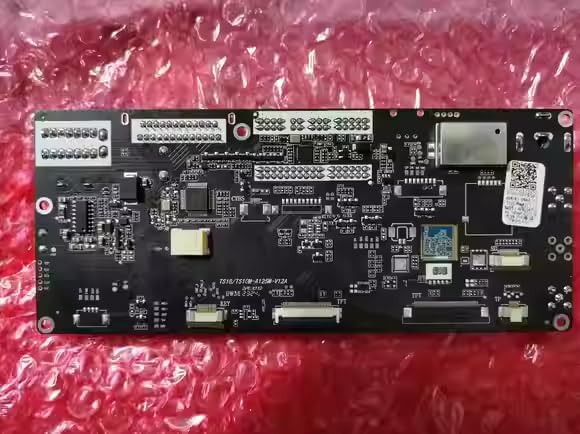
Slika 4.1: Prednja strana view of the TS18 Single Motherboard, showing various integrated circuits and connection points.
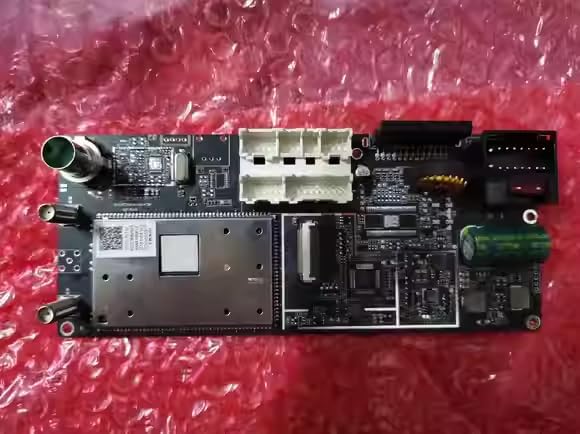
Slika 4.2: Pozadi view of the TS18 Single Motherboard, highlighting various input/output connectors for power, display, and peripherals.
- Završne provjere: Double-check all connections for security and correctness. Reconnect the vehicle's battery.
5. Uputstvo za upotrebu
Once installed and powered on, the TS18 Single Motherboard will boot into the Android operating system. Interaction is primarily via a connected touchscreen display.
- Uključivanje/isključivanje: The system typically powers on automatically with the vehicle's ignition. To power off, follow the shutdown procedure within the Android system settings or turn off the vehicle's ignition.
- Interfejs ekrana na dodir: Navigate the Android interface by tapping, swiping, and pinching on the connected touchscreen display.
- Wi-Fi povezivanje: To connect to a Wi-Fi network, go to Android Settings > Network & Internet > Wi-Fi. Select your desired network and enter the password if required.
- Navigacija: The system supports Road map type navigation. Access pre-installed navigation applications or download new ones from the app store. Ensure the GPS antenna has a clear view neba za optimalan prijem signala.
- Informacije o sistemu: Možeš view detailed system information, including CPU, GPU, memory, and software versions, through the Android settings menu.

Slika 5.1: Prample of the Android system information screen, displaying hardware specifications and storage details.
6. Održavanje
- čišćenje: Use a soft, dry, lint-free cloth to clean the motherboard if it becomes dusty. Do not use liquid cleaners or solvents.
- Ažuriranja softvera: Periodically check for system software updates through the Android settings menu to ensure optimal performance and security.
- Kontrola okoline: Ensure the operating environment within the vehicle remains within reasonable temperature and humidity ranges to prevent damage to electronic components.
7. Otkrivanje problema
If you encounter issues with your TS18 Single Motherboard, refer to the following common troubleshooting steps:
| Problem | Mogući uzrok | Rješenje |
|---|---|---|
| Nema snage | Incorrect power connection, blown fuse, vehicle battery low. | Check all power connections. Inspect vehicle fuses. Ensure vehicle battery is charged. |
| Nema displeja | Display cable disconnected, incompatible display, display unit fault. | Verify display cable connection. Ensure display unit is compatible and functional. |
| Nema zvuka | Audio cables disconnected, volume muted, amppitanje lifiera. | Check audio output connections. Adjust volume settings in Android. Verify external ampspašivač ako se koristi. |
| Gubitak GPS signala | GPS antenna disconnected, obstructed view of sky, faulty antenna. | Ensure GPS antenna is securely connected and has a clear line of sight to the sky. |
| Problemi sa Wi-Fi vezom | Incorrect password, out of range, Wi-Fi antenna issue. | Verify Wi-Fi password. Move closer to the Wi-Fi source. Check Wi-Fi antenna connection. |
| Sistem ne reaguje | Softverski kvar, pregrijavanje. | Perform a system restart (if possible via power cycle). Ensure adequate ventilation. |
If the problem persists after attempting these solutions, please contact your seller or a qualified service technician for further assistance.
8. Specifikacije
| Feature | Detalj |
|---|---|
| Dimenzije proizvoda | 30 x 10 x 20 inča |
| Broj modela stavke | motherboard 6+128 |
| Brand | Generic |
| Vrsta usluge vozila | Auto |
| Posebna karakteristika | Touchscreen (requires compatible display) |
| Tehnologija povezivanja | Wi-Fi |
| Vrsta karte | Put |
| Uključene komponente | Motherboard only |
| Vrsta montaže | Montaža na kontrolnu ploču, Montaža na ploču |
| Rezolucija | 0000 (Actual resolution depends on connected display) |
| Operativni sistem | Android |
| Display Type | Touchscreen (requires compatible display) |
9. Garancija i podrška
For warranty information and technical support, please refer to the terms and conditions provided by your retailer or contact the seller directly. Keep your purchase receipt as proof of purchase for any warranty claims.