Uvod
This manual provides comprehensive instructions for the W26 Pro Max Smart Watch with Bluetooth Earphones. It covers setup, operation, maintenance, and troubleshooting to ensure optimal use of your device. The W26 Pro Max is a versatile 2-in-1 device, combining a smartwatch with integrated wireless Bluetooth earphones, designed to keep you connected and active.
Sadržaj paketa
Prilikom otvaranja pakovanja, molimo Vas da provjerite da li su sve komponente prisutne:
- W26 Pro Max Smart Watch
- Integrated Wireless Bluetooth Earphones
- Kabel za punjenje
- Korisnički priručnik (ovaj dokument)
- Additional Watch Strap (if included as a free gift)

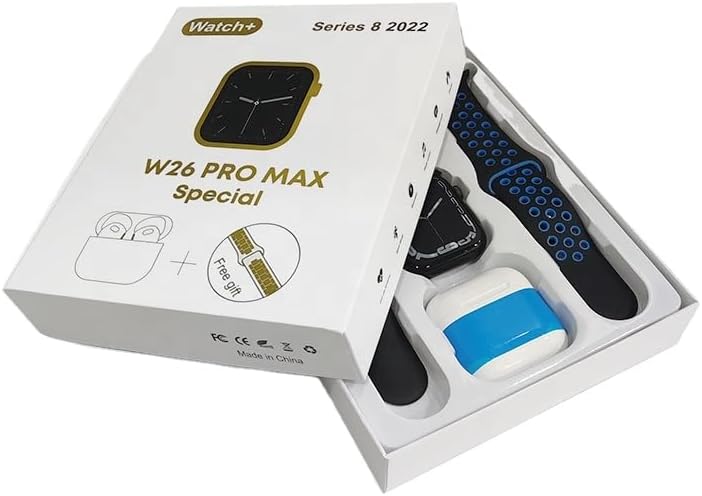
Image: The W26 Pro Max Smart Watch and its accompanying Bluetooth earphones, along with an extra watch strap, are neatly arranged within their retail packaging. The watch face is visible, and the earphones are housed in their charging case.

Slika: Pogled odozgo prema dolje view of the W26 Pro Max Smart Watch and Bluetooth Earphones within their packaging. The watch, earphones, and an additional strap are clearly visible, indicating the complete product set.
Vodič za postavljanje
1. Početno punjenje
Before first use, fully charge both the smartwatch and the integrated earphones. Connect the provided charging cable to the watch and a compatible USB power source. The watch display will indicate charging status. Ensure the earphones are properly seated in their charging case within the watch.
2. Uključivanje / isključivanje napajanja
- Uključeno: Press and hold the side button on the smartwatch until the screen illuminates.
- Iskljuciti: Pritisnite i držite bočni taster, a zatim na ekranu odaberite opciju "Isključivanje".
3. Uparivanje sa vašim pametnim telefonom
To unlock full functionality, pair your W26 Pro Max with your smartphone via Bluetooth.
- Provjerite je li Bluetooth omogućen na vašem pametnom telefonu.
- On the W26 Pro Max, navigate to the Bluetooth settings.
- On your smartphone, search for available Bluetooth devices and select "W26 Pro Max" from the list.
- Potvrdite zahtjev za uparivanje na oba uređaja ako se to od vas zatraži.
- For optimal performance, download and install the recommended companion application (e.g., "FitPro app" as mentioned in product description) from your smartphone's app store.
4. Earphone Pairing
The integrated earphones automatically pair with the smartwatch when removed from their charging slots. To pair them with another device (e.g., directly with your phone):
- Remove the earphones from the smartwatch.
- Omogućite Bluetooth na uređaju sa kojim želite da se uparite.
- Traži "W26 Pro Max Earphones" (or similar name) in the Bluetooth device list and select to connect.
Uputstvo za upotrebu
Navigating the Smartwatch
- Touchscreen: Prevucite prstom lijevo/desno, gore/dolje za navigaciju kroz menije i pristup funkcijama. Dodirnite za odabir.
- Bočno dugme: Press to return to the home screen or wake the device. Long press for power options or voice assistant.
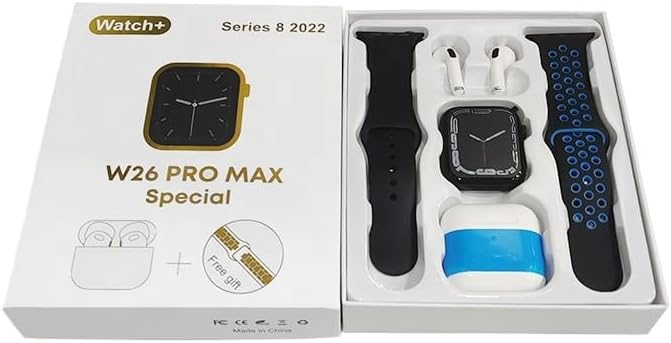
Image: The W26 Pro Max Smart Watch screen shows a voice assistant interface, with text bubbles indicating "Call Linda!" and "What's the weather like today?". This illustrates the voice command functionality.
Ključne karakteristike
Praćenje kondicije i zdravlja
The W26 Pro Max is equipped with sensors to monitor various health metrics.
- Praćenje srčanog ritma: The optical heart rate sensor continuously tracks your heart rate. View real-time data on the watch or in the companion app.
- Pedometar: Tracks your daily steps, distance, and calories burned.
- Praćenje spavanja: Prati vaše obrasce spavanja, uključujući duboki san, lagani san i vrijeme buđenja.

Image: The W26 Pro Max Smart Watch screen displays heart rate information, showing a graph of heart rate over time, current beats per minute (bpm), and blood pressure readings. This demonstrates the health monitoring capabilities.
Slika: Detaljna view of the W26 Pro Max Smart Watch screen showing heart rate and blood pressure monitoring. The text explains that an optical heart rate sensor is used for precise calculation and data can be viewed on the watch or via the FitPro app.
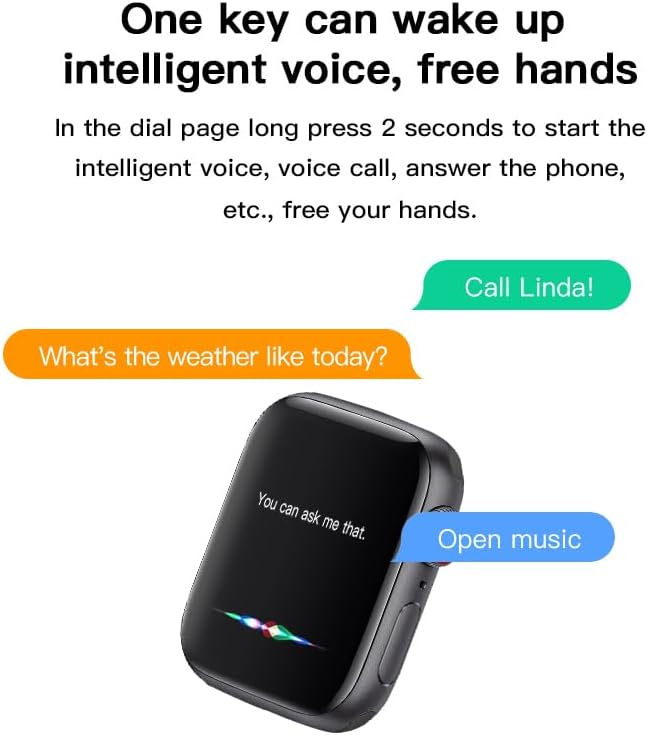
Image: The W26 Pro Max Smart Watch screen displays sleep monitoring data, showing sleep quality (Excellent), percentages of deep sleep, light sleep, and awake time, along with total sleep duration. This highlights the sleep tracking feature.
Komunikacija i mediji
- Bluetooth pozivi: Make and receive calls directly from your smartwatch using the integrated microphone and speaker.
- Obavještenja: Primajte upozorenja za pozive, poruke i obavještenja aplikacija sa svog uparenog pametnog telefona.
- Reprodukcija muzike: Control music playing on your smartphone or listen directly via the integrated earphones.

Image: The W26 Pro Max Smart Watch screen shows music playback controls, including play/pause and skip track buttons, along with a visualizer. This indicates the watch's capability to control audio.
Glasovni asistent
Long press the side button to activate the intelligent voice assistant. Use voice commands for calls, weather inquiries, music control, and more, providing hands-free operation.
Održavanje i njega
- čišćenje: Wipe the watch and earphones with a soft, dry, lint-free cloth. For stubborn dirt, slightly dampNapržite krpu vodom. Izbjegavajte jake hemikalije ili abrazivne materijale.
- Otpornost na vodu: The W26 Pro Max has an IP68 rating, meaning it is resistant to dust and can withstand immersion in water up to 1.5 meters for 30 minutes. However, it is not suitable for diving, hot showers, or saunas. Always dry the device thoroughly after exposure to water.
- Održavanje baterije: To prolong battery life, avoid fully discharging the device frequently. Charge it regularly and store it in a cool, dry place when not in use for extended periods.
- Skladištenje: Uređaj čuvajte na hladnom i suhom mjestu, dalje od direktne sunčeve svjetlosti i ekstremnih temperatura.
Rješavanje problema
| Problem | Mogući uzrok | Rješenje |
|---|---|---|
| Uređaj se ne uključuje. | Niska baterija. | Charge the device for at least 30 minutes before attempting to power on again. |
| Nije moguće uparivanje sa pametnim telefonom. | Bluetooth is off on phone/watch; device not in pairing mode; interference. | Ensure Bluetooth is enabled on both devices. Restart both devices. Move closer to the phone. Forget previous pairings and try again. |
| Earphones not connecting. | Earphones not properly seated; low earphone battery. | Ensure earphones are fully seated in their charging slots within the watch. Charge the watch to ensure earphones are charging. |
| Netačni zdravstveni podaci. | Nepravilno prianjanje; začepljenje senzora. | Pazite da sat čvrsto prianja uz zglob, ne previše stegnut ili previše labav. Očistite senzor na stražnjoj strani sata. |
| Kratko trajanje baterije. | Frequent use of power-intensive features; old battery. | Reduce screen brightness, limit notifications, disable unnecessary features. Ensure full charge cycles. |
Specifikacije
| Feature | Detalj |
|---|---|
| Broj modela | W26 Pro Max |
| Display | 1.78" AMOLED Touchscreen |
| Operativni sistem | Wear OS |
| Povezivanje | Bluetooth |
| Kapacitet baterije | 280mAh (watch) |
| Trajanje baterije | Do 3 dana (tipična upotreba) |
| Otpornost na vodu | IP68 |
| Posebne karakteristike | Integrated Bluetooth Earphones, Heart Rate Sensor, Pedometer, Sleep Tracker, Microphone, Speaker, Voice Assistant |
| Kapacitet memorije | 16 MB |
| Dimenzije paketa | 16.8 x 12.8 x 3 cm |
| Težina | 170 g |
Garancija i podrška
For information regarding warranty coverage and customer support, please refer to the documentation provided with your purchase or contact the retailer where the product was acquired. As this product is manufactured by "Generic", specific warranty details may vary by region and seller.
For technical assistance or further inquiries, please reach out to the customer service channels provided by your point of purchase.