1. Proizvod je gotovview
This replacement remote control is designed for use with various Pioneer Smart 4K LCD LED HDTV models. It is pre-programmed and requires no additional setup or coding. Simply insert batteries, and it is ready for immediate use.
Sadržaj paketa:
- 1 x Zamjenski daljinski upravljač
Note: Batteries and a separate instruction manual are not included in the package.
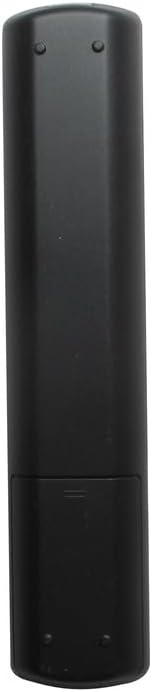
Slika 1.1: Prednja strana view of the Generic replacement remote control. This image displays the full layout of the remote's buttons, including power, channel, volume, navigation, and smart TV function buttons.
2. Podešavanje i ugradnja baterija
This remote control is designed for immediate use without any programming. The only setup required is the installation of batteries.
- Obtain Batteries: Purchase two (2) new AAA batteries from a local retailer. These are not included with the remote control.
- Otvoreni pretinac za baterije: Locate the battery compartment cover on the back of the remote control. Gently slide the cover downwards or press the latch (if present) to open it.
- Umetnite baterije: Insert the two AAA batteries into the compartment, ensuring that the positive (+) and negative (-) terminals align correctly with the markings inside the compartment. Incorrect insertion can prevent the remote from functioning.
- Zatvorite pretinac za baterije: Vratite poklopac pretinca za baterije na mjesto dok ne klikne sigurno.
- Test daljinski: Point the remote control towards your Pioneer TV and press the Power button. The TV should respond. If not, recheck battery orientation or replace with new batteries.
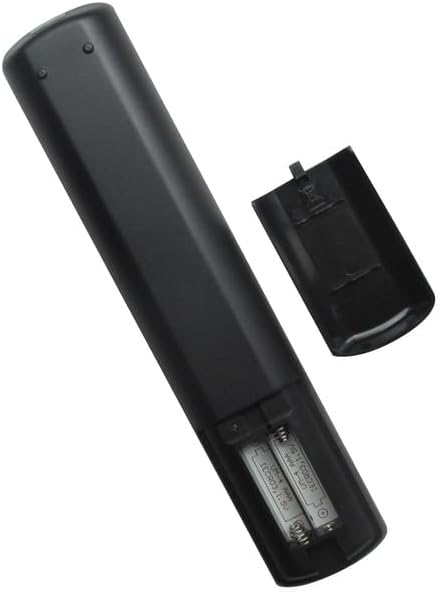
Slika 2.1: Stražnja strana view of the remote control with the battery compartment open. This image illustrates the correct placement of AAA batteries within the remote's battery compartment.
3. Uputstvo za upotrebu
Once batteries are installed, the remote control is ready to operate your compatible Pioneer TV. Point the remote directly at the TV's infrared receiver for optimal performance.
Osnovne funkcije:
- Dugme za napajanje: Uključuje ili isključuje TV.
- Channel Buttons (CH+/CH-): Mijenja TV kanal gore ili dolje.
- Volume Buttons (VOL+/VOL-): Povećava ili smanjuje jačinu zvuka TV-a.
- Dugme za isključivanje zvuka: Isključuje ili uključuje zvuk TV-a.
- Dugme za ulaz/izvor: Ciklično se kreće kroz dostupne ulazne izvore (HDMI, AV, itd.).
- Navigation Buttons (Up, Down, Left, Right, OK/Enter): Used to navigate menus and select options on the TV screen.
- Dugme menija: Otvara glavni meni televizora.
- Dugme za izlaz/nazad: Closes menus or returns to the previous screen.
- Brojčani gumbi (0-9): Direktno unosi brojeve kanala.
For specific advanced functions or smart TV features, refer to your Pioneer TV's original user manual, as button labels and functions may vary slightly depending on the TV model.
4. Održavanje
Zamjena baterije:
- Zamijenite baterije kada daljinski upravljač postane spor ili prestane raditi.
- Uvijek zamijenite obje baterije istovremeno novim AAA baterijama.
- Nemojte miješati stare i nove baterije ili različite vrste baterija.
- Izvadite baterije ako daljinski upravljač nećete koristiti duži period kako biste spriječili curenje.
čišćenje:
- Obrišite daljinski upravljač mekom, suhom krpom.
- Ne koristite tekuća sredstva za čišćenje, sprejeve ili abrazivne materijale, jer mogu oštetiti površinu daljinskog upravljača ili unutrašnje komponente.
5. Otkrivanje problema
-
Daljinski ne radi:
- Provjerite da li su baterije pravilno umetnute s ispravnim polaritetom (+/-).
- Zamijenite stare baterije novim AAA baterijama.
- Provjerite ima li prepreka između daljinskog upravljača i infracrvenog prijemnika televizora.
- Ensure you are within a reasonable range and pointing the remote directly at the TV.
-
Certain buttons not responding:
- This remote is a generic replacement. While it supports primary functions, some highly specific or advanced smart TV features might require the original TV remote.
- Očistite površinu daljinskog upravljača, posebno oko tipki koje ne reagiraju, kako biste uklonili prljavštinu ili ostatke.
6. Specifikacije
| Brand | Generic |
| Proizvođač | Generic |
| Kompatibilni uređaji | Pioneer Television models: PLE-43S05FHD, PLE-55S05FHD, PLE-43S07FHD, PLE-2405HD, PLE-55S06UHD |
| Maksimalni broj podržanih uređaja | 1 (One Television) |
| Posebna karakteristika | Nije potrebno programiranje |
| Izvor napajanja | 2 x AAA baterije (nisu uključene) |
7. Garancija i podrška
No specific warranty information is provided for this generic replacement remote control. For any issues or inquiries, please refer to the retailer from whom the product was purchased.
As this is a generic replacement, direct manufacturer support may not be available. Please consult your TV's original manual for detailed information regarding your television's functions.