
Radxa Radxa Camera 8M 219
Radxa Camera 8M 219 Instruction Manual
Model: Radxa Camera 8M 219
Product Overview
The Radxa Camera 8M 219 is a compact camera module designed for integration with Radxa Single Board Computers (SBCs). It features an 8-megapixel IMX219 sensor and connects via a MIPI CSI interface, providing high-quality imaging capabilities for various embedded applications.

Front view of the Radxa Camera 8M 219, showing the lens and the Radxa logo on the green PCB.

Nazad view of the Radxa Camera 8M 219, displaying the "Radxa Camera 8M" text and the MIPI CSI connector.
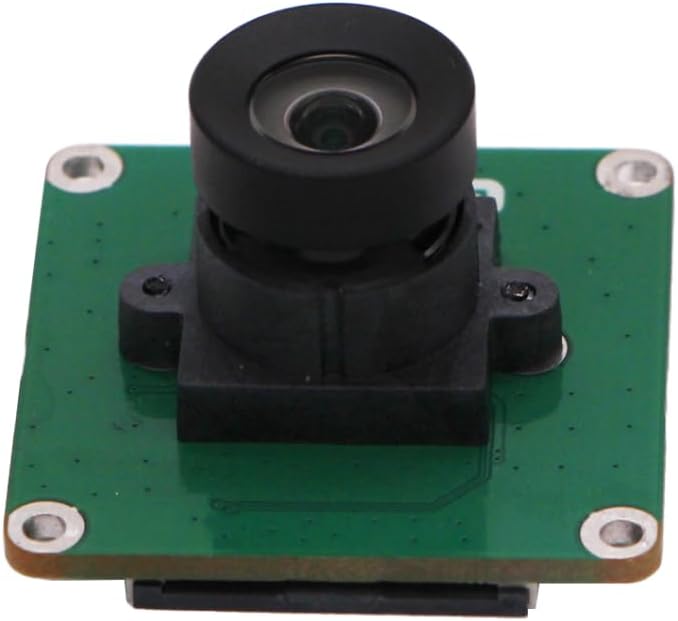
Side profile of the Radxa Camera 8M 219, highlighting the compact form factor and lens assembly.
Ključne karakteristike
- IMX219 Sensor: Equipped with an 8-megapixel Sony IMX219 sensor for high-resolution image capture.
- MIPI CSI Interface: Utilizes the MIPI CSI (Camera Serial Interface) for efficient data transfer to compatible host devices.
- Radxa SBC Compatibility: Designed to seamlessly integrate with various Radxa Single Board Computers.

Close-up view of the Sony IMX219 sensor, highlighting its 8-megapixel capability.
Vodič za postavljanje
1. Raspakivanje
Carefully remove the Radxa Camera 8M 219 from its packaging. Ensure all components listed in the "What's in the Box" section are present.
- Board Body
2. Connecting to a Radxa SBC
The camera connects to your Radxa Single Board Computer via the MIPI CSI interface. Locate the MIPI CSI connector on both the camera module and your SBC.
- Identify the MIPI CSI connector on your Radxa SBC. This is typically a small, multi-pin flat flexible cable (FFC) connector.
- Gently lift the locking tab on the SBC's MIPI CSI connector.
- Insert the ribbon cable from the Radxa Camera 8M 219 into the connector, ensuring the contacts are facing the correct direction (usually blue side up or contacts facing the PCB).
- Press down the locking tab to secure the ribbon cable in place.
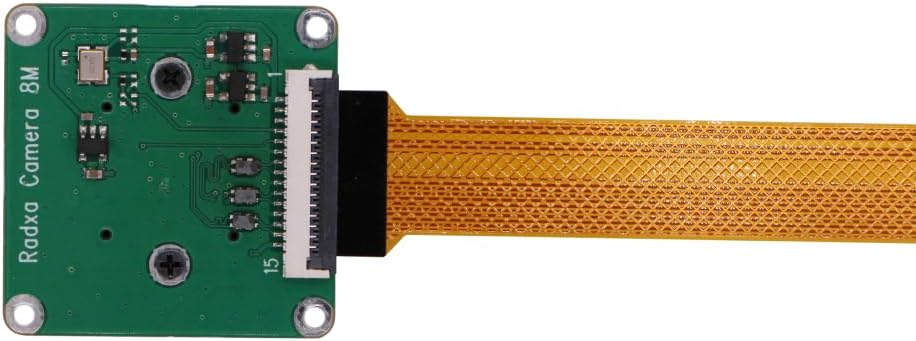
The Radxa Camera 8M 219 with its attached ribbon cable, ready for connection.

Diagram illustrating the connection of the camera's MIPI CSI interface to a compatible SBC.

The Radxa Camera 8M 219 fully connected to a Radxa Single Board Computer.
For specific instructions on your Radxa SBC model, refer to its official documentation.
Uputstvo za upotrebu
Once the camera is physically connected to your Radxa SBC, you will need to configure the software to enable and utilize the camera. This typically involves installing necessary drivers and camera software.
1. Konfiguracija softvera
- Operativni sistem: Ensure your Radxa SBC is running a compatible Linux distribution.
- Instalacija drajvera: Install the appropriate camera drivers for the IMX219 sensor. Refer to the official Radxa documentation or community forums for detailed instructions specific to your SBC model and operating system.
- Camera Software: Utilize standard Linux camera tools (e.g.,
libcamera,fswebcam,gstreamer) or specific Radxa-provided utilities to access and control the camera.
2. Basic Camera Usage (Example)
After successful driver installation, you can test the camera. For example, koristeći libcamera-still (ako libcamera is installed and configured):
libcamera-still -o test.jpgThis command will capture an image and save it as test.jpg u trenutnom direktoriju.
For video streaming, you might use libcamera-vid or gstreamer commands. Consult the documentation for your chosen software for advanced usage.
Održavanje
The Radxa Camera 8M 219 is a low-maintenance device. Follow these guidelines to ensure its longevity and optimal performance:
- Čišćenje sočiva: If the lens becomes dirty, gently clean it with a soft, lint-free cloth specifically designed for optical surfaces. Avoid abrasive materials or harsh chemicals.
- Zaštita od prašine: Keep the camera in a clean, dust-free environment when not in use or when integrated into a system.
- Fizičko rukovanje: Handle the camera module by its edges to avoid touching the lens or the sensitive electronic components on the PCB.
- Temperatura i vlažnost: Operate and store the camera within recommended environmental conditions to prevent damage. Avoid extreme temperatures and high humidity.
Rješavanje problema
| Problem | Mogući uzrok | Rješenje |
|---|---|---|
| Camera not detected by SBC. |
|
|
| No image or black screen. |
|
|
| Image is distorted or blurry. |
|
|
Specifikacije
| Feature | Detalj |
|---|---|
| Senzor | Sony IMX219 |
| Rezolucija | 8 megapiksela |
| Interface | MIPI CSI |
| Kompatibilnost | Radxa Single Board Computers (SBCs) |
| Težina artikla | 0.48 unci (približno 13.6 grama) |
| Dimenzije paketa | 0.3 x 0.3 x 0.2 inča (približno 7.6 x 7.6 x 5.1 mm) |
| Proizvođač | Radxa |
| Zemlja porijekla | Kina |
Garancija i podrška
Informacije o garanciji
This product is typically covered by a standard manufacturer's warranty. Please refer to the specific warranty terms provided by Radxa or your point of purchase for details regarding coverage period and conditions. Keep your proof of purchase for warranty claims.
Tehnička podrška
For technical assistance, driver downloads, and detailed documentation, please visit the official Radxa website or their community forums. These resources provide comprehensive guides, software updates, and peer support for Radxa products.
Official Radxa Webstranica: www.radxa.com
For direct support inquiries, contact the seller or manufacturer through the platform where the product was purchased.
Ask a question about this manual
Ask about setup, troubleshooting, compatibility, parts, safety, or missing instructions. Manuals+ will review the question and use this page’s manual context to help answer it.