
MSHUKCOE MSHUKCOE-MD538
MSHUKCOE MD538 Wireless Bluetooth Headset User Manual
Model: MSHUKCOE-MD538
Brand: MSHUKCOE
1. Proizvod je gotovview
The MSHUKCOE MD538 Wireless Bluetooth Headset is designed for comfortable, discreet audio listening, especially for side sleepers. These ultra-thin earbuds offer immersive sound in a lightweight, barely-there design, fitting comfortably without the bulk of traditional headphones.
Key features include an advanced Bluetooth chip for stable wireless connection, intuitive touch controls, and a compact charging case providing extended playtime. The design prioritizes comfort for prolonged wear, including during sleep.
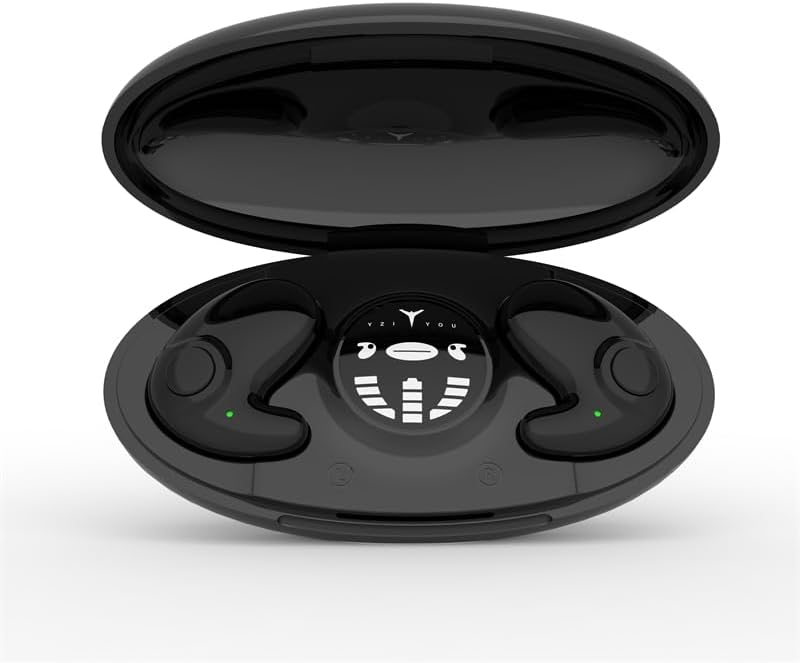
Figure 1: The MD538 earbuds resting in their open charging case, displaying the charging indicators.

Figure 2: An MD538 earbud shown worn in an ear, highlighting its small, invisible design and thin profile (10.6 mm).
2. Šta se nalazi u kutiji
Upon opening your MSHUKCOE MD538 package, you should find the following components:
- MSHUKCOE MD538 Wireless Earbuds (Left and Right)
- Prijenosna torbica za punjenje
- USB kabel za punjenje (tip-C)
- Korisnički priručnik (ovaj dokument)
Note: While the product data listed "DVD" as an included component, this is likely an error. The standard package includes the items listed above.
3. Vodič za postavljanje
3.1. Punjenje slušalica i kutijice
Before first use, ensure both the earbuds and the charging case are fully charged. The charging case provides multiple charges for the earbuds, extending their usage time significantly.
- Place the earbuds into their respective slots in the charging case. Ensure they are correctly seated; magnetic closures will help secure them.
- Connect the USB Type-C charging cable to the charging port on the case and the other end to a compatible USB power source (e.g., wall adapter, computer USB port).
- The charging case features a display that indicates the battery levels of both earbuds and the case itself. Allow approximately 1 hour for a full charge of the earbuds and 2 hours for the charging case.

Figure 3: The charging case display indicating individual earbud power levels and the charging compartment's power.
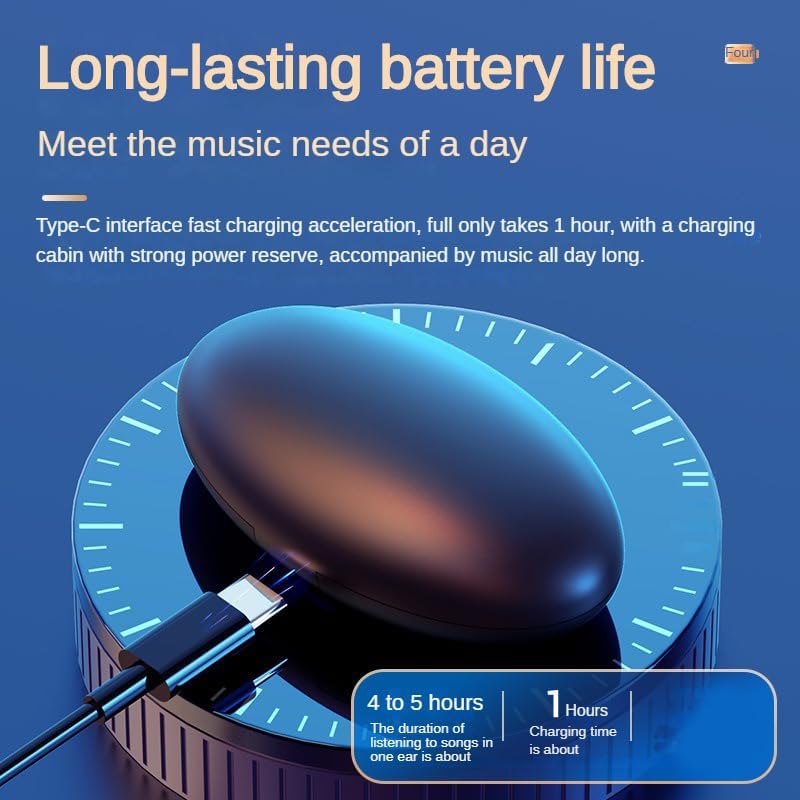
Figure 4: The earbud charging in its case, illustrating the Type-C fast charging capability and battery life.
3.2. Uparivanje sa vašim uređajem
The MD538 earbuds are designed for easy automatic pairing.
- Otvorite kutijicu za punjenje. Slušalice će automatski ući u način rada za uparivanje.
- Na vašem uređaju (pametnom telefonu, tabletu itd.) idite na postavke Bluetootha.
- Traži available devices and select "MSHUKCOE-MD538" (or similar name) from the list.
- Nakon povezivanja, čut ćete zvučnu potvrdu i slušalice će biti spremne za upotrebu.
Automatsko ponovno povezivanje: After the initial successful pairing, the earbuds will automatically connect to the last used device when taken out of the charging case, enabling immediate use.
4. Uputstvo za upotrebu
The MD538 earbuds feature intuitive touch controls for managing audio playback and calls.
4.1. Nošenje slušalica
The MD538 earbuds are designed for an open-ear fit, resting gently on top of your ear without entering the ear canal. This design is particularly comfortable for side sleepers.

Figure 5: Illustration of the ergonomic design, showing how the earbud fits comfortably for side sleepers.
4.2. Dodirnite Kontrole
Each earbud is equipped with a touch-sensitive area for control. Specific functions may vary slightly depending on your device and operating system.
- Pusti/pauza: Jednim dodirom na bilo koju slušalicu.
- Sljedeća pjesma: Dvaput dodirnite desnu slušalicu.
- Prethodni zapis: Dvaput dodirnite lijevu slušalicu.
- Odgovori/Završi poziv: Jednokratno dodirnite bilo koju slušalicu tokom dolaznog poziva.
- odbiti poziv: Pritisnite i držite prst na bilo kojoj slušalici tokom dolaznog poziva.
- Aktivirajte glasovnog asistenta: Triput dodirnite bilo koju slušalicu (npr. Siri, Google Assistant).
5. Održavanje
Proper maintenance ensures the longevity and optimal performance of your MD538 earbuds.
- čišćenje: Use a soft, dry, lint-free cloth to wipe the earbuds and charging case. Do not use harsh chemicals, cleaning solvents, or strong detergents.
- Otpornost na vodu: The earbuds are rated as Waterproof. However, this does not mean they are suitable for swimming or prolonged submersion. Avoid exposing them to excessive moisture or liquids. Dry them thoroughly if they get wet.
- Skladištenje: Kada se ne koriste, slušalice čuvajte u kutijici za punjenje kako biste ih zaštitili od prašine i oštećenja. Čuvajte ih na hladnom i suhom mjestu, dalje od ekstremnih temperatura.
- Održavanje baterije: To preserve battery life, avoid fully discharging the earbuds or charging case frequently. Charge them regularly, even if not in constant use.
6. Otkrivanje problema
If you encounter issues with your MD538 earbuds, refer to the following common solutions:
| Problem | Moguće rješenje |
|---|---|
| Slušalice se ne uparuju/ne povezuju. |
|
| Nema zvuka iz jedne ili obje slušalice. |
|
| Kućište za punjenje se ne puni. |
|
| Loš kvalitet zvuka. |
|
7. Specifikacije
Detailed technical specifications for the MSHUKCOE MD538 Wireless Bluetooth Headset:
| Naziv modela | MSHUKCOE-TWS-MD538-Black |
| Tehnologija povezivanja | bežični (Bluetooth) |
| Bluetooth verzija | 5.3 |
| Bluetooth domet | 10 metara (otprilike 30 stopa) |
| Težina slušalica (svaka) | 3.2 g (0.11 oz) |
| Earbud Thickness | 10.4mm |
| Trajanje baterije (slušalice) | Do 6 sati |
| Kućište za punjenje Trajanje baterije | Up to 24 Hours (additional charges) |
| Futrola za punjenje Kapacitet baterije | 300 mAh |
| Vrijeme punjenja kućišta | 2 sata |
| Frekvencijski odziv | 20000 Hz |
| Osjetljivost | 90 dB |
| Impedansa | 32 Ohm |
| Nivo vodootpornosti | Vodootporan |
| Tip kontrole | Call Control, Button, Voice |
| Dimenzije proizvoda | 2.95 x 1.57 x 0.98 inča (kućište za punjenje) |
| Ukupna težina artikla | 2.12 unci (60.1 grama) |

Figure 6: Visual comparison highlighting the MD538's smaller, thinner, and lighter design compared to standard headphones.
8. Garancija i podrška
For any questions or concerns regarding your MSHUKCOE MD538 Wireless Bluetooth Headset, please contact us directly via Amazon. Our team is dedicated to ensuring your satisfaction with our products.
Please note that specific warranty details are not provided in this manual. For warranty information, please refer to your purchase documentation or contact MSHUKCOE customer support through the Amazon platform.
Ask a question about this manual
Ask about setup, troubleshooting, compatibility, parts, safety, or missing instructions. Manuals+ will review the question and use this page’s manual context to help answer it.