
1. Uvod i sigurnosne informacije
This manual provides essential instructions for the installation, operation, and maintenance of your GAMEMAX GX-850 80 Plus Gold Fully Modular Power Supply. Please read this manual thoroughly before installation and retain it for future reference.
1.1 Važna sigurnosna upozorenja
- Opasnost od strujnog udara: Power supplies contain high voltage components. Do not open the power supply unit. There are no user-serviceable parts inside. Opening the unit will void the warranty.
- Pravilno uzemljenje: Ensure your computer system is properly grounded to prevent electrical hazards.
- Isključite napajanje: Uvijek isključite kabel za napajanje iz zidne utičnice prije instaliranja, uklanjanja ili servisiranja napajanja ili bilo kojih drugih komponenti računara.
- ventilacija: Osigurajte odgovarajuću ventilaciju oko napajanja. Ne blokirajte ventilacijske otvore.
- Moisture and Temperature: Do not operate the power supply in high humidity or high-temperature environments. Keep it away from water and heat sources.
- Profesionalna instalacija: Ako niste sigurni u vezi s bilo kojim koracima instalacije, potražite pomoć kvalificiranog tehničara.
2. Sadržaj paketa
Verify that all items are present in your GAMEMAX GX-850 package:
- GAMEMAX GX-850 80 Plus Gold Fully Modular Power Supply
- Modular Cable Set (including ATX 24-pin, CPU 8-pin, PCIe 6+2-pin, SATA, Peripheral 4-pin cables)
- AC strujni kabl
- Montažni vijci
- Korisnički priručnik (ovaj dokument)
3. Proizvod je gotovview
The GAMEMAX GX-850 is an 850-watt 80 Plus Gold certified fully modular power supply designed for desktop computers. It features an LLC and DC-DC circuit design for high efficiency and stable power delivery, along with an ultra-quiet FDB (Fluid Dynamic Bearing) fan for optimal cooling and low noise.
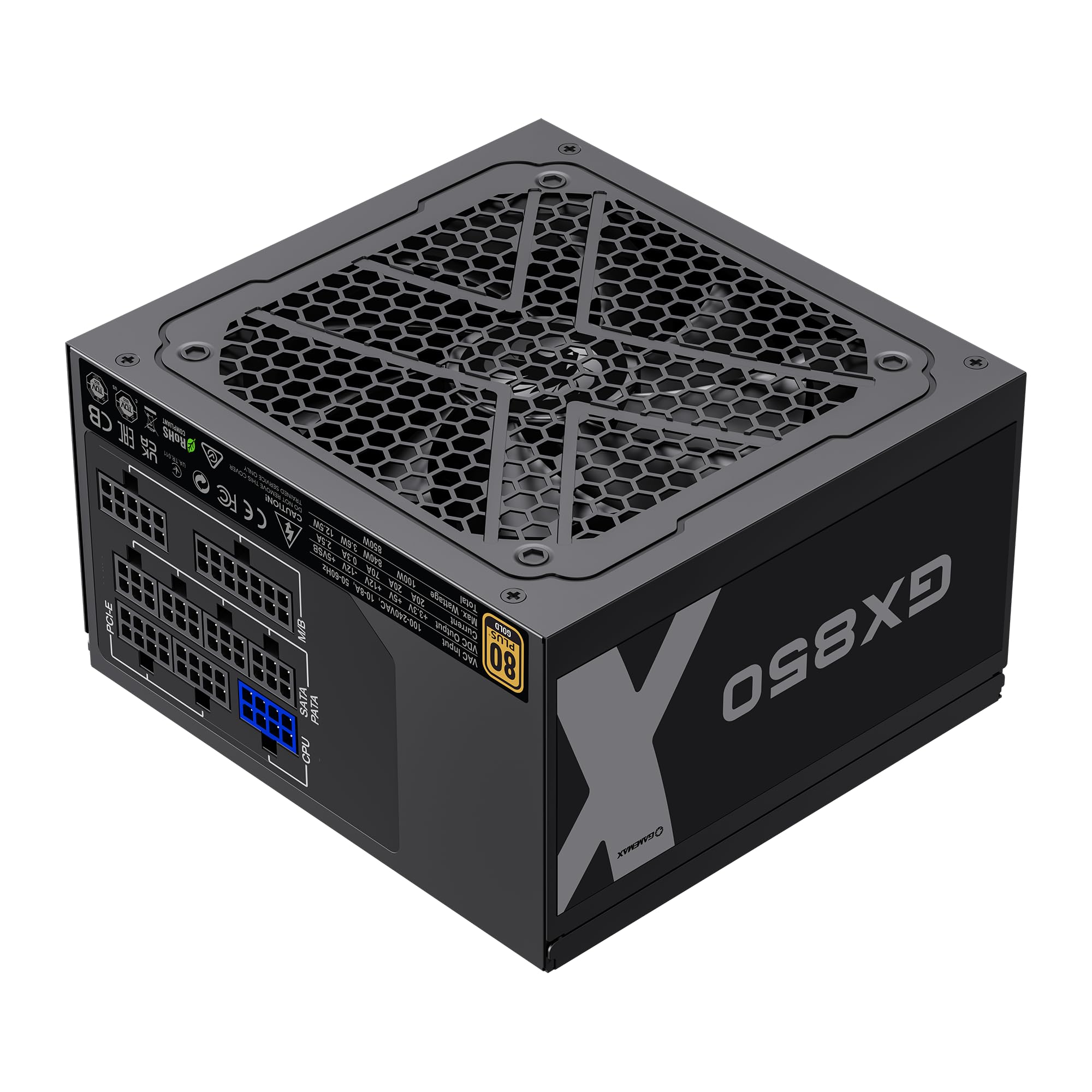
Image: The GAMEMAX GX-850 80 Plus Gold Fully Modular Power Supply, showcasing its black finish and modular design.
3.1 Ključne karakteristike
- 80 Plus zlatni certifikat: Osigurava visoku energetsku efikasnost, smanjujući troškove toplote i rada.
- LLC+DC-DC Circuit: Advanced circuit design for stable voltage output and improved efficiency.
- Potpuno modularni dizajn: Allows for custom cable management, reducing clutter and improving airflow.
- FDB Fan: Ultra-quiet temperature-controlled Fluid Dynamic Bearing fan for silent operation and extended lifespan.
- 105℃ Mainstream Capacitor: High-quality capacitors ensure long life and smooth power output.
- Sveobuhvatna zaštita: Features SIX levels of protection: Over Temperature Protection (OTP), Over Current Protection (OCP), Short Circuit Protection (SCP), Over Voltage Protection (OVP), Under Voltage Protection (UVP), and Over Power Protection (OPP).
4. Postavljanje i instalacija
Follow these steps to properly install your GAMEMAX GX-850 power supply into your computer system.
4.1 Koraci instalacije
- Pripremite svoj sistem: Provjerite je li računar potpuno isključen i iskopčan iz zidne utičnice. Otvorite kućište računara.
- Uklonite stari PSU (ako je primjenjivo): Isključite sve kablove iz starog napajanja i izvadite ga iz kućišta.
- Montiranje novog napajanja: Carefully place the GAMEMAX GX-850 into the power supply bay of your computer case. Secure it with the provided mounting screws. Ensure the fan is facing the correct direction for optimal airflow (typically facing down if your case has a bottom vent, or up if it's a top-mounted PSU).
- Spojite modularne kablove: Identify the necessary cables for your components. Connect the modular cables to the corresponding ports on the power supply first, then route them to your components.
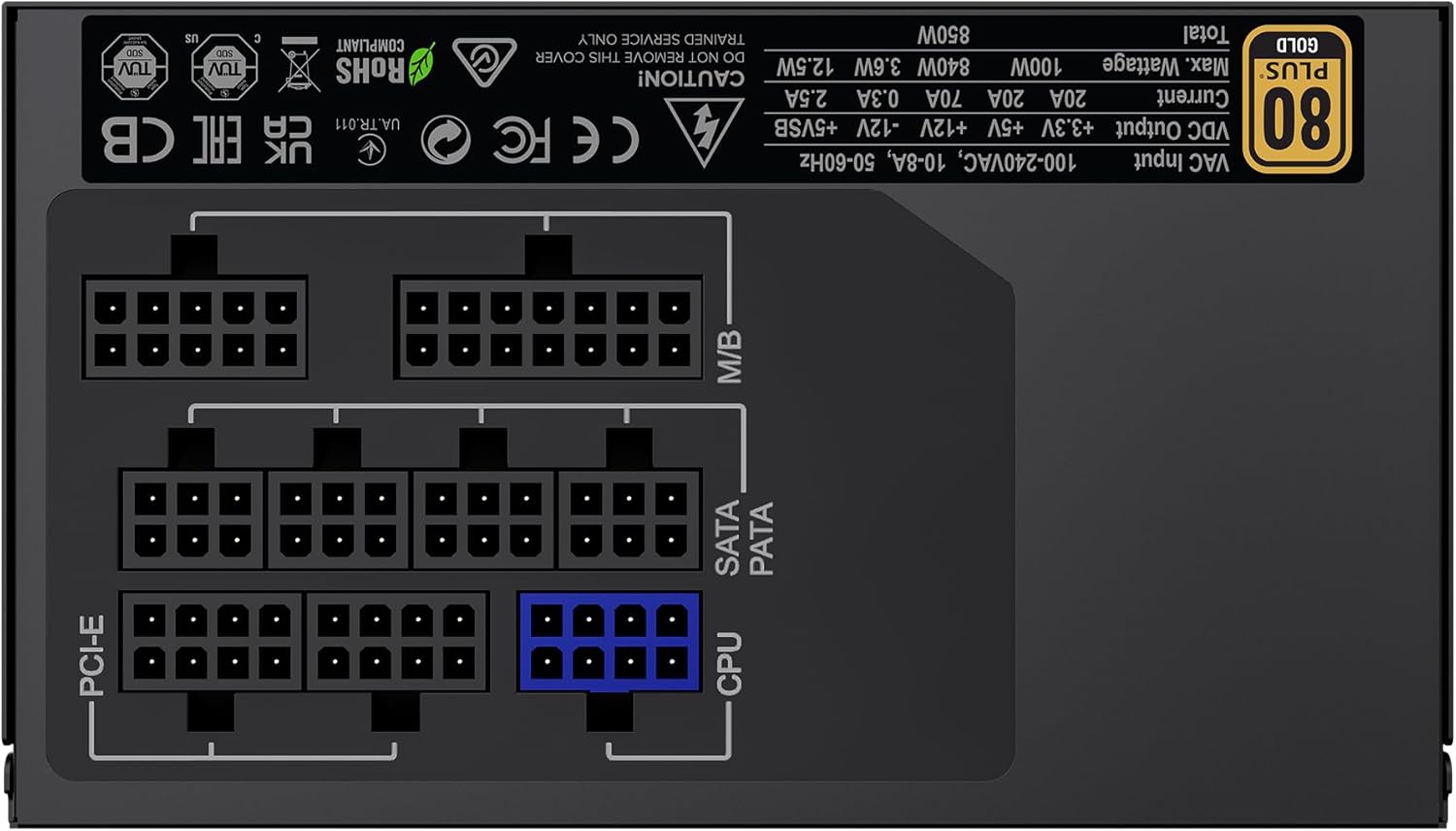
Slika: Stražnja strana view of the GAMEMAX GX-850 showing the fully modular cable connection ports for PCI-e, M/B (Motherboard), SATA/PATA, and CPU cables.
- Motherboard (M/B): Povežite 24-pinski ATX kabl na matičnu ploču.
- CPU: Connect the 8-pin (or 4+4-pin) CPU power cable to the CPU power connector on your motherboard.
- Graphics Cards (PCI-e): Connect the 6+2-pin PCIe power cables to your graphics card(s). Use separate cables for each connector if your GPU requires multiple.
- Storage Devices (SATA): Spojite SATA kablove za napajanje na SSD-ove, HDD-ove i optičke uređaje.
- Peripherals (PATA/Molex): Connect peripheral power cables to any other devices requiring them (e.g., fan controllers, older drives).
- Upravljanje kablovima: Uredno provucite kablove kako biste poboljšali protok zraka i estetiku.
- Zatvorite kućište i priključite AC napajanje: Close your computer case. Connect the AC power cord to the power supply and then to a grounded wall outlet.
5. Uputstvo za upotrebu
After successful installation, follow these steps to operate your system.
- Prekidač: Provjerite je li prekidač za napajanje na stražnjoj strani napajanja u položaju 'UKLJUČENO' (I).
- Uključivanje sistema: Press the power button on your computer case to turn on the system.
- System Power Off: To turn off your system, use the operating system's shutdown procedure. For a hard shutdown, hold the case power button for several seconds. For complete power disconnection, switch the PSU's power switch to 'OFF' (O) and unplug the AC cord.
6. Održavanje
Redovno održavanje pomaže u osiguravanju dugotrajnosti i optimalnih performansi vašeg napajanja.
- Čišćenje prašine: Periodically clean the power supply's fan and ventilation grilles using compressed air to prevent dust buildup, which can impede cooling. Ensure the system is powered off and unplugged before cleaning.
- Provjera kablova: Occasionally check all modular cable connections to ensure they are securely seated.
- Uslovi okoline: Maintain a clean, dry, and well-ventilated environment for your computer.
7. Otkrivanje problema
Ako naiđete na probleme s napajanjem, pogledajte sljedeće uobičajene korake za rješavanje problema:
- Nema napajanja:
- Ensure the AC power cord is securely plugged into both the wall outlet and the power supply.
- Provjerite je li prekidač za napajanje na stražnjoj strani napajanja u položaju 'UKLJUČENO' (I).
- Verify that the 24-pin ATX and 8-pin CPU power cables are correctly and firmly connected to the motherboard.
- Testirajte zidnu utičnicu s drugim uređajem kako biste potvrdili da ima napajanja.
- Nestabilnost sistema/Nasumična isključenja:
- Ensure all modular cables are fully seated at both the PSU and component ends.
- Check for proper ventilation and ensure the PSU fan is spinning. Overheating can cause shutdowns.
- If you have recently added new components, ensure your 850W power supply is sufficient for the total system wattage.
- Ventilator se ne okreće:
- The GX-850 features a temperature-controlled fan. It may not spin at low loads or temperatures. This is normal operation.
- If the fan does not spin under load and the PSU feels hot, ensure there are no obstructions and consider contacting support.
If problems persist after performing these steps, contact GAMEMAX customer support or your retailer for further assistance.
8. Specifikacije
Detailed technical specifications for the GAMEMAX GX-850 80 Plus Gold Power Supply:
| Feature | Specifikacija |
|---|---|
| Naziv modela | GX-850 Modular |
| Brand | GAMEMAX |
| Output Wattage | 850 Watts |
| Form Factor | ATX |
| Certifikacija efikasnosti | 80 plus zlato |
| Dizajn napajanja | Full Modular |
| Metoda hlađenja | Air (FDB Fan) |
| Broj navijača | 1 |
| Minimalni ulazni volumentage | 115 Volts |
| Maximum Input Voltage | 240 volti (AC) |
| Gornja temperatura | 105 Degrees Celsius (Capacitors) |
| Kompatibilni uređaji | Stoni računar |
| Tipovi konektora | ATX, PCI-e, SATA |
9. Garancija i podrška
GAMEMAX products are manufactured to high-quality standards. For warranty information, please refer to the warranty card included with your product or visit the official GAMEMAX webstranica. Uslovi garancije mogu se razlikovati u zavisnosti od regije i prodavca.
For technical support or further inquiries, please contact GAMEMAX customer service through their official webweb-mjesto ili kontakt informacije koje vam je dao vaš prodavač.