
1. Uvod
Hvala na kupoviniasing the Soundmaster MCD5600 Stereo System. This versatile audio system combines classic and modern audio technologies, including a record player, DAB+ and FM radio, double cassette deck, CD player, USB playback, and Bluetooth connectivity. It also features a digitization function to convert your analog media to MP3 files on a USB drive. This manual provides essential information for safe operation, setup, and maintenance of your device. Please read it thoroughly before use and retain it for future reference.
2. Sigurnosna uputstva
- Izvor napajanja: Uvjerite se da napajanje odgovara voltage specified on the unit. Disconnect from the power outlet during lightning storms or when unused for long periods.
- ventilacija: Do not block any ventilation openings. Allow adequate space around the unit for proper airflow to prevent overheating.
- Voda i vlaga: Do not expose the unit to rain, moisture, dripping, or splashing. Do not place objects filled with liquids, such as vases, on the apparatus.
- toplina: Držite uređaj dalje od izvora toplote kao što su radijatori, grijalice, peći ili drugi uređaji (uključujući ampLifiers) koji proizvode toplotu.
- čišćenje: Čistite samo suvom krpom. Nemojte koristiti tečna sredstva za čišćenje ili sredstva za čišćenje u obliku aerosola.
- servisiranje: Ne pokušavajte sami servisirati ovaj proizvod. Sve servise prepustite kvalificiranom servisnom osoblju.
- plasman: Postavite uređaj na stabilnu, ravnu površinu kako biste spriječili njegov pad.
3. Sadržaj paketa
Molimo Vas da prilikom raspakivanja provjerite da li su svi artikli prisutni:
- Soundmaster MCD5600 Main Unit
- 2 x External Speakers
- Daljinski upravljač
- Uputstvo za upotrebu (ovaj dokument)
- FM/DAB+ Antenna
- Power Cable
4. Proizvod je gotovview
Familiarize yourself with the main components and controls of your stereo system.
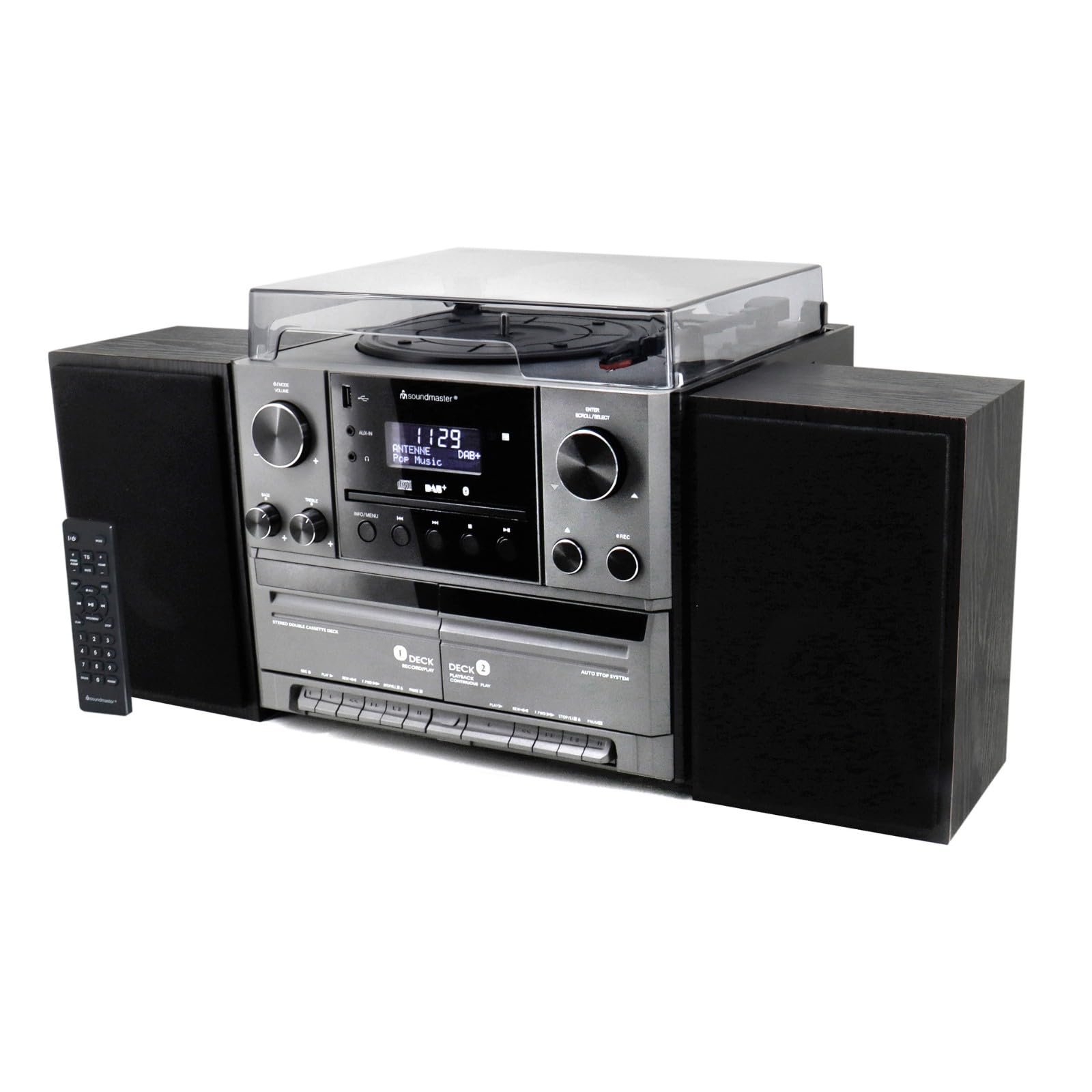
Slika 4.1: Front view of the Soundmaster MCD5600 stereo system, showing the main unit flanked by two speakers, with the remote control positioned to the left. The display, control knobs, and various media inputs are visible.

Slika 4.2: Front view of the Soundmaster MCD5600 stereo system with the CD tray open and a cassette tape inserted into one of the two cassette decks. This image highlights the multi-media capabilities of the unit.
5. Podešavanje
5.1 Povezivanje zvučnika
Connect the included speakers to the speaker terminals on the rear of the main unit. Ensure correct polarity (red to red, black to black) for optimal sound quality. Place speakers equidistant from the listening position for the best stereo effect.
5.2 Antenska veza
Connect the supplied 75 Ohm antenna to the FM/DAB+ antenna input on the rear panel. Extend the antenna fully and position it for the best possible radio reception.
5.3 Priključak za napajanje
Plug the power cable into the AC inlet on the rear of the unit, then connect the other end to a standard wall outlet.
6. Uputstvo za upotrebu
6.1 Opće kontrole
- Dugme za napajanje: Pritisnite da uključite ili isključite jedinicu.
- Gumb za jačinu zvuka: Rotate to adjust the overall sound volume.
- Dugme za izvor/funkciju: Press repeatedly to cycle through available audio sources (CD, Phono, Tape, FM, DAB+, Bluetooth, USB).
- Prikaz: Shows current mode, track information, radio frequency, and time.
6.2 Rad CD plejera
- Pritisnite CD source button.
- Pritisnite OPEN/CLOSE dugme da otvorite ležište za CD.
- Place a CD (CD/CD-MP3/CD-R/CD-RW/WMA compatible) with the label side up into the tray.
- Pritisnite OPEN/CLOSE ponovo da biste zatvorili ladicu. Uređaj će pročitati disk.
- Pritisnite PLAY/PAUSE za pokretanje ili pauziranje reprodukcije.
- Koristi PRESKOČI NAPRIJED/NAZAD dugmad za navigaciju po stazama.
- The PROGRAM i REPEAT functions allow for customized playback sequences and continuous repetition.
6.3 Record Player Operation
- Pritisnite PHONE source button.
- Select the appropriate speed (33, 45, or 78 RPM) using the speed selector switch based on your record type.
- Place a record on the turntable platter. For 45 RPM singles, use the included adapter.
- Carefully lift the tonearm using the cueing lever and position it over the desired track on the record.
- Lower the tonearm gently onto the record. Playback will begin automatically.
- At the end of the record, lift the tonearm and return it to its rest.
6.4 Rad kasetofona
The unit features two cassette decks: Deck 1 (Record/Play) and Deck 2 (Continuous Play).
- Pritisnite TRAKA source button.
- Pritisnite STOP/EJECT button on the desired deck to open the cassette door.
- Insert a cassette tape with the open edge facing upwards. Close the door.
- Pritisnite IGRAJ za početak reprodukcije.
- Koristi FAST FORWARD i REWIND dugmad za navigaciju kroz traku.
- To record, ensure Deck 1 is selected, insert a blank tape, select your desired input source (e.g., Phono, CD, Radio), and press the RECORD dugme.
6.5 Radio (FM/DAB+) Operation
- Pritisnite FM or DAB+ source button.
- For FM radio, use the TUNING knob or buttons to manually tune or auto-scan for stations.
- For DAB+ radio, the unit will automatically scan for available digital stations. Use the SCROLL/SELECT knob to browse and select stations.
- To save a station as a preset, refer to the specific instructions in the full manual for your model.
6.6 Bluetooth rad
- Pritisnite BLUETOOTH source button. The display will show "PAIRING" or similar.
- Omogućite Bluetooth na vašem eksternom uređaju (pametnom telefonu, tabletu itd.).
- Traži "MCD5600" (or similar device name) in your device's Bluetooth settings and select it to pair.
- Nakon uparivanja, možete reproducirati zvuk sa svog uređaja putem stereo sistema.
6.7 Reprodukcija s USB-a
- Umetnite USB fleš disk u USB port na prednjoj ploči.
- Pritisnite USB source button.
- The unit will read the contents of the USB drive. Use the navigation buttons to browse folders and select MP3 files za reprodukciju.
6.8 Digitization (Encoding)
The MCD5600 allows you to convert audio from vinyl records, cassette tapes, or radio broadcasts directly to MP3 files na povezanom USB disku.
- Umetnite USB fleš disk u USB port.
- Select the desired audio source (Phono, Tape, FM, DAB+).
- Start playback of your chosen source (e.g., start a record, play a cassette, tune to a radio station).
- Pritisnite RECORD button on the main unit. The display will indicate recording is in progress.
- Pritisnite STOP when you wish to end the recording. The audio will be saved as an MP3 file na vašem USB disku.
7. Održavanje
- Čišćenje jedinice: Wipe the exterior surfaces with a soft, dry, lint-free cloth. Do not use abrasive cleaners or solvents.
- Record Player Stylus: Periodically check the stylus for dust and debris. Clean gently with a soft brush designed for styli, brushing from back to front. Replace the stylus if sound quality deteriorates significantly.
- Cassette Heads: After extended use, clean the cassette heads, pinch rollers, and capstans with a cotton swab lightly dampnapunjen izopropil alkoholom.
- CD sočivo: Avoid touching the CD lens. If cleaning is necessary, use a specialized CD lens cleaner disc.
8. Otkrivanje problema
| Problem | Mogući uzrok | Rješenje |
|---|---|---|
| Nema struje | Kabl za napajanje nije priključen; Utičnica je neispravna | Provjerite priključak kabela za napajanje; pokušajte s drugom utičnicom |
| Nema zvuka | Volume too low; Incorrect source selected; Speakers not connected | Povećajte jačinu zvuka; Odaberite ispravan izvor; Provjerite priključke zvučnika |
| CD preskače ili se ne reproducira | CD dirty or scratched; CD inserted incorrectly | Clean CD; Insert CD label-side up |
| Loš radio prijem | Antenna not extended or positioned correctly | Extend and reposition antenna; Try auto-scan for DAB+ |
| Bluetooth uparivanje nije uspjelo | Device too far; Bluetooth not enabled on external device | Move device closer; Ensure Bluetooth is enabled and in pairing mode |
9. Specifikacije
- Broj modela: MCD5600SW
- Brand: Soundmaster
- Boja: Crna
- CD plejer: CD, CD-MP3, CD-R, CD-RW, WMA compatible; Program/Repeat functions
- Record Player: 33/45/78 RPM speeds
- kasetofon: Double cassette (Deck 1: Record/Play, Deck 2: Continuous Play)
- radio: FM-PLL with preset stations, DAB+ Digital Radio (75 Ohm antenna connection)
- Povezivanje: USB priključak, Bluetooth
- Posebne karakteristike: Digitization (CD, cassette, radio to USB-MP3 encoding)
10. Informacije o garanciji
This Soundmaster MCD5600 Stereo System comes with a manufacturer's warranty. Spare parts availability is guaranteed for 1 year from the date of purchase. For detailed warranty terms and conditions, please refer to the warranty card included with your product or contact your retailer. Keep your proof of purchase for any warranty claims.
11. Podrška
If you encounter any issues not covered in the troubleshooting section or require further assistance, please contact your retailer or the Soundmaster customer support. Contact details can typically be found on the manufacturer's webweb-mjestu ili u ambalaži vašeg proizvoda.