
1. Uvod
The Portkeys HS8 is an 8-inch high-brightness camera field monitor designed for professional video production. It features an 1100nit display, 3D LUT support, 4K HDMI input, and 3G SDI input/output, all housed in a durable aluminum body. This manual provides detailed instructions for setting up, operating, and maintaining your HS8 monitor.

Slika 1.1: Prednja strana view of the Portkeys HS8 Camera Field Monitor.
2. Sadržaj paketa
Please check the package contents upon opening to ensure all items are present.
- Portkeys HS8 Monitor
- D-TAP B za navojni DC kabel za napajanje
- Maramica za čišćenje ekrana
- Kartica za povratne informacije kupaca
- M3 Allen Screw*4
- M2 imbus ključ
- Zaptivka glave cilindra*4
- Mikro USB fleš disk

Image 2.1: Visual representation of the Portkeys HS8 package contents.
3. Vodič za postavljanje
3.1 Montiranje monitora
The Portkeys HS8 features VESA 100 x 100 mounting points for secure attachment to various camera rigs or stands. It also includes standard 1/4-inch screw threads for flexible mounting options.
Slika 3.1: Pozadi view of the monitor highlighting VESA mounting points and dual NP-F battery plates.
3.2 Napajanje monitora
The HS8 monitor offers multiple power options:
- Dual NP-F Battery Plates: Insert two compatible Sony NP-F style batteries into the dedicated slots on the back of the monitor.
- Ulaz DC 7-20V: Connect an external power source using the provided D-Tap cable to the 5.5mm barrel connector.
- VESA 100 x 100 Mounting Points: These points can be used with V-Mount or Gold-Mount battery plates (sold separately) for extended power.
- NP-F Dummy Battery Plate with Power Passthrough: A built-in dummy battery plate provides 8V/10W power passthrough, allowing you to attach and power a wireless transmitter directly from the monitor.

Image 3.2: Detail of the NP-F battery plates and power passthrough for accessories.

Image 3.3: Illustration of the dual NP-F battery plate configuration.
3.3 Povezivanje video izvora
The HS8 monitor supports both HDMI and SDI video inputs and outputs.
- HDMI ulaz: Connect your camera or video source to the HDMI IN port. The monitor supports up to 4K HDMI input.
- 3G SDI Input/Output: Use the SDI IN port for SDI video sources. The SDI OUT port can be used to loop out the signal to another monitor or device.
- HDMI izlaz: The HDMI OUT port allows simultaneous output of the video signal.

Slika 3.4: Gotovoview ulaznih i izlaznih portova monitora.
4. Uputstvo za upotrebu
4.1 Uključivanje/isključivanje napajanja
Locate the power switch on the side of the monitor. Slide it to the "ON" position to power on the device. Slide to "OFF" to power down.
4.2 Navigacija kroz korisničko sučelje (UI)
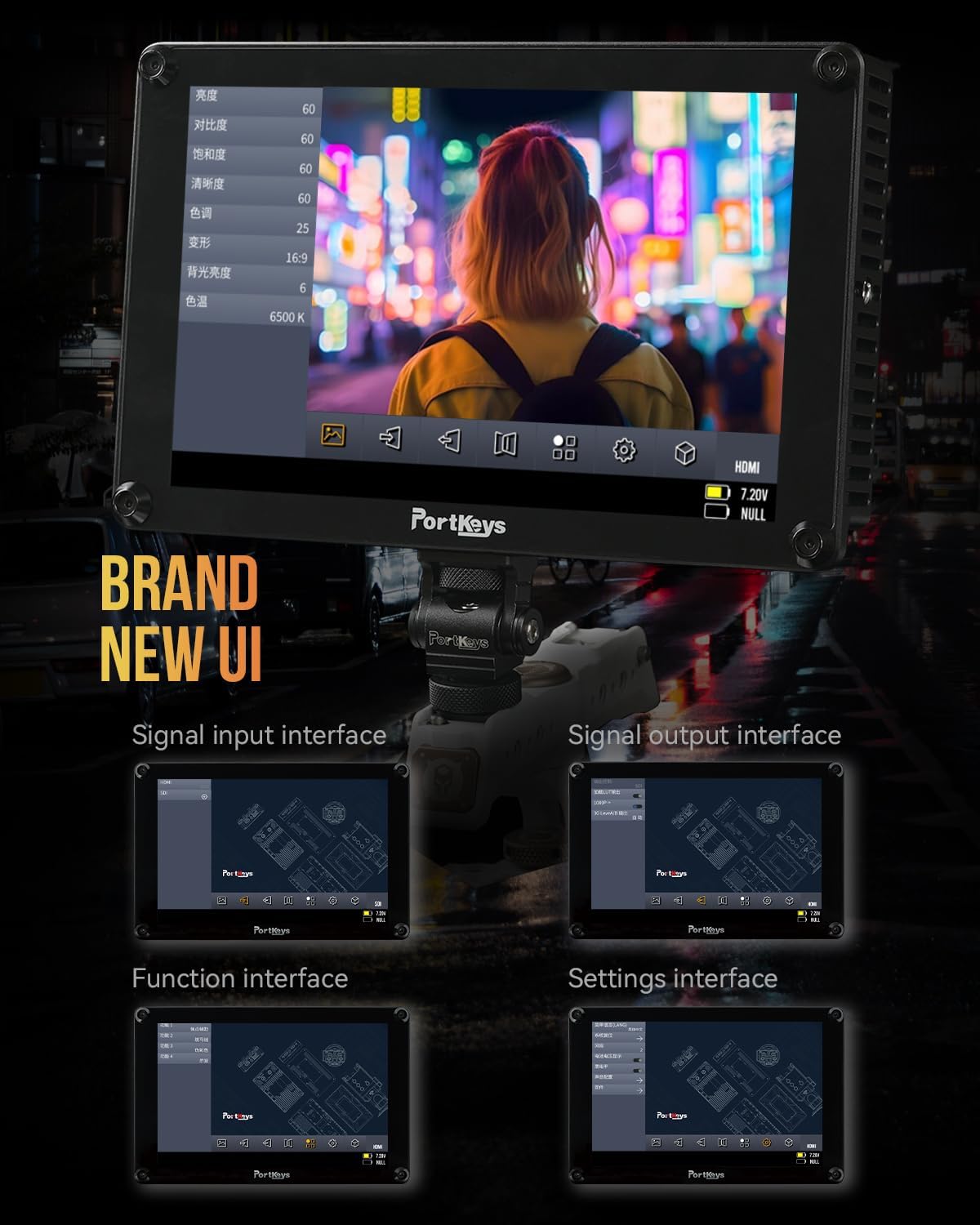
The Portkeys HS8 features a custom operating system with a user-friendly interface. Navigate through menus and settings using the touch screen or the physical buttons.

Image 4.1: The monitor's intuitive user interface for accessing functions and settings.
4.3 Professional Monitoring Tools
The HS8 includes a suite of professional monitoring tools accessible via the UI:
- Valni oblik: Visualizes the luminance and chrominance levels of your video signal.
- histogram: Displays the distribution of tones in your image.
- zebra: Highlights overexposed areas to prevent clipping.
- vrhunac: Assists with focus by highlighting sharp edges.
- Lažna boja: Uses color overlays to represent exposure levels.
- Anamorphic Image De-squeeze: Corrects the aspect ratio of anamorphic footage.
- Audio mjerači: Displays audio levels for monitoring sound.
- 3D LUT: Supports loading custom 3D Look-Up Tables for accurate color representation and creative grading.

Slika 4.2: Monitor prikazujeasing its professional monitoring features.

Slika 4.3: Detaljno view of waveform and histogram tools on the HS8 monitor.

Image 4.4: False color display on the HS8 for precise exposure control.

Image 4.5: Peaking function in action on the HS8 monitor to aid focusing.

Image 4.6: Key features of the Portkeys HS8 monitor.

Image 4.7: The monitor's display quality with REC.709 color and high brightness.
5. Održavanje
5.1 Čišćenje monitora
To clean the screen, use the provided screen cleaning wipe or a soft, lint-free cloth. For stubborn smudges, lightly dampen the cloth with a screen-safe cleaning solution. Avoid harsh chemicals or abrasive materials.
5.2 Skladištenje
When not in use, store the monitor in a dry, cool place, away from direct sunlight and extreme temperatures. It is recommended to use a protective case to prevent damage during transport or storage.
6. Otkrivanje problema
6.1 Nema napajanja
- Provjerite jesu li baterije potpuno napunjene i pravilno umetnute.
- If using DC power, verify the power cable is securely connected and the power source is active.
- Check the power switch is in the "ON" position.
6.2 Nema video signala
- Confirm the video source (camera) is powered on and outputting a signal.
- Check that the HDMI or SDI cables are securely connected to both the monitor and the source.
- Provjerite je li na monitoru odabran ispravan ulazni izvor.
- Test with different cables or video sources if possible.
6.3 Image Lag (HDMI)
Some cameras, such as the Canon R5, may experience a delay when switching between playback and shooting modes via HDMI. This is often a characteristic of the camera's HDMI output processing rather than the monitor itself. Ensure your camera's firmware is up to date and check its settings for HDMI output options.
7. Specifikacije
| Feature | Opis |
|---|---|
| Brand | Portkeys |
| Broj modela | HS8 |
| Veličina ekrana | 8 inča |
| Native Resolution | 1920 x 1200 |
| Display Type | LCD |
| Osvetljenost | 1100 nita |
| Kontrast Ratio | 1000:1 |
| Viewing Angle | 170 stepeni |
| Dubina boje | 10-bit (8+2 FRC) panel |
| Povezivanje | HDMI (4K input), 3G SDI In/Out |
| Power Input | Dual NP-F Battery Plates, DC 7-20V (5.5mm barrel) |
| Prolaz napajanja | 8V/10W NP-F dummy battery plate |
| Točke montiranja | VESA 100 x 100, 1/4-inch screw threads |
| Stanovanje | Aluminijum |
| Težina artikla | 0.68 kilograma (1.48 lbs) |
| Color Calibration | Rec.709 |

Image 7.1: Visual summary of Portkeys HS8 specifications.
8. Zvanični video proizvoda
Video 8.1: Official product video for the Portkeys HS8 Camera Monitor, demonstrating its features and connectivity options.
9. Garancija i podrška
9.1 Informacije o garanciji
The Portkeys HS8 Camera Field Monitor comes with a 1-godišnja garancija proizvođača od datuma kupovine. Ova garancija pokriva nedostatke u materijalu i izradi pri normalnoj upotrebi. Molimo sačuvajte dokaz o kupovini za reklamacije.
9.2 Korisnička podrška
For technical assistance, troubleshooting, or warranty inquiries, please contact Portkeys Official Store customer support. Refer to the contact information provided with your product or visit the official Portkeys website.