

1. Uvod
The JoFomp Digital Wall Clock is designed to provide clear and comprehensive timekeeping, environmental monitoring, and alarm functions for various indoor settings. Its large 9-inch LED display ensures excellent visibility, day or night. This manual provides detailed instructions for setup, operation, and maintenance of your new digital clock.

Image: The digital clock shown with its dimensions (8.98" / 22.8cm length, 2.95" / 7.5cm height, 1.38" / 3.5cm depth) and icons representing its multiple functions: Dual Alarm, Temperature, Week, Brightness Control, Drowsiness (Snooze), Humidness, Memory Function, and Date.
2. Sadržaj paketa
- JoFomp Digital Wall Clock (Model: 5503)
- USB kabel za napajanje
- Adapter za napajanje
- Mounting Nails (x2)
- Korisnički priručnik (ovaj dokument)
3. Sigurnosne informacije
- Ensure the power adapter and cable are undamaged before use.
- Ne izlažite uređaj ekstremnim temperaturama, direktnoj sunčevoj svjetlosti ili visokoj vlažnosti.
- Čuvati van domašaja djece.
- Ne pokušavajte sami rastavljati ili popravljati sat. Za servis se obratite kvalifikovanom osoblju.
- Use only the provided USB cable and adapter, or a compatible 5V/1A power source.
- Odgovorno odložite baterije u skladu s lokalnim propisima.
4. Podešavanje
4.1 Priključak za napajanje
- Connect the USB power cable to the clock's USB port (located on the back).
- Plug the other end of the USB cable into the provided power adapter.
- Insert the power adapter into a standard wall outlet. The clock display will illuminate.
4.2 Memory Battery Installation (Optional but Recommended)
The clock requires a constant power supply to operate. A memory battery ensures that time data is retained during power outages, preventing the need to reset the time. Two 1.5V AAA batteries are required (not included).
- Pronađite odeljak za baterije na poleđini sata.
- Otvorite poklopac odeljka za baterije.
- Umetnite dvije baterije od 1.5 V AAA, pazeći na ispravan polaritet (+/-).
- Čvrsto zatvorite poklopac odeljka za baterije.
4.3 Opcije montaže
The JoFomp Digital Wall Clock can be placed on a desk or mounted on a wall.
- Položaj stola: Simply place the clock on any flat, stable surface.
- Montaža na zid: Use the two provided mounting nails. Insert the nails into the wall at the desired location, ensuring they are level and spaced correctly to fit the hanging holes on the back of the clock. Carefully hang the clock onto the nails.

Image: The back panel of the clock, highlighting the "SET", "UP", and "DOWN" buttons, the memory battery storage compartment, the wall hanging hole, and the USB power outlet.

Image: Two illustrations demonstrating the clock's versatility: one showing it hung on a wall, and another showing it placed on a desktop.
5. Uputstvo za upotrebu
5.1 Podešavanje vremena i datuma
- Pritisnite i držite dugme "SET" button on the back of the clock to enter time setting mode.
- Koristite "UP" i "DOLJE" buttons to adjust the hour. Press "SET" to confirm and move to minutes.
- Repeat the process to set minutes, year, month, and day.
- After setting the date, press "SET" to exit the setting mode.
5.2 12/24 Hour Format Switch
In normal time display mode, short press the "UP" button to switch between 12-hour (with AM/PM indicator) and 24-hour formats.
Video: Demonstration of the JoFomp digital clock's features, including switching between 12-hour and 24-hour time formats, changing temperature units, and showing timer and countdown functions. This video highlights the clock's versatility and ease of use.
5.3 Daylight Saving Time (DST) Function
To enable or disable DST, short press the "DOLJE" button in the time display state. The clock will automatically adjust the time by one hour forward or backward as appropriate.

Image: The clock display illustrating the Daylight Saving Time (DST) function, showing how the time shifts by one hour when DST is enabled or disabled, along with visual cues for "Spring Forward" and "Fall Back".
5.4 Kontrola svjetline
The clock features automatic and manual brightness adjustment modes.
- Automatska svjetlina: The built-in light sensor adjusts display brightness based on ambient light.
- Manual Brightness: You can manually set the brightness level to your preference.
- Režim spavanja: A light-sensitive sleep mode is available for minimal disturbance during rest.

Image: The clock display showing different brightness settings: "L-AU" (Third Gear Auto-Brightness), "L-SL" (Fourth Gear Sleep Mode Auto-Brightness), "L-01" (Low light level), "L-02" (Medium brightness), and "L-03" (High brightness).

Image: A side-by-side comparison of the clock's display brightness during the day (bright) and at night (dimmed), demonstrating its automatic brightness adjustment feature for optimal visibility.
5.5 Dual Alarm Function
Sat podržava dva nezavisna alarma.
- Pritisnite dugme "SET" button repeatedly until "AL1" or "AL2" appears on the display.
- Press and hold "SET" to enter alarm setting mode.
- Use "UP" i "DOLJE" to set the alarm hour and minutes.
- Pritisnite "SET" to confirm each step.
- To activate/deactivate an alarm, short press the "UP"ili"DOLJE" button when "AL1" or "AL2" is displayed. An alarm icon will appear when active.
- When an alarm sounds, press any button to activate snooze, or press and hold "SET" to turn off the alarm.

Image: The clock display showing two alarm icons, indicating the dual alarm function. The image also depicts scenarios like "Wake Up Time" and "Exercise Time" to illustrate practical uses of the dual alarms.

Image: A visual representation of the dual alarm feature, showing the clock in two different environments (a kitchen and a gym), suggesting its utility for setting multiple reminders for various daily activities.
5.6 Prikaz temperature i vlažnosti
The clock continuously displays temperature in Celsius (°C) or Fahrenheit (°F) and relative humidity (%).
- To switch between °C and °F, short press the "DOLJE" button when the temperature is displayed.
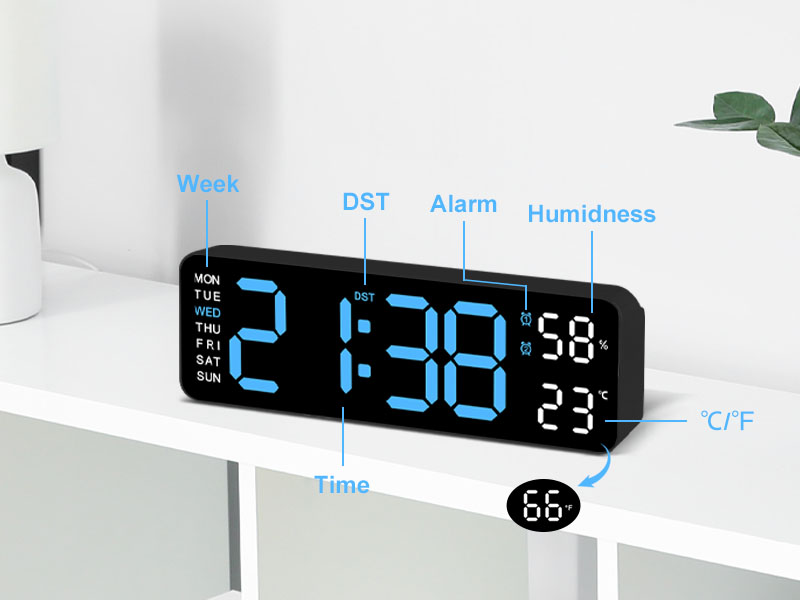
Slika: Detaljna view of the clock's display, with labels pointing to the Week, DST, Alarm, Humidness, Temperature (°C/°F), and Time indicators, along with a small icon for the temperature sensor.
6. Održavanje
- Čistite sat mekom, suhom krpom. Ne koristite abrazivna sredstva za čišćenje ili rastvarače.
- Avoid placing the clock in areas with excessive dust or moisture.
- If not in use for an extended period, disconnect the power and remove the memory batteries.
7. Otkrivanje problema
| Problem | Mogući uzrok | Rješenje |
|---|---|---|
| Prikaz sata je isključen. | Nema napajanja. | Ensure USB cable is securely connected and power adapter is plugged into a working outlet. |
| Time/Date resets after power outage. | Memory batteries not installed or depleted. | Install two new 1.5V AAA batteries in the memory compartment. |
| Temperature/Humidity reading seems inaccurate. | Clock placed near heat/cold source or in direct sunlight. | Relocate the clock to an area with stable ambient temperature and humidity. Allow time for readings to stabilize. |
| Alarm se ne oglašava. | Alarm not activated or volume too low (if applicable). | Ensure the alarm is set and activated (alarm icon visible). Check if there's a volume setting (refer to specific alarm setting instructions). |
8. Specifikacije
| Feature | Detalj |
|---|---|
| Brand | JoFomp |
| Broj modela | 5503 |
| Display Type | Digitalna LED |
| Veličina ekrana | 9 inča |
| Dimenzije proizvoda | 11.8"W x 4"H (approx. 22.8cm x 7.5cm x 3.5cm) |
| Izvor napajanja | Corded Electric (USB 5V/1A) |
| Memorijska baterija | 2 x 1.5V AAA baterije (nisu uključene) |
| Posebne karakteristike | Dual Alarm, Adjustable Brightness (Auto/Manual), Calendar, Large Display, Temperature (°C/°F), Humidity, DST, 12/24H Format, Snooze |
| Vrsta montaže | Wall Mount or Desk Placement |
| Materijal | Akrilonitril butadien stiren (plastika) |
| Unutrašnja/vanjska upotreba | Indoor Only |
9. Garancija i podrška
JoFomp products are manufactured with high-quality standards. For any issues or inquiries regarding your digital wall clock, please contact JoFomp customer support through the retailer's platform or the official JoFomp website.
Please retain your purchase receipt for warranty claims. Specific warranty terms and conditions may vary by region and retailer.
Za dalju pomoć posjetite JoFomp Store on Amazon.


