
Uvod
This manual provides essential instructions for setting up, operating, maintaining, and troubleshooting your Acer Nitro 50 N50-656 desktop computer. Please read this guide thoroughly before using your new system to ensure proper function and longevity.
Sigurnosne informacije
- Napajanje: Use only the power adapter provided with your computer. Ensure the power outlet is properly grounded.
- ventilacija: Do not block ventilation openings. Ensure adequate airflow around the computer to prevent overheating.
- Izloženost tečnosti: Keep the computer away from liquids. Do not operate with wet hands.
- plasman: Place the computer on a stable, flat surface. Avoid placing it in direct sunlight or near heat sources.
- servisiranje: Do not attempt to service the computer yourself. Refer all servicing to qualified service personnel.
1. Vodič za postavljanje
1.1 Raspakivanje
Carefully remove the computer and all accessories from the packaging. Verify that all components listed in the packing list are present.
1.2 Povezivanje perifernih uređaja
- Monitor: Connect your monitor to the graphics card's display output (HDMI or DisplayPort) on the rear of the computer.
- tastatura i miš: Povežite tastaturu i miš na dostupne USB portove.
- Snaga: Connect the power cable to the power supply unit (PSU) on the rear of the computer, then plug the other end into a grounded electrical outlet.
- Mreža (opcionalno): For a wired internet connection, connect an Ethernet cable from your router to the LAN port on the computer.
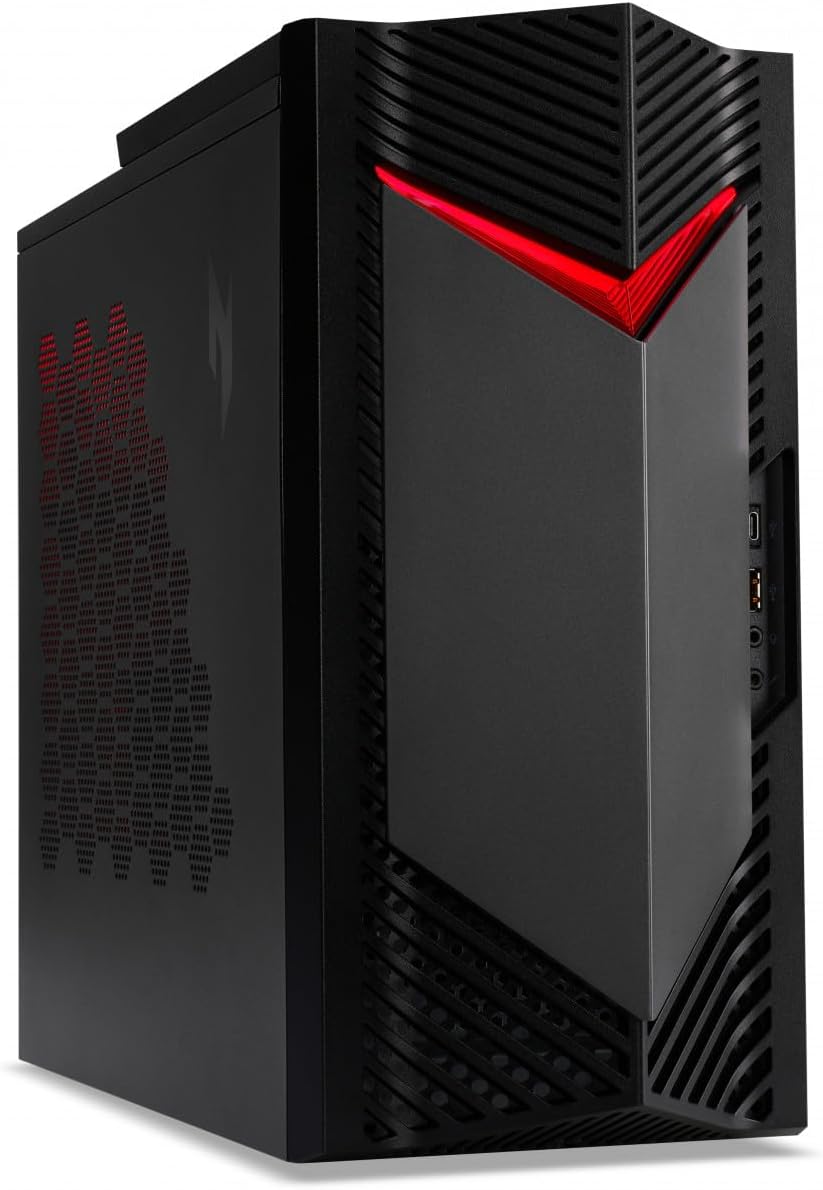
Slika 1: Prednja strana view of the Acer Nitro 50 N50-656 desktop PC, showing the power button and front ports.
1.3 Početno uključivanje i podešavanje Windowsa
- Pritisnite dugme za napajanje koje se nalazi na prednjoj strani računara.
- Slijedite upute na ekranu da biste dovršili početno podešavanje sustava Windows 11, uključujući jezik, regiju, mrežnu vezu i kreiranje korisničkog računa.
2. Uputstvo za upotrebu
2.1 Uključivanje/isključivanje napajanja
- Za uključivanje: Pritisnite dugme za napajanje jednom.
- Za isključivanje: Click the Start button in Windows, then select Power > Shut down. Do not force shut down by holding the power button unless necessary to prevent data loss.
- Za ponovno pokretanje: Kliknite dugme Start u sistemu Windows, a zatim izaberite Napajanje > Ponovo pokreni.
2.2 Korištenje portova i povezivosti
Your Acer Nitro 50 N50-656 is equipped with various ports for connecting external devices. Refer to the image below for common port locations.
Slika 2: Pozadi view of the Acer Nitro 50 N50-656, illustrating the arrangement of USB ports, audio jacks, HDMI, DisplayPort, and Ethernet port.
- USB portovi: For connecting keyboards, mice, external drives, and other USB devices.
- HDMI/DisplayPort: For connecting monitors. Use the ports on the dedicated graphics card (NVIDIA GeForce RTX 4060) for optimal performance.
- Audio priključci: For connecting speakers, headphones, or microphones.
- Ethernet priključak: Za žičanu mrežnu vezu.
- Bluetooth: Za bežično povezivanje s kompatibilnim uređajima poput slušalica ili kontrolera za igre.
2.3 Ažuriranja sistema
Regularly check for and install Windows updates and driver updates for your graphics card and other components to ensure optimal performance and security. You can find Windows updates in the Settings app under "Windows Update". Graphics card drivers can be updated via the NVIDIA GeForce Experience application or NVIDIA's official website.
3. Održavanje
3.1 Čišćenje
- Eksterijer: Koristite meku, damp krpu za čišćenje vanjskih površina. Izbjegavajte jake hemikalije.
- prašina: Periodically clean dust from the ventilation grilles and internal components using compressed air. Ensure the computer is powered off and unplugged before cleaning.

Slika 3: Bočna strana view of the Acer Nitro 50 N50-656, showing the side panel and ventilation areas.
3.2 Održavanje softvera
- Operativni sistem: Keep Windows 11 updated to the latest version.
- Antivirus: Install and regularly update antivirus software to protect against malware.
- Čišćenje diska: Periodically run disk cleanup tools to remove temporary filei optimizirajte skladištenje.
3.3 Hardware Considerations
- Protok zraka: Ensure the computer is placed in an area with good airflow to prevent heat buildup, which can affect performance and component lifespan.
- Upravljanje kablovima: Organize cables to prevent obstruction of vents and to maintain a tidy setup.

Slika 4: Interni view of the Acer Nitro 50 N50-656, showing the main components like the CPU cooler, RAM, and graphics card.
4. Otkrivanje problema
4.1 Uobičajeni problemi i rješenja
- Nema napajanja:
- Provjerite je li kabel za napajanje sigurno priključen i na računar i na zidnu utičnicu.
- Ensure the power switch on the PSU (if present) is in the 'On' position.
- Testirajte utičnicu drugim uređajem.
- Bez prikaza:
- Ensure the monitor is powered on and the video cable is securely connected to the graphics card's output on the PC and the monitor's input.
- Provjerite je li ulazni izvor monitora ispravno odabran.
- Pokušajte s drugim video kabelom ili monitorom ako je dostupan.
- Spore performanse:
- Zatvorite nepotrebne aplikacije koje rade u pozadini.
- Provjerite i instalirajte sva ažuriranja za Windows ili upravljačke programe koja su na čekanju.
- Pokrenite čišćenje i defragmentaciju diska (za HDD-ove, nije potrebno za SSD-ove).
- Skenirajte za zlonamjerni softver ili viruse.
- Zamrzavanje/rušenje sistema:
- Ensure the system has adequate ventilation and is not overheating.
- Update drivers, especially graphics drivers.
- Check for Windows updates.
- If issues persist, consider running system diagnostics or contacting support.
5. Specifikacije
| Feature | Detalj |
|---|---|
| Brand | acer |
| Broj modela stavke | DG.E3UEG.001 |
| Serije | Nitro 50 N50-656 |
| Operativni sistem | Windows 11 |
| Opis tastature | ožičen |
| Marka procesora | Intel o AMD |
| Tip procesora | Core i5 |
| Brzina procesora | 6 |
| Broj jezgara | 1 |
| Veličina RAM-a | 16 GB |
| Maximum Memory | 16 GB |
| Tehnologija tvrdog diska | SSD |
| Interfejs tvrdog diska | Serial ATA |
| Rezolucija ekrana | 1920 x 1080 |
| Rezolucija | 1920x1080 |
| Marka grafičkog čipseta | Intel |
| Opis grafičke kartice | Posvećeno |
| GPU | NVIDIA GeForce RTX 4060 |
| Graphics Card RAM | 8 GB |
| Tip grafičkog RAM-a | GDDR6X Memory |
| Procesor Socket | LGA 1700 |
| Vrsta povezanosti | Bluetooth |
| Hardversko sučelje | SSD |
| Broj HDMI portova | 1 |
| Tip konektora | Bluetooth, USB |
| Dostupnost rezervnih dijelova | Information not available on spare parts |
| Ažuriranja softvera zagarantovana do | Informacije nisu dostupne |
| ASIN | B0CXLZ7LLQ |
| Datum prve dostupnosti | 8. marta 2024 |
| CPU model | Core i5 |
| Brzina procesora | 6 |
| Grafički koprocesor | NVIDIA GeForce RTX 4060 |
| Kapacitet memorije | 16 GB |
| Specifične upotrebe za proizvod | posao |
| PC Type | Computer Tower |
| Veličina instalirane RAM memorije | 16 GB |
6. Garancija i podrška
Za informacije o garanciji, molimo pogledajte garantni list koji ste dobili uz proizvod ili posjetite službenu Acer podršku. website. For technical assistance, driver downloads, or further troubleshooting, please contact Acer customer support or visit their online support portal. Keep your product's serial number (located on a sticker on the chassis) handy when contacting support.
Acer podrška Webstranica: www.acer.com/support